Lifestyle
Planning a website budget: separate first-year, renewal and maintenance costs
A website budget needs more than a promotional monthly price. Group spending into setup, ongoing use, renewal and migration; list hosting, domains, email, themes, plugins and maintenance time. Learn to distinguish long-term monthly equivalents, automatic renewal and outsourced quotes, then practise with clearly hypothetical figures. Build a cost list, decide what is needed now or later, and know which terms to keep before paying.
About 7 min read
The first question in a website budget is how much it will cost to keep using the site, not just how much you charge to your card today. Introductory discounts, long-term prepayments, domain renewals, plugin subscriptions and maintenance work may appear on different pages and have different payment dates. Put them in one table before comparing plans.
This guide offers a way to organize a budget; it does not set a standard market price for any hosting company or contractor. Enter the checkout details or written quotes you actually receive. The sample figures are only for practising calculations, not plans currently available to buy, and they do not include unverified discounts or earnings forecasts.
List the functions first, then the services to buy
Describe the website's purpose as work you can verify, such as displaying a portfolio, publishing articles regularly or receiving service inquiries. For each task, list the content, tools and person responsible, then separate what is essential now from what can wait. If all you currently need is to display contact details, you do not need to buy membership, booking and transaction systems together. Otherwise you may keep paying for capabilities you have not used.
Next, separate the site's basic services: domain, hosting, email and content tools. Some plans may include several of these, but check the applicable period, quantities, storage and renewal terms. Do not record a ‘free domain’ as permanently cost-free, or assume website hosting includes the professional email service you need. Mark unclear items as ‘to be confirmed’ rather than zero. Also record the subscription holder and who can cancel it, so the company does not pay for a service that only a former collaborator can change.
Divide expenses into four periods
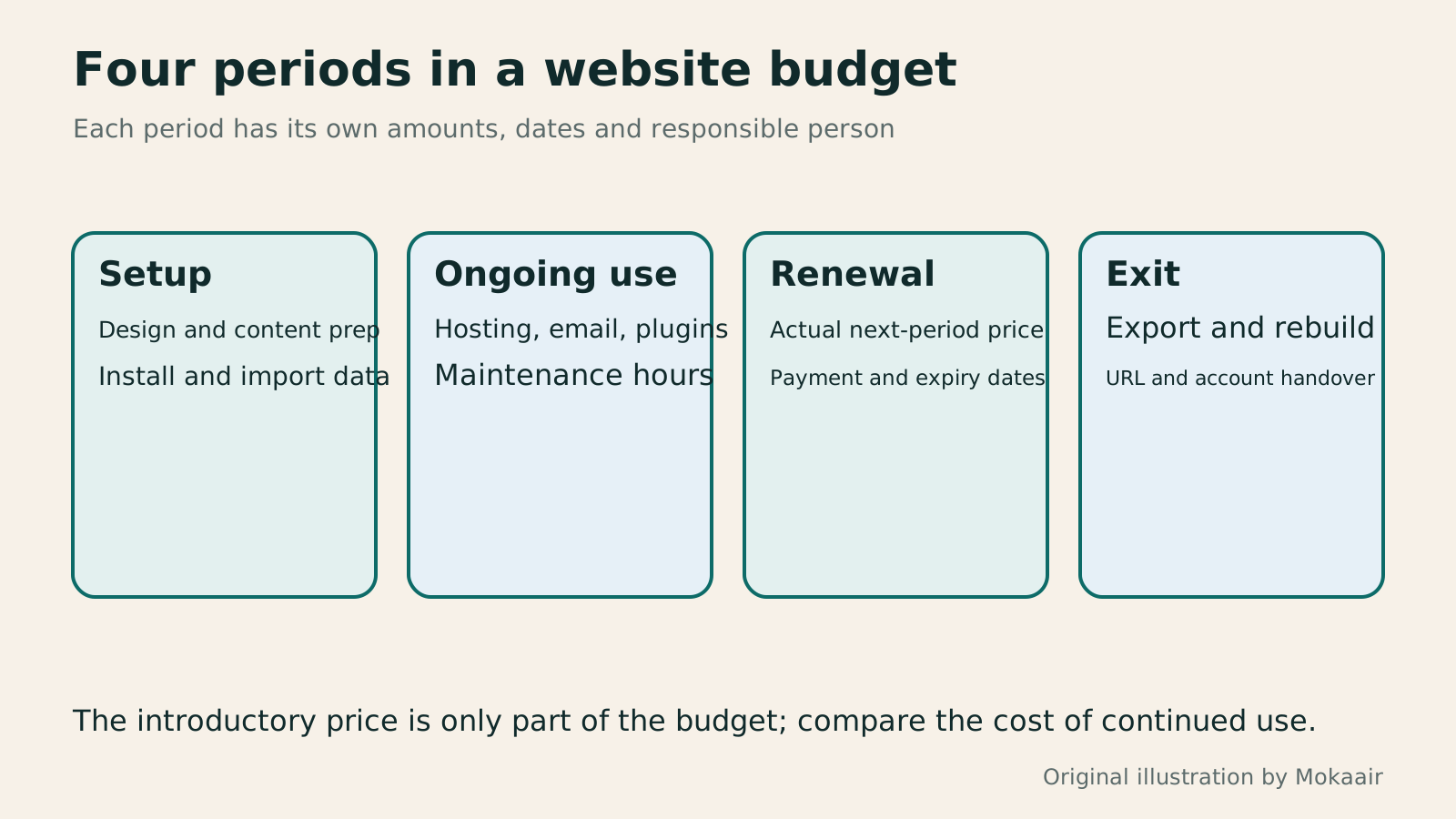
Setup spending includes initial design, content preparation and importing data. Ongoing spending includes hosting, email, plugins and maintenance. Renewal spending focuses on the next billing period's price, while exit spending includes exporting, migration, rebuilding layouts and handover. This division reminds you that buying a website theme once does not eliminate future updates, and annual maintenance does not necessarily include new feature development.
Add both payment dates and service expiry dates to the budget sheet; they are not the same. A provider may renew automatically before expiry. WordPress.com's official documentation explains how to check automatic-renewal settings and the next charge for each subscription. In practice, use the dates shown in your account and make sure the billing email address can receive notifications.
A monthly equivalent for a long contract is not monthly payment
Suppose a hypothetical plan requires payment for thirty-six months upfront and its advertising divides the total by thirty-six to show a monthly rate. You may still have to pay the entire amount today. When comparing, record at least the amount payable now, the period covered and the next renewal price, and read the cancellation or refund terms. Do not directly compare the lowest-looking monthly equivalent with a plan that allows payment each month.
For example, assume first-year hosting costs three thousand monetary units, the domain six hundred and plugins one thousand two hundred, for a total of four thousand eight hundred. With another three thousand in one-time design fees, first-year cash spending becomes seven thousand eight hundred. Recalculate the second year using actual renewal quotes. You cannot simply subtract the one-time design fee and assume all other charges will stay unchanged forever.
Compare outsourced quotes for the same deliverables
A website quote may include requirements discussions, layout design, content entry, mobile adjustments and training, or it may cover only installation and applying an existing template. Ask for each service to specify the page count, revision scope, who supplies content and what will be delivered. Two quotes both labelled ‘business website’ do not mean that the difference is just how much the designers charge.
Define maintenance clearly too: does it mean software updates, availability monitoring, help restoring the site or monthly copy changes? Ask whether fixing plugin conflicts costs extra and whether new features require a new quote. Keep the scope and acceptance criteria in writing. This reduces the gap between you interpreting a warranty as unlimited free changes and the contractor treating every problem as extra work.
Allow time for maintenance and possible exit costs
Building a site yourself still costs time. You need to organize images, proofread articles, manage accounts and update the website. Estimate according to your own working situation rather than forcing someone else's hourly rate onto it. The point is to know which tasks someone must do every month. If all your time goes into fixing tools and the site's content is left untouched, reconsider the tools' complexity or how maintenance work is shared.
Exit costs are easy to overlook. When changing platforms, exporting articles, organizing images, redirecting URLs, moving email data and rebuilding layouts can be separate jobs. You do not need to purchase migration services on day one, but you should know which data you can obtain yourself. For domains, ICANN notes that renewal and recovery fees after expiry vary by registrar, so keep the registrar's current terms directly.
- Match each required function to a service or outsourced item, and record what is not included.
- For each item, enter the current quote, currency, billing cycle, amount payable and next renewal information.
- Include setup, maintenance and exit work, with the person responsible and estimated hours listed separately.
- Before paying, check the checkout total, automatic renewal and cancellation terms, and keep the quote or receipt.
Keep the site running with an adjustable budget
You do not have to buy every idea at once. Use existing functions to complete the core flow first, then add tools as real needs emerge. For example, when readers frequently ask about available appointment times, first observe the amount of manual work before deciding whether a booking system is worthwhile. Connecting changing needs with costs is easier to manage than buying early because a limited-time discount appears.
Before each renewal, review whether the tool is still used, whether functions overlap and which pages cancellation would affect. Do not remove a payment item just to see whether the site breaks. First find out what stopping the service will do, save the data you need and arrange alternatives. A stable website budget lets you explain the work each expense supports and stop unneeded spending in an orderly way.
Read the full description
Separate website costs into setup, ongoing use, renewal and exit instead of comparing only the first payment.
| Cost field | What to enter | Often overlooked |
|---|---|---|
| Setup | One-time design, content entry or import fees | Content preparation and extra revisions |
| Use | Subscriptions for hosting, email, plugins and other services | Quantity, storage and currency |
| Renewal | Renewal price and expected charge date | Promotion ending and payment method |
| Maintenance | Work scope, owner and hours | Restoration and plugin conflicts |
| Exit | Export, migration, layouts and handover | Domain, email and old URLs |
Shared hosting, VPS and managed cloud hosting: how to choose for a small siteShared Hosting, VPS, and Managed Cloud: How a Small Website Should ChooseShared hosting, VPS, and managed cloud services often share one price list, but the terms may describe resource allocation or maintenance responsibility. This guide uses a small site to compare storage, memory, transfer, backups, and support. Find the real constraint before adjusting settings, upgrading a plan, or moving hosts. You do not need to memorize specifications first: take this concrete checklist to a provider.Read the full article
When a domain or hosting expires: checks before renewal or cancellationWhat happens when a domain or hosting expires: a checklist before renewal or shutdownDomains, hosting and email can expire separately, with different effects if unpaid. Check orders, expiry details and admin access before renewal, recovery eligibility after expiry, and data to save before closing or moving a site. Build a checklist in time order; manage the domain, site backups, email and external accounts separately. Avoid cancelling a service only to lose verification emails, or keeping a content export without images and site settings.Read the full article
Lifestyle
Changing domain registrars: transfer locks, authorization codes and keeping DNS working
Moving a domain to another registrar changes who manages its registration; it does not automatically move your website or email. This guide covers eligibility, common locks, authorization codes and the application process. DNS, nameserver and email checks help users in Taiwan hand over domains such as .com, while reminding them to check the separate rules for .tw and other extensions.
Lifestyle
Comparing WordPress hosting: assess providers with one requirements worksheet
To compare WordPress hosting, align site content, service responsibilities and billing periods before interpreting plan differences. This guide offers a worksheet and verification process, separates official specifications from your own measurements and unresolved conditions, and covers renewal, backups, support and exit costs. It is for users in Taiwan choosing their first host or considering a different provider, without ranking services by a single speed test or promotional monthly price.
Lifestyle
Setting up a Namecheap domain: connecting it to a website and email after registration
After buying a Namecheap domain, identify its DNS manager to connect your website and email. Official documentation explains Nameservers, Advanced DNS and Mail Settings, with two routes: change nameservers or keep the current DNS. This guide provides preparation checks, step-by-step verification and fault-reporting details for people using different domain, hosting and email providers, helping prevent accidental deletion of existing email records while bringing a website online.
Lifestyle
Managing a Gandi domain: registration, DNS and renewal checks
Gandi keeps registration, DNS, email and renewal settings in separate places. Based on current official documentation, this guide covers post-purchase checks, LiveDNS records, backups, transfers and what the 2026 Classic DNS migration means for existing users. Check your own account and build a domain register others can take over, avoiding outdated tutorial nameservers and the assumption that paying means your website and email are fully configured.
Articles that cite this one
- Self-hosted store or marketplace: choose by product, traffic, and upkeep costs
- Comparing WordPress hosting: assess providers with one requirements worksheet
- What happens when a domain or hosting expires: a checklist before renewal or shutdown
- WordPress.com or self-hosted WordPress: balancing maintenance, costs and control
- How to choose a CMS or website platform: let your update workflow decide where your site lives
- Shared Hosting, VPS, and Managed Cloud: How a Small Website Should Choose
Latest travel guides

GuideTokyo
Where to Stay in Tokyo: Comparing Shinjuku, Ueno, Tokyo Station, Shibuya, Asakusa, Ikebukuro, and Ginza, Plus Airport Access, Accommodation Tax, and Luggage Delivery
Where should you stay in Tokyo? Compare Shinjuku, Ueno, Tokyo Station, Shibuya, Asakusa, Ikebukuro, and Ginza by the same criteria: access from Narita and Haneda, transit routes, nearby attractions, neighborhood character, and who each area suits. Includes a comparison table, a Yamanote Line diagram, Tokyo’s accommodation tax as verified in 2026/9 (changing to 3% in 2027/4), and Airport TA-Q-BIN luggage shipping rules.
- Budget
- Hotels

GuideTokyo
How to Choose Tokyo Transit Passes: Are Suica, Welcome Suica, the Tokyo Subway Ticket, and the JR Pass Worth It?
On a first Tokyo trip, start with an IC card and pay per ride (Welcome Suica has no deposit and is valid for 28 days). If you take four or more subway rides in a day, add a 72-hour Tokyo Subway Ticket for 2,000 yen; a JR Pass is never worthwhile if you stay in Tokyo and do not go to Kansai. See what TOURIST PASMO, Suica on iPhone, and the Tokyo Metro day pass do and do not cover, with a decision chart. Prices verified in September 2026.
- Transport
- Budget

GuideTokyo
Tokyo Disneyland and DisneySea Guide: Ticket Prices, Fantasy Springs, Disney Premier Access (DPA), Standby Pass, and Which Park to Choose for Your First Visit
Tokyo Disney one-day Passport prices vary: most weekdays in 9/2026 cost ¥9,900 and weekends ¥10,900. At 14:00 daily, tickets go on sale for the same date two months later. Free Priority Pass is no longer on the official service list; only paid Disney Premier Access (¥1,000–3,500 per person per use) shortens waits. Covers hours, the 25th anniversary, Standby Pass, Entry Request, Fantasy Springs access and first-visit park choice; checked on the official site in 9/2026.
- Itineraries
- Family
Sources
- WordPress.com: Managing automatic renewal · Checked:
- ICANN: Domain name renewal and expiration FAQs · Checked:
- Hostinger: Renewal provisions in the terms of service · Checked: