Lifestyle
Before Hiring a Web Design Agency: The Brief, Quotes and Deliverables Checklist
Before hiring a web design agency, define your site's audience, key actions and deliverables so you can compare quotes. Using a small studio as an example, this guide covers page and template counts, content duties, feature specs, mobile and accessibility checks, account and source-file handover, and post-launch maintenance terms. An editable requirements checklist helps reduce extra costs and communication gaps; no agency recommendations are included.
About 8 min read
Contents
- 1. Define Visitor Tasks Before Deciding What Goes on the Site
- 2. List Pages, Templates, Content and Features Separately
- 3. Compare Quotes Alongside Rules for Changes
- 4. Test Complete Workflows, Not Just Homepage Screenshots
- 5. Hand Over Assets, Permissions and Data Needed to Rebuild
- 6. Define the Scope of Post-Launch Maintenance
“We want a polished website” is a useful starting point for discussion, but not a suitable basis for a quote. Two websites may each have ten pages, yet ten articles sharing one template and ten pages requiring different interactions involve very different amounts of design and maintenance work.
A project brief does not need to be a hefty specification document. Start by telling the agency what visitors need to accomplish, what you can provide and what counts as completed delivery. This makes differences between quotes traceable to actual work. The following adaptable brief uses a hypothetical small studio offering craft classes.
Define Visitor Tasks Before Deciding What Goes on the Site
The studio wants to introduce its brand, help visitors find suitable classes and receive enrollment inquiries. The brief can begin with three tasks: view class details and transportation information, compare dates and suitability, and submit an inquiry with contact information. Specify the completion screen for each task, rather than simply listing “Home, About Us, Contact Us.”
Next, specify what is outside the current phase, such as live availability, online payments and member accounts. These boundaries affect data sources, error handling and administrative permissions. If the site only accepts inquiries through a form, its confirmation message must not suggest that a place has been reserved.
Explain your requirements using your own materials and text. On reference websites, you can highlight the navigation style, information order or proportion of whitespace you like to help the designer understand your aims; do not ask them to copy someone else's images, wording or entire visual design. Also note what does not work for you, such as excessive animation or a contact option that is hard to find on mobile.
List Pages, Templates, Content and Features Separately
Start by drawing a site tree, then mark shared templates. For example, a homepage, a brand introduction page, a class listing page, six class detail pages and a contact page total ten pages, but may require only five main templates. Clarify whether you can add data yourself as the number of classes grows, or whether the agency must lay out every new page.
Assign responsibility for each content item: who writes class descriptions, takes photos, obtains instructors' consent to use their likenesses, organizes prices, supplies English translations and uploads how many entries. If images are not ready, provide their aspect ratios, quantities and intended uses, and agree on a replacement schedule. Approving a design with placeholder text does not mean the final content has been proofread.
Feature descriptions should cover the starting point, inputs, success and failure. For a contact form, for example, specify its fields, the recipient's email address, how missing information is flagged and how delivery failures are detected. For payment, booking or third-party integrations, separately list account eligibility requirements, fees and integration responsibilities; do not merely name a service.
Compare Quotes Alongside Rules for Changes
Put each agency's quote into the same scope comparison table, listing design templates, content entries, revision rounds, integrations, data migration and training. Two quotes with the same total may differ because one includes content upload while the other delivers an empty website. Price differences may also reflect image production, language versions or post-launch support, so page counts alone are not enough.
Suppose the project has four milestones: requirements confirmation, visual design approval, feature completion and handover. Ask for inspectable results at each stage. Payment arrangements are for both parties to negotiate, but deliverables should be specific, such as a mobile class-page prototype, a testable form and a complete asset inventory, rather than simply “eighty percent complete.”
A change order need not be complicated: state the new requirement, affected pages, additional cost, delivery date and approval date. Distinguish fixes needed to meet the original specifications, agreed revision rounds and new features so that replacing a photo does not trigger another dispute. For work that cannot yet be priced, list the assumptions and when an estimate will follow, leaving room for decisions.
Test Complete Workflows, Not Just Homepage Screenshots
Use titles of realistic length, longer names, phone photos and potentially incomplete data for acceptance testing. Find a class from the homepage, read its restrictions, submit the form and check that the administrator receives the notification. Only by completing the whole sequence can you tell whether the information and features connect properly. Use agreed test data in forms and tell recipients how to recognize it.
On mobile, check whether menus open and close, tables overflow, buttons are obscured, images crop out key details and the site remains usable with enlarged text. W3C's introductory checks also cover keyboard focus, headings, image alternative text and form labels. These can serve as preliminary checks, but passing them does not mean a comprehensive accessibility evaluation is complete.
If the site must meet a specific accessibility standard, state its version, level, scope and evaluation method in advance, and have people with the relevant expertise perform acceptance testing. W3C recommends incorporating these responsibilities and evaluations into the development process and maintaining accessibility over time. Do not wait until the final day to make “accessibility” a promise with no defined testing scope.
- Define acceptance-testing paths around visitor tasks, covering success, failure and return actions.
- Use content of realistic length and check it on the agreed devices, browsers and text-zoom settings.
- For each issue, record the URL, steps, expected and actual results, and date.
- After fixes, repeat the affected workflows and retain a record of unfinished items and who is responsible for follow-up.
Hand Over Assets, Permissions and Data Needed to Rebuild
The deliverables checklist should identify account ownership for the domain, hosting, administration system, analytics tools and integrated services. Separately list original design files, code, images, content, configuration instructions and licensing records. Not every platform provides code you can deploy yourself. If using a hosted service, confirm what can be exported and the restrictions on leaving the platform before signing the contract.
Using WordPress does not mean that handing over a single export file is enough. The official tool exports posts, pages and related content data in WXR format. During handover, also confirm how to back up and restore website files, the database, media, and theme and plugin settings. Practice in an agreed test environment so that missing essential data is discovered before a failure.
WordPress software is licensed under GPLv2 or later, but the project may also include photos, fonts, external services and paid support. Record each item's source, usage terms, person responsible for renewal and expiration date. Do not assume all materials can be used freely just because the site uses open-source software. Transfer accounts through appropriate permissions and secure channels, rather than leaving shared passwords in the requirements document indefinitely.
Define the Scope of Post-Launch Maintenance
Maintenance can be divided into content updates, system updates, backup and recovery, and incident handling, with frequency, responsibility and billing specified for each. Ask the agency how quickly it responds to reported failures, how it classifies them and whether actual repairs are included. A “one-year warranty” without a defined scope can easily create mismatched expectations.
Test the updates you will handle yourself, too. Actually add a class, replace an image and preview the mobile page, using the account permissions you will receive after handover. Video tutorials and operating instructions should match the delivered version and identify fields you should not change yourself, giving future studio staff a reliable reference.
Before closing the project, mark each requirement as completed, deferred or canceled, and record the reason. Launch marks the start of a new phase: changing classes, additional content and user feedback will continue to require revisions. A clear management process keeps every small update from feeling like a new website project.
Read the full description
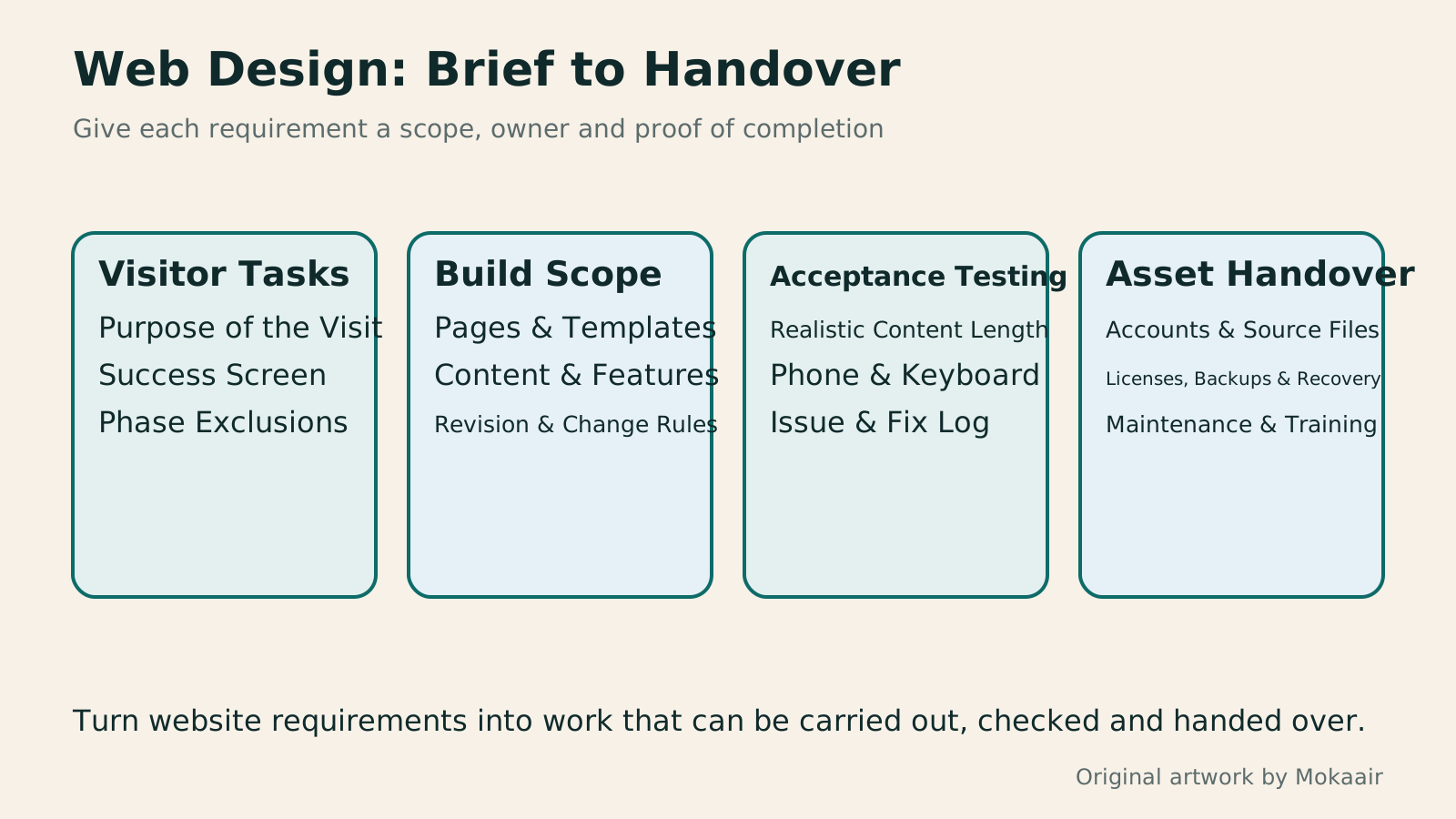
Four sections cover task definition, scope confirmation, acceptance testing and asset handover for an outsourced website, each listing information to check.
| Requirement | Hypothetical Studio Example | Acceptance Evidence |
|---|---|---|
| Main task | Submit a contact request after reading about a class | Complete workflow and notification results |
| Pages and templates | Ten content pages and five main templates | Page list and shared-template descriptions |
| Content responsibilities | The studio supplies photos; the agency uploads six classes | Materials inventory and upload completion status |
| Usability | Select classes on mobile and use the form with a keyboard | Test conditions, issues and fix records |
| Handover and maintenance | Accounts, source files, backups and operating tutorials | Asset inventory, permissions list and recovery procedures |
Estimate the Full Website Budget FirstPlanning a website budget: separate first-year, renewal and maintenance costsA website budget needs more than a promotional monthly price. Group spending into setup, ongoing use, renewal and migration; list hosting, domains, email, themes, plugins and maintenance time. Learn to distinguish long-term monthly equivalents, automatic renewal and outsourced quotes, then practise with clearly hypothetical figures. Build a cost list, decide what is needed now or later, and know which terms to keep before paying.Read the full article
Schedule Regular Website MaintenanceWhat website maintenance involves: a routine for backups, updates, and incident reportsWebsite maintenance includes more than plugin updates: check content, accounts, backups, outgoing email, and expiring services. Using a small WordPress content site, this guide covers routine observation, pre- and post-update checks, restoration, and incident reports, with a worksheet for owners, editors, and maintainers. Set a schedule by update frequency, identify urgent cases, and keep records the next collaborator can use.Read the full article
Understand WordPress Backup and RecoveryHow to back up WordPress: files, databases and restoration drillsA successful backup message is not enough. Build a checklist for WordPress files, databases and off-site copies, then learn the UpdraftPlus and WPvivid controls, restore limitations and isolated drills needed to confirm recovery. Plan schedules, retained versions, configuration files and acceptance records so someone can restore a personal or studio website.Read the full article
Found this guide helpful? Share it with someone who needs it
Lifestyle
www, Subdomains, and Subdirectories: Choosing a Website URL Structure
Whether to use www or put a blog at blog.example.com or example.com/blog/ depends on platform support and maintenance. This article explains hostnames and paths, then compares content roles, DNS settings, HTTPS certificates, and URL consistency for subdomains and subdirectories. An original decision table and launch checklist help small websites in Taiwan build URL structures that are easy to use, manage, and hand over.
Lifestyle
How to Start a Web Design Project: Requirements, Content, and Acceptance Testing in Order
Building your first website often stalls over unclear requirements, content, and acceptance criteria, rather than colors. Using an original neighborhood repair studio example, this guide covers user interviews, content preparation, prototyping, development, and handover, with deliverables for each stage. Steps, a comparison table, learning resources, and original diagrams help readers building or commissioning a site turn “Is it finished?” into tasks they can verify.
Lifestyle
Website Caching and CDNs: Which Layer to Clear When Updates Do Not Appear
A website may be updated while phones still show old content because caches remain in different places. Using a Taiwan studio's business-hours update, this article explains browser, WordPress/hosting and CDN roles, cache responses, expiry times and targeted purging. An ordered procedure, comparison table and original diagram help site managers trace old versions while keeping account and shopping workflows correct.
Lifestyle
How to Map Website Structure: From Content Inventory to Navigation and Page Relationships
Website structure is more than a homepage and a few subpages: it helps users know where information is, find it, and understand the next step. An original community equipment-sharing site example covers content inventories, task grouping, navigation labels, page relationships, and tree testing, distinguishing card sorting, site structure diagrams, and Sitemaps for search engines. Steps, a comparison table, and original diagrams help small sites build usable, maintainable information structures.
Sources
- W3C Planning and Managing Web AccessibilityChecked:
- W3C Easy Checks for Web AccessibilityChecked:
- WordPress Content Export ToolChecked:
- WordPress Software LicenseChecked:
Compiled from the references and verification dates listed above; fares, schedules, product features, and terms can change, so please confirm the latest details on the relevant official website before travelling, booking, or purchasing.