Lifestyle
How to Map Website Structure: From Content Inventory to Navigation and Page Relationships
Website structure is more than a homepage and a few subpages: it helps users know where information is, find it, and understand the next step. An original community equipment-sharing site example covers content inventories, task grouping, navigation labels, page relationships, and tree testing, distinguishing card sorting, site structure diagrams, and Sitemaps for search engines. Steps, a comparison table, and original diagrams help small sites build usable, maintainable information structures.
About 8 min read
Contents
- 1. Inventory content before choosing main menu items
- 2. Group by user tasks and avoid copying the organizational chart
- 3. Use card sorting to explore how people understand content
- 4. Map page relationships and distinguish navigation from Sitemaps
- 5. Use tree testing to validate labels and paths
- 6. Maintain consistency on pages and set rules for new content
The website for a community equipment-sharing center has borrowing rules, equipment descriptions, repair classes, membership information, and FAQs. All the information is online, yet residents still cannot find out how to borrow an electric drill. The problem may not be a missing search box: navigation is named after internal teams, so users do not know which section to visit.
Information architecture addresses how content is organized, named, and linked. The sharing center, category names, and test scenarios below are original examples, developed using NN/g research methods and W3C navigation guidance consulted on 2026-9-14. This is a practice plan; it does not claim that interviews were conducted for a real sharing center or that outcomes were measured.
Inventory content before choosing main menu items
Start by listing existing and planned content, recording its title, URL or file location, intended audience, question it answers, maintainer, and update status. An equipment-sharing center may have borrowing policies from different years, past events, and duplicate membership information. If you map navigation directly from the current folders, you will carry old problems into the new website.
Review each item and decide whether to keep, update, merge, or remove it. If two sets of borrowing rules conflict, first confirm which is valid and who can approve it. Do not simply put the document with the more recent date first while keeping both sets of answers. For content that needs to be kept as a historical record, clearly mark its applicable period and provide an entry point to the current rules so readers do not mistake old announcements for current information.
A content inventory and a main menu are different deliverables. Not every document needs to become a top-level entry point. First identify what information the site provides, then choose categories that best support its main tasks. This also helps the team see gaps—for example, plenty of event highlights but no clear registration eligibility or cancellation procedure.
Group by user tasks and avoid copying the organizational chart
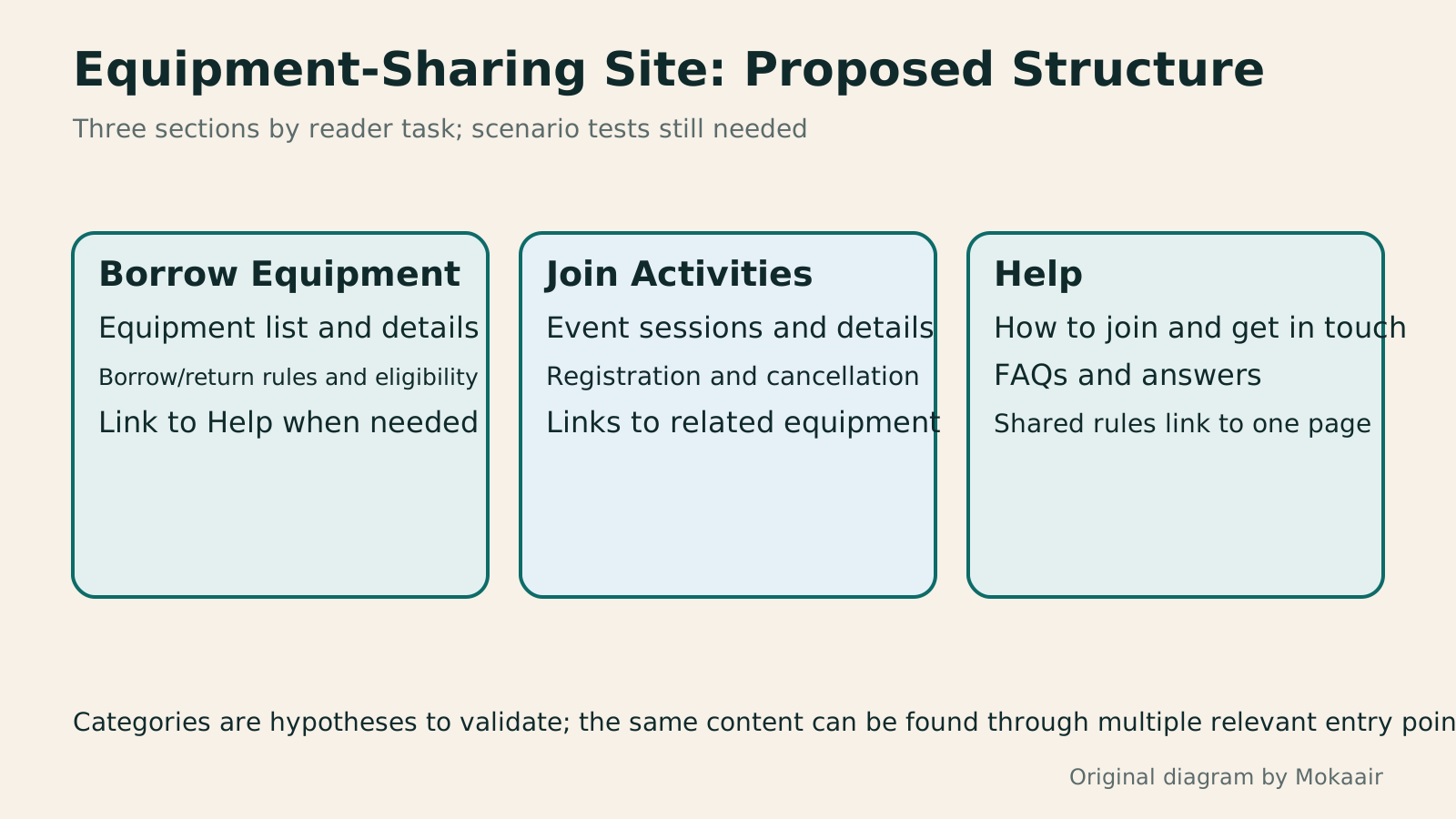
For this original sharing center example, an initial proposal could have three main sections: Borrow Equipment, Join Activities, and Help. Borrow Equipment includes the equipment list and borrowing and return rules; Join Activities includes sessions, registration, and cancellation information; Help includes how to join, contact details, and FAQs. This is only a proposal to validate, not a menu that every community website should use.
Categories should reflect how readers think when looking for information. For example, eligibility to borrow equipment may also relate to becoming a member, but the content need not be duplicated. Designate one main page and provide relevant links from both equipment descriptions and Help. Having different entry points lead to the same information can make updates more consistent.
Do not put every uncertain item into Other just to keep categories tidy. Nor should sections be based solely on internal Administration, Activities, and Equipment teams unless research shows that readers actually use those names to find information. The people responsible within the organization can be recorded in the management inventory; public-facing categories should primarily use concepts that users understand.
Use card sorting to explore how people understand content
Card sorting gives participants representative content items to group, letting you observe which items they think belong together and how they would name each group. Open card sorting lets participants create their own groups; providing existing categories for them to sort items into tends toward closed card sorting. The two approaches answer different questions, so first decide what you want to explore.
The sharing center can put borrowing and return deadlines, the equipment list, class sessions, and contact details on separate cards, using names that are as clear and neutral as possible. If every card starts with Administration Team or Activities Team, participants may merely match identical words, rather than reveal how they actually understand the content. Recording hesitation and explanations often helps uncover problems more than looking only at the final arrangement.
Sorting results provide clues; they do not automatically produce a single correct website structure. Different participants may have different needs: some place membership eligibility in the borrowing process, while others put it in Help. Summarize shared trends and disagreements, then propose a feasible structure as a hypothesis. A few colleagues who are easy to invite cannot be treated as representatives of all residents.
Map page relationships and distinguish navigation from Sitemaps
A structure diagram can use boxes to represent pages or categories, lines to show hierarchy, and different markers to indicate links between sections. Every node should correspond to the content inventory and be labeled as an overview page, detail page, or external service. If a category is only a grouping heading and cannot be clicked, explain this in the legend so designers and developers do not interpret it differently.
A diagram may contain many pages, but the main navigation shows only the entry points suitable for use throughout the site. An individual equipment page can include borrowing and return rules, similar equipment, and contact details. The footer can also provide contact or policy information. Define each entry point's role clearly. Do not turn every link between pages into a new parent category, causing the entire diagram to lose its hierarchy.
A website structure diagram used for planning serves a different purpose from an XML Sitemap submitted to search engines: the former helps people understand content relationships, while the latter provides search engines with information such as URLs. A URL being listed in a Sitemap does not mean users can find it on the public site, nor does it guarantee search engine indexing. When changing URLs, also prepare a separate mapping of old and new URLs and a list of redirect requirements.
Use tree testing to validate labels and paths
Once you have initial categories, you can run a tree test using only a text hierarchy. Give participants a scenario, such as: You want to know when an electric drill must be returned; find where you should look. Avoid using the menu's exact wording in the task to hint at the answer. Let participants choose a path based on their own understanding, then record whether they find an acceptable information location.
Card sorting explores possible groupings; tree testing evaluates a proposed hierarchy. You cannot declare a menu validated after doing only the former. Observe the first choice, any backtracking, the final location, and the reasons given, and define acceptable answers in advance. If the same content has multiple legitimate entry points, account for these when interpreting the results.
If participants often look for borrowing and return deadlines through Help, labels, grouping, or entry points between sections may need adjustment. There is no need to immediately scrap the entire structure. Compare results across different tasks before revising it, and record changes and hypotheses still to be tested. Text-only tests do not cover images, expanding menus on mobile, or keyboard interaction; these still need to be tested on actual pages.
- Inventory content and its valid versions, and decide what to keep, update, merge, or remove.
- Propose categories based on main tasks, and use card sorting to understand how target readers think.
- Map page hierarchy, links between sections, and entry point roles; label node types and content still to be added.
- Run tree tests with scenario tasks, then check actual desktop, mobile, and keyboard navigation.
Maintain consistency on pages and set rules for new content
W3C's menu structure guidance recommends semantic markup that expresses relationships, understandable names for different navigation areas, and an indication of the current page. When handing off the design, explicitly list the names and functions of the main menu, on-page table of contents, and footer so developers do not have to infer which elements belong together solely from their appearance.
Navigation repeated across the same set of pages should maintain the same relative order; cases such as users actively rearranging it require separate consideration. Navigation can be collapsed on mobile, but clear labels, order, and destinations still need to be preserved. Consistency does not mean every screen must look exactly the same, nor does it prevent adding appropriate secondary navigation.
Finally, set rules for adding content: where new equipment belongs, how to link across categories, who can change the menu, and when to review outdated information. Regularly check the structure against search terms, customer support questions, and feedback about information people cannot find to assess whether it still meets their needs. Good information architecture must be clear when first mapped and remain workable as content grows.
Read the full description
Three category cards list content for Borrow Equipment, Join Activities, and Help, illustrating task-based grouping for a website.
| Tool or deliverable | Main purpose | Cannot prove on its own |
|---|---|---|
| Content inventory | Identify content and its management status | Categories match readers' habits |
| Card sorting | Explore how content is grouped | The existing hierarchy is necessarily easy to navigate |
| Website structure diagram | Express relationships between pages and categories | The actual menu is operable |
| Tree testing | Validate findability within a text hierarchy | Mobile and assistive technology interactions work properly |
| Testing actual pages | Check navigation and task completion | Every untested scenario is problem-free |
| XML Sitemap | Provide URL information to search engines | Successful public-site navigation or search indexing |
Include website structure in the web design processHow to Start a Web Design Project: Requirements, Content, and Acceptance Testing in OrderBuilding your first website often stalls over unclear requirements, content, and acceptance criteria, rather than colors. Using an original neighborhood repair studio example, this guide covers user interviews, content preparation, prototyping, development, and handover, with deliverables for each stage. Steps, a comparison table, learning resources, and original diagrams help readers building or commissioning a site turn “Is it finished?” into tasks they can verify.Read the full article
Understand what Sitemaps for search are used forHow to Plan a Sitemap: Which URLs to Include, How to Submit It, and How to Maintain ItA sitemap is a URL list for search engines. Choosing the wrong content or leaving it outdated means successful submission still cannot solve indexing problems. This article covers selecting public canonical URLs, WordPress sitemap locations, XML formatting and file limits, and Search Console submission and maintenance. A URL-type comparison table and an original synchronization diagram help small websites in Taiwan build a sustainably managed Sitemap.Read the full article
Organize URL changes and redirects
Found this guide helpful? Share it with someone who needs it
Lifestyle
www, Subdomains, and Subdirectories: Choosing a Website URL Structure
Whether to use www or put a blog at blog.example.com or example.com/blog/ depends on platform support and maintenance. This article explains hostnames and paths, then compares content roles, DNS settings, HTTPS certificates, and URL consistency for subdomains and subdirectories. An original decision table and launch checklist help small websites in Taiwan build URL structures that are easy to use, manage, and hand over.
Lifestyle
Before Hiring a Web Design Agency: The Brief, Quotes and Deliverables Checklist
Before hiring a web design agency, define your site's audience, key actions and deliverables so you can compare quotes. Using a small studio as an example, this guide covers page and template counts, content duties, feature specs, mobile and accessibility checks, account and source-file handover, and post-launch maintenance terms. An editable requirements checklist helps reduce extra costs and communication gaps; no agency recommendations are included.
Lifestyle
How to Start a Web Design Project: Requirements, Content, and Acceptance Testing in Order
Building your first website often stalls over unclear requirements, content, and acceptance criteria, rather than colors. Using an original neighborhood repair studio example, this guide covers user interviews, content preparation, prototyping, development, and handover, with deliverables for each stage. Steps, a comparison table, learning resources, and original diagrams help readers building or commissioning a site turn “Is it finished?” into tasks they can verify.
Lifestyle
Website Caching and CDNs: Which Layer to Clear When Updates Do Not Appear
A website may be updated while phones still show old content because caches remain in different places. Using a Taiwan studio's business-hours update, this article explains browser, WordPress/hosting and CDN roles, cache responses, expiry times and targeted purging. An ordered procedure, comparison table and original diagram help site managers trace old versions while keeping account and shopping workflows correct.
Articles that cite this one
Sources
- NN/g: Information Architecture and Website Structure DiagramsChecked:
- NN/g: Card Sorting Research MethodsChecked:
- NN/g: Differences Between Card Sorting and Tree TestingChecked:
- NN/g: Tree Testing and Task DesignChecked:
- W3C: Menu Structure and the Current ItemChecked:
- W3C: Consistent Relative Order of NavigationChecked:
- Google: Sitemap Uses and LimitationsChecked:
Compiled from the references and verification dates listed above; fares, schedules, product features, and terms can change, so please confirm the latest details on the relevant official website before travelling, booking, or purchasing.