Lifestyle
How to Design a 404 Page: Explain the Problem and Help Readers Continue
404 pages need more than art and a home button: explain missing content and help readers finish their task. An original exhibition-site example covers clear copy, relevant categories and search, HTTP status codes, proper redirects and error tracking. Steps, a comparison table and original diagrams distinguish missing content, moved pages and service outages, avoiding attractive pages that return success or redirecting every old URL to an unrelated home page.
About 8 min read
Contents
- 1. First, Establish Why This URL Has No Content
- 2. Explain Clearly Without Blaming Readers
- 3. Offer Destinations Relevant to the Original Task
- 4. Both the Display and HTTP Status Must Be Correct
- 5. Track Which Interruptions Deserve Priority
- 6. Acceptance Testing Should Cover Links, Styling and Post-Fix Checks
When readers open an exhibition introduction from an old bookmark and find that the page does not exist, what they really want to know is where the exhibition information went and what they can still look up. A 404 page should help them through this interruption with a clear next step, rather than simply displaying a large error code.
The exhibition information website and copy below are original examples, based on Google, MDN and GOV.UK documentation consulted on 2026-9-14. This article did not involve changing website routes, submitting anything to search tools or measuring real visitor behavior; it provides actionable design and acceptance testing methods.
First, Establish Why This URL Has No Content
404 means the server cannot find the requested resource; it does not itself indicate whether the situation is temporary or permanent. A mistyped URL, deleted content, an outdated link or an incorrect route configuration can all cause this result. First check whether the original content should exist, then decide whether to restore the page, redirect to its new location or retain a genuine not-found response.
For an exhibition website, if the same introduction has simply moved to a different URL, you can map it to the new page. If the event has ended but useful transport information, details about the works or retrospective content remain, you can retain the original page and mark the event as ended. An event ending does not mean its page must disappear; whether to keep it depends on the content's purpose and maintenance arrangements.
Service interruptions, database failures and login requirements also need their own handling; they should not all be presented as missing content. For resources confirmed to be permanently removed, you can use 410 to indicate their removal where appropriate. For Google's index, both 404 and 410 are responses that indicate the URL's content should not be retained; changing the code cannot guarantee removal by a specified time.
Explain Clearly Without Blaming Readers
An original main heading could be “We can't find this exhibition page,” followed by “The link may have changed, or this information may no longer be available.” Do not insist that readers entered something incorrectly when you have not established the cause, and there is no need for lengthy technical descriptions of the server. Both the page title and main heading should make the current situation clear to users.
GOV.UK's guidance for page-not-found pages emphasizes concise wording, avoiding blame and providing helpful contact information. On a general content website, you could offer ways to check the URL, browse exhibition categories or contact the editors. These are this article's design recommendations, not a requirement for every website to copy a government website's entire layout.
You can keep illustrations and your brand voice, but do not let jokes, oversized codes or animations obscure the next actions. If you add images, ensure that important information is still presented as text and that buttons remain usable on narrow screens and when zoomed in. Readers have already encountered an interruption; the way forward should be easy to find.
Offer Destinations Relevant to the Original Task
An exhibition website could prioritize “View current exhibitions,” “Browse exhibition retrospectives” and site search, with the home page as a fallback. Choose options based on content that actually exists on the website, rather than adding lots of seemingly popular links. Only options that genuinely help readers narrow their search deserve a place on the error page.
If a category can be inferred from known mappings of old URLs, you can offer a related category, but do not treat arbitrary URL segments as confirmed titles. Site search needs a clear label, and unsuccessful searches should also produce understandable results. Do not copy private parameters from the URL directly into the search box, page copy or analytics logs.
Going back to the previous page can sometimes help, but readers may have arrived directly from a bookmark or search result, and the previous page may be on another website. Keep explicit destinations within your site rather than offering only the browser's back action. Explain the purpose of contact options, such as reporting a broken link, so users know what information to provide.
Both the Display and HTTP Status Must Be Correct
Writing “page not found” on the screen does not automatically make the server return 404. If the response is 200 but the content consists only of a not-found message, Google may classify it as a soft 404. After completing a custom design, use Network in the developer tools to inspect the document request for the original failing URL and confirm its actual HTTP status.
Do not consider acceptance testing complete after merely opening a fixed /404 demonstration page. Enter a deep URL that has never been created, load it directly and refresh, then inspect the final URL, response and display. Some websites show an error only during frontend navigation, but return to the home page or show a blank page when opened directly. These differences need separate testing.
If content has moved, use the correct permanent redirect to its corresponding new content and update links on your own website. Google explicitly warns against redirecting large numbers of old URLs to an unrelated home page, because this may confuse users and may be treated as a soft 404. If multiple articles have genuinely been consolidated into one comprehensive new piece, redirects can follow that mapping.
- Spot-check URLs that do not exist, have moved or should exist but fail, and classify the causes first.
- Write an explanation of the situation and add working categories, search or contact options.
- Confirm the HTTP response at the original failing URL, and test direct entry and refreshing.
- Update broken links and mapping rules, then schedule further repairs according to traffic and impact.
Track Which Interruptions Deserve Priority
You can combine server logs, internal broken-link checks and Search Console's indexing reports to identify problems. Record the URL path, where it is linked from, when it was discovered, the cause and the action taken. Different tools cover different areas; an error page where analytics tools fail to load may leave no frontend event.
Prioritize broken links in navigation bars, active campaigns, popular articles or important workflows. Nonexistent paths requested by bots scanning at random have a different impact from error pages reached through buttons on your site. Do not create content or large numbers of redirects solely because a URL has the highest 404 count.
Google's documentation explains that a removed page with no replacement returning 404 is not necessarily a problem, and Google may still revisit old URLs after some time. The goal is not to keep reports permanently free of 404 responses, but to make content that should exist accessible, return the correct response for content that should be removed and fix broken links that remain in use.
Acceptance Testing Should Cover Links, Styling and Post-Fix Checks
Check the error page's own stylesheet, image and script paths as well. When opened from a deeply nested URL, relative paths may point elsewhere, causing missing images or more broken links. Try every category, search and contact option to confirm that none creates a loop, and check that the page remains readable on mobile.
After completing a fix, request the same original URL again and confirm that the status code, redirect destination and content are consistent. If you use caching or a content delivery service, check whether the old response is still being served after the fix. Indexing reports may need to wait for a subsequent crawl; do not assume a fix has failed simply because the report has not yet updated.
Keep a record of fixes, including your diagnosis, the corresponding content and the verification date. During future redesigns or bulk article deletions, you can then check which old links people still use. A 404 page can help readers continue, but maintaining the actual entry points and content mappings will reduce the chances of the same interruption happening again.
Read the full description
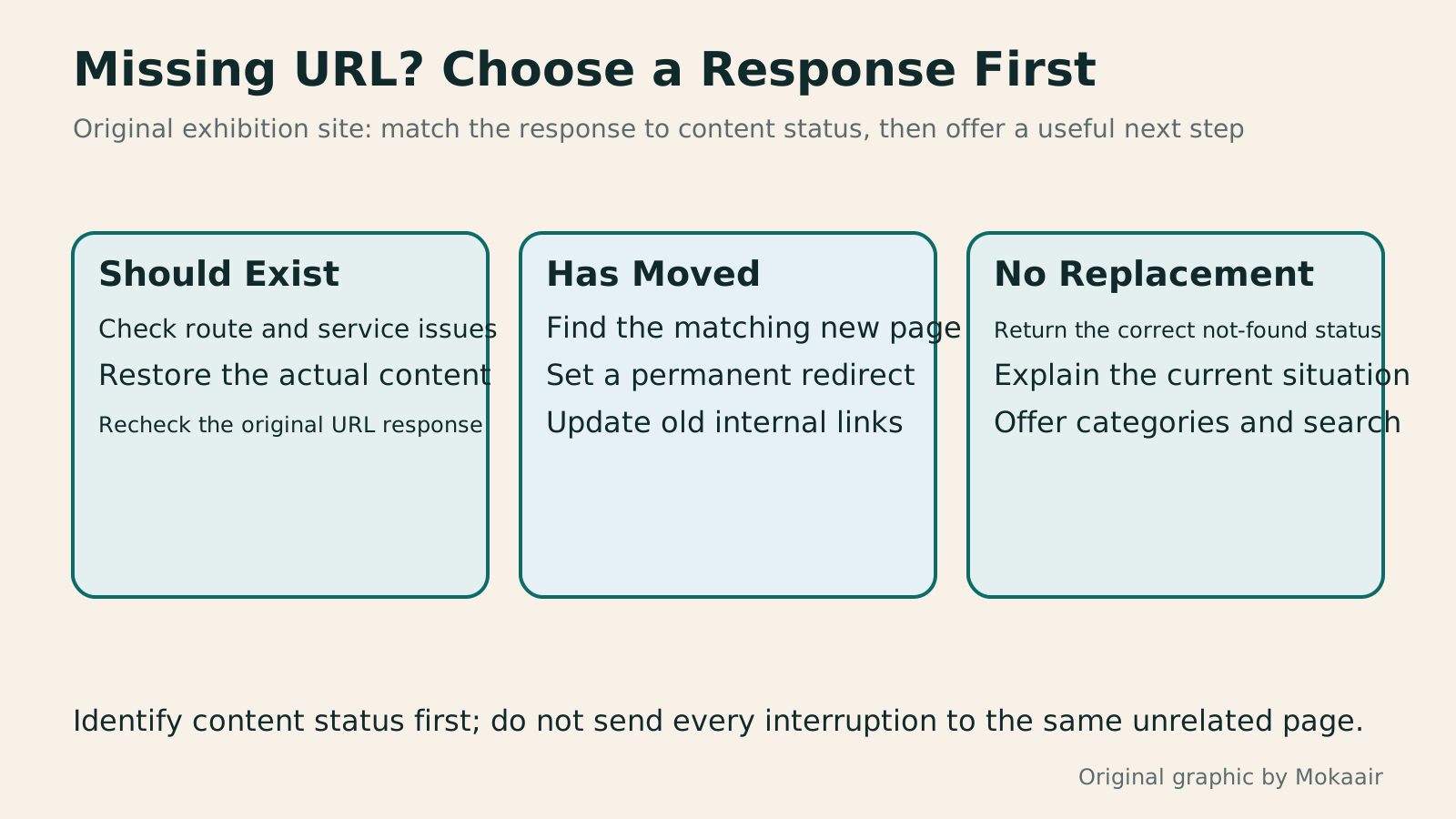
Three cards distinguish content that should exist, has moved or has no replacement, matching each to a repair, redirect or clear page-not-found message.
| Situation | Appropriate Action | Result to Verify |
|---|---|---|
| The URL does not exist | 404 with a clear explanation and useful destinations | The original URL returns the correct response |
| The same content has a new URL | Permanently redirect to the corresponding new page | The new page works and is reached without detours |
| Content is confirmed permanently removed | Use 410 or an appropriate not-found response for the situation | There is no redirect to an unrelated replacement |
| Content should exist but is unavailable due to a fault | Restore the service and use an appropriate error status | The fault is not treated as a normal deletion |
| The page says not found but returns 200 | Check for soft 404 issues and inspect route responses | The display and HTTP status agree |
| A past event has ended | Consider retaining a retrospective and labeling the event's status | Readers do not mistakenly think they can still attend |
Understand the Different Uses of 301 and 302 Redirects
Organize Website Categories and Information ArchitectureHow to Map Website Structure: From Content Inventory to Navigation and Page RelationshipsWebsite structure is more than a homepage and a few subpages: it helps users know where information is, find it, and understand the next step. An original community equipment-sharing site example covers content inventories, task grouping, navigation labels, page relationships, and tree testing, distinguishing card sorting, site structure diagrams, and Sitemaps for search engines. Steps, a comparison table, and original diagrams help small sites build usable, maintainable information structures.Read the full article
Use Search Console to Check Indexing Status
Found this guide helpful? Share it with someone who needs it
Lifestyle
How Websites Build Trust: Authors, Sources and High-Risk Topics
Website trust rests on verifiable author backgrounds, sources, methods and correction accountability. This article explains E-E-A-T and YMYL's uses and limits, using original scenarios for everyday posts, software tutorials and high-risk information to outline author, editor and expert reviewer roles. A checklist covers source applicability, partnership disclosures, dates and corrections, so author boxes, institution names and search rankings are not taken as proof of accuracy.
Lifestyle
Understanding website authority scores: Tool metrics vs. search performance
Website authority scores appear in SEO reports and partnership proposals, but tools calculate them differently. Using Ahrefs Domain Rating and Semrush Authority Score, this article explains differences between domains, pages, links, estimated traffic and actual outcomes, with steps for same-tool comparisons, anomaly checks and monthly reports. It helps small sites treat scores as research clues, not Google certification or ranking guarantees.
Lifestyle
Articles Competing for Rankings? Identify Overlapping Intent and Consolidate Content
Multiple articles from one site appearing for similar queries do not always hurt each other. This article shows how Search Console, article tasks and content differences reveal truly duplicate needs and guide retention, repositioning or merging. It explains the distinct roles of permanent redirects, canonical and noindex, plus pre-merge backups, URL mapping, internal link updates and performance tracking, to avoid deleting articles based only on keywords or short-term rankings.
Lifestyle
How to Plan a Sitemap: Which URLs to Include, How to Submit It, and How to Maintain It
A sitemap is a URL list for search engines. Choosing the wrong content or leaving it outdated means successful submission still cannot solve indexing problems. This article covers selecting public canonical URLs, WordPress sitemap locations, XML formatting and file limits, and Search Console submission and maintenance. A URL-type comparison table and an original synchronization diagram help small websites in Taiwan build a sustainably managed Sitemap.
Sources
- MDN: 404 Not FoundChecked:
- Google: HTTP Status Codes and CrawlersChecked:
- GOV.UK: Page not found pagesChecked:
- Google: Site Moves and URL MappingChecked:
- Search Console: Indexing Reports, soft 404 and 404Checked:
Compiled from the references and verification dates listed above; fares, schedules, product features, and terms can change, so please confirm the latest details on the relevant official website before travelling, booking, or purchasing.