Lifestyle
Articles Competing for Rankings? Identify Overlapping Intent and Consolidate Content
Multiple articles from one site appearing for similar queries do not always hurt each other. This article shows how Search Console, article tasks and content differences reveal truly duplicate needs and guide retention, repositioning or merging. It explains the distinct roles of permanent redirects, canonical and noindex, plus pre-merge backups, URL mapping, internal link updates and performance tracking, to avoid deleting articles based only on keywords or short-term rankings.
About 8 min read
Contents
- 1. Identify Overlapping Intent, Not Just Shared Keywords
- 2. Investigate by Pairing Queries with Pages
- 3. First Choose Whether to Keep, Reposition or Merge
- 4. Preserve Unique Information and Sources Before Merging the Text
- 5. Migrate Old URLs and Internal Links Together
- 6. Track Technical Results and Whether Reader Needs Are Preserved
You wrote two articles about organizing storage, but search results sometimes show the first and sometimes the second. This is worth investigating, but you cannot immediately conclude that they are competing for rankings. Different pages may naturally suit different queries, devices and usage contexts.
Content consolidation should start with the reader's task: do the two articles answer the same question, does this confuse readers, and does maintaining two versions create inconsistent information? Establish this evidence before deciding whether to change titles, clarify each article's role or merge them. This helps preserve content that already has value.
Identify Overlapping Intent, Not Just Shared Keywords
Suppose a site has articles titled “Drawer Sorting Basics” and “The First Step in Organizing Drawers.” Both teach readers to empty drawers, sort their contents and put everything back. If their conditions of use and final outcomes are nearly identical, consolidation may be worthwhile. Another article, “Checking Stuck Drawer Slides,” also mentions drawers, but its practical purpose is different and it should retain its own focus.
After using keywords to find candidate articles, write down each article's target readers, main question, essential steps and unique information. List shared passages separately from differences, then judge whether those differences justify a standalone article. Different titles alone do not prove there is no duplication, and overlapping vocabulary does not mean every article needs a new title.
Google has a canonicalization mechanism for duplicate or similar content and selects a representative URL. Duplicate versions are not quite the same issue as two articles that each have their own editorial content. First determine whether you are dealing with multiple URLs generated for technical reasons or two pieces of content serving the same task, so you can choose the right approach.
Investigate by Pairing Queries with Pages
Select a relevant query in the Search Console performance report, then switch to the page dimension to see which URLs have appeared. Record the date, country and device scope, then examine comparable periods. Google documents this viewing method, but the appearance of multiple URLs alone does not establish that they need merging. You still need to consider the content and its intended use.
Then reverse the process and examine queries for each page to see whether it also serves other important needs. The first article may attract readers seeking sorting methods, while the second helps people find storage solutions for specific dimensions. Deleting one just to improve performance for a particular term could also remove an independently useful answer.
Most performance report data is attributed to the canonical URL, and query data is also subject to anonymization and row limits. During analysis, also check the actual canonical URL and URL Inspection results to avoid mistaking data attribution for lost traffic. If the sample is too small, save your observations and clarify each article's role first. There is no need to rush into extensive deletions that are difficult to reverse.
First Choose Whether to Keep, Reposition or Merge
If the two articles produce different outcomes, clarify their respective roles in their titles, introductions and related links. For example, one could establish sorting principles while the other covers measuring and arranging narrow drawers. Keep the necessary content in each and reduce repetitive general introductions, so readers can decide which article to read first.
Consider consolidation only if the task is the same and the information is complementary. When choosing which URL to retain, consider content completeness, existing references to it, how readers use it and long-term maintenance costs. Do not simply choose the newest article or the page ranking higher on a single day. An existing, usable URL with a clear focus usually does not need to be replaced with a third, new URL just for consolidation.
If multiple URLs are merely technical versions of the same content, a maintainer can review the canonical URL and redirect strategy. canonical expresses a preference for a representative version. It does not automatically send visitors to another page, nor is it a universal button for merging articles on different topics. Before proceeding, confirm how similar the content is and the practical reasons for retaining both entry points.
Preserve Unique Information and Sources Before Merging the Text
First back up both articles, their images, sources and original URL settings, then create a content mapping. For each original key point, note which section retains it, whether it is rewritten after verification, or whether it is removed because it no longer applies. Do not simply join the two articles together: repeated introductions, inconsistent terminology and conflicting steps will make the merged article harder to read.
The drawer-sorting example could be reorganized into four sections: preparation, sorting decisions, trial placement in small batches and maintenance. Place the original exceptional situations alongside the relevant steps. Recheck figures, product features and image captions against the relevant dates. Do not assume something is still correct today just because an older article included it. Every important conclusion should be traceable to retained sources or original reasoning.
After writing, reread the new content with each old article's main queries in mind to confirm that no important questions have been omitted. If one need receives only a passing sentence in the new article, reconsider whether the articles should have been merged at all. Consolidation should provide a complete answer that is easier to use, rather than simply reduce the number of articles on the site.
- Save the original articles and settings, and map the old content to the new sections.
- Choose the URL to retain, and organize the essential steps and unique information.
- Recheck information that may have changed, and write one coherent article rather than a patchwork.
- Validate the result against the original reader questions, confirming that the main needs are still answered.
Migrate Old URLs and Internal Links Together
Once you confirm that the old article has been permanently replaced by the new content, ask a maintainer to set up an appropriate permanent server-side redirect, such as 301 or 308. Google treats these responses as signals that the destination should become the canonical URL. The destination must meet the original need. Do not send every deleted article to the homepage or an unrelated popular page.
Update related articles, menus, category entry points and the Sitemap at the same time, so internal links point directly to the retained version. Make sure old images or downloads still have an appropriate place, and check whether important external references require notifying their owners to update them. Record each redirect's source, destination, reason and date to avoid loops that redirect back and forth during later redesigns.
noindex excludes content from the index; it does not send existing visitors to a new article. robots.txt is not a canonicalization tool either. If content has actually been removed and has no corresponding replacement page, provide the appropriate not-found response for the situation instead of pretending it has been merged. The technical approach depends on the content decision. Do not apply one rule everywhere just to reduce red warnings in reports.
Track Technical Results and Whether Reader Needs Are Preserved
Afterward, open each old URL to check that it reaches the correct content, with no redirect chain or error page. Then check the new page's actual markup and readability. Next, record Google's subsequent crawling and indexing activity. Technical changes taking effect does not mean search data will finish updating that same day.
Performance comparisons should examine the overall changes for the original set of needs across both old and new pages. Do not claim that total performance has improved just because clicks to the retained page increased: it may simply have inherited the old page's traffic. Keep the comparison scope consistent, note seasonality, site redesigns and other content updates, and watch for the loss of distinct queries previously served.
If results fall short of expectations, first check redirects, indexing and content omissions before deciding what to adjust. Do not repeatedly split and merge articles in response to short-term fluctuations. Save the decision table and verification records so future contributors can review the existing division of responsibilities before adding articles. This reduces duplication at its source instead of requiring another cleanup every so often.
Read the full description
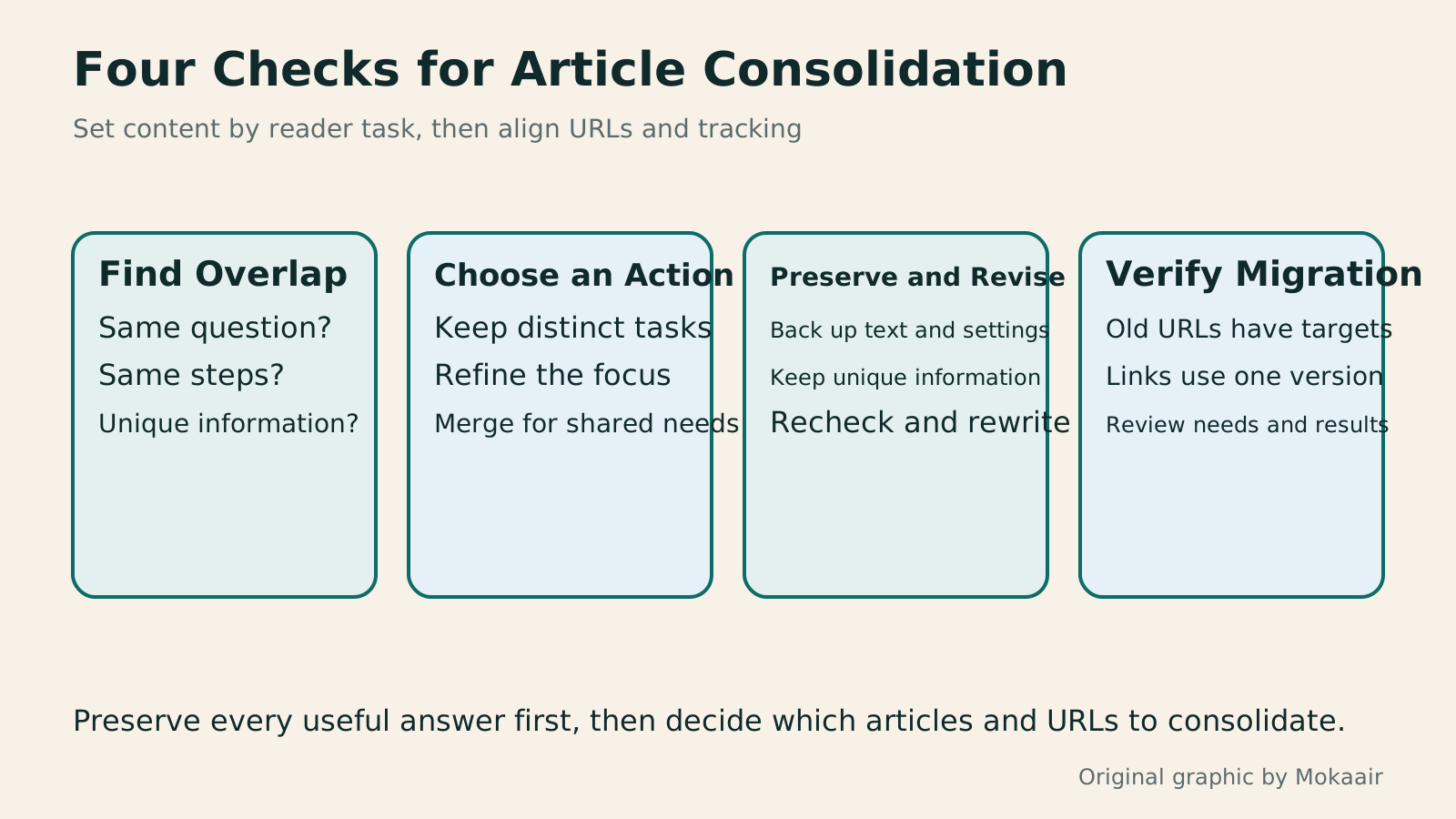
Four blocks—identify intent, choose an action, preserve and revise, and verify migration—show the process for removing article duplication and consolidating content.
| Situation | More Appropriate Action | Avoid |
|---|---|---|
| Same terms, different practical purposes | Keep both and clearly distinguish their scope | Deleting articles just because they share keywords |
| Same question, complementary content | Reorganize and merge under a suitable URL | Simply joining the two article bodies together |
| Multiple URLs for the same content | Review canonical and redirect strategies | Using robots.txt to specify the representative version |
| New content permanently replaces an old article | Map it to a relevant destination and update links | Redirecting large numbers of pages to the homepage |
| Content removed with no replacement page | Provide a not-found response appropriate to its status | Pretending unrelated content fulfills the original need |
| Insufficient data and an unclear cause | Observe first and clarify each article's role | Making major changes based on one day's rankings |
Use Search Intent to Identify an Article's TaskHow to Identify Search Intent: Turn Keywords into Questions Worth AnsweringThe same keyword can signal learning, comparison, finding a specific entry point or taking action. Using original luggage-storage examples, this guide shows how to judge intent from wording, time and place, result formats and your own query data, then turn a hypothesis into a clear content task. It includes an observation table, ways to handle mixed intent, content-format choices and later validation. Do not copy ranking pages or treat one search-results screen as the answer for every reader.Read the full article
Create a WordPress Backup Before MergingHow to back up WordPress: files, databases and restoration drillsA successful backup message is not enough. Build a checklist for WordPress files, databases and off-site copies, then learn the UpdraftPlus and WPvivid controls, restore limitations and isolated drills needed to confirm recovery. Plan schedules, retained versions, configuration files and acceptance records so someone can restore a personal or studio website.Read the full article
Found this guide helpful? Share it with someone who needs it
Lifestyle
How Websites Build Trust: Authors, Sources and High-Risk Topics
Website trust rests on verifiable author backgrounds, sources, methods and correction accountability. This article explains E-E-A-T and YMYL's uses and limits, using original scenarios for everyday posts, software tutorials and high-risk information to outline author, editor and expert reviewer roles. A checklist covers source applicability, partnership disclosures, dates and corrections, so author boxes, institution names and search rankings are not taken as proof of accuracy.
Lifestyle
Understanding website authority scores: Tool metrics vs. search performance
Website authority scores appear in SEO reports and partnership proposals, but tools calculate them differently. Using Ahrefs Domain Rating and Semrush Authority Score, this article explains differences between domains, pages, links, estimated traffic and actual outcomes, with steps for same-tool comparisons, anomaly checks and monthly reports. It helps small sites treat scores as research clues, not Google certification or ranking guarantees.
Lifestyle
How to Design a 404 Page: Explain the Problem and Help Readers Continue
404 pages need more than art and a home button: explain missing content and help readers finish their task. An original exhibition-site example covers clear copy, relevant categories and search, HTTP status codes, proper redirects and error tracking. Steps, a comparison table and original diagrams distinguish missing content, moved pages and service outages, avoiding attractive pages that return success or redirecting every old URL to an unrelated home page.
Lifestyle
How to Plan a Sitemap: Which URLs to Include, How to Submit It, and How to Maintain It
A sitemap is a URL list for search engines. Choosing the wrong content or leaving it outdated means successful submission still cannot solve indexing problems. This article covers selecting public canonical URLs, WordPress sitemap locations, XML formatting and file limits, and Search Console submission and maintenance. A URL-type comparison table and an original synchronization diagram help small websites in Taiwan build a sustainably managed Sitemap.
Articles that cite this one
Sources
- Google: Specify a Canonical URLChecked:
- Google's Guide to RedirectsChecked:
- Search Console: Common Tasks and Query MatchingChecked:
- Search Console: Data Dimension LimitsChecked:
- Google's URL Migration GuideChecked:
Compiled from the references and verification dates listed above; fares, schedules, product features, and terms can change, so please confirm the latest details on the relevant official website before travelling, booking, or purchasing.