Lifestyle
Planning content with Semrush: keywords, competitor pages and a tracking list
Semrush can help expand keywords, inspect competing pages and track a chosen market, but its tools cover different data and purposes. Using a pottery studio in Taichung as an original scenario, this guide connects Keyword Magic Tool, Organic Rankings, Keyword Gap and Position Tracking. It distinguishes general from personal difficulty and estimated traffic. Steps, a comparison table and an original diagram help explain why a topic belongs on the list and how to observe it under fixed conditions.
About 7 min read
A pottery studio seeking more class inquiries might need a trial-class page, a beginner's preparation list and an explanation of age requirements for family classes. Semrush can organize search clues. But passing every suggested keyword to a writer still does not show which belongs in an article, a class page or a FAQ.
This guide builds a research workflow that can be handed to another person, from candidate terms to a tracking list. The Taichung pottery studio is an original scenario, not evidence that local rankings were checked. The operational suggestions come from official documentation; no account was logged into, campaign created or private website data obtained.
Define the service question before building a research list
First describe the intended reader and the action you want to support. A first-time pottery-class participant, for instance, needs to know the duration, what the price includes and how to collect the finished piece. Those questions shape a page's purpose and differ from a search for artwork photos or wholesale materials. The first test of a topic is whether you can provide a useful answer.
Enter a seed term in Keyword Magic Tool, choose the country database matching the market, then examine related terms and topic groups. Use include, exclude and intent filters, placing services you do not offer in a separate column. Keep the original query and filter settings; otherwise next time you may have only the results, with no record of what was excluded.
The tool's Questions view or related concepts can reveal how beginners ask. Automatic groups and intent labels still require human review, especially because short Chinese terms can serve several purposes. Rewrite a term as a complete reader question, then decide whether it needs its own article, a section on an existing page or no coverage at all.
Separate KD, PKD and advertising competition
As checked on September 14, 2026, Keyword Difficulty is a general difficulty estimate. Personal Keyword Difficulty considers the domain entered, including topical relevance, competition and domain metrics. PKD must use the right website; another brand's result does not mean your own site can rank with the same ease.
Neither difficulty metric is a success probability, and its percentage does not represent an equal percentage of the budget needed to rank. Use it to narrow a list, then examine the needs served by current results and your own ability to create the content. Even if difficulty is low, a studio that does not offer a particular class must not write a misleading service page to chase the metric.
Keep Volume, CPC and Competitive Density separate too. Search volume estimates demand; CPC and advertiser competition density belong to paid search. High ad competition does not mean organic ranking must be difficult, nor does low CPC make an educational topic worthless. Do not blend the columns into one recommendation score.
Use competing pages to study demand, not mistake estimates for revenue
Organic Rankings can query a root domain, subdomain, subfolder or exact URL, then narrow by database, device and date. If the studio serves readers in Taiwan, check the market and query scope first. Do not let a large platform's global pages obscure content relevant to the studio's own service.
Choose relevant pages from the Pages or Positions reports and note the associated queries, URLs, intent and Last Update. The SERP field can help inspect the search results captured by the tool. Treat these as clues about demand and result format, then research primary sources for your own content. Do not copy another site's recommendation order or test conclusions.
The report's search traffic is an estimate. Traffic Cost estimates value using paid-search costs; it is not the competitor's actual ad bill or revenue. A rising chart can also reflect a database update. Check notes, dates and metric definitions before discussing whether the change might reflect content performance.
Find gaps with Keyword Gap and record reasons not to follow them
In Keyword Gap, enter your site and a few sites with similar readers, and hold the organic-search type and region constant. Check whether your current plan supports a particular subfolder or URL comparison before using it. Do not mix your organic terms with a competitor's ad terms as if they were one ranking gap, unless comparing those channels is the purpose of the research.
Missing means all selected competitors rank for a term but your site does not; Untapped means at least one comparison site ranks and yours does not; Weak means yours ranks below every comparison site. These categories describe the tool's current data and scope. They do not directly prove that your site has no content about the subject.
The pottery studio can divide gaps into three groups: genuine class questions worth expanding, information already present but unclear, and requests unrelated to the business. Record why the third group will not be pursued. For the first, check whether a new article is actually needed. A competitor's article alone is not sufficient reason to create your own.
Track selected questions under comparable conditions
Choose terms for ongoing observation from the human-reviewed list, assign a corresponding page, then configure Position Tracking's site scope, search engine, region and device. The official guide warns that the original region and device cannot be directly changed after creation, so confirm the market you actually serve before starting.
Keywords can be imported by the methods the tool offers. For a CSV, official guidance requires the terms in the first column; other columns are not imported. Keep authors, deadlines and article angles in an editorial sheet. Tracking tags can group trial classes, family classes and preparation information so later reviews return to the same reader tasks.
A tracking campaign is not a real-time account of every ranking on the web; it observes selected terms under specified conditions. Adding many terms can change the makeup of the aggregate report. Save the addition date and keep a fixed set for before-and-after comparisons. For multiple regions or devices, check multi-targeting and quotas first; do not casually delete the original campaign folder to rebuild it.
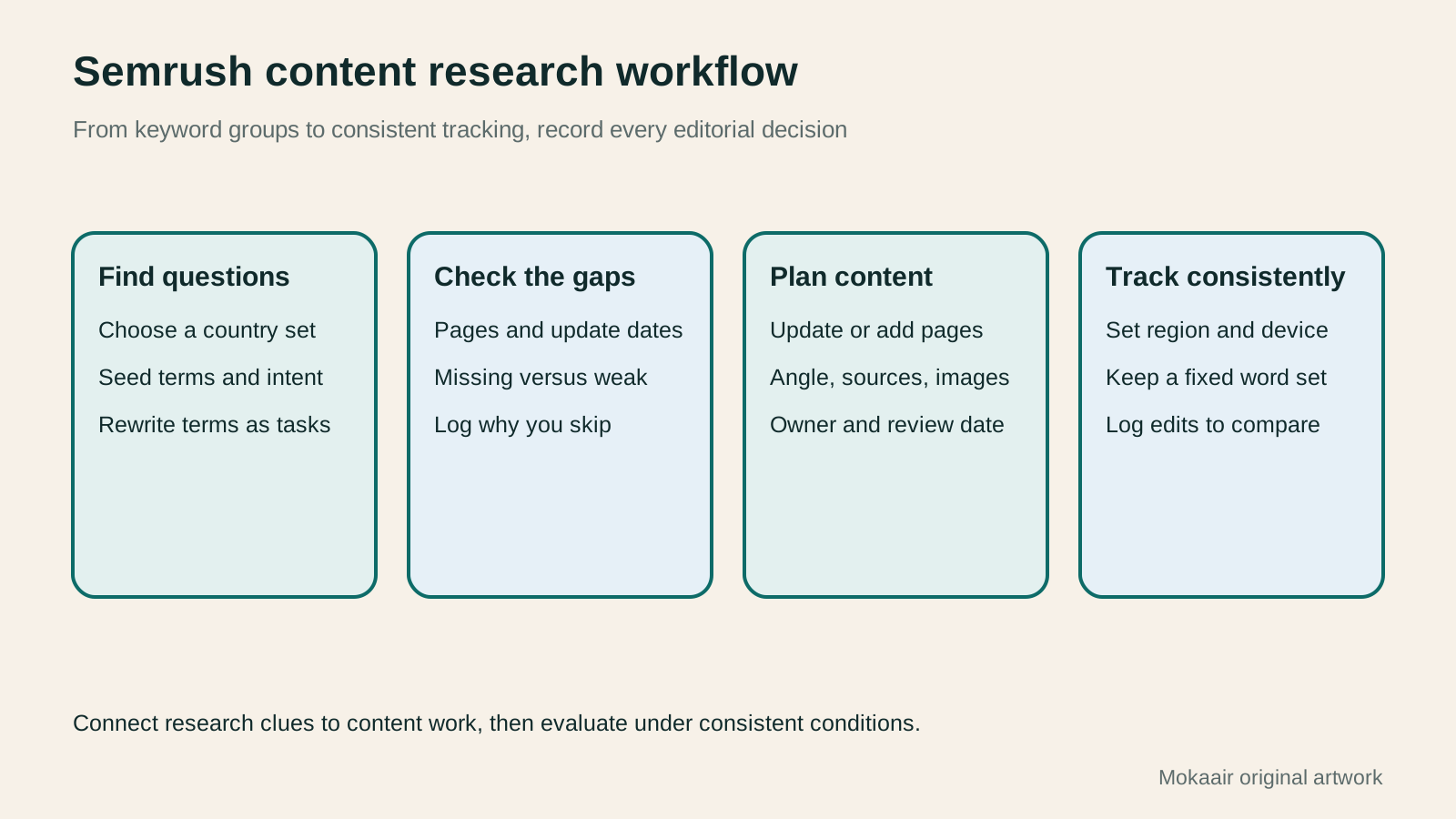
- Define reader actions and service scope; choose the database and organize candidate queries.
- Distinguish metric definitions, then check competing pages and Keyword Gap categories.
- Match retained topics to new or existing pages; record sources, owners and purpose.
- Confirm region, device and a fixed keyword set; save a baseline and review it regularly.
Save data dates alongside editorial decisions
According to the official documentation, Keyword Magic Tool data is updated monthly and that tool itself cannot switch dates to show earlier results. Other reports have different historical-data features. A date selector in one view does not mean every tool has the same capability. Include the tool name and date checked when downloading files.
For each row in the editorial list, keep the reader question, corresponding URL, whether an answer already exists, evidence still needed, image requirements and intended review date. A Semrush list can organize terms and update metrics, but the article still needs its own examples, sources and judgment. A suggested page structure in the tool is not finished content.
Later evaluation should consider whether tracking conditions stayed comparable, whether the article answered its question, and actual site data collected with authorization. Inquiry counts can also vary with class dates and available places; a ranking curve alone cannot explain why. Record each edit and remaining uncertainty so the next research cycle has a comparable basis.
| Tool or field | Use in this workflow | Limitation to check |
|---|---|---|
| Keyword Magic Tool | Expand candidate terms and questions | Country database and filters |
| KD / PKD | Set an initial research order | General estimate or specific domain |
| Organic Rankings | Inspect queries and corresponding pages | Estimated traffic and update date |
| Keyword Gap | Categorize gaps to investigate | Comparison sites and keyword type |
| Position Tracking | Observe selected terms over time | Fixed region, device and term set |
Plan articles around search intentHow to Identify Search Intent: Turn Keywords into Questions Worth AnsweringThe same keyword can signal learning, comparison, finding a specific entry point or taking action. Using original luggage-storage examples, this guide shows how to judge intent from wording, time and place, result formats and your own query data, then turn a hypothesis into a clear content task. It includes an observation table, ways to handle mixed intent, content-format choices and later validation. Do not copy ranking pages or treat one search-results screen as the answer for every reader.Read the full article
Check duplicate topics and existing content
Compare against your own Search Console data
Lifestyle
Technical SEO audit order: crawling, indexing, rendering, and site structure
A useful technical SEO audit needs reproducible evidence and a sensible repair order. Using a site relaunch as an example, this guide explains how to sample page templates and check public access, indexing directives, JavaScript rendering, canonical URLs, and site structure. It separates urgent repairs, scheduled improvements, and later observation so that a general site owner can hand actionable findings to maintainers without treating a passing test as a ranking guarantee.
Lifestyle
How to write article titles: Show search readers the scope and purpose
A useful title tells readers before they click what problem an article addresses, when it applies, and what information they will get. Using original rewrites of everyday tutorials, this guide checks the topic, purpose, limits, and evidence behind title promises. It explains why the page heading, HTML title, and Google search title may differ, then offers prepublication checks and post-change observation without stuffing keywords, claiming tests that never happened, or adding an unverified year.
Lifestyle
How to Identify Search Intent: Turn Keywords into Questions Worth Answering
The same keyword can signal learning, comparison, finding a specific entry point or taking action. Using original luggage-storage examples, this guide shows how to judge intent from wording, time and place, result formats and your own query data, then turn a hypothesis into a clear content task. It includes an observation table, ways to handle mixed intent, content-format choices and later validation. Do not copy ranking pages or treat one search-results screen as the answer for every reader.
Lifestyle
A beginner's SEO learning roadmap: make your site readable before measuring traffic and results
SEO beginners need not memorize ranking factors or buy a suite of tools. Using a small Taiwan website, this guide orders five topics: how search works, site readability, content planning, Search Console metrics, and results. Exercises by stage, a resource table, and a change log help you make pages readers and search engines can understand, then plan further work from data instead of tool scores or short-term swings.
Latest travel guides

GuideTokyo
Where to Stay in Tokyo: Comparing Shinjuku, Ueno, Tokyo Station, Shibuya, Asakusa, Ikebukuro, and Ginza, Plus Airport Access, Accommodation Tax, and Luggage Delivery
Where should you stay in Tokyo? Compare Shinjuku, Ueno, Tokyo Station, Shibuya, Asakusa, Ikebukuro, and Ginza by the same criteria: access from Narita and Haneda, transit routes, nearby attractions, neighborhood character, and who each area suits. Includes a comparison table, a Yamanote Line diagram, Tokyo’s accommodation tax as verified in 2026/9 (changing to 3% in 2027/4), and Airport TA-Q-BIN luggage shipping rules.
- Budget
- Hotels

GuideTokyo
How to Choose Tokyo Transit Passes: Are Suica, Welcome Suica, the Tokyo Subway Ticket, and the JR Pass Worth It?
On a first Tokyo trip, start with an IC card and pay per ride (Welcome Suica has no deposit and is valid for 28 days). If you take four or more subway rides in a day, add a 72-hour Tokyo Subway Ticket for 2,000 yen; a JR Pass is never worthwhile if you stay in Tokyo and do not go to Kansai. See what TOURIST PASMO, Suica on iPhone, and the Tokyo Metro day pass do and do not cover, with a decision chart. Prices verified in September 2026.
- Transport
- Budget

GuideTokyo
Tokyo Disneyland and DisneySea Guide: Ticket Prices, Fantasy Springs, Disney Premier Access (DPA), Standby Pass, and Which Park to Choose for Your First Visit
Tokyo Disney one-day Passport prices vary: most weekdays in 9/2026 cost ¥9,900 and weekends ¥10,900. At 14:00 daily, tickets go on sale for the same date two months later. Free Priority Pass is no longer on the official service list; only paid Disney Premier Access (¥1,000–3,500 per person per use) shortens waits. Covers hours, the 25th anniversary, Standby Pass, Entry Request, Fantasy Springs access and first-visit park choice; checked on the official site in 9/2026.
- Itineraries
- Family
Sources
- Using Semrush Keyword Magic Tool · Checked:
- Semrush Personal Keyword Difficulty · Checked:
- Keyword Magic Tool dates and metrics · Checked:
- Semrush Organic Rankings scope · Checked:
- Semrush organic-ranking fields · Checked:
- Semrush Keyword Gap categories · Checked:
- Configuring Semrush Position Tracking · Checked: