Lifestyle
How to Identify Search Intent: Turn Keywords into Questions Worth Answering
The same keyword can signal learning, comparison, finding a specific entry point or taking action. Using original luggage-storage examples, this guide shows how to judge intent from wording, time and place, result formats and your own query data, then turn a hypothesis into a clear content task. It includes an observation table, ways to handle mixed intent, content-format choices and later validation. Do not copy ranking pages or treat one search-results screen as the answer for every reader.
About 7 min read
The words ‘luggage storage’ alone do not tell you whether someone wants to learn the drop-off process, compare lockers with staffed storage, or find an available spot beside a station. A long article based only on those words may mention everything while helping none of these readers finish the task in front of them.
Search intent is a judgment about a searcher's immediate goal. It needs evidence and allows uncertainty: one term can carry several reasonable needs at once. An editor's job is to choose which situation a page will serve and provide enough information for that reader to take the next step.
Read the object, action and constraints in the query
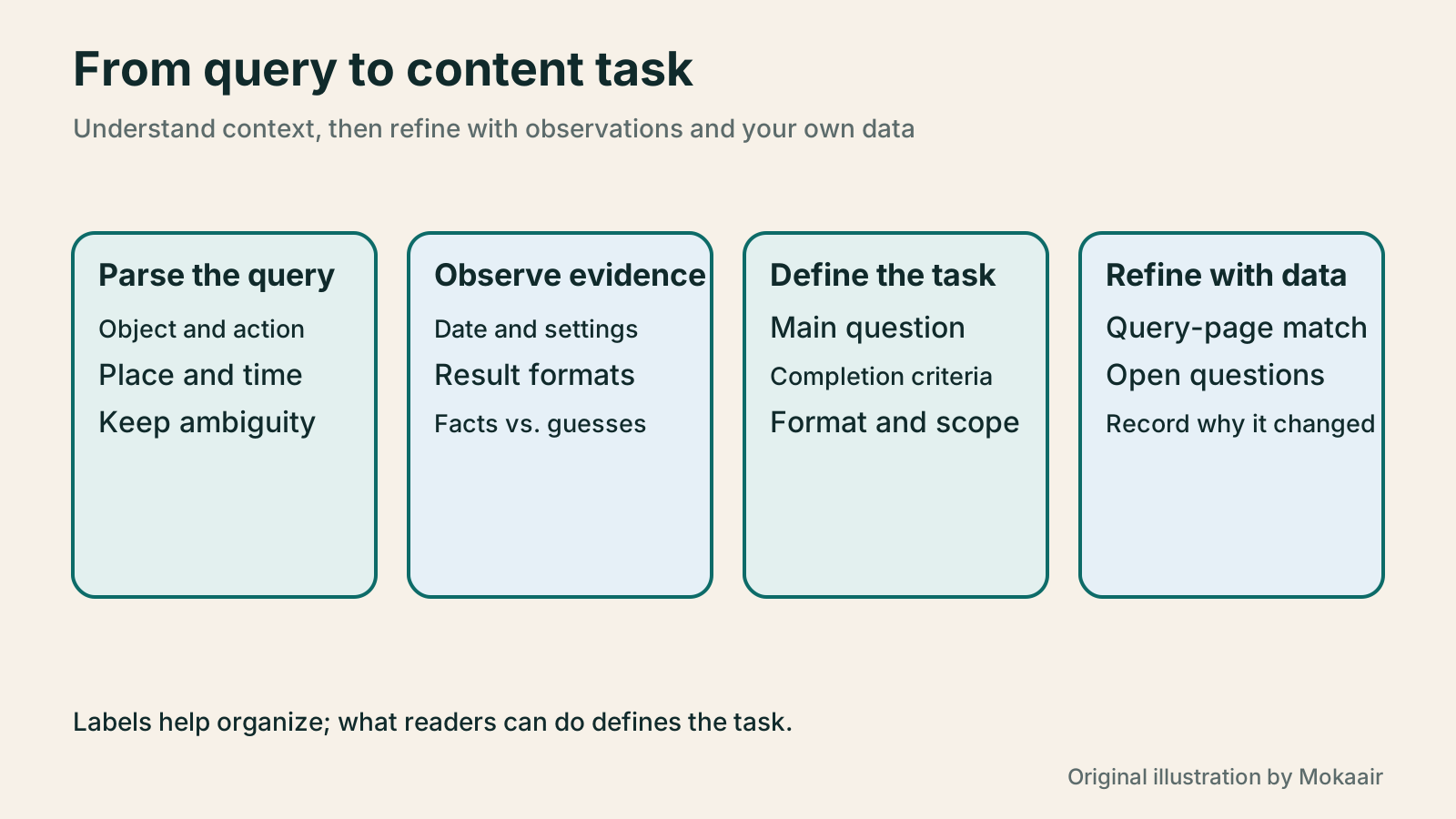
Break a query into three parts: what the person is looking for, what they want to do, and what limits apply. ‘Taipei Main Station luggage storage evening pickup’ contains a place, a service and a time requirement; ‘luggage storage versus lockers’ sounds more like a choice between methods. These are starting clues, not a conclusion from a single word; later observations must support them.
Google explains that Search considers meaning, language, location, settings and other context, and can relate words with different wording. Two queries that look different may need the same answer. The same short query may need different results in different places or at different times.
Keep the original query in your worksheet before adding your interpretation and confidence level. For example, tentatively mark ‘luggage storage cost’ as a cost comparison, while noting that you do not yet know whether a specific location matters. Recording ambiguity reminds you to investigate further instead of forcing every query into a single box for speed.
Classify by the job to be done, not by a rigid rule
For editing purposes, you may temporarily group goals into learning a concept, comparing options, finding a named destination and completing an action. This helps communication; it does not mean each query can have only one fixed label. Someone looking for a store may first check the price, and someone learning the process may book afterward.
For example, ‘Do I need ID for storage?’ calls for a clear explanation of rules and how to verify them; ‘locker or staffed storage?’ needs a comparison on common terms; ‘sign in to a particular service’ usually calls for the correct entry point. If you do not operate that service, hiding its official sign-in link at the end of a long article may add little value.
Give each group a completion condition: understand a restriction, narrow a choice, reach the right page, or know how to take the next step. This is more actionable than writing only ‘informational’ or ‘transactional’. When choosing a format, check it against that condition instead of imitating the length of similar articles.
Record the scope and date when observing search results
For actual research, choose the language and location context used by your Taiwan readers, then record the query, date, device and search settings. Google says results depend on this context, and Search Console warns that your own searches may not reproduce reported results. An incognito window can reduce some existing-state effects but cannot erase all location and setting differences.
First observe result types: written guides, official services, maps, products, videos or other modules. Mark ads separately; their presence is not evidence of what organic results favor. Record ‘what appeared’ and ‘what it might mean’ in separate columns. Several location entry points may suggest local needs, for example, but you still need to check readers' actual goals.
Observations can guide your format, but cannot justify copying another page's paragraph order or adopting its ranking. Every luggage-storage phrase here is a teaching example, not a survey of results on a particular day. For a real topic, check official rules and service information separately, then answer with your own structure, examples and comparison criteria.
Handle multiple needs behind one query
For mixed intent, choose one primary task and cover other needs only enough to help readers decide what to do next. An article comparing storage methods can explain how to check time, size and pickup restrictions, then link to a real service entry point. It need not contain a complete store list for every station.
Two questions help decide whether to split pages: do readers need different steps, and does each page need different evidence? A process guide needs preparation and retrieval steps; a service-location guide needs verifiable addresses and operating details. If two pages differ only by place name without meaningful service differences, first ask whether each can support a standalone page.
Leave an undecidable query marked for later observation and work first on clearer, longer queries. Existing reader questions or support records can also help, after removing personal information; do not treat one case as everyone's need. Intent research may conclude that no new article is needed and that an existing page's entry point or explanation should improve instead.
Turn intent into a deliverable content task
Write a short task card for each topic: target reader, use situation, main question, completion condition, required evidence and out-of-scope matters. For a comparison of storage methods, required material might include comparison dimensions, where to check rules and a scenario-based choice. Sources must support each factual claim about a service.
Then choose a suitable format. Use steps for a procedure, a table for trade-offs, a diagram for spatial relationships and a prominent verified official link when the task is finding an entry point. The task determines the format; seeing a video in search results does not mean every topic needs a video.
After drafting, check the article against each original query. If readers ask whether they can collect luggage in the evening, explain clearly how to verify hours and special restrictions, not merely that the service is ‘convenient’. When rules differ by operator or location, state the difference and the way to check it instead of inventing one universal rule to make the article look complete.
- Keep the original query and separate its topic, action and constraints.
- Record search observations and context, separating facts from guesses about needs.
- Choose the main task and decide whether to combine, split or improve an existing page.
- Turn the task into content requirements, then check every original question after drafting.
Revise the initial judgment with your own data
If your site has data, examine Search Console performance by query, page, country or device to see which needs bring visitors to which page. The report includes clicks, impressions and average position, but does not directly tell you whether readers were satisfied. Query-to-destination matches are more useful for this task than sitewide click totals alone.
If a comparison page often receives queries for a specific entry point, check whether its opening and navigation create confusion. If a tutorial receives many advanced questions, consider adding exceptions or a follow-up. Do not assume a falling click-through rate proves the intent was wrong; first check whether query mix, device, location or period changed.
When updating the task card, retain the original judgment, later evidence and reason for adjustment. Search intent is not permanently fixed by its first classification: seasons, service redesigns and reader familiarity can change needs. Revisit primary queries during major content updates so the page keeps serving real questions rather than an old label.
| Original query example | Tentative task | What the content must provide |
|---|---|---|
| How do I retrieve stored luggage? | Understand the process and preparation | Steps, required proof and how to check exceptions |
| Locker versus staffed luggage storage | Compare service methods | Consistent criteria, restrictions and scenario-based choice |
| Sign in to a particular storage service | Find a named entry point | Correct official entry point and necessary explanation |
| Evening storage near Taipei Main Station | Act locally with a time constraint | How to verify locations, opening hours and pickup terms |
| Luggage storage cost | Possibly compare costs or find a specific price | First confirm location, size and billing scope |
Apply the task to one article and its page settings
Build an order for learning and observing SEO
Lifestyle
Technical SEO audit order: crawling, indexing, rendering, and site structure
A useful technical SEO audit needs reproducible evidence and a sensible repair order. Using a site relaunch as an example, this guide explains how to sample page templates and check public access, indexing directives, JavaScript rendering, canonical URLs, and site structure. It separates urgent repairs, scheduled improvements, and later observation so that a general site owner can hand actionable findings to maintainers without treating a passing test as a ranking guarantee.
Lifestyle
How to write article titles: Show search readers the scope and purpose
A useful title tells readers before they click what problem an article addresses, when it applies, and what information they will get. Using original rewrites of everyday tutorials, this guide checks the topic, purpose, limits, and evidence behind title promises. It explains why the page heading, HTML title, and Google search title may differ, then offers prepublication checks and post-change observation without stuffing keywords, claiming tests that never happened, or adding an unverified year.
Lifestyle
A beginner's SEO learning roadmap: make your site readable before measuring traffic and results
SEO beginners need not memorize ranking factors or buy a suite of tools. Using a small Taiwan website, this guide orders five topics: how search works, site readability, content planning, Search Console metrics, and results. Exercises by stage, a resource table, and a change log help you make pages readers and search engines can understand, then plan further work from data instead of tool scores or short-term swings.
Lifestyle
A keyword research workflow: Reader needs, long-tail queries, and topic priorities
Keyword research should produce a schedulable content list, not hundreds of unused terms. Using a small baking tutorial site, this guide collects clues from reader questions, Search Console, Google Keyword Planner, and Google Trends. It separates search-volume estimates, ad competition, and relative interest, then groups specific needs, checks existing pages, and prioritizes topics by value and production capacity.
Articles that cite this one
- What to Do When Searches Get No Clicks: Rethinking Traffic Value Through Reader Tasks
- Planning content with Semrush: keywords, competitor pages and a tracking list
- Reading search results: SERP features, CTR and changing impressions
- Finding article ideas with Google Trends: relative interest, regions and seasons
Latest travel guides

GuideTokyo
Where to Stay in Tokyo: Comparing Shinjuku, Ueno, Tokyo Station, Shibuya, Asakusa, Ikebukuro, and Ginza, Plus Airport Access, Accommodation Tax, and Luggage Delivery
Where should you stay in Tokyo? Compare Shinjuku, Ueno, Tokyo Station, Shibuya, Asakusa, Ikebukuro, and Ginza by the same criteria: access from Narita and Haneda, transit routes, nearby attractions, neighborhood character, and who each area suits. Includes a comparison table, a Yamanote Line diagram, Tokyo’s accommodation tax as verified in 2026/9 (changing to 3% in 2027/4), and Airport TA-Q-BIN luggage shipping rules.
- Budget
- Hotels

GuideTokyo
How to Choose Tokyo Transit Passes: Are Suica, Welcome Suica, the Tokyo Subway Ticket, and the JR Pass Worth It?
On a first Tokyo trip, start with an IC card and pay per ride (Welcome Suica has no deposit and is valid for 28 days). If you take four or more subway rides in a day, add a 72-hour Tokyo Subway Ticket for 2,000 yen; a JR Pass is never worthwhile if you stay in Tokyo and do not go to Kansai. See what TOURIST PASMO, Suica on iPhone, and the Tokyo Metro day pass do and do not cover, with a decision chart. Prices verified in September 2026.
- Transport
- Budget

GuideTokyo
Tokyo Disneyland and DisneySea Guide: Ticket Prices, Fantasy Springs, Disney Premier Access (DPA), Standby Pass, and Which Park to Choose for Your First Visit
Tokyo Disney one-day Passport prices vary: most weekdays in 9/2026 cost ¥9,900 and weekends ¥10,900. At 14:00 daily, tickets go on sale for the same date two months later. Free Priority Pass is no longer on the official service list; only paid Disney Premier Access (¥1,000–3,500 per person per use) shortens waits. Covers hours, the 25th anniversary, Standby Pass, Entry Request, Fantasy Springs access and first-visit park choice; checked on the official site in 9/2026.
- Itineraries
- Family
Sources
- How Google generates and ranks Search results · Checked:
- Search Console Performance report overview · Checked:
- Google guidance on people-first content · Checked: