Lifestyle
How to Plan a Sitemap: Which URLs to Include, How to Submit It, and How to Maintain It
A sitemap is a URL list for search engines. Choosing the wrong content or leaving it outdated means successful submission still cannot solve indexing problems. This article covers selecting public canonical URLs, WordPress sitemap locations, XML formatting and file limits, and Search Console submission and maintenance. A URL-type comparison table and an original synchronization diagram help small websites in Taiwan build a sustainably managed Sitemap.
About 8 min read
Contents
- 1. Filter URLs first: distinguish public content from other versions
- 2. Identify the actual generator and avoid conflicting configurations
- 3. Use valid formatting and meaningful update dates
- 4. Submit the file's location; a successful fetch does not mean every page is indexed
- 5. Keep the list in sync when content is added, moved, or removed
- 6. Regularly compare with the admin content list to find omissions and stale entries
A website with a hundred articles but thousands of URLs in its sitemap does not necessarily have more content. Categories, sorting parameters, and different versions can all inflate the list. The first step in creating a Sitemap is deciding which URLs are worth letting search engines discover, rather than dumping every visible link into a file.
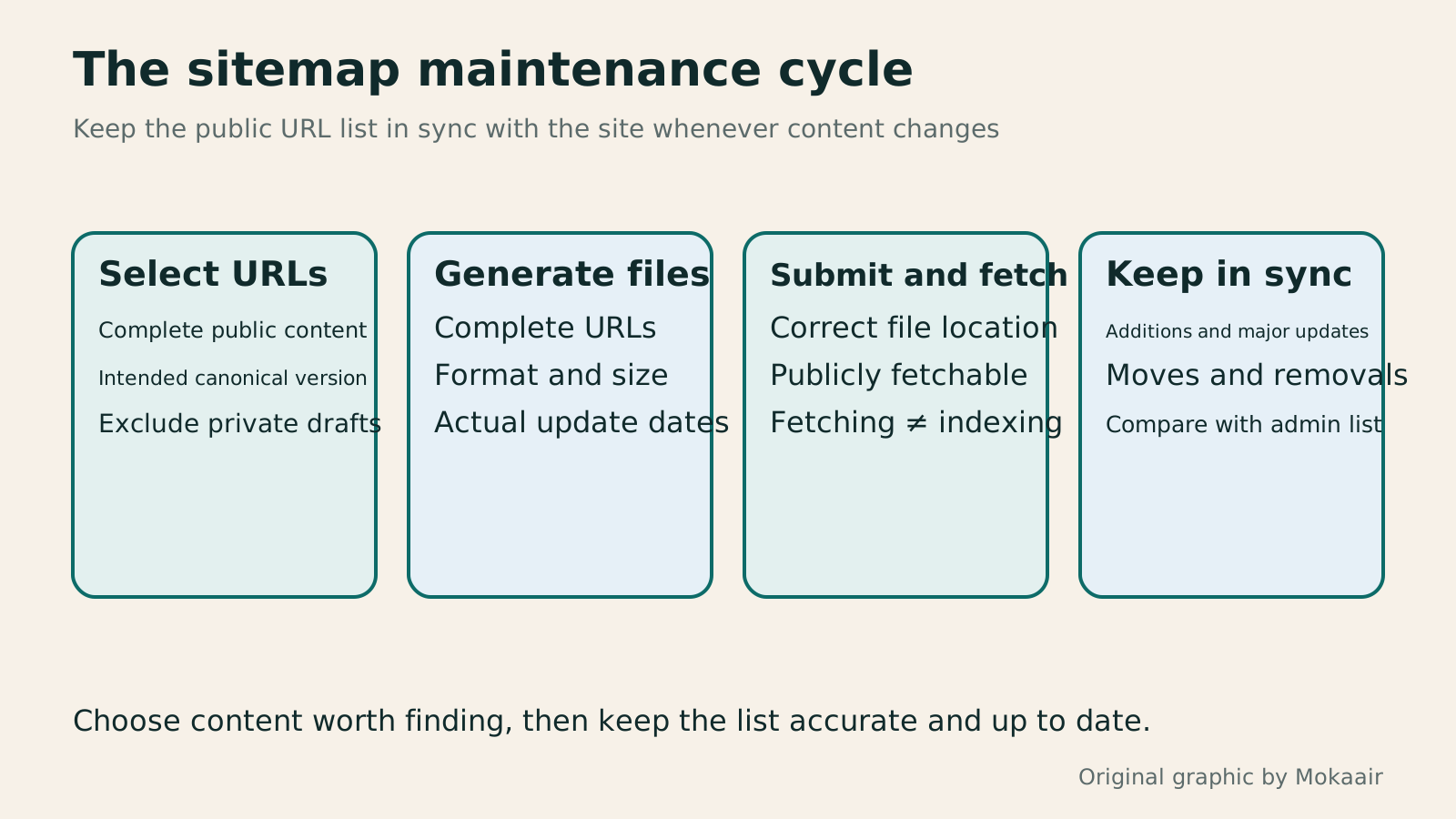
Think of a sitemap as a handover list for public content: whenever content is added, changed, moved, or deleted, the list must stay consistent with the site. The following example uses a small tutorial website to move from content inventory to maintenance after submission; it does not represent work performed on any real website.
Filter URLs first: distinguish public content from other versions
Start by listing published articles, main service pages, and useful category landing pages from the site's admin area, then check whether you really want each to appear in search results. For every entry, record the complete URL, content type, whether it is public, the intended canonical URL, and the person responsible. This inventory is the basis for later comparisons; you cannot rely solely on search results to reconstruct all your content.
If the same article has tracking parameters or multiple URL versions, generally list the preferred canonical version. Drafts, personal information that requires login, pages that no longer exist, and duplicate URLs generated solely for sorting usually do not belong on this public list. If different language versions each provide complete content, decide based on their URLs and canonicalization arrangements.
Do not automatically keep or remove every category page. Suppose "Parent and Child Crafts" provides clear course descriptions and navigation links; it may serve a distinct purpose. First assess the content value of narrow tags that contain only one article and lack organization. Sitemap selection rules should align with your content planning, rather than letting plugin defaults decide everything for you.
Identify the actual generator and avoid conflicting configurations
When using a content management system, first look for a Sitemap automatically generated by the platform or a plugin, as it is more likely to stay in sync with publication status. WordPress core provides sitemap functionality. With pretty permalinks, the index is usually at /wp-sitemap.xml; without them, core uses /?sitemap=index.
SEO plugins may also offer their own sitemap locations and exclusion rules. Check which features are currently enabled, then verify what the public URL actually returns. If several sitemaps coexist, identify what each covers and who maintains it. Multiple files are not inherently a violation, but duplication, outdated content, or conflicting settings make management harder.
WordPress's search engine visibility setting affects whether its core sitemap is enabled, and plugins can also change this behavior. If a sitemap returns 404, check the site's intended public visibility, permalinks, and the generator actually in use instead of simply turning off all privacy settings. Verify in an appropriate environment before making changes to the production site.
Use valid formatting and meaningful update dates
XML sitemaps need the correct structure, UTF-8 encoding, and character handling. URLs should be complete, including the protocol and domain. If you generate one yourself, use appropriate XML tools to handle special characters. Avoid directly concatenating URLs containing & into strings, which can cause formatting errors. Users generally do not need to handwrite the entire list line by line.
Google supports formats including XML, RSS/Atom, and plain text; choosing a particular format does not guarantee better rankings. Plain text uses one complete URL per line. RSS or Atom usually covers only recent updates, so the presence of a subscription feed does not mean all older articles are also listed.
A single file is limited to 50 MB when uncompressed and 50,000 URLs. If it exceeds these limits, split it and use an index file or submit the files separately. Google ignores priority and changefreq; lastmod should reflect actual updates to significant content, structured data, or links. Regenerating the file every day does not mean every article received a substantive update that day.
- Confirm that the generator outputs complete URLs, and spot-check special characters and encoding.
- Check the entry count and uncompressed size, splitting by content type if necessary.
- Confirm that only significant changes update the corresponding lastmod; avoid always setting it to today's date.
- Document the generation rules and maintainer so the next redesign has a reference.
Submit the file's location; a successful fetch does not mean every page is indexed
Before submitting, confirm that Googlebot can access the sitemap publicly without logging in. In Search Console's Sitemap report, you submit the file's URL; you do not upload the file to Google. Submission through this report requires property owner permissions, and you must select the correct property that covers that URL.
After entering the actual location, record the submission date, fetch status, and error messages. If fetching fails, first check the URL, access restrictions, and server response. If there is a parsing error, return to the generator and check the format. Do not repeatedly submit different guessed filenames before fixing the original problem.
A success status means Google can fetch and process the file; it does not guarantee that every listed page will be crawled or indexed. The report's discovered URL count is also not the total number of pages indexed in search. Continue by checking indexing information for important pages, and record successful file fetching separately from actual page outcomes.
Keep the list in sync when content is added, moved, or removed
When publishing a new tutorial, confirm that it appears in the intended list and can be found normally through the site's internal navigation. Adding it to a Sitemap cannot replace good navigation. After a major update, check that its date is reasonable. Let the generator keep routine updates in sync, without treating each resubmission as a technique to speed up search.
When changing an article's URL, also check the new URL, how the original URL is handled, internal links, and canonical URL settings. The sitemap should gradually reflect the versions you currently want to present, rather than remaining full of redirects or dead entries over the long term. If you only remove an entry from the sitemap while the original page remains publicly accessible, that does not guarantee it will disappear from search results.
Content that truly needs protection should use appropriate access controls. To change indexing, choose the right method for the page's purpose. Deleting a submission record from Search Console likewise does not delete your website's pages or information Google already knows about. The list, the pages, and their search status are three things that need to be coordinated.
Regularly compare with the admin content list to find omissions and stale entries
For maintenance, start with the list of published content and compare it with the URLs in the sitemap. First identify important pages that should be public but are missing, then look for items that have been removed from the site but remain in the sitemap. Finally, spot-check canonical versions and update dates. Do not assume the content is correct just because the file opens.
If the article count and sitemap count differ, first check what each count covers: an index file may also include categories, authors, or other content, while RSS may contain only recent articles. Comparing counts separately by type is more useful than requiring the two totals to match exactly. Search Console also does not necessarily list all sitemaps discovered through other methods.
Schedule a check after bulk publishing, changing plugins, redesigning the site, or moving domains, and inspect routinely according to your update frequency. Keep a record of when issues were found, fixed, and rechecked so you can tell whether they recur. A good sitemap has clear rules and continually reflects the site's actual state.
Read the full description
Four stages: select public canonical URLs, use a generator to create valid files, submit and check fetch status, then sync and review as content changes.
| URL type | How to handle it | What to check |
|---|---|---|
| Public articles and service pages | Include the intended canonical URLs | Pages are accessible and content is complete |
| Parameterized or alternative versions | Identify duplicates and canonical versions first | Do not include every variant |
| Drafts or private information | Exclude from the public list | Implement access protection separately |
| Removed or moved pages | Keep entries in sync: remove them or list the new URLs | Old URL handling and internal links |
| Separate language versions | Include based on content and canonicalization setup | Language pages are accessible normally |
Set up Search Console first and understand each stage
Determine whether crawl budget really is the problem
Clarify duplicate content and the role of each pageArticles Competing for Rankings? Identify Overlapping Intent and Consolidate ContentMultiple articles from one site appearing for similar queries do not always hurt each other. This article shows how Search Console, article tasks and content differences reveal truly duplicate needs and guide retention, repositioning or merging. It explains the distinct roles of permanent redirects, canonical and noindex, plus pre-merge backups, URL mapping, internal link updates and performance tracking, to avoid deleting articles based only on keywords or short-term rankings.Read the full article
Found this guide helpful? Share it with someone who needs it
Lifestyle
How Websites Build Trust: Authors, Sources and High-Risk Topics
Website trust rests on verifiable author backgrounds, sources, methods and correction accountability. This article explains E-E-A-T and YMYL's uses and limits, using original scenarios for everyday posts, software tutorials and high-risk information to outline author, editor and expert reviewer roles. A checklist covers source applicability, partnership disclosures, dates and corrections, so author boxes, institution names and search rankings are not taken as proof of accuracy.
Lifestyle
Understanding website authority scores: Tool metrics vs. search performance
Website authority scores appear in SEO reports and partnership proposals, but tools calculate them differently. Using Ahrefs Domain Rating and Semrush Authority Score, this article explains differences between domains, pages, links, estimated traffic and actual outcomes, with steps for same-tool comparisons, anomaly checks and monthly reports. It helps small sites treat scores as research clues, not Google certification or ranking guarantees.
Lifestyle
How to Design a 404 Page: Explain the Problem and Help Readers Continue
404 pages need more than art and a home button: explain missing content and help readers finish their task. An original exhibition-site example covers clear copy, relevant categories and search, HTTP status codes, proper redirects and error tracking. Steps, a comparison table and original diagrams distinguish missing content, moved pages and service outages, avoiding attractive pages that return success or redirecting every old URL to an unrelated home page.
Lifestyle
Articles Competing for Rankings? Identify Overlapping Intent and Consolidate Content
Multiple articles from one site appearing for similar queries do not always hurt each other. This article shows how Search Console, article tasks and content differences reveal truly duplicate needs and guide retention, repositioning or merging. It explains the distinct roles of permanent redirects, canonical and noindex, plus pre-merge backups, URL mapping, internal link updates and performance tracking, to avoid deleting articles based only on keywords or short-term rankings.
Articles that cite this one
Sources
- Google: Build and Submit a SitemapChecked:
- Google Sitemap ReportChecked:
- Sitemaps XML ProtocolChecked:
- Introduction to WordPress Core SitemapsChecked:
- WordPress Source Code for Determining Whether Sitemaps Are EnabledChecked:
- WordPress Source Code for the Sitemap Index URLChecked:
Compiled from the references and verification dates listed above; fares, schedules, product features, and terms can change, so please confirm the latest details on the relevant official website before travelling, booking, or purchasing.