Lifestyle
www, Subdomains, and Subdirectories: Choosing a Website URL Structure
Whether to use www or put a blog at blog.example.com or example.com/blog/ depends on platform support and maintenance. This article explains hostnames and paths, then compares content roles, DNS settings, HTTPS certificates, and URL consistency for subdomains and subdirectories. An original decision table and launch checklist help small websites in Taiwan build URL structures that are easy to use, manage, and hand over.
About 8 min read
Contents
- 1. Understand the URL: distinguish the hostname from the path
- 2. Choose a consistent www version, then support the other entry point
- 3. Subdirectories suit shared management, but platform capabilities still matter
- 4. Subdomains suit separate services, with separate responsibilities
- 5. Check each layer before launch to avoid waiting on the wrong thing
- 6. Treat structural changes to a live website as a URL migration
When adding a blog or booking service, you may get stuck on a seemingly small question: should the feature name go before the domain or after the slash? This choice affects how the platform connects to your website, who maintains it, and whether readers lose their way when switching between services.
There is no need to treat URL structure as a rankings contest. For small websites, keeping content updated reliably, assigning clear responsibilities, and keeping old entry points working are usually higher priorities. The hypothetical needs of a studio website below show how to plan naming and technical settings together.
Understand the URL: distinguish the hostname from the path
Take https://learn.example.com/classes/ as an example: https indicates the communication protocol used for the connection, learn.example.com is the hostname, and /classes/ is the path within the website. By comparison, https://example.com/learn/ uses the original hostname and expresses the content location through a path. The difference is more than just the order of the text.
A subdomain such as learn.example.com can point to the same service or connect to a different platform that supports custom domains. The www in www.example.com is also part of this kind of hostname; it is not a required prefix for every website, nor does it automatically guarantee access to the same content as the version without www.
For a subdirectory such as /learn/, the website or server determines what content to return. Paths on modern websites do not necessarily correspond to physical folders, so creating a folder with the same name in your hosting file manager may not make the existing system work correctly. DNS controls where hostnames point; it cannot directly configure article paths after the slash.
Choose a consistent www version, then support the other entry point
When choosing whether to use www, first check your website platform's support, existing links to your site, and current website settings. If your site already uses one version reliably, there is no need to switch solely because the other seems more like what a large company would use. The key is to keep your main links, shared URLs, and search markup consistent.
Also account for readers who manually enter the other version. You can make the non-primary version respond correctly and then redirect to the corresponding primary URL; for example, an article page should lead to the same article, rather than every page redirecting to the homepage. Having both names point to the same host does not mean the server already knows to serve the same content or redirect automatically.
HTTPS must also cover the hostnames people actually visit. If readers encounter a certificate error on the non-primary version first, the subsequent redirect rules may never get a chance to work properly. List DNS, hostname binding, certificates, and redirects separately when planning, so you do not change just one setting and assume both www entry points are fully configured.
Subdirectories suit shared management, but platform capabilities still matter
Suppose the studio already has a website with article management, and the new educational content will mainly be edited by the same person. Choosing example.com/learn/ may make it easier to retain the existing menus, search, styling, and content management. This is a judgment based on maintenance needs, not a claim that all subdirectories inherently rank more easily in search.
If the learning platform is a separate service, first confirm whether it can run directly under a path on the main site. Some platforms offer custom hostname connections but may not support subdirectories; forcing one into /learn/ may require an additional proxy, path rewriting, or custom integration work. Ask about these costs before choosing a solution, rather than discovering that the services cannot connect after the website is built.
Google's SEO Starter Guide recommends choosing subdomains or subdirectories according to business and management needs, without treating either form as a universal shortcut. When evaluating the options, ask: who publishes content, who updates the software, who fixes errors, will search be shared, and how can the content be taken along when changing platforms? These answers are usually more useful than whether the URL looks short.
Subdomains suit separate services, with separate responsibilities
If another provider manages the booking system, booking.example.com may be a more direct way to connect it. First confirm that the provider supports that hostname, then configure DNS using the information it supplies. Do not copy an IP address from another tutorial or assume all platforms use the same record type.
In Cloudflare's official process, for example, A maps to IPv4, AAAA maps to IPv6, and CNAME points to another fully qualified domain name. Proxy status and TTL then need to be configured as required. A CNAME target is not a full webpage URL containing https and a path; follow the service provider's requirements for the actual fields and values.
Once services are separated, you still need to confirm how branding information, links back to the main site, account login, notification emails, and data exports work together. Using names under the same main domain does not mean two platforms automatically share member accounts. Also list each service's administrators, costs, and expiration dates, and hand over the DNS settings and hostname bindings when discontinuing a service.
- List each content area or service and the platform currently managing it.
- Ask providers about their requirements for supporting subdomains, subdirectories, and custom domains.
- After choosing the names, record who is responsible for DNS, hostname binding, and certificates.
- Go from the main site to the new area and back, checking navigation and functionality firsthand.
Check each layer before launch to avoid waiting on the wrong thing
First verify that DNS resolves to the expected service, then check whether that service accepts the hostname. Next, check the HTTPS certificate and actual page, and only then examine paths, redirects, and content. If DNS is correct but the provider displays a screen indicating that the hostname is not bound, repeatedly deleting DNS records usually will not solve the binding problem within the platform.
Test URLs should include at least the primary homepage, the other www version, deeper content pages, and the new subdomain or subdirectory. Check that the required parameters are preserved correctly and that images and links do not point back to the test site. If two different services are involved, do not just check whether their homepages look similar; also verify the actual behavior of login and links back to the main site, one by one.
Choose the right scope to monitor in Search Console as well. A Domain property can cover subdomains and different protocols, while a URL-prefix property is limited to the specified prefix. Having data for the main site does not mean the new subdomain is covered by the same URL-prefix report. Verify the scope before interpreting any apparent lack of impression or indexing data.
Treat structural changes to a live website as a URL migration
Moving articles from blog.example.com to example.com/blog/ changes every article's full URL. First map the old URLs to the new ones and confirm that the content is in its new location. Then arrange the corresponding redirects and updates to internal links, canonical tags, and sitemaps. Do not simply point DNS to the main site without configuring how the old paths will be handled.
Also maintain the arrangements needed to keep the original service and entry points working, so readers can still use old bookmarks. If structural changes, a platform switch, and major revisions to the body text all happen together, it becomes harder to determine which change caused a problem. Record separate dates and acceptance checks for work that can be distinguished. Search results take time to reflect changes, and there is no guaranteed level of traffic growth.
Finally, compile a master URL table listing each hostname or path's purpose, platform, administrator, primary version, and deactivation method. The next time you add courses, membership, or customer support features, consult this table before expanding. A good structure should help readers know where they are and maintainers know who should handle a problem.
Read the full description
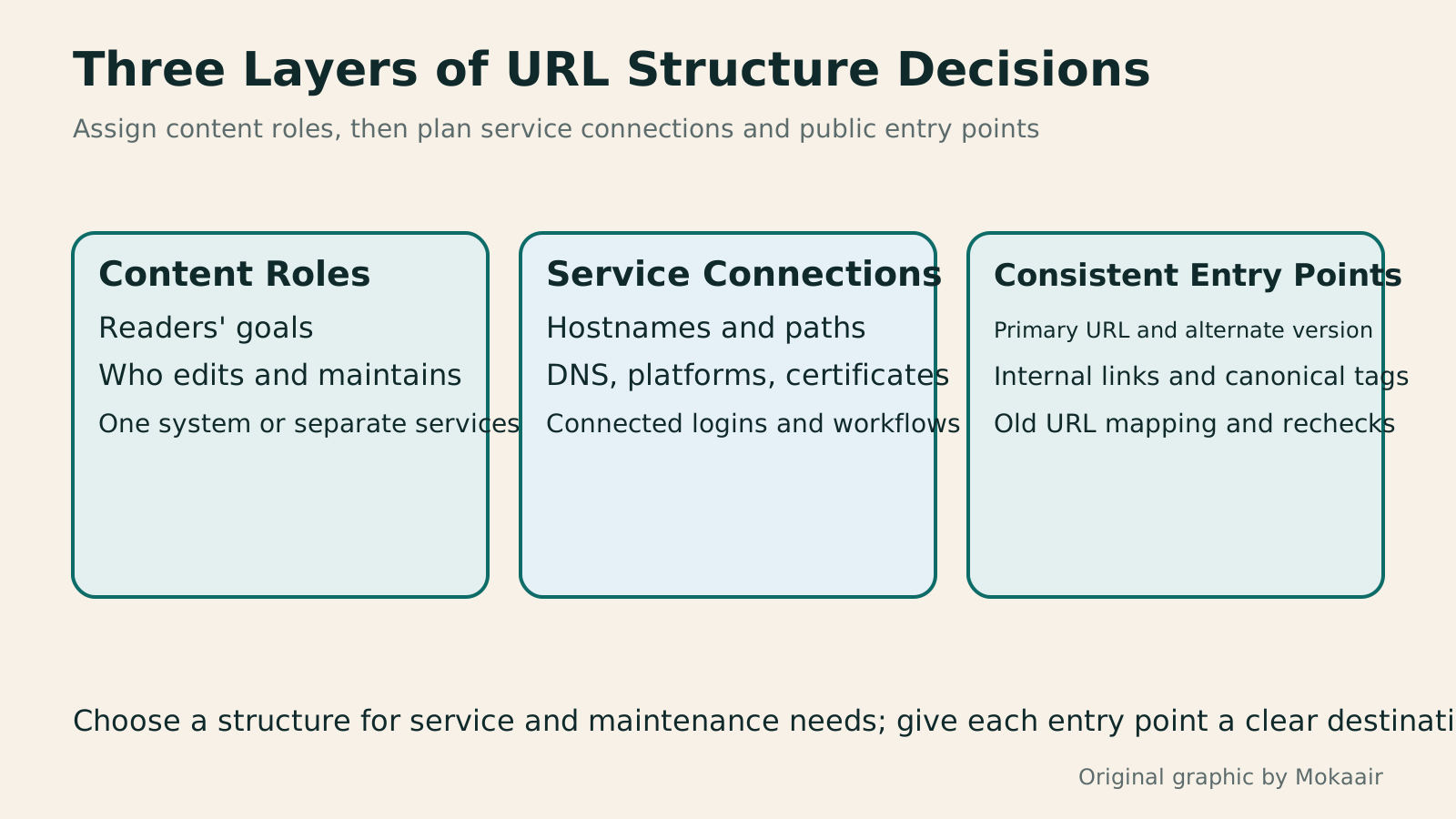
Three panels cover content and maintenance roles, DNS and platform connections, and URL and search consistency—the areas to assess together when choosing subdomains or subdirectories.
| Structure | Best-suited needs | What to check first |
|---|---|---|
| Main site with or without www | Establishing a consistent public entry point | Platform, certificates, and the other version's response |
| Main-site subdirectory /learn/ | Content managed in the same system | Routing, menus, and publishing workflow |
| Subdomain learn.example.com | An independent platform or separate service responsibilities | Custom domains, DNS, and management responsibilities |
| Changing an existing URL structure | Addressing a specific maintenance or service need | Page-by-page mapping, redirects, and follow-up checks |
DNS records and common issues
HTTPS certificate setup and verification
Verifying 301 and 302 configurations
Found this guide helpful? Share it with someone who needs it
Lifestyle
Before Hiring a Web Design Agency: The Brief, Quotes and Deliverables Checklist
Before hiring a web design agency, define your site's audience, key actions and deliverables so you can compare quotes. Using a small studio as an example, this guide covers page and template counts, content duties, feature specs, mobile and accessibility checks, account and source-file handover, and post-launch maintenance terms. An editable requirements checklist helps reduce extra costs and communication gaps; no agency recommendations are included.
Lifestyle
How to Start a Web Design Project: Requirements, Content, and Acceptance Testing in Order
Building your first website often stalls over unclear requirements, content, and acceptance criteria, rather than colors. Using an original neighborhood repair studio example, this guide covers user interviews, content preparation, prototyping, development, and handover, with deliverables for each stage. Steps, a comparison table, learning resources, and original diagrams help readers building or commissioning a site turn “Is it finished?” into tasks they can verify.
Lifestyle
Website Caching and CDNs: Which Layer to Clear When Updates Do Not Appear
A website may be updated while phones still show old content because caches remain in different places. Using a Taiwan studio's business-hours update, this article explains browser, WordPress/hosting and CDN roles, cache responses, expiry times and targeted purging. An ordered procedure, comparison table and original diagram help site managers trace old versions while keeping account and shopping workflows correct.
Lifestyle
How to Map Website Structure: From Content Inventory to Navigation and Page Relationships
Website structure is more than a homepage and a few subpages: it helps users know where information is, find it, and understand the next step. An original community equipment-sharing site example covers content inventories, task grouping, navigation labels, page relationships, and tree testing, distinguishing card sorting, site structure diagrams, and Sitemaps for search engines. Steps, a comparison table, and original diagrams help small sites build usable, maintainable information structures.
Sources
- MDN: URL Components and PathsChecked:
- MDN: Choosing Between www and Non-wwwChecked:
- Cloudflare: Creating Subdomain RecordsChecked:
- Google SEO Starter Guide: Choosing a Site StructureChecked:
- Google: Adding a Website PropertyChecked:
- Google: Site MigrationsChecked:
Compiled from the references and verification dates listed above; fares, schedules, product features, and terms can change, so please confirm the latest details on the relevant official website before travelling, booking, or purchasing.