Lifestyle
Shared Hosting, VPS, and Managed Cloud: How a Small Website Should Choose
Shared hosting, VPS, and managed cloud services often share one price list, but the terms may describe resource allocation or maintenance responsibility. This guide uses a small site to compare storage, memory, transfer, backups, and support. Find the real constraint before adjusting settings, upgrading a plan, or moving hosts. You do not need to memorize specifications first: take this concrete checklist to a provider.
About 6 min read
When choosing hosting, separate two questions first: what resources the website receives and who keeps the service running. VPS describes a virtual-server arrangement, while managed service describes work that a provider takes responsibility for; both can apply at the same time. Seeing the words “cloud” or “managed” therefore does not reveal the full specifications or division of responsibility.
This guide starts with article sites, portfolios, and small-shop introductions. No plan name alone guarantees speed or search ranking. Compare the site's work, visitor patterns, maintenance capacity, and payment terms together, or you may buy what looks like an upgrade without solving the real problem.
With shared hosting, confirm the management scope first
Shared hosting usually lets multiple websites use the same pool of server resources and management environment. Users commonly manage the website, database, files, and sometimes included mailboxes through a control panel. This does not mean the site must be slow, but an “unlimited traffic” label does not remove every other limit. Check the plan documents for resource, process, and acceptable-use conditions.
For one content site, first confirm whether the installation, HTTPS, backup, restore, and support processes are sufficient. Ask which data counts toward storage, whether the database has a separate limit, what happens when traffic increases, and whether the required software or scheduled tasks are allowed. These conditions describe your future work better than a website-count headline. If the existing site has separate email or backup services, list them separately and determine which must move with the host.
A VPS provides a virtual-server environment
A VPS is a virtual private server, usually an independently manageable virtual environment divided from physical infrastructure. Depending on the service, you can install and configure the system, but you may also need to maintain the operating system, web server, database, security updates, and backups yourself. Renting a VPS does not mean that a specialist is already maintaining a WordPress website for you.
When comparing VPS plans, examine CPU type, network transfer, backups, and support scope as well as memory and storage. The same virtual CPU count does not guarantee the same operating conditions. Product documents should explain whether processor time is shared and whether the plan suits sustained or occasional workloads. This guide provides no untested performance ranking and does not treat provider specifications as a guarantee of visitor experience.
Ask exactly what a managed service handles
A managed service may help with installation, monitoring, updates, caching, or backups, but its boundary differs by provider. Some services mainly maintain the server; others focus on a particular application. Third-party plugin conflicts, custom development, or content changes may not be included. Compare management as a responsibility table instead of writing “included” in one cell and assuming every problem is covered.
Ask providers through concrete situations: which logs will support inspect when the site fails, how quickly a backup can be obtained, who performs a restore, and who renews certificates. If you mainly want to write, reduced maintenance work may be valuable. If you need special software and system settings, also check whether the management service limits the control you need.
Read resource specifications through the site's workload
Storage must cover software, images, databases, logs, and backups, not only the images on public pages. Memory relates to concurrent work and database and plugin needs. Network transfer measures data actually downloaded and is different from connection bandwidth. When a plan compresses these ideas into a short label, read the detailed explanation before comparing it.
Do not estimate every workload from monthly page views alone. The same number of visitors can create different server work when they read cacheable articles, sign in as members, search large datasets, or use a dynamic checkout. List which pages need real-time computation and which content can be cached, then examine current errors, resource use, and peaks to identify what actually needs more capacity.
When the website slows down, find the bottleneck first
Before moving to a larger host, determine whether every page is slow or only certain articles, the admin area, or forms. Large images, third-party scripts, repeated queries, a broken cache, and insufficient hosting resources can all feel like a slow website, but they require different remedies. Test the same set of pages under similar conditions with one measurement method, and keep before-and-after results instead of declaring success from one unusually fast reading.
If the evidence shows sustained resource shortage, ask exactly what an upgrade changes, whether downtime is required, and whether you can return to the old plan. Keep a migration or restore route as well. A provider's one-click upgrade does not remove the need to check every application. After the upgrade, verify the website, mail, scheduled tasks, and required integrations to confirm that the added resources solved the original problem.
- Inventory the site type, required software, data volume, and current maintenance owner, then write down the non-negotiable conditions.
- Compare resources, backups, support, usage limits, and full payment terms item by item instead of copying the marketing headline.
- Test the candidate or current environment with the main visitor flows and record speed, errors, and resource use.
- Confirm upgrade, restore, and exit routes, then choose a service you can continue to manage.
Let maintenance capacity grow with the hosting
Without systems-maintenance experience, a low-cost VPS can convert a financial cost into time spent on installation, maintenance, and failures. When someone already manages the environment, a configurable service may fit better. Evaluate maintenance hours together with service fees; do not choose an environment you cannot take over merely because its specification table shows larger numbers.
As the website grows, revisit its data and workflows rather than treating the first choice as permanent. Retain control of the domain and accounts, obtainable backups, and essential configuration records. Then a future resource increase, move to managed service, or provider change can begin with known conditions instead of first recovering lost passwords and website data.
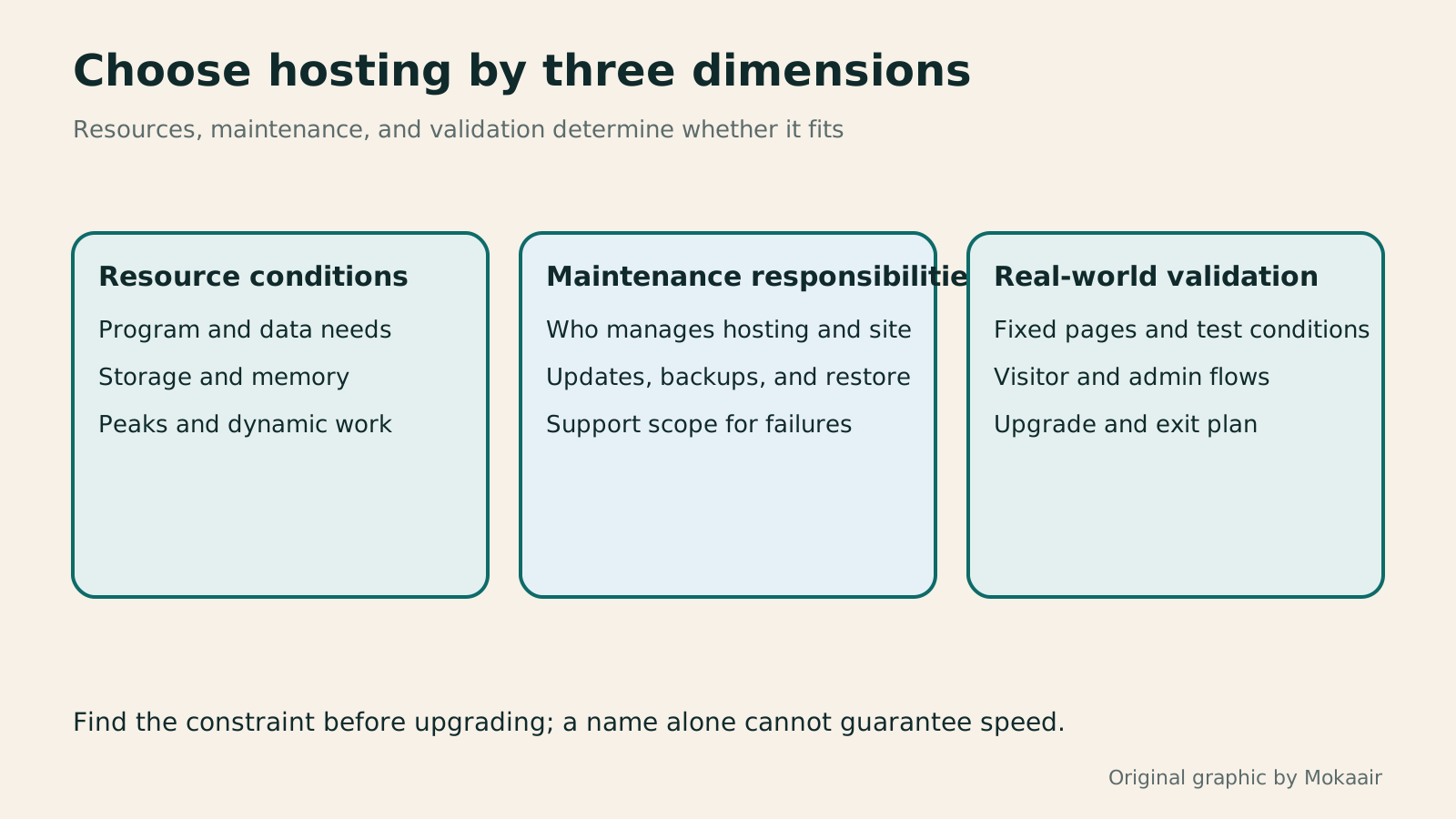
| Area | Question to ask | Evidence to inspect |
|---|---|---|
| Resources | What does the site receive, and where are the limits? | CPU, memory, storage, and transfer documents |
| Management | Who updates, monitors, and restores? | Managed-service scope and support terms |
| Performance | Has the reason for slowness been identified? | Measurements and logs under fixed conditions |
| Scaling | What changes with an upgrade, and can you exit? | Downtime, rollback, and billing terms |
How to budget for a website: separate the first year, renewals, and maintenancePlanning a website budget: separate first-year, renewal and maintenance costsA website budget needs more than a promotional monthly price. Group spending into setup, ongoing use, renewal and migration; list hosting, domains, email, themes, plugins and maintenance time. Learn to distinguish long-term monthly equivalents, automatic renewal and outsourced quotes, then practise with clearly hypothetical figures. Build a cost list, decide what is needed now or later, and know which terms to keep before paying.Read the full article
What website maintenance includes: routine backups, updates, and incident reportingWhat website maintenance involves: a routine for backups, updates, and incident reportsWebsite maintenance includes more than plugin updates: check content, accounts, backups, outgoing email, and expiring services. Using a small WordPress content site, this guide covers routine observation, pre- and post-update checks, restoration, and incident reports, with a worksheet for owners, editors, and maintainers. Set a schedule by update frequency, identify urgent cases, and keep records the next collaborator can use.Read the full article
Lifestyle
Changing domain registrars: transfer locks, authorization codes and keeping DNS working
Moving a domain to another registrar changes who manages its registration; it does not automatically move your website or email. This guide covers eligibility, common locks, authorization codes and the application process. DNS, nameserver and email checks help users in Taiwan hand over domains such as .com, while reminding them to check the separate rules for .tw and other extensions.
Lifestyle
Comparing WordPress hosting: assess providers with one requirements worksheet
To compare WordPress hosting, align site content, service responsibilities and billing periods before interpreting plan differences. This guide offers a worksheet and verification process, separates official specifications from your own measurements and unresolved conditions, and covers renewal, backups, support and exit costs. It is for users in Taiwan choosing their first host or considering a different provider, without ranking services by a single speed test or promotional monthly price.
Lifestyle
Setting up a Namecheap domain: connecting it to a website and email after registration
After buying a Namecheap domain, identify its DNS manager to connect your website and email. Official documentation explains Nameservers, Advanced DNS and Mail Settings, with two routes: change nameservers or keep the current DNS. This guide provides preparation checks, step-by-step verification and fault-reporting details for people using different domain, hosting and email providers, helping prevent accidental deletion of existing email records while bringing a website online.
Lifestyle
Managing a Gandi domain: registration, DNS and renewal checks
Gandi keeps registration, DNS, email and renewal settings in separate places. Based on current official documentation, this guide covers post-purchase checks, LiveDNS records, backups, transfers and what the 2026 Classic DNS migration means for existing users. Check your own account and build a domain register others can take over, avoiding outdated tutorial nameservers and the assumption that paying means your website and email are fully configured.
Articles that cite this one
- How to evaluate FastComet hosting: resources, backups and WordPress installation
- Comparing WordPress hosting: assess providers with one requirements worksheet
- Getting started with hosting.com: from the former A2 name to current service options
- Planning a website budget: separate first-year, renewal and maintenance costs
- Building a site on Cloudways: servers, applications and account verification
Latest travel guides

GuideTokyo
Where to Stay in Tokyo: Comparing Shinjuku, Ueno, Tokyo Station, Shibuya, Asakusa, Ikebukuro, and Ginza, Plus Airport Access, Accommodation Tax, and Luggage Delivery
Where should you stay in Tokyo? Compare Shinjuku, Ueno, Tokyo Station, Shibuya, Asakusa, Ikebukuro, and Ginza by the same criteria: access from Narita and Haneda, transit routes, nearby attractions, neighborhood character, and who each area suits. Includes a comparison table, a Yamanote Line diagram, Tokyo’s accommodation tax as verified in 2026/9 (changing to 3% in 2027/4), and Airport TA-Q-BIN luggage shipping rules.
- Budget
- Hotels

GuideTokyo
How to Choose Tokyo Transit Passes: Are Suica, Welcome Suica, the Tokyo Subway Ticket, and the JR Pass Worth It?
On a first Tokyo trip, start with an IC card and pay per ride (Welcome Suica has no deposit and is valid for 28 days). If you take four or more subway rides in a day, add a 72-hour Tokyo Subway Ticket for 2,000 yen; a JR Pass is never worthwhile if you stay in Tokyo and do not go to Kansai. See what TOURIST PASMO, Suica on iPhone, and the Tokyo Metro day pass do and do not cover, with a decision chart. Prices verified in September 2026.
- Transport
- Budget

GuideTokyo
Tokyo Disneyland and DisneySea Guide: Ticket Prices, Fantasy Springs, Disney Premier Access (DPA), Standby Pass, and Which Park to Choose for Your First Visit
Tokyo Disney one-day Passport prices vary: most weekdays in 9/2026 cost ¥9,900 and weekends ¥10,900. At 14:00 daily, tickets go on sale for the same date two months later. Free Priority Pass is no longer on the official service list; only paid Disney Premier Access (¥1,000–3,500 per person per use) shortens waits. Covers hours, the 25th anniversary, Standby Pass, Entry Request, Fantasy Springs access and first-visit park choice; checked on the official site in 9/2026.
- Itineraries
- Family
Sources
- AWS: Web-hosting services and resource concepts · Checked:
- AWS: VPS and management models · Checked:
- DigitalOcean: Virtual-server products and resource types · Checked: