Lifestyle
SaaS, PaaS and IaaS: The Responsibilities You Take On When Using a Service
SaaS, PaaS and IaaS differ not just in where software runs, but in who maintains each layer. An original community classroom registration scenario explains responsibilities for ready-made cloud software, application platforms and infrastructure, with checks for accounts, data, updates, backups and leaving a service. A comparison table and original diagrams help everyday users understand service plans and assign specific people to the work before outsourcing.
About 8 min read
Contents
A community classroom wants students to register online. A vendor offers three proposals: subscribe to a ready-made registration tool, put a custom application on a platform, or rent a cloud server. All three can be called cloud services, but the ongoing work differs greatly. Before choosing a plan, clarify whether the classroom wants to maintain course data, the application, or even manage the server system itself.
This article explains SaaS, PaaS and IaaS through an original classroom scenario, based on primary documents from NIST, Microsoft and AWS consulted on 2026/9/14. No services were actually purchased or deployed, and no particular vendors are ranked. The responsibility table is a discussion aid; formal assignments must still be based on the selected service and contract.
Start with the layer you can control
SaaS stands for Software as a Service: users directly use applications supplied by a provider. For example, the classroom creates courses, manages students and configures notifications in a ready-made registration tool without installing a server operating system itself. The service determines which features can be adjusted, so a particular waitlist rule may not be freely rewritten.
PaaS stands for Platform as a Service: the provider supplies a platform for running applications, and users deploy applications they have developed or obtained. In this example, if an engineer is hired to build the registration workflow, the application can be handed to the platform to run. The platform handles more underlying maintenance, but someone still needs to fix incorrect course logic, vulnerable packages or improper application settings.
IaaS stands for Infrastructure as a Service: users obtain basic resources such as computing, storage and networking, and can control the virtual server's operating system and install software. This offers more room to accommodate special requirements, while adding work for updates, monitoring and troubleshooting. The provider's management of physical equipment does not mean it will fix the registration application the classroom installed itself.
A service type does not describe an entire company
NIST uses these three types to describe the layer at which a service is provided, and separately distinguishes deployment models such as public and private clouds. They answer different questions, so a private cloud cannot simply be treated as IaaS, nor does having a mobile App necessarily indicate a particular service type. Read the product's actual features when classifying it; the brand name alone is insufficient.
The same registration system may combine several types: the classroom uses SaaS to send notifications, hosts a custom website on PaaS, and has an IaaS server for a legacy system. In this case, map the data flows separately. If the quotation says only "fully cloud-based," everyone may assume the other party will handle failed notification integrations or problems synchronizing student data.
When comparing control, ask the vendor directly: who can install updates, view logs, modify the application and stop the service? Then ask whether these actions require an interface, customer support or an engineer. Turning the answers into actionable tasks is more useful than memorizing three acronyms when finding a plan that fits the classroom's staffing.
The classroom still needs to manage data and accounts
Microsoft's explanation of shared responsibility states that customers still need to manage their data, identities and settings under their control, regardless of service type. In this example, the provider can maintain the login feature, but will not automatically know which part-time employee has left, which class roster should be available only to its instructor, or whether an exported file may be sent to an external partner.
First assign the operations that administrators, administrative staff and teachers each need. Teachers may only need to view the courses they teach, without being able to download every student's contact details. Use individual accounts with available multi-factor authentication, and establish a procedure for revoking access when staff leave. Even with SaaS, these settings and routine checks cannot simply be left to the statement "the cloud will handle it."
Also distinguish between data stored by the service provider and files downloaded by the classroom. If exported rosters remain on shared computers, in personal email accounts or in folders with unrestricted sharing, the risks extend beyond the cloud platform. A worksheet can record each file's purpose, who may read it and its retention period, so someone is also responsible for organizing copies outside the registration tool.
Ask about updates, backups and recovery item by item
AWS uses EC2 as an example to explain that IaaS users must manage guest operating system updates, software installation and security group settings; for more abstracted services, the provider handles more underlying work. This reminds us that a responsibility table for one virtual server cannot be applied directly to every cloud product. The specific service being selected must be considered.
The classroom can break maintenance down into application updates, applying platform settings, retaining data copies and recovery drills. For each task, ask whether it is included in the monthly fee, who initiates it, how failures are reported and what point in time can be recovered. Whether the provider has redundant equipment and whether a user can recover an accidentally deleted registration record are separate checks.
Arrange a small acceptance test: create a few fictional registration records, export them using the officially provided method, confirm that the file opens and all fields are present, and ask the responsible person to explain the recovery procedure. This example is a suggested acceptance method and does not claim that any service has been tested. When restoring actual production data, establish a separate operating window and confirmation procedure to avoid overwriting newer records.
- List services such as registration, notifications and storage, and identify the scope of control for each.
- Assign account, data, application and system maintenance to clearly identified people.
- Use fictional data to confirm that exports, notifications and recovery instructions are workable.
- Check ongoing costs and exit procedures before deciding whether to introduce production data.
Include staff time when comparing costs
The three types do not correspond directly to cheap, mid-priced and expensive. Ready-made tools may charge by user or feature, while platforms and infrastructure resources may charge by usage; the actual model depends on the plan. Comparing only monthly server fees may overlook engineering maintenance, monitoring, backups, additional storage and data transfer out, as well as administrative staff's operating time.
In this example, one enrollment cycle can serve as the comparison period: importing data before courses begin, accepting registrations during enrollment, sending notifications after the deadline, and exporting records when courses end. For each stage, record who needs to spend how much time and which costs change when students or files are added. Estimates for the same workload provide a basis for comparing different services.
Also clarify the difference between budget alerts and usage limits. Receiving an alert does not necessarily stop billing automatically, and shutting down an application does not necessarily delete every resource that continues to incur charges. During procurement, ask the provider to list the procedure for stopping use and any resources that may remain, rather than assuming that logging out terminates the service.
Practice leaving before adopting a service
When leaving a service, first check what you can take with you: can courses, students, payment records, attachments, activity logs and permission settings all be exported? Being able to download a spreadsheet does not mean the registration workflow can be fully rebuilt. If the application is deployed on a platform, also confirm whether the source code, environment settings and database can be handed over, rather than merely obtaining the public-facing website URL.
Next, confirm the exported files' formats, linking fields and retention periods. For example, student and registration records need matching identifier fields; otherwise, people with the same name may be indistinguishable after moving to a new tool. Ask the person taking over to actually read a de-identified sample, record any missing fields, and include the assistance and costs needed for migration in the outsourcing scope.
Finally, name a primary and backup contact for every critical task. A small classroom can reasonably choose to give the service provider more technical work, while still retaining control over account management, data use and handover. A good choice meets the functional requirements and gives every ongoing task someone to handle it. There is no need to rent a server no one will maintain just for the sake of control.
Read the full description
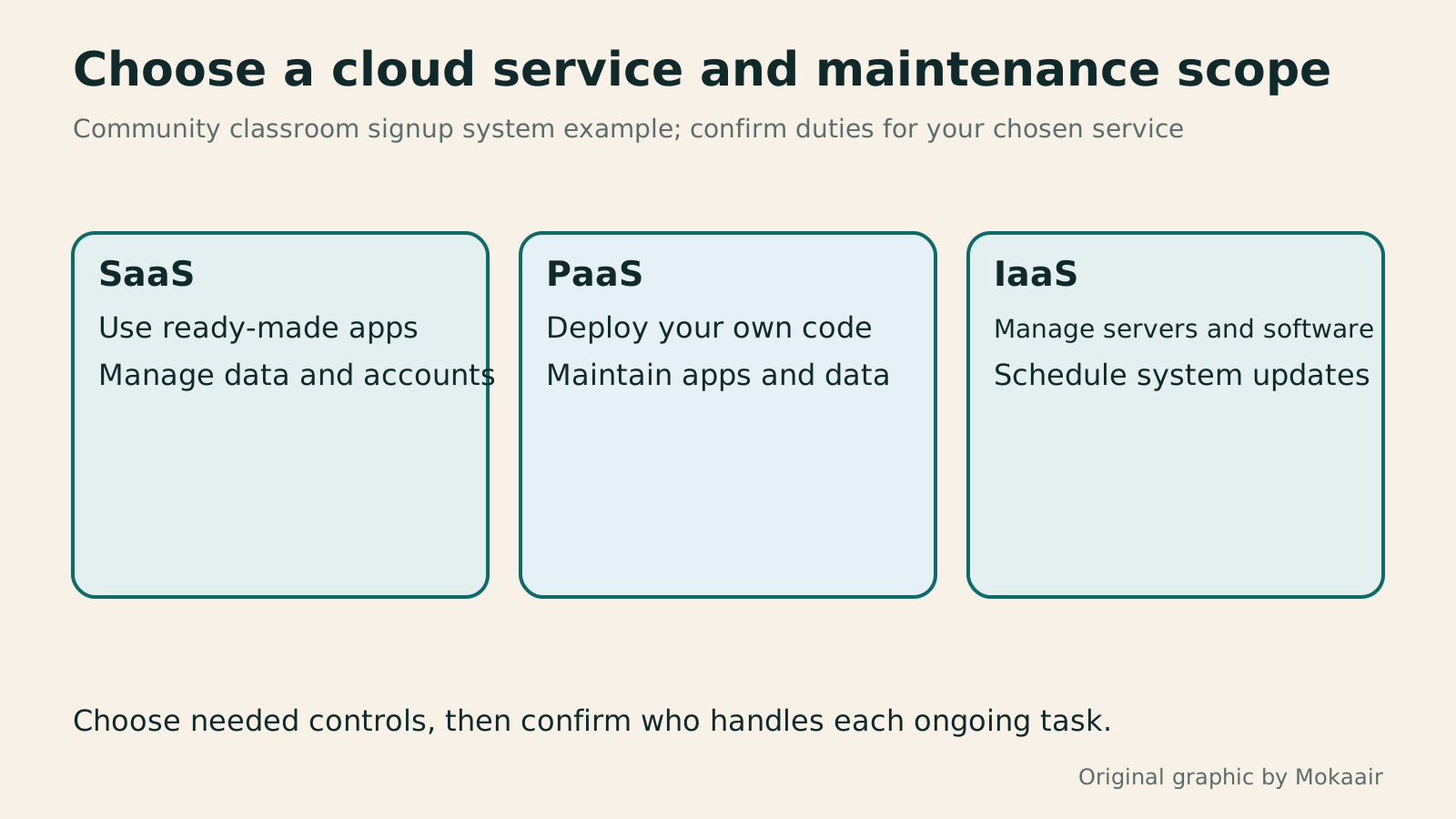
Three cards show users' control over ready-made software, application platforms and infrastructure, reminding them that data and accounts still need management.
| Service type | Users' main areas of control | Work still to assign |
|---|---|---|
| SaaS: ready-made software | Data, accounts and settings the product allows | Staff permissions, exports and usage workflows |
| PaaS: application platform | Deployed applications and some runtime settings | Code updates, data and integration maintenance |
| IaaS: infrastructure resources | Operating systems, software and configurable networking | System patches, monitoring and application maintenance |
| Combined use | Confirm separately for each service | Data flows and troubleshooting across services |
Make maintenance part of routine website checksWhat website maintenance involves: a routine for backups, updates, and incident reportsWebsite maintenance includes more than plugin updates: check content, accounts, backups, outgoing email, and expiring services. Using a small WordPress content site, this guide covers routine observation, pre- and post-update checks, restoration, and incident reports, with a worksheet for owners, editors, and maintainers. Set a schedule by update frequency, identify urgent cases, and keep records the next collaborator can use.Read the full article
Plan your website budget and ongoing costs before procurementPlanning a website budget: separate first-year, renewal and maintenance costsA website budget needs more than a promotional monthly price. Group spending into setup, ongoing use, renewal and migration; list hosting, domains, email, themes, plugins and maintenance time. Learn to distinguish long-term monthly equivalents, automatic renewal and outsourced quotes, then practise with clearly hypothetical figures. Build a cost list, decide what is needed now or later, and know which terms to keep before paying.Read the full article
Found this guide helpful? Share it with someone who needs it
Lifestyle
www, Subdomains, and Subdirectories: Choosing a Website URL Structure
Whether to use www or put a blog at blog.example.com or example.com/blog/ depends on platform support and maintenance. This article explains hostnames and paths, then compares content roles, DNS settings, HTTPS certificates, and URL consistency for subdomains and subdirectories. An original decision table and launch checklist help small websites in Taiwan build URL structures that are easy to use, manage, and hand over.
Lifestyle
Before Hiring a Web Design Agency: The Brief, Quotes and Deliverables Checklist
Before hiring a web design agency, define your site's audience, key actions and deliverables so you can compare quotes. Using a small studio as an example, this guide covers page and template counts, content duties, feature specs, mobile and accessibility checks, account and source-file handover, and post-launch maintenance terms. An editable requirements checklist helps reduce extra costs and communication gaps; no agency recommendations are included.
Lifestyle
How to Start a Web Design Project: Requirements, Content, and Acceptance Testing in Order
Building your first website often stalls over unclear requirements, content, and acceptance criteria, rather than colors. Using an original neighborhood repair studio example, this guide covers user interviews, content preparation, prototyping, development, and handover, with deliverables for each stage. Steps, a comparison table, learning resources, and original diagrams help readers building or commissioning a site turn “Is it finished?” into tasks they can verify.
Lifestyle
Website Caching and CDNs: Which Layer to Clear When Updates Do Not Appear
A website may be updated while phones still show old content because caches remain in different places. Using a Taiwan studio's business-hours update, this article explains browser, WordPress/hosting and CDN roles, cache responses, expiry times and targeted purging. An ordered procedure, comparison table and original diagram help site managers trace old versions while keeping account and shopping workflows correct.
Sources
- NIST SP 800-145: Definitions of Cloud Service and Deployment ModelsChecked:
- Microsoft Learn: Shared Responsibility in the CloudChecked:
- AWS: Shared Responsibility ModelChecked:
Compiled from the references and verification dates listed above; fares, schedules, product features, and terms can change, so please confirm the latest details on the relevant official website before travelling, booking, or purchasing.