Lifestyle
Self-hosted store or marketplace: choose by product, traffic, and upkeep costs
A self-hosted store, a hosted branded storefront, and a marketplace solve different operating needs. This guide gives small brands in Taiwan a way to compare product fit, customer acquisition, payments and delivery, per-order costs, and customer data. It uses a limited trial and data-export checks to assess tools such as Shopify, SHOPLINE, and WooCommerce, helping you build a channel mix you can maintain instead of comparing only monthly fees or templates.
About 7 min read
To sell products online, some merchants start on a marketplace, some subscribe to a hosted branded-store service, and others build with WooCommerce. All three approaches can work. What matters is whether you currently need exposure, operating tools, or more control over your processes and site.
Map the path from product discovery to customer purchase, then calculate the costs you would bear. You do not have to launch on every channel at once. Nor should a platform's popularity distract you from whether its search, checkout, and after-sales processes suit your products.
First, distinguish the three ways to set up shop
A self-hosted store generally means arranging your own website environment and using tools such as WooCommerce to manage products and orders. A hosted branded store uses a service such as Shopify or SHOPLINE to build your own storefront; the provider operates the platform within the scope of its service. Shopify plans, for example, include hosted commerce infrastructure.
A marketplace puts many sellers in one shopping environment, where customers can search and compare. It offers an existing shopping entry point, along with its own listing, fee, transaction, and after-sales rules. A hosted branded-store service gives you store-building tools; that does not mean it will bring a new shop buyers as a large marketplace might.
Before comparing services, write down who handles hosting, payments, logistics, promotions, and customer support, and who can change checkout or obtain data. A provider's support team may help with platform issues, but the merchant still has to arrange responses to defects, fulfilment, and customer enquiries. Platform support does not take over your entire after-sales operation.
Use product characteristics to choose the first channel to test
For products with clear specifications that are easy to search and compare on price, test whether a marketplace reaches buyers with a defined need. For products needing more guidance, sizing advice, or brand context, check whether the storefront can present that content fully and make questions easy. These are trial-sale hypotheses, not fixed answers for product categories.
Consider a handmade cup. Besides capacity and price, buyers may care about how it feels, size differences, and care instructions. Prepare complete information, then see whether each channel clearly displays specifications, lead time, stock, and after-sales details. If essential information can only be squeezed into one image, maintaining it later will be difficult.
If you need preorders, bundles, subscriptions, or custom fields, check each feature and its limits. Being able to install an app or plugin does not guarantee that it works with Taiwan payment providers, convenience-store pickup, and invoice services together. Running one representative order through the entire process exposes problems more readily than building ten brand-presentation pages first.
Compare per-order and monthly fixed costs
Split expenses into fixed costs and costs that vary with transactions. Fixed items include the platform, hosting, licences, and maintenance. Variable items include payment processing, marketplace transaction fees, promotion fees, advertising, packaging, shipping subsidies, and returns handling. A fee's calculation base may include or exclude shipping, tax, and discounts; read the applicable terms at the time.
Shopify's documentation explains that using a third-party payment provider may incur a platform transaction fee separate from the provider's own fee. Shopee Mall's terms also distinguish transaction commissions from payment and system-processing fees, with conditions such as product category and period. Do not treat any one rate as the total cost for every seller or order.
Take a purely illustrative calculation, using one consistent currency: payment received for a product is 900, product cost is 360, packaging and delivery cost 90, transaction and promotion fees are assumed to total 80, and advertising to acquire that order costs 120. That leaves 250 for fixed costs and other expenses. These are assumed figures, not after-tax net profit; replace them with actual bills before comparing.
Check how customers and customer data accumulate
An owned storefront needs a sustainable source of customers, such as search content, social channels, partnerships, or advertising. On a marketplace, examine search exposure, clicks, purchases, and returns. Neither side should be judged on visitor counts alone: track customers who complete purchases, whether they understand the product, and why they buy again.
When choosing a platform, actually export a small sample of product, order, and customer data. Check formats, date ranges, required fields, and permissions. SHOPLINE order reports can be exported by range and field; compare that capability with your accounting, fulfilment, and migration needs rather than merely confirming that an export button exists.
A Shopify customer CSV will not carry passwords or order history from another store along with it. Check export and import separately on other platforms too. Being able to download customer data does not grant unrestricted use as a marketing list. Preserve consent and unsubscribe status, and process data for the purposes originally disclosed, so a move does not trigger messages customers never expected.
Include maintenance capacity and multichannel stock in the decision
A self-hosted WooCommerce store needs backups, updates, and compatibility testing. Official guidance recommends backing up before updates and validating important purchase flows in a test environment. If you outsource this work, specify maintenance tasks, response arrangements, and handover materials in the contract. A quote for completing the website does not mean there will be no ongoing costs.
A hosted service also requires you to manage administrator access, apps, product content, and data retention. Ask what data remains accessible if you stop renewing, how add-on apps are cancelled, and who owns the custom domain. Keep original brand assets and product data to reduce the effort of a redesign or move later.
When running two channels, designate the primary record of inventory and test stock deductions, restocking after cancellations, returns, and synchronisation delays. For handmade goods with limited quantities, you can initially allocate a quota to each channel. Do not list your entire stock on both and discover only after two buyers purchase the same item that syncing failed.
Use a limited trial to decide when to expand
Choose a few representative products, set an affordable trial period and budget, and write down the measures in advance. Alongside sales, record the amount left per order, customer-service hours, return reasons, and repeated manual work. High traffic with continuing losses, or an order process that needs manual rescue every time, calls for changes.
After the trial, identify where the problem lies. No visitors may point to insufficient exposure; views without purchases may point to product information, price, or trust; failed payments call for a check of the transaction flow first. Without evidence, do not change platform, products, and advertising at once, or you will struggle to tell what helped.
Once the first channel can reliably take orders, deliver, and reconcile payments, add the data and inventory integration needed for a second. Record each channel's role and results so you can adjust investment to actual needs, rather than opening more storefronts than your team can maintain because peers have both a website and marketplace presence.
- List product needs, main customer sources, and essential transaction features.
- Check current fees and data exports, and run one complete test order.
- Trial a few products with a defined budget; record costs and staff time.
- Identify problem sources and test inventory processes before retaining or expanding channels.
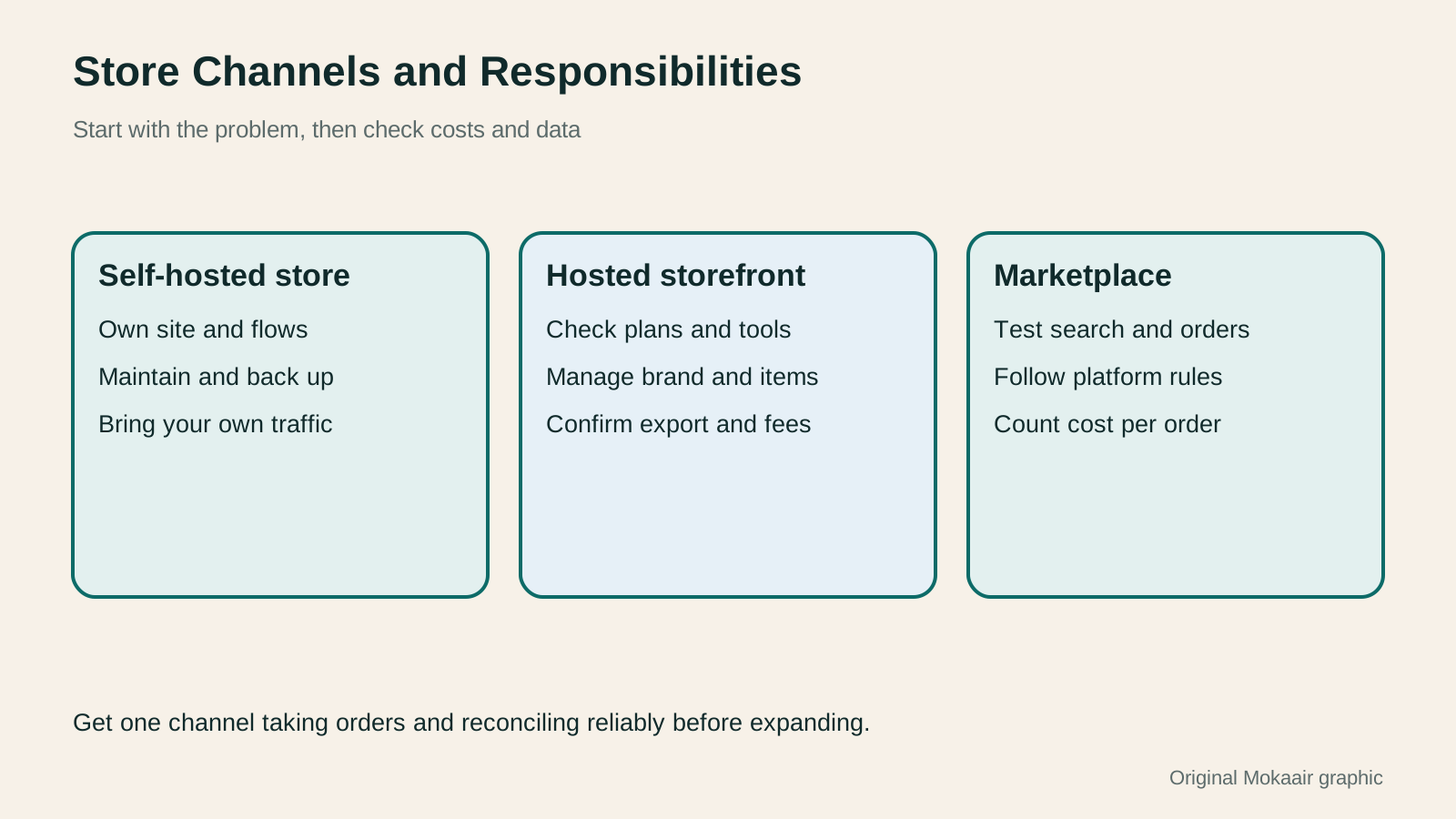
| Aspect | Self-hosted store | Hosted branded platform | Marketplace |
|---|---|---|---|
| Customer acquisition | Plan and operate it yourself | Plan and operate it yourself | Can reach platform buyers, but still competes |
| Upkeep | Arrange technical maintenance | Share duties according to service scope | Work within marketplace features |
| Costs | Hosting, plugins, upkeep, and transactions | Plan, apps, and transactions | Calculated under seller and promotion rules |
| Data | Manage data and backup duties | Check export and migration options | Check access scope and usage rules |
| Getting started | Complete the core purchase flow first | Check plan and integrations first | Trial representative products first |
Plan the launch of a WooCommerce store
Work out a website build and maintenance budgetPlanning a website budget: separate first-year, renewal and maintenance costsA website budget needs more than a promotional monthly price. Group spending into setup, ongoing use, renewal and migration; list hosting, domains, email, themes, plugins and maintenance time. Learn to distinguish long-term monthly equivalents, automatic renewal and outsourced quotes, then practise with clearly hypothetical figures. Build a cost list, decide what is needed now or later, and know which terms to keep before paying.Read the full article
Lifestyle
Product Page SEO: Organizing Specifications, Variants and Buying Questions
Product page SEO goes beyond putting popular terms in titles: search results, variant URLs and the buying interface must point to the same product. Using an original desktop storage box example, this article covers specifications, buying questions, single-page and multipage variants, Product structured data and launch checks. Comparison tables, practical steps and original SVGs help stores keep prices, stock and images in sync.
Lifestyle
GPT-6.1 Sol Launches: New Sol Version in the API, Codex and ChatGPT Work, Not in Chat
OpenAI launched GPT-6.1 Sol on September 29, 2026, with the API name gpt-6.1-sol. The launch rollout covers Codex and ChatGPT Work on Plus, Pro, Business, Enterprise and Edu (Enterprise and Edu need an administrator to enable it); Free and Go are not included at launch, and it is not in Chat (checked September 2026).
Lifestyle
Claude Sonnet 5.5 Launches: Same List Price as Sonnet 5, Available in the API, on Cloud Platforms and in Claude.ai
Anthropic launched Claude Sonnet 5.5 on September 28, 2026. API list prices are the same as Sonnet 5 ($2 per million input tokens, $10 per million output tokens). It is available in Claude.ai, the API and several cloud platforms, and higher-risk cybersecurity requests fall back to Sonnet 5 (checked September 2026).
Lifestyle
Claude Code Adds mods: TypeScript Functions in Plugins Change Its Behavior and Interface
On October 1, 2026, Anthropic introduced Claude Code mods: TypeScript or JavaScript functions that ship inside a plugin and run in the Claude Code process, and can rewrite prompts, manage tool calls and draw new interface. Anthropic says they work in the CLI and the desktop app and are not sandboxed; the documentation says v2.1.287 or later is required (checked October 2026).
Latest travel guides

GuideTokyo
Where to Stay in Tokyo: Comparing Shinjuku, Ueno, Tokyo Station, Shibuya, Asakusa, Ikebukuro, and Ginza, Plus Airport Access, Accommodation Tax, and Luggage Delivery
Where should you stay in Tokyo? Compare Shinjuku, Ueno, Tokyo Station, Shibuya, Asakusa, Ikebukuro, and Ginza by the same criteria: access from Narita and Haneda, transit routes, nearby attractions, neighborhood character, and who each area suits. Includes a comparison table, a Yamanote Line diagram, Tokyo’s accommodation tax as verified in 2026/9 (changing to 3% in 2027/4), and Airport TA-Q-BIN luggage shipping rules.
- Budget
- Hotels

GuideTokyo
How to Choose Tokyo Transit Passes: Are Suica, Welcome Suica, the Tokyo Subway Ticket, and the JR Pass Worth It?
On a first Tokyo trip, start with an IC card and pay per ride (Welcome Suica has no deposit and is valid for 28 days). If you take four or more subway rides in a day, add a 72-hour Tokyo Subway Ticket for 2,000 yen; a JR Pass is never worthwhile if you stay in Tokyo and do not go to Kansai. See what TOURIST PASMO, Suica on iPhone, and the Tokyo Metro day pass do and do not cover, with a decision chart. Prices verified in September 2026.
- Transport
- Budget

GuideTokyo
Tokyo Disneyland and DisneySea Guide: Ticket Prices, Fantasy Springs, Disney Premier Access (DPA), Standby Pass, and Which Park to Choose for Your First Visit
Tokyo Disney one-day Passport prices vary: most weekdays in 9/2026 cost ¥9,900 and weekends ¥10,900. At 14:00 daily, tickets go on sale for the same date two months later. Free Priority Pass is no longer on the official service list; only paid Disney Premier Access (¥1,000–3,500 per person per use) shortens waits. Covers hours, the 25th anniversary, Standby Pass, Entry Request, Fantasy Springs access and first-visit park choice; checked on the official site in 9/2026.
- Itineraries
- Family
Sources
- Shopify Taiwan plans and hosting information · Checked:
- Shopify third-party payment providers · Checked:
- Shopify third-party transaction fees · Checked:
- Shopify customer CSV limitations · Checked:
- SHOPLINE order export · Checked:
- Shopee Mall service terms · Checked:
- WooCommerce updates and testing · Checked: