Lifestyle
CLI commands and slash commands
Distinguish shell commands and launch flags, interactive slash commands, keyboard shortcuts and natural-language requests. Check the input location: /plan belongs in the Codex interactive client; codex --help runs in the operating-system terminal.
About 12 min read · Practice 20 min
On this page
- What you will accomplish
- Before you begin
- Distinguish five kinds of input
- Step 1: inspect version and help
- Step 2: start a session and inspect status
- Step 3: request a plan
- Step 4: exit and locate the same session
- Common-command index
- Verification, troubleshooting and restoring
- Practice and verification record
Back to the Codex learning hubCodex learning hub: tutorial directoryA planned 60-lesson, ten-unit Codex curriculum, from setup and your first task to MD instructions and advanced integrations. Find your next lesson by experience, platform, goal or command; unpublished entries show their status.Read the full article
What you will accomplish
The scope is Codex CLI. The desktop app and ChatGPT web can also have slash menus, but their commands differ. Do not treat Claude Code commands, older screenshots or desktop shortcuts as CLI syntax. Check the interface and version you are actually using.
Before you begin
Complete CLI installationInstall and start Codex CLIChoose an installation platform, sign in, inspect a file, make a one-line change, verify it independently and resume the session. Includes a repeatable two-file exercise and a missing-file test.Read the full article and sign-in. Download the todo materials and copy expected into codex-practice. This lesson primarily reads files and produces a plan; GitHub and paid external services are unnecessary. If codex is not found, resolve installation first instead of confusing path discovery with authentication.
Open PowerShell on Windows, Terminal on macOS, or a shell in the relevant Linux/WSL environment at the practice folder. WSL /home paths differ from Windows C:\Users paths. Run commands where the CLI is installed and verify the location before proceeding.
Distinguish five kinds of input
| Type | Where it goes | Example | Effect |
|---|---|---|---|
| Startup option or flag | After a terminal command | --help in codex --help | Controls that command; --help is not a standalone slash command |
| Shell command | PowerShell / Terminal / Linux shell | codex --help | Runs the CLI and prints help |
| Interactive slash command | Composer after Codex starts | /status | Handled by the current interactive UI |
| Shortcut | Press keys, do not type their names | Ctrl+R | Searches prompt history |
| Natural-language prompt | Codex conversation composer | Explain core.mjs without editing. | Gives the agent a task to interpret |
A shell usually displays a path and prompt; Codex has its own conversation input. Typing /plan in PowerShell is interpreted as a shell command or path, not Codex Plan mode. Conversely, pasting installation commands into a Codex conversation may ask the agent to execute them, which differs from running them yourself.
Step 1: inspect version and help
codex --version
codex --help
codex resume --help
Run these one line at a time. They show the version, available subcommands and flags, and resume-specific help. They do not start a new agent task. The Windows environment checked for this lesson reported codex-cli 0.154.0-alpha.6.2; that is an evidence record, not an instruction to install this preview build.
Square brackets in help indicate optional arguments; angle brackets usually identify a value to replace. Do not copy placeholders such as SESSION_ID literally or combine every documented flag. If an option is missing, check spelling, subcommand and version before deciding to update.
Step 2: start a session and inspect status
codex
Inside the interactive interface, type /, search for status in the popup and run /status. Expect session configuration such as the model, permissions and context state, with fields varying by version. This is not a purchase or reset-credit redemption command.
/status
Also ask for the working directory in a read-only prompt. If it is wrong, leave the session, enter the correct folder in the shell and restart. Switching models does not correct a directory mistake.
Report the current working directory and list the five Small Steps source files.
Do not edit anything. If this is not the practice folder, stop and explain.
Step 3: request a plan
Plan modePlan mode: agree on the work firstPlan mode is useful when scope or approach still needs decisions. It produces an implementation plan, not finished code. Define the questions to resolve and check that the plan includes inputs, outputs, constraints and verification.Read the full article helps inspect requirements, scope and verification before implementation. Run the following in the interactive composer to design a Clear completed feature. It must preserve active tasks and handle an empty list. This lesson produces only the plan.
/plan Plan a Clear completed button for this todo website. Do not implement it yet. Preserve active tasks and explain how to verify an empty list, mixed completion states, and reload behavior.
A useful plan identifies files, button placement, data operations, persistence and test cases. “Edit, test, finish” is insufficient. Check for invented React components or a database that this project does not have. Add constraints until you can use the plan to judge results. When ready to implement later, follow the current interface's mode controls and prompts. A plan does not establish that the website has changed.
While Codex is working, /plan is temporarily unavailable. Wait for that work to finish. If you actually need to interrupt it, use the current interface's stop control and inspect completed changes before requesting a plan. Repeating /plan or switching modes does not undo earlier actions.
Step 4: exit and locate the same session
Record the task name or session identifier after planning, then enter /quit in the interactive composer. Back in the system terminal, run codex resume. Check time, content and location in the picker before selecting the task. For beginners, choosing explicitly is easier to verify than assuming the latest session is the intended one.
/quit
codex resume
The documentation also provides codex resume --last for the latest session in the current directory; --all broadens the search. Check resume --help before using these options. After resuming, ask for the previous plan and outstanding work, then verify the path. Remembering the feature does not prove the files are in the right location.
When the launch directory differs from the saved session directory, the CLI may ask which directory to use; tui.resume_cwd also affects that choice. Check the full codex-practice path rather than trusting the chat title. An explicit --cd overrides that setting. Beginners can leave overrides out and consult sessions and resumingSessions, resuming and forkingDistinguish new, resumed and forked tasks, locate the right history and verify the directory and remaining work.Read the full article.
Common-command index
| Input | Interface | Purpose and use here |
|---|---|---|
| /model | Interactive CLI | Inspect available models and reasoning choices; you can cancel |
| /permissions | Interactive CLI | Inspect or adjust authorization; reading does not require broader access |
| /review | Interactive CLI | Review changes; findings still need verification |
| /compact | Interactive CLI | Summarize a long conversation; not a complete original transcript |
| /skills | Interactive CLI | Find skills for the next lesson |
| /copy | Interactive CLI | Copy the most recent completed response |
| codex exec --help | System terminal | Inspect non-interactive options, outside the conversation |
| Ctrl+R | CLI shortcut | Search prompt history; Enter selects and Esc cancels |
See model selectionChoose a model, effort and speedModel choice affects available capabilities and usage conditions; reasoning effort affects how much work the agent devotes to a problem. Compare quality on the same small task before increasing effort. Use the options currently exposed by your account rather than assuming a named model is universally available.Read the full article, permissionsPermissions, sandbox, network and keysSandbox rules define technical access to files and networks; approval policy determines when the agent asks before acting. No prompt does not guarantee permission, and read access does not imply write access everywhere.Read the full article and codex execcodex exec and scriptscodex exec runs one non-interactive task for scripts or CI. Normally progress goes to stderr and the final answer to stdout. --json produces JSON Lines events, not a single JSON object.Read the full article for those workflows. Before /compact, preserve errors that need exact reproduction and the acceptance criteria; see context handoffContext and task handoffLong work needs durable decisions and evidence, not just a long conversation. README explains use, design documents explain choices, handoffs record current progress and AGENTS.md holds ongoing instructions. Do not turn all temporary progress into permanent rules.Read the full article. The hub's command search accepts terms such as /plan, AGENTS.md and resume.
Verification, troubleshooting and restoring
Normal verification: version and help work, the directory is correct, planning did not edit files, and the same task can be resumed. Boundary verification: type a nonexistent name in the slash menu and observe that it does not become the function you expected. Cancel and check documentation rather than increasing permissions or installing an unknown add-on.
“Command not found” or the Windows equivalent means the shell cannot find codex. Check installation and open a fresh terminal environment. If codex --help works but /plan does not, the input surface is often wrong; that is not a missing CLI installation.
Rejected argument: use ordinary -- hyphens, not a typographic dash, and preserve spaces and quotes. Different subcommands accept different flags; a flag on the main command does not necessarily work everywhere.
Missing or wrong resumed task: consider whether it started in another directory, host or CLI environment. Inspect the picker and help. Do not delete history as a fix. This lesson does not modify source code, so exiting ends it; leaving or restarting a conversation does not undo earlier file operations.
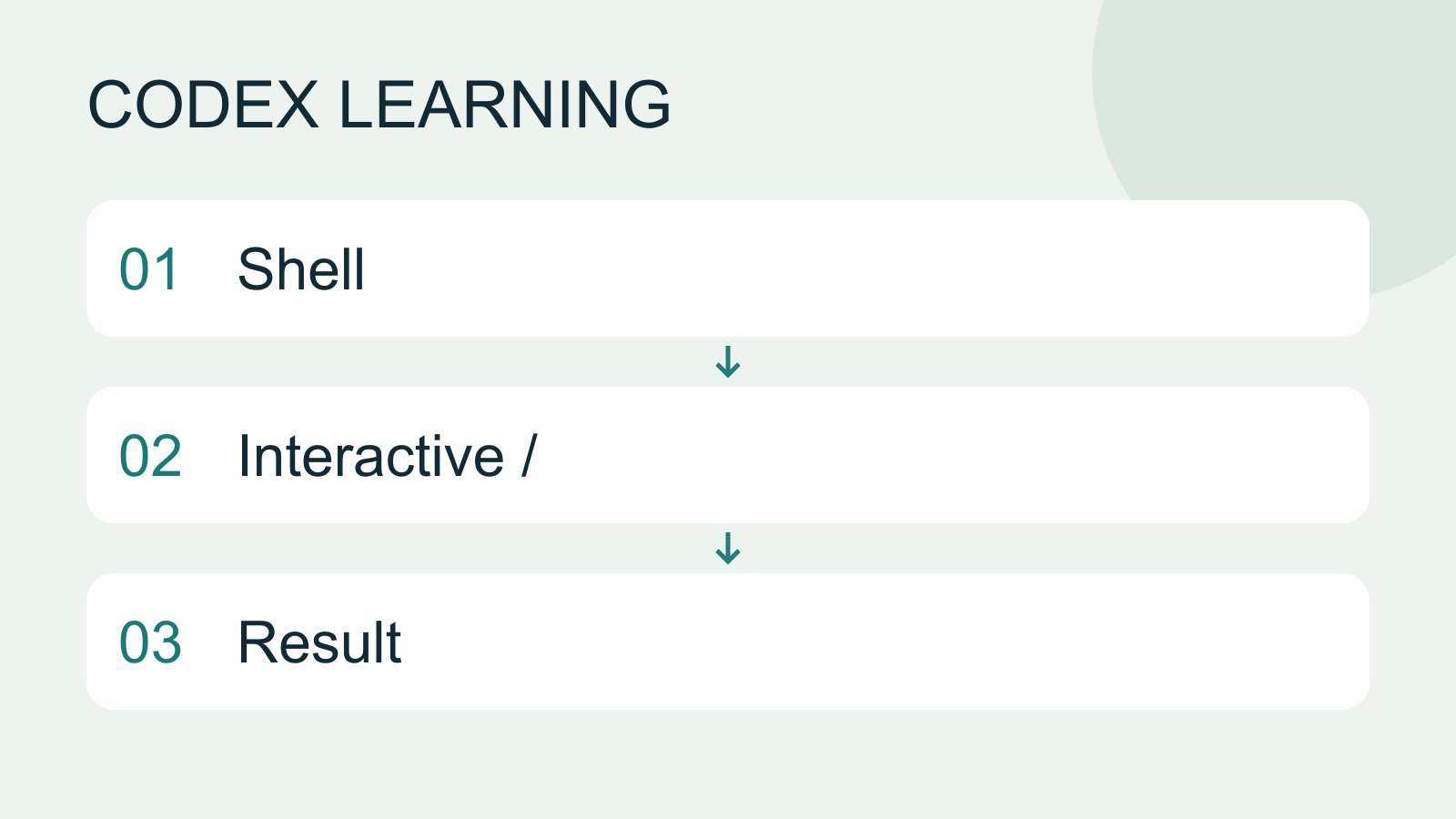
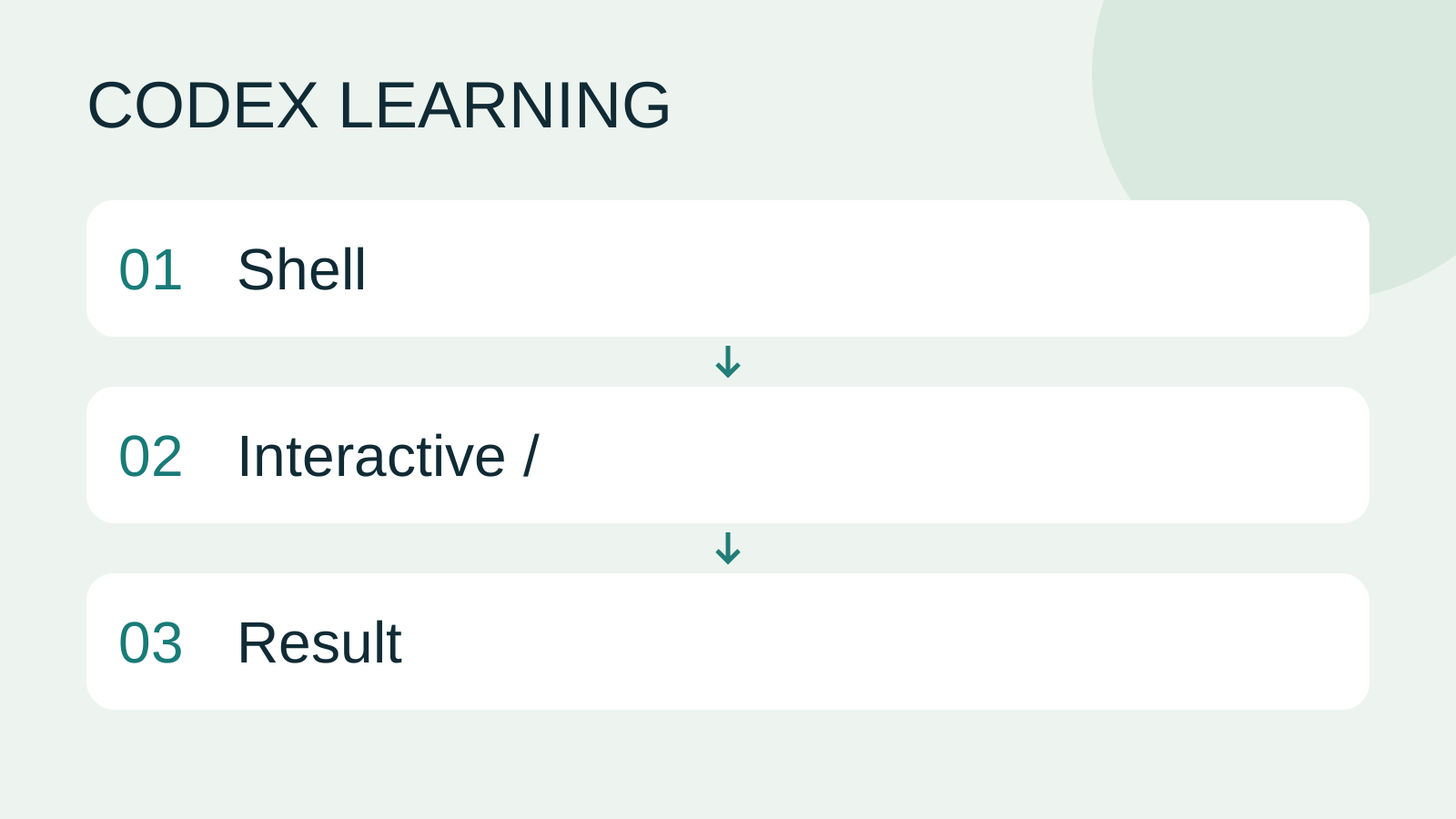
In the diagram, 01 is the system terminal, 02 is Codex interactive input, and 03 is the result to verify.
Practice and verification record
Make a four-row note for help, status, a read-only request and resuming. Include the input location and expected result for each, then try them. Explaining the interface difference between codex resume and /resume is more useful than memorizing many flags.
Checked on 2026-09-14 against the official CLI command documentation and local --help. Windows checks covered version, main-command help and resume help. Interactive commands, model menus and macOS/Linux behavior were checked through documentation, not all exercised directly. Continue with SkillsSkills and SKILL.mdA skill packages a repeatable workflow with instructions and optional resources. The minimum is a directory containing SKILL.md with name and description metadata followed by the procedure and expected output. Installation alone does not prove a task used it.Read the full article and testing and reviewTests, code review and pull requestsTests check behavior under specified conditions, review examines the change for defects and a PR presents proposed integration. They complement each other: tests passing does not establish review approval, and an open PR is not a merge.Read the full article.
Back to the Codex learning hubCodex learning hub: tutorial directoryA planned 60-lesson, ten-unit Codex curriculum, from setup and your first task to MD instructions and advanced integrations. Find your next lesson by experience, platform, goal or command; unpublished entries show their status.Read the full article
Read the full description
Shell to Interactive / to Result
Lifestyle
Codex learning hub: tutorial directory
A planned 60-lesson, ten-unit Codex curriculum, from setup and your first task to MD instructions and advanced integrations. Find your next lesson by experience, platform, goal or command; unpublished entries show their status.
Lifestyle
Worktrees and isolated tasks
A Git worktree gives one repository multiple working directories on different branches. It isolates file edits, but databases, ports and external services may still be shared. File isolation is not full resource isolation.
Lifestyle
Workshop: build a small website
Plan and build the Small Steps task website from brief.md, with adding, completing, deleting, filtering and local persistence. Separate HTML, CSS, data functions, UI events and tests, verify with Node and browser checks, and document restart and recovery steps.
Lifestyle
Usage and efficiency: reducing rework
Record task conditions, model options, time and outcomes to reduce unnecessary retries and excess context.
Articles that cite this one
Latest travel guides

GuideTokyo
Where to Stay in Tokyo: Comparing Shinjuku, Ueno, Tokyo Station, Shibuya, Asakusa, Ikebukuro, and Ginza, Plus Airport Access, Accommodation Tax, and Luggage Delivery
Where should you stay in Tokyo? Compare Shinjuku, Ueno, Tokyo Station, Shibuya, Asakusa, Ikebukuro, and Ginza by the same criteria: access from Narita and Haneda, transit routes, nearby attractions, neighborhood character, and who each area suits. Includes a comparison table, a Yamanote Line diagram, Tokyo’s accommodation tax as verified in 2026/9 (changing to 3% in 2027/4), and Airport TA-Q-BIN luggage shipping rules.
- Budget
- Hotels

GuideTokyo
How to Choose Tokyo Transit Passes: Are Suica, Welcome Suica, the Tokyo Subway Ticket, and the JR Pass Worth It?
On a first Tokyo trip, start with an IC card and pay per ride (Welcome Suica has no deposit and is valid for 28 days). If you take four or more subway rides in a day, add a 72-hour Tokyo Subway Ticket for 2,000 yen; a JR Pass is never worthwhile if you stay in Tokyo and do not go to Kansai. See what TOURIST PASMO, Suica on iPhone, and the Tokyo Metro day pass do and do not cover, with a decision chart. Prices verified in September 2026.
- Transport
- Budget

GuideTokyo
Tokyo Disneyland and DisneySea Guide: Ticket Prices, Fantasy Springs, Disney Premier Access (DPA), Standby Pass, and Which Park to Choose for Your First Visit
Tokyo Disney one-day Passport prices vary: most weekdays in 9/2026 cost ¥9,900 and weekends ¥10,900. At 14:00 daily, tickets go on sale for the same date two months later. Free Priority Pass is no longer on the official service list; only paid Disney Premier Access (¥1,000–3,500 per person per use) shortens waits. Covers hours, the 25th anniversary, Standby Pass, Entry Request, Fantasy Springs access and first-visit park choice; checked on the official site in 9/2026.
- Itineraries
- Family
Sources
- Codex CLI developer commands · Checked:
- CLI overview · Checked: