Lifestyle
How to Use Wireframes and Prototypes: Validate Flows Before Refining Visuals
Wireframes, visual mockups, and interactive prototypes serve different purposes. What matters is the question you need to validate now. An original plant care home visit booking scenario shows how to choose fidelity, cover flows and exception states, write tasks without hinting at answers, and turn test observations into change records. Steps, a comparison table, and original diagrams help design beginners and small teams identify usability difficulties before full development.
About 8 min read
Contents
- 1. Define what to validate before choosing a deliverable
- 2. Prepare enough content and states for the task
- 3. Give test tasks context without supplying the steps
- 4. Rehearse the prototype to avoid mistaking build flaws for design problems
- 5. Turn observations into traceable change records
- 6. After the prototype, the actual product still needs acceptance testing
A highly polished booking page looks ready to launch, but clicking through reveals only one path you can complete: you cannot go back or change the date, and there is no fully booked state. These screens can support a discussion about visuals, but finding out whether users can complete a booking requires different preparation.
This article uses an original scenario for booking plant care home visits as an exercise. Its methods draw on NN/g and GOV.UK materials consulted on 2026-9-14. The service, screen states, and test tasks were all designed for this exercise; there are no real bookings or participant results. The prototype supports learning and decisions; it does not represent a completed, operational system.
Define what to validate before choosing a deliverable
Wireframes primarily convey screen structure, content order, and the placement of controls. Visual mockups add typography, colors, and details. Prototypes simulate certain interactions or service behaviors. Teams may use these terms differently, so before handing anything over, clearly explain which parts are interactive and which are only illustrative.
If you want to discuss whether the plant care page should introduce service coverage or prices first, a simple wireframe can start the conversation. If you want to see whether users can change their time slot, you need to show responses to clicks, going back, and retaining data. Connecting multiple screens into a flow with action arrows can also help everyone understand how the screens relate.
Do not use high or low fidelity as a blanket description for every detail. NN/g explains that fidelity can vary independently across interaction, visuals, and content: a grayscale screen can still use nearly final wording, while a polished visual mockup may offer no interaction at all. Let the research question determine which aspects need to be realistic.
Prepare enough content and states for the task
The original booking exercise can define a service that covers only certain areas and requires users to choose a date and time slot and enter contact details. First list where the task starts, what users will see when it is complete, and which information should remain when they go back to make changes. This scope list helps prevent drawing only a success page without the complete interactions leading to it.
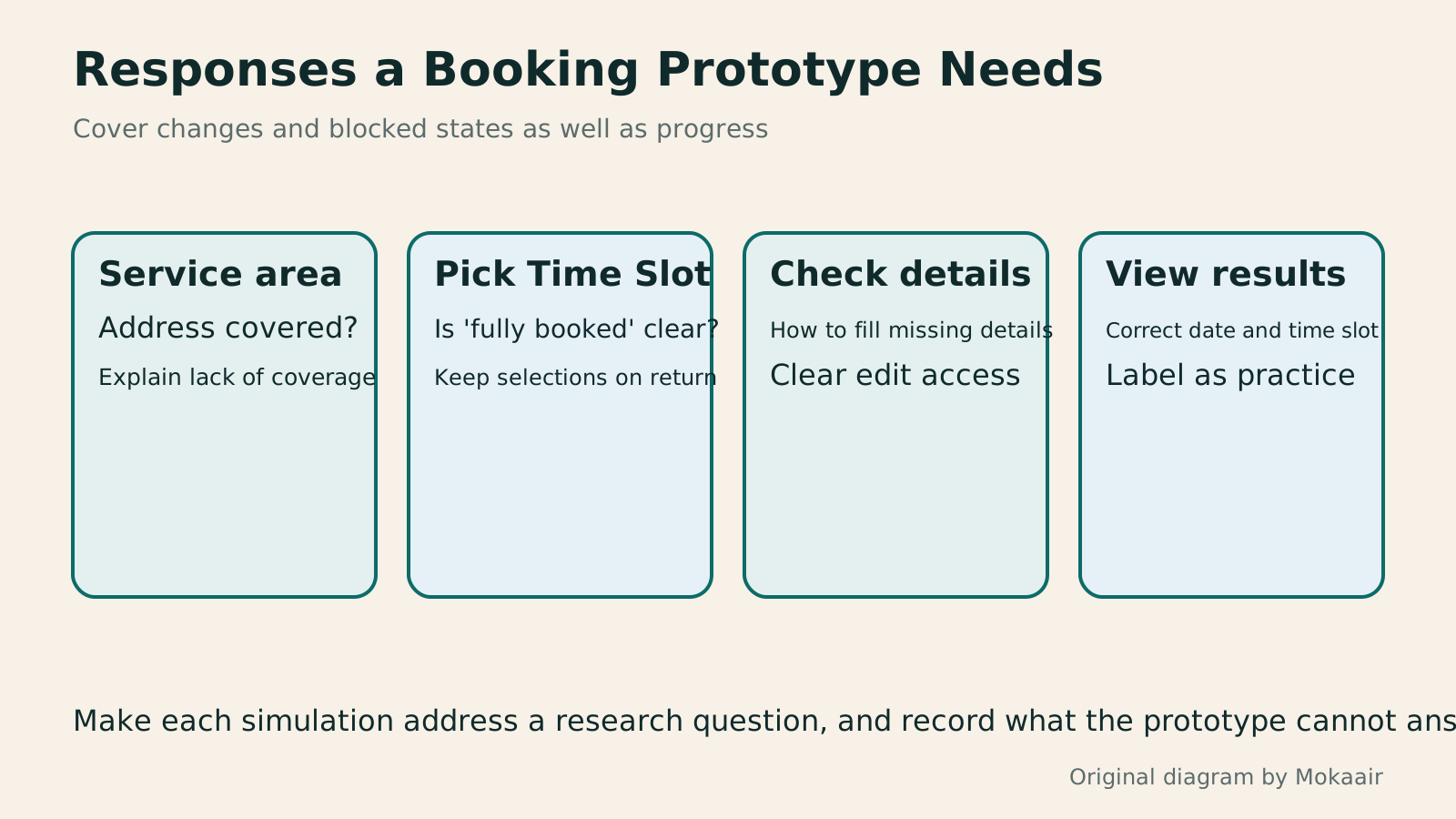
Add important branches based on the question you want to validate, such as an address outside the service area, a fully booked time slot, missing required fields, and confirmation after submission. You do not need to simulate every backend condition in every study. However, if a branch affects the research task, you cannot wait until a participant encounters it to declare that page unimportant.
Text length and content also affect judgment. Using identical dummy dates or meaningless text throughout can hide problems with finding information. You can use plausible fictional service data and clearly state that no booking will be made. Plan separately for scenarios that require real data for validation; do not collect home addresses or payment information in a simple prototype.
Give test tasks context without supplying the steps
First write down the user goal you want to observe, then turn it into an activity participants can understand. For example: you will be home on Saturday afternoon and would like a plant care visit. Find a time slot that meets your needs and complete this practice booking. This gives participants criteria for choosing without directly telling them which menu or button to click.
To test going back to make changes, introduce a new condition at an appropriate stage: the original time slot is no longer convenient, so please choose another time that works for you. Do not write the task as clicking Previous and then clicking the dropdown on the right. Otherwise, you mainly test whether participants can follow instructions, rather than whether they can find out how to act on their own.
First define observable completion criteria, such as the confirmation page showing the expected date and time slot, then decide which difficulties to record. Questions about preferences can come after the task to help explain participants' reasons. Simply asking whether someone would use the service provides different evidence from observing them complete a practice task. Do not claim the flow is smooth based only on satisfaction feedback.
Rehearse the prototype to avoid mistaking build flaws for design problems
Before formally inviting participants, walk through the planned test paths yourself and check the starting screen, clickable areas, going back, scrolling, and links. For a paper prototype, arrange the screens in order and agree on who will switch them. This checks whether the research tool works; it does not mean writing successful results for actual user testing in advance.
At the start of the session, obtain consent for the study, explain that the prototype is unfinished, and clarify which actions will not actually take place. Ask participants to express their thoughts as they work, while the moderator mainly observes and listens. When assistance is needed to continue, record when you intervened and what hints you provided so the data can be interpreted later.
If a button has no link configured and a participant gets stuck, first distinguish a prototype malfunction from an unclear design. You can ask what they expected to happen, but do not directly classify this pause as a flaw in the actual service. Check again after fixing the prototype. If the version changes between tests, record the version and time as well.
- Write down the research question and completion criteria, then decide the required levels of content, visuals, and interaction.
- Organize task flows, exception states, and test data, then build a prototype with a clearly defined scope.
- Rehearse links and screen changes, prepare neutral tasks, and obtain participant consent.
- Record actions, hints, and version differences, choose the problems to address, and arrange validation.
Turn observations into traceable change records
Organize each problem by task, screen, observation, impact, and next step. If a participant goes back and finds the date has been cleared, first record which version this happened in, whether it affected completion, and whether they sought help. Then discuss whether to retain the date, add a prompt, or reorganize the editing flow.
Prioritize problems by considering whether they block the task, cause incorrect choices, and which scenarios they affect. Do not rank them solely by how often people mention them. A less frequent problem that could lead to an incorrect booking also deserves early investigation. Counts from a small amount of qualitative data do not equal occurrence rates across the overall user population.
After making changes, retain the before and after versions and the reasons for your decisions so the team knows which observation prompted each change. When comparing two versions, remember that previously seen content may affect later actions; faster completion the second time cannot be attributed directly to the new version. Quantitative comparisons require a separately designed study with consistent conditions and an appropriate research method.
After the prototype, the actual product still needs acceptance testing
A clickable prototype can test specific aspects of understanding and flow, but usually cannot validate real payments, data storage, permissions, performance, or all assistive technology behaviors. GOV.UK's alpha guidance also distinguishes early prototypes from production-quality code. When handing a prototype to developers, explain which parts remain assumptions or simulations.
Even if the plant care example supports a complete booking demonstration, the actual service still needs to handle whether time slots stay synchronized, simultaneous bookings by multiple people, notification delivery, and cancellation rules. These questions can be raised early during prototyping, but a successful screen demonstration does not mean the backend and operational processes have also passed testing.
At handover, include flow diagrams, state descriptions, test findings, and unresolved problems, and arrange validation during the actual product stage. The prototype does not necessarily need to be retained as code or refined endlessly. Once it provides enough information to support the next decision, organize the evidence and move into the appropriate design, development, or research work.
Read the full description
Four original state cards cover service confirmation, time selection, detail checks, and the results page, identifying responses to validate at each step.
| Format | What the booking exercise can check | Main limitation |
|---|---|---|
| Simple wireframe | Information order and field placement | Visual details are not yet finalized |
| Screen flow with arrows | Whether return paths and branches are explained | Cannot directly represent responses to actions |
| Paper prototype | Explore tasks by switching screens | Screen changes need rehearsal, and interventions must be recorded |
| Clickable prototype | Date changes and the confirmation flow | Data and states may only be simulated |
| Nearly final visual mockup | Font size, density, and screen hierarchy | A finished appearance does not mean an operational service |
Practice design thinking with everyday problemsPracticing Design Thinking: From Interviews to Small, Testable PrototypesDesign thinking helps frame everyday and service problems without making every exercise a sticky-note-filled workshop. An original community umbrella-lending scenario explains interview preparation, observation versus conjecture, scoped problem definitions, idea comparison and small prototypes. Steps, a method comparison table and original diagrams help beginners turn discussion into decisions they can check, without mistaking a few opinions for everyone's needs.Read the full article
Complete formal acceptance testing for a website projectHow to Start a Web Design Project: Requirements, Content, and Acceptance Testing in OrderBuilding your first website often stalls over unclear requirements, content, and acceptance criteria, rather than colors. Using an original neighborhood repair studio example, this guide covers user interviews, content preparation, prototyping, development, and handover, with deliverables for each stage. Steps, a comparison table, learning resources, and original diagrams help readers building or commissioning a site turn “Is it finished?” into tasks they can verify.Read the full article
Understand responsive screens and checks on actual devicesResponsive and Adaptive Websites: Planning Layouts for Mobile ReadingA website opening on a phone does not ensure small-screen readability. Using an original community course signup page, this article compares responsive and adaptive layouts, content-based breakpoints, and images, forms and navigation at different widths. Steps, a comparison table and original diagrams cover zoom, orientation, keyboard and real-device acceptance checks, helping readers discuss usable pages across devices with designers or developers.Read the full article
Found this guide helpful? Share it with someone who needs it
Lifestyle
www, Subdomains, and Subdirectories: Choosing a Website URL Structure
Whether to use www or put a blog at blog.example.com or example.com/blog/ depends on platform support and maintenance. This article explains hostnames and paths, then compares content roles, DNS settings, HTTPS certificates, and URL consistency for subdomains and subdirectories. An original decision table and launch checklist help small websites in Taiwan build URL structures that are easy to use, manage, and hand over.
Lifestyle
Before Hiring a Web Design Agency: The Brief, Quotes and Deliverables Checklist
Before hiring a web design agency, define your site's audience, key actions and deliverables so you can compare quotes. Using a small studio as an example, this guide covers page and template counts, content duties, feature specs, mobile and accessibility checks, account and source-file handover, and post-launch maintenance terms. An editable requirements checklist helps reduce extra costs and communication gaps; no agency recommendations are included.
Lifestyle
How to Start a Web Design Project: Requirements, Content, and Acceptance Testing in Order
Building your first website often stalls over unclear requirements, content, and acceptance criteria, rather than colors. Using an original neighborhood repair studio example, this guide covers user interviews, content preparation, prototyping, development, and handover, with deliverables for each stage. Steps, a comparison table, learning resources, and original diagrams help readers building or commissioning a site turn “Is it finished?” into tasks they can verify.
Lifestyle
Website Caching and CDNs: Which Layer to Clear When Updates Do Not Appear
A website may be updated while phones still show old content because caches remain in different places. Using a Taiwan studio's business-hours update, this article explains browser, WordPress/hosting and CDN roles, cache responses, expiry times and targeted purging. An ordered procedure, comparison table and original diagram help site managers trace old versions while keeping account and shopping workflows correct.
Articles that cite this one
Sources
- NN/g: Prototype Fidelity and Test PreparationChecked:
- NN/g: UX Deliverables GlossaryChecked:
- NN/g: Task Scenarios That Do Not Hint at AnswersChecked:
- GOV.UK: Moderated Usability TestingChecked:
- GOV.UK: Differences Between Alpha Prototypes and Production ProductsChecked:
- GOV.UK: Informed Consent for ResearchChecked:
Compiled from the references and verification dates listed above; fares, schedules, product features, and terms can change, so please confirm the latest details on the relevant official website before travelling, booking, or purchasing.