Lifestyle
Project instructions with AGENTS.md
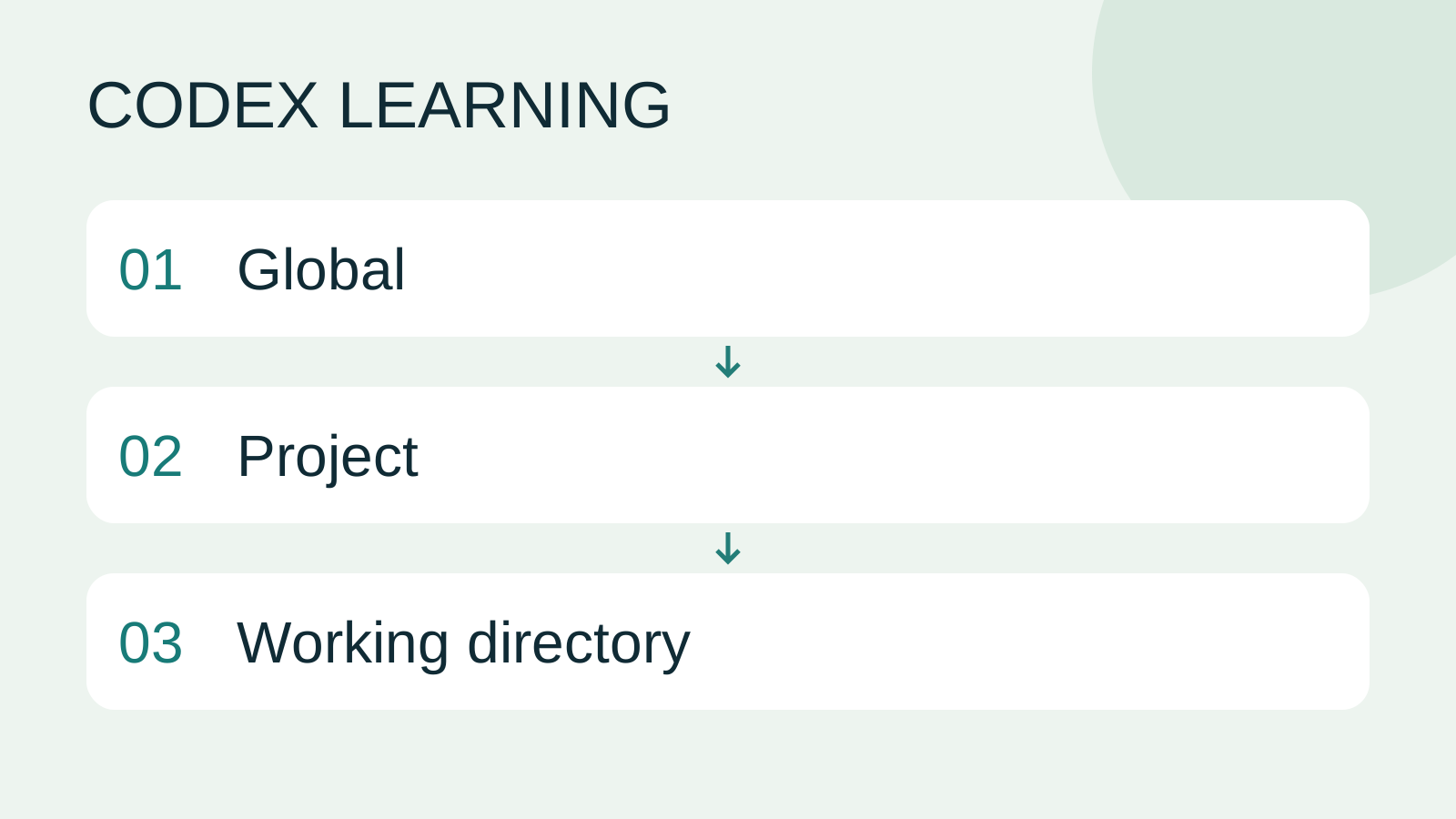
AGENTS.md supplies project instructions before Codex starts work. Global guidance and files along the project-root-to-working-directory path form an instruction chain. At the same level, AGENTS.override.md takes precedence. Keep rules concrete and verify what was actually loaded.
About 12 min read · Practice 20 min
Beginner · Desktop / CLI / VS Code / JetBrains
Before you start
On this page
- What you will accomplish
- Before you begin
- How instructions are selected
- Step 1: check the directory and filename
- Step 2: write complete, actionable instructions
- Step 3: start fresh and verify discovery
- Step 4: verify behavior with a small change
- Troubleshooting and restoring the exercise
- Practice and sources
Back to the Codex learning hubCodex learning hub: tutorial directoryA planned 60-lesson, ten-unit Codex curriculum, from setup and your first task to MD instructions and advanced integrations. Find your next lesson by experience, platform, goal or command; unpublished entries show their status.Read the full article
What you will accomplish
An instruction file saves project requirements you would otherwise repeat, such as testing commands and data preservation. It is not a credential store and does not enable network access or increase filesystem permissions. See permissions and sandboxesPermissions, sandbox, network and keysSandbox rules define technical access to files and networks; approval policy determines when the agent asks before acting. No prompt does not guarantee permission, and read access does not imply write access everywhere.Read the full article for authorization settings; a sentence saying “allow everything” cannot reconfigure the execution environment.
Before you begin
Download the todo practice materials. Extract them, copy the expected folder and name the copy codex-practice. Use the complete reference version for this lesson so an unfinished filter does not look like an instruction problem. The data is fictional. Start outside private projects and leave global instructions alone for now.
The folder root should directly contain index.html, style.css, app.js, core.mjs and core.test.mjs. Have a working Codex desktop app or CLI. Tests use Node.js; a local preview uses Python 3. You can write the instruction file first and return to the first project lessonFinish your first small projectUse an independent copy of the Small Steps todo website to change its heading and background. Identify the five practice files and compare the diff, core tests and two viewport widths while preserving behavior and data.Read the full article to prepare these tools later.
How instructions are selected
Codex combines global and project guidance. The default global location is .codex in your user home; CODEX_HOME changes that location when configured. Within a project, discovery walks from the root to the current working directory. Guidance closer to the working directory can refine earlier requirements. It does not automatically read every child folder just because that folder exists.
At each directory, AGENTS.override.md is considered before AGENTS.md, followed by configured fallback names. Files at the same level are not all added together. README.md normally explains the project to people; being Markdown does not automatically make it an instruction file. The default combined project-instruction limit is 32 KiB. Remove duplicated explanations and large examples before increasing that limit.
This lesson adds only the practice project's AGENTS.md. Global preferences affect other projects. Once you know which requirements really are universal, consult config.toml settingsConfigure Codex with config.tomlconfig.toml sets client options, while AGENTS.md describes working instructions. User settings live in Codex home; trusted projects can add .codex/config.toml. CLI overrides, project layers and managed requirements mean a single file does not prove the effective configuration.Read the full article and the official documentation before changing them.
Without a discoverable project root, instruction discovery checks only the current directory. Start this non-Git exercise at the codex-practice root rather than assuming a session launched in any child folder will find the parent instructions. See instruction scopesAGENTS.md scopes and overridesTrace root and nested instructions, conflicts and overrides, and verify which files were selected.Read the full article for repository-root and subdirectory comparisons, and splitting instructions and reference filesSeparating rules, documentation and contextSeparate working rules, project entry points, design requirements and handoff state. Check outdated hypotheses against actual files and tests.Read the full article for longer documents.
Step 1: check the directory and filename
On Windows, open codex-practice in File Explorer, show file extensions, and create AGENTS.md in a plain-text editor. Check that the name has not become AGENTS.md.txt. Open PowerShell in the folder and run the commands below. The listing should include the five practice files. If you are one level above expected, enter the correct folder before continuing.
Get-Location
Get-ChildItem -Name
On macOS, open a terminal at the practice folder, or type cd followed by the folder path dragged from Finder. On Linux, use the file manager's “Open in Terminal” action. Run the following in either system and create the same file with a plain-text editor. Preserve filename case so Linux can discover it too.
pwd
ls -a
If AGENTS.md already exists, read and preserve it, then merge only the needed requirements. A fresh copy of this exercise has no such file. Do not overwrite another project's instructions merely to reproduce these steps.
Step 2: write complete, actionable instructions
The following is the entire file and requires no packages. The sample uses English so every translation shares the same content; you may write your own instructions in your preferred language. What matters is that the commands exist, the scope is concrete and compliance is observable.
# Small Steps practice instructions

- Work only inside this practice folder.
- Keep the existing task data format and localStorage key unchanged.
- Do not add packages or external network requests for this exercise.
- Run `node --test core.test.mjs` after changing JavaScript.
- After changing HTML or CSS, check the page at 390px and 1280px widths.
- Preserve visible keyboard focus and accessible form labels.
- In the final response, list changed files, checks run, and checks not run.
- Say why a check could not be run; do not report it as passed.
“Make it good” is not a useful requirement on its own. This file turns quality into observable checks: a real test command, two viewport widths, keyboard focus and a delivery record. Do not substitute npm test: this exercise has no package.json, so that command would introduce a recurring failure.
Step 3: start fresh and verify discovery
Save the file and start a new Codex session from the practice folder. In the desktop app, select this project and create a new task. In the CLI, leave the old interactive session and run codex again in this directory. Instructions are gathered when the session starts; editing the file during an existing conversation does not prove it has been reloaded.
List the AGENTS.md or AGENTS.override.md files loaded for this task.
Summarize the rules that apply to this practice folder.
Do not modify any files. If you cannot establish a source, say so.
Expect the response to identify the practice folder's AGENTS.md and summarize testing, layout and reporting requirements. Treat that answer as a clue, then open the file and compare its contents. If the response only repeats the prompt without the correct path, fix the working directory or filename before requesting edits.
Step 4: verify behavior with a small change
In index.html, change the main heading to "Small steps, clear progress."
Keep the todo behavior, stored data, and other visible text unchanged.
Follow the project instructions. Show the changed file and report the checks.
The diff should mainly contain the heading text in index.html. Start a preview with py -m http.server 4173 --bind 127.0.0.1 on Windows, or python3 -m http.server 4173 --bind 127.0.0.1 on macOS/Linux. Open http://127.0.0.1:4173, check the heading, both widths and Tab focus, then add Read and mark it complete. If Codex has no browser tool, perform the visual checks yourself and have it identify the checks it could not run.
A successful case has the requested scope, preserved data and a report that follows the instructions. The boundary case is a task without browser access: a valid response states that limitation and the remaining manual checks, rather than inventing screenshots or passes. Instructions still require verification through real files and tools.
Match each instruction to evidence
| Situation | Requirement | Evidence to inspect |
|---|---|---|
| Only the HTML heading changes | Viewport, focus and delivery checks | Requested text and actual screen; missing checks explicitly listed |
| JavaScript changes | Run existing data tests | Actual command, exit status and test counts |
| A tool is unavailable | Explain why; do not report a pass | Original error and NOT RUN, with no invented result |
The heading-only edit does not trigger the “after changing JavaScript” condition. Do not classify that alone as a missed test. You can separately check that the command works with the read-only request below; expected should produce 3 passes and 0 failures. This verifies the command and report, not every instruction branch.
Run node --test core.test.mjs from this practice folder without editing any files.
Report the working folder, command, exit status, and test counts.
If the command cannot run, quote the error and mark the check NOT RUN.
Troubleshooting and restoring the exercise
If the file is not found, check the selected project, actual extension, empty contents and a same-level override, in that order. A differently capitalized filename working on Windows does not guarantee discovery on Linux. Start a new session after correcting it.
If rules conflict, inspect their source levels, especially a deeper directory or global override. Separate universal guidance from a local exception clearly; adding more contradictory sentences makes the problem worse. A later lesson covers nested discovery. Keep this exercise to one project file.
If tests were not run, first check whether JavaScript was actually changed. Then check node --version and confirm core.test.mjs is in the working directory. A missing runtime and undiscovered instructions are different failures. Request the actual error instead of accepting “it should pass.”
Stop the preview with Ctrl+C. Restore only the changed heading. If this lesson created AGENTS.md, move it outside the practice folder to keep a copy; if you amended an existing file, restore only your additions. Removing instructions does not undo file changes made while they were active. Verify the restored instruction state in a new session.
| Scope | Location | Treatment here |
|---|---|---|
| Global | CODEX_HOME, default user .codex | Preserve existing settings |
| Project | codex-practice/AGENTS.md | Add and verify in a new session |
| Same-level override | AGENTS.override.md | Check whether it takes precedence |
Practice and sources
Add a rule asking for manual checks first in the final response, then start a new session and request another heading change. Success means the source is identified, the diff contains only the requested heading and the report follows the new order. Remove your added rule and compare the next fresh session.
Checked on 2026-09-14 against the official AGENTS.md documentation for discovery and size limits. The practice website and data tests were verified on Windows/Edge; this is not a claim of hands-on macOS, Linux or Codex instruction-discovery testing. Continue with Markdown basicsMarkdown and MD filesMarkdown uses plain-text markers for headings, lists, links and code, commonly in .md files. README.md explains a project, AGENTS.md supplies agent instructions and SKILL.md defines a reusable skill. An arbitrary MD file is not automatically an instruction source.Read the full article, context handoffContext and task handoffLong work needs durable decisions and evidence, not just a long conversation. README explains use, design documents explain choices, handoffs record current progress and AGENTS.md holds ongoing instructions. Do not turn all temporary progress into permanent rules.Read the full article and SkillsSkills and SKILL.mdA skill packages a repeatable workflow with instructions and optional resources. The minimum is a directory containing SKILL.md with name and description metadata followed by the procedure and expected output. Installation alone does not prove a task used it.Read the full article.
Back to the Codex learning hubCodex learning hub: tutorial directoryA planned 60-lesson, ten-unit Codex curriculum, from setup and your first task to MD instructions and advanced integrations. Find your next lesson by experience, platform, goal or command; unpublished entries show their status.Read the full article
Read the full description
Global to Project to Working directory
Lifestyle
Codex learning hub: tutorial directory
A planned 60-lesson, ten-unit Codex curriculum, from setup and your first task to MD instructions and advanced integrations. Find your next lesson by experience, platform, goal or command; unpublished entries show their status.
Lifestyle
Worktrees and isolated tasks
A Git worktree gives one repository multiple working directories on different branches. It isolates file edits, but databases, ports and external services may still be shared. File isolation is not full resource isolation.
Lifestyle
Workshop: build a small website
Plan and build the Small Steps task website from brief.md, with adding, completing, deleting, filtering and local persistence. Separate HTML, CSS, data functions, UI events and tests, verify with Node and browser checks, and document restart and recovery steps.
Lifestyle
Usage and efficiency: reducing rework
Record task conditions, model options, time and outcomes to reduce unnecessary retries and excess context.
Articles that cite this one
Latest travel guides

GuideTokyo
Where to Stay in Tokyo: Comparing Shinjuku, Ueno, Tokyo Station, Shibuya, Asakusa, Ikebukuro, and Ginza, Plus Airport Access, Accommodation Tax, and Luggage Delivery
Where should you stay in Tokyo? Compare Shinjuku, Ueno, Tokyo Station, Shibuya, Asakusa, Ikebukuro, and Ginza by the same criteria: access from Narita and Haneda, transit routes, nearby attractions, neighborhood character, and who each area suits. Includes a comparison table, a Yamanote Line diagram, Tokyo’s accommodation tax as verified in 2026/9 (changing to 3% in 2027/4), and Airport TA-Q-BIN luggage shipping rules.
- Budget
- Hotels

GuideTokyo
How to Choose Tokyo Transit Passes: Are Suica, Welcome Suica, the Tokyo Subway Ticket, and the JR Pass Worth It?
On a first Tokyo trip, start with an IC card and pay per ride (Welcome Suica has no deposit and is valid for 28 days). If you take four or more subway rides in a day, add a 72-hour Tokyo Subway Ticket for 2,000 yen; a JR Pass is never worthwhile if you stay in Tokyo and do not go to Kansai. See what TOURIST PASMO, Suica on iPhone, and the Tokyo Metro day pass do and do not cover, with a decision chart. Prices verified in September 2026.
- Transport
- Budget

GuideTokyo
Tokyo Disneyland and DisneySea Guide: Ticket Prices, Fantasy Springs, Disney Premier Access (DPA), Standby Pass, and Which Park to Choose for Your First Visit
Tokyo Disney one-day Passport prices vary: most weekdays in 9/2026 cost ¥9,900 and weekends ¥10,900. At 14:00 daily, tickets go on sale for the same date two months later. Free Priority Pass is no longer on the official service list; only paid Disney Premier Access (¥1,000–3,500 per person per use) shortens waits. Covers hours, the 25th anniversary, Standby Pass, Entry Request, Fantasy Springs access and first-visit park choice; checked on the official site in 9/2026.
- Itineraries
- Family
Sources
- AGENTS.md instructions · Checked:
- Configuration basics · Checked: