Lifestyle
How to Build a Small Business Website: Service Pages, Trust Signals, and Inquiries
A small business website should help visitors understand the services, decide whether they are a good fit, and send an inquiry. Using WordPress and a fictional local design studio, this guide plans the home, service, portfolio, about, and contact pages. It provides a practical content checklist and acceptance criteria, including form fields, error messages, notification delivery, and ownership after handoff, so the site becomes a usable entry point for clients.
About 7 min read
Contents
- 1. Choose the visitor's most important task first
- 2. Explain scope and terms on each service page
- 3. Make brand and portfolio information verifiable
- 4. Build clear pages and entry points in WordPress
- 5. Make the form easy to finish and the inquiry easy to handle
- 6. Document handoff and update responsibilities
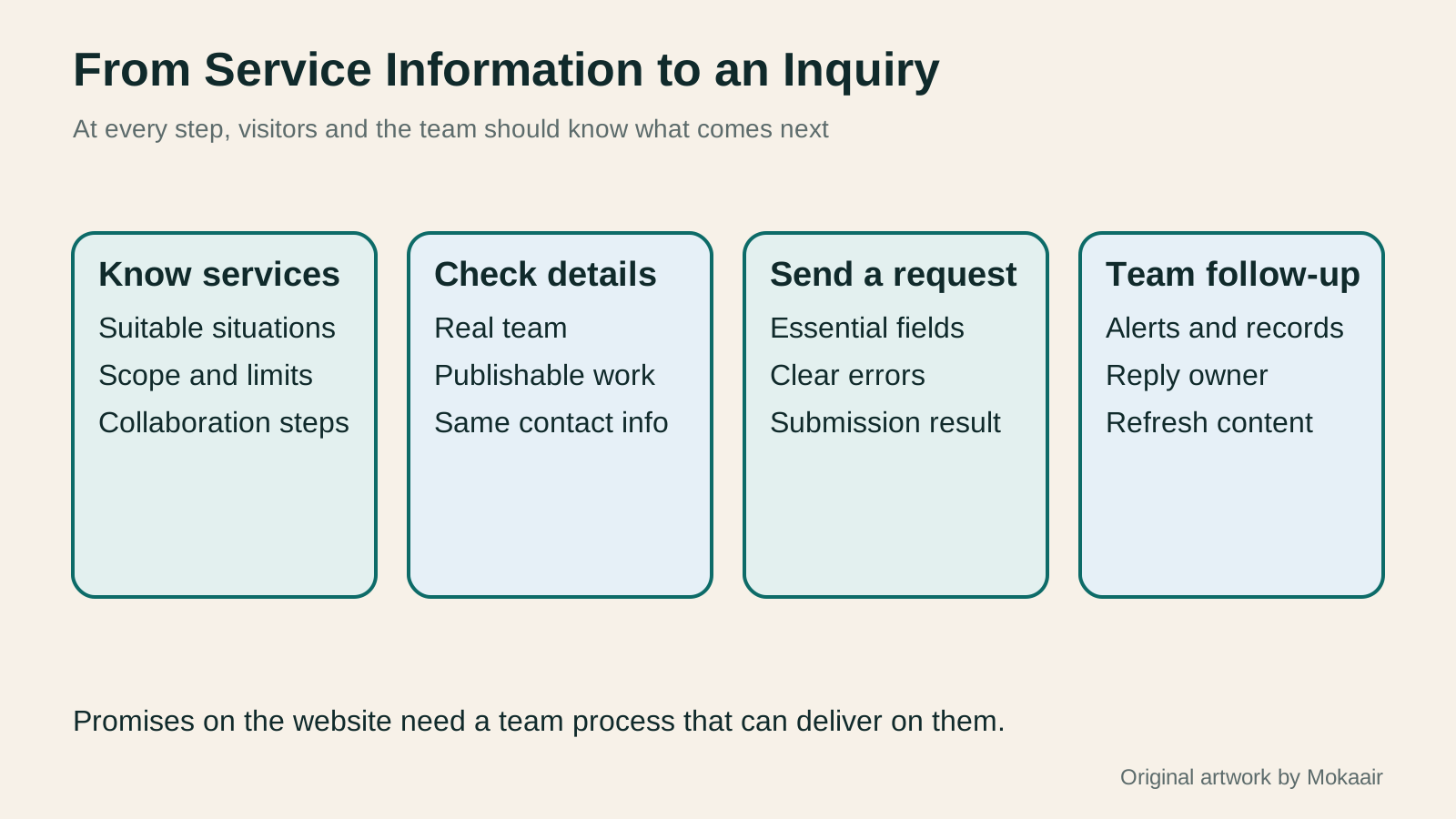
A small business website does not need to be large at launch, but it should answer a few basic questions: What do you offer, who is it for, how do you work together, and what can a visitor do next? Attractive photos and animation can express a style, but they cannot replace a clear service scope and a way to get in touch. Explain these essentials first so the site can reduce the team's need to repeat itself.
This guide uses a fictional local design studio to map the path from exploring services to submitting an inquiry. WordPress is one implementation tool; the content structure and acceptance criteria also apply to other platforms. This article does not invent client case studies or conversion-rate figures. Example wording illustrates planning, not actual operating outcomes.
Choose the visitor's most important task first
Do not ask visitors to subscribe, follow, download, book, and buy at the same time without identifying the primary action. For a first version, the design studio could invite suitable clients to send a project inquiry, which the team then reviews. If instant booking is not available, the button should not claim that a booking is immediately confirmed.
List the main audiences and their common questions. A small shop may need a menu update, a brand may need campaign graphics, and a team may need a presentation. Different requests may call for different details. Identify the shared information before organizing the service pages. Internal department names do not necessarily make useful navigation labels; use language visitors understand.
Write down concrete conditions for completion: visitors can find a suitable service, understand the scope of work, and provide essential details; the team can receive and answer the inquiry. Test each condition before launch. Visitor counts are another metric, but they cannot tell you whether the inquiry process actually works.
Explain scope and terms on each service page
Start each main service page with the problem it addresses, suitable situations, deliverables, and work that is excluded. A menu design page might state that layout design and production files are included, then separately explain whether photography, copywriting, or printing is included. A vague promise of 'full-service solutions' forces visitors to email just to discover the basic scope.
Describe the collaboration in clear steps, such as confirming requirements, preparing materials, discussing a first draft, and delivery. If timing depends on complete materials or the number of revisions, explain those factors instead of guaranteeing an arbitrary number of days. If each project needs a custom quote, list what affects the price rather than using a starting price that rarely applies.
Frequently asked questions should address genuine points of uncertainty. The first version can draw on the team's existing service rules. Do not turn every answer into a sales slogan: required files, whether one item can be commissioned, and how later revisions work are usually more useful than repeating how professional the team is.
Make brand and portfolio information verifiable
The about page should identify the actual team or person responsible, the service area, and a working contact method. Keep the name consistent with other public channels, or explain differences between the website, social accounts, and email signature. If there is no public-facing office, say that work is by appointment or remote rather than posting an address that suggests walk-in visits.
A portfolio entry can describe the client's need, the part the team handled, constraints, and deliverables, using images for which the necessary rights have been secured. Label a practice piece or concept proposal clearly; do not present it as a completed commercial engagement. Performance figures need supporting data. Without measurement, describe the deliverables and design choices instead.
Confirm permission to publish client names, logos, testimonials, and photos before posting. Creating the work does not automatically grant permission to display every part of the collaboration. If anonymity is needed, retain useful details about the method while removing identifying information; do not invent another client to fill the page.
Build clear pages and entry points in WordPress
Create the home, main service, portfolio or work, about, and contact pages, then organize the navigation. Pages suit relatively stable service information; posts can hold regularly published insights and updates. Keep the homepage introduction and links to key services brief, and place detailed terms on the relevant service pages so visitors can scan easily.
Give each service page a next step that fits its context, such as 'Tell us what you need' linking to the inquiry form. Make button labels match their destinations; 'View projects' should not open a subscription dialog. On mobile, show the service essentials first and make contact easy to find rather than letting a large hero image occupy the entire initial screen.
Test the layout with service names and content of realistic length, checking title wrapping, portfolio images, and footer details. After changing a menu, header, or shared block, check several pages. Reviewing only the homepage may miss a service page without a contact button or broken mobile navigation.
- Choose the primary visitor task and list the services, terms of collaboration, and essential information.
- Prepare brand and portfolio material that can be published; label practice work and anonymized examples.
- Create the main pages and navigation, linking each service page to an appropriate inquiry route.
- Complete an inquiry on a phone while signed out, and confirm the team receives it and can follow up.
Make the form easy to finish and the inquiry easy to handle
Collect only what is needed to understand the request initially, such as a name, reply method, service type, and description. Give every field a clear label, distinguish required from optional fields, and do not rely only on faint placeholder text. W3C's forms guidance also emphasizes instructions, validation, and feedback after an action.
An error should identify what needs fixing, such as an invalid reply email address, rather than simply saying 'Submission failed.' Preserve completed fields where possible so one correction does not mean starting over. After submission, say what was received and what happens next. If a response time cannot be guaranteed, explain the likely process and offer another contact route.
Test that form notifications reach the right recipients and check whether suitable submission records and a fallback process exist. Review spam handling, reply addresses, and team coverage so inquiries do not remain in a former colleague's inbox. For attachments, decide whether they are necessary, which formats are acceptable, and how they will be stored; do not enable uploads merely because the tool offers them.
Document handoff and update responsibilities
Assign an owner to each important page and record how to update service changes, new portfolio items, contact details, and form routing. At handoff, have the actual site manager edit some text, replace an image, and process a test inquiry. This checks permissions and instructions more meaningfully than merely passing over a password.
Keep observing whether visitors find a service, where they get stuck in the form, and whether the inquiries the team receives contain the needed details. Use these specific questions to improve the content and form instead of immediately attributing every result to the visual design. Check backups, updates, and renewals regularly so content and technical maintenance both have accountable owners.
| Page or feature | Question to answer | Acceptance check |
|---|---|---|
| Home | What do you do, and for whom? | Main services are quick to find |
| Service page | What is included, and how do we work? | Terms and next step are clear |
| Portfolio | What have you done, and what was your role? | Work is genuine, publishable, and explained |
| About and contact | Who provides the service, and how can I reach them? | Information is consistent and usable |
| Inquiry form | How do I describe my needs? | Visitors can finish it; the team receives and answers it |
| Site handoff | Who handles updates? | The incoming owner completes a real task |
WordPress posts and pages: choose the right content type and URLWordPress posts and pages: choose the right content type and URLWordPress posts and pages both hold text and images, but serve different purposes and are organized differently. Using a fictional community baking school, this guide explains when to use each, then covers blocks, excerpts, featured images, URLs and prepublication checks. Follow a repeatable workflow for your first item, and keep links stable when updating published content instead of assuming that a title edit leaves its URL and layout untouched.Read the full article
WordPress categories, tags and menus: help readers find the next articleWordPress categories, tags and menus: help readers find the next articleCategories, tags and navigation menus organize posts, connect details and provide entry points in different ways. Using a fictional home-cooking site, this guide explains naming and creating categories and tags, setting up navigation in block or classic themes, and checking mobile and keyboard use. It also covers what URLs and mappings to preserve when renaming, changing a slug, merging or deleting, so a growing site remains easy to explore without listing every post in an oversized menu.Read the full article
What website maintenance involves: a routine for backups, updates, and incident reportsWhat website maintenance involves: a routine for backups, updates, and incident reportsWebsite maintenance includes more than plugin updates: check content, accounts, backups, outgoing email, and expiring services. Using a small WordPress content site, this guide covers routine observation, pre- and post-update checks, restoration, and incident reports, with a worksheet for owners, editors, and maintainers. Set a schedule by update frequency, identify urgent cases, and keep records the next collaborator can use.Read the full article
Found this guide helpful? Share it with someone who needs it
Lifestyle
Before Resetting WordPress: Separate Content, Theme Settings, and Full Restore
Starting over in WordPress does not always require wiping the site. This guide compares style resets, content revisions, database resets, and full restores; explains the scope of WP Reset and the limits of its snapshots; and walks through a test site, backup checks, and acceptance after a reset. It helps ordinary users in Taiwan identify the actual problem and choose a suitably narrow action with a recovery plan.
Lifestyle
WordPress Performance Plugins: Caching, Images, and Feature Conflicts
WordPress performance plugins need settings matched to the actual site; enabling every option at once is unsafe. Using a small Taiwan-based course and shop site, this guide compares WP Rocket and NitroPack, divides responsibility for caching and images, and shows how to diagnose conflicts caused by CSS and JavaScript optimization. A comparison table, staged workflow, and original diagram help administrators retain a measurement baseline and verify forms, menus, and shopping flows.
Lifestyle
Handling WordPress Comment Spam: Review Rules and Akismet
Stopping spam in WordPress comments takes sensible moderation rules and a way to correct mistakes, as well as a plugin. This guide covers discussion settings, Akismet activation and plan eligibility, reporting spam, and rescuing legitimate comments. Its daily review checklist helps small-site owners reduce the workload while leaving room for readers with real questions to join the discussion.
Lifestyle
Build a personal blog with WordPress: from categories to your first post
To start a personal blog, decide what questions you want to answer over time, then plan the homepage, post list and basic pages. Using WordPress as an example, this guide develops a writing workflow from content categories and reading layouts through the first post and later updates. It also covers checks for post cards, pagination and comments. It is for readers in Taiwan who want to turn their notes into public content: finish a small but complete site first, then add features as needed.
Articles that cite this one
Sources
- W3C: Forms that are easy to use and accessibleChecked:
- WordPress: Create a pageChecked:
- WordPress: Navigation blockChecked:
- Google: Helpful, reliable contentChecked:
Compiled from the references and verification dates listed above; fares, schedules, product features, and terms can change, so please confirm the latest details on the relevant official website before travelling, booking, or purchasing.