Lifestyle
Handling WordPress Comment Spam: Review Rules and Akismet
Stopping spam in WordPress comments takes sensible moderation rules and a way to correct mistakes, as well as a plugin. This guide covers discussion settings, Akismet activation and plan eligibility, reporting spam, and rescuing legitimate comments. Its daily review checklist helps small-site owners reduce the workload while leaving room for readers with real questions to join the discussion.
About 7 min read
Contents
Seeing many promotional links each day can make it tempting to empty every comment awaiting review. Some may actually add useful information or ask a genuine question. Comment management needs both to stop obvious spam and to give normal discussion a chance to be seen.
For a site publishing everyday how-to articles, set a moderation boundary with WordPress discussion settings, let Akismet help classify comments, and have a person handle uncertain items and mistakes. This is an ongoing process to adjust, not a switch that needs no further checking once turned on.
Decide which posts need comments first
List why comments are open: additions to a tutorial, error reports, questions, or simply an old theme’s default feature. If one type of announcement needs no discussion, adjust that group of posts. Do not close a tutorial with lasting Q&A value merely because it was published some time ago.
On the Discussion settings screen, you can control whether new posts accept comments, whether pingbacks or trackbacks are accepted, and whether people must sign in. Each choice has a cost. Requiring an account adds a barrier but can also discourage an occasional reader. If you do not need membership, assess whether moderation alone is enough.
Check the default for new posts separately from settings on existing posts. To change older posts, filter a small group first and confirm the scope of a bulk edit. Disabling new comments, deleting existing comments, and hiding the comment area are different actions. Useful contributions from readers may deserve to remain.
Set human moderation rules people can understand
At first, a person with the right permissions can approve comments while you observe daily volume. WordPress can also hold comments for review based on link counts and keywords, but many links do not automatically mean spam; a reader may be sharing references. Holding a comment pending confirmation is often easier to correct than deleting broadly.
A keyword can match inside a longer word, so avoid placing very short English strings or common Chinese words on a strict block list. Start with distinctive promotional phrases that recur, and record why and when each rule was added. If legitimate comments are caught, review the rule instead of making every reader guess which words they may use.
Place a short policy near the comment area: relevant additions are welcome, personal contact details should not be public, and unrelated ads are not accepted. Treat disagreement about content separately from spam. Do not mark a reader’s criticism as spam and feed the classifier a wrong signal.
Check the Akismet plan and connection
Akismet is an external spam-detection service. Activating its plugin requires a valid account or API key. Its official Personal plan is for non-commercial personal use. A site with ads, affiliate links, sales, or business promotion should check eligibility for a commercial plan; a small site is not automatically entitled to a free key.
When installing, confirm the author is Automattic, then connect it using the official flow for your current WordPress version. Settings may appear under Akismet Anti-spam, Jetpack, or a newer Connectors integration. After entering the key, confirm the account and site status. Do not put the key in a public screenshot or the body of a handover document.
Check the scope of Akismet protection for each integration. It can check WordPress comments, but contact forms may need extra field settings. Official guidance also says it does not handle WordPress spam user registrations. If fake members are the problem, address the registration process; a comment plugin cannot replace it.
Confirm classification in a way you can reverse
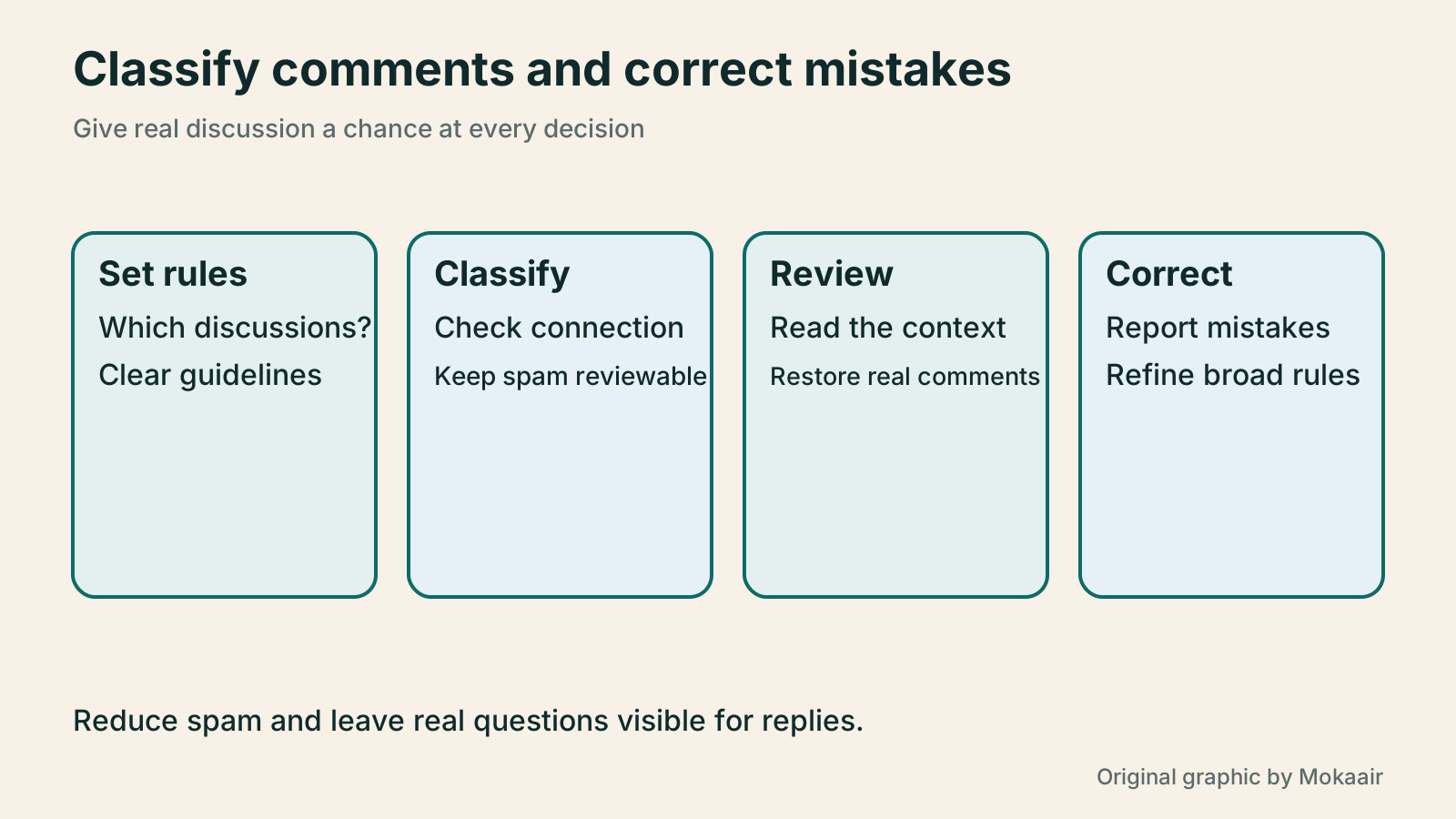
When starting to monitor, consider sending spam to the Spam area for a person to review instead of immediately enabling the mode that silently discards the worst spam. That makes it easier to spot normal comments classified in error and establish your own review rhythm. Decide whether to use a more aggressive mode from actual volume and false positives.
The official test string is akismet-guaranteed-spam. Put only that string in the body of a test comment, then check the Spam tab under Comments in the admin area. Test on a controlled page and clean up the test record afterward. You need neither a real malicious link nor random nonsense to decide whether the tool works.
- Confirm the plugin connection, initially keeping spam where a person can review it.
- Submit the official test string and check that it reaches the Spam tab.
- Submit a normal, relevant test comment too, and verify moderation and front-end display.
Rescue false positives and report missed spam
Review the Spam tab regularly. For a confirmed legitimate comment, choose Not Spam and then follow the site’s approval process. Mark obvious spam that reached Pending or Published as Spam. Akismet says those corrective signals are collected while the service remains active.
Do not approve a whole batch of uncertain items just to clear the count. Narrow them by post, time, or repeating pattern. Read whether a comment responds to the topic and whether link text matches its destination. You need not open a suspicious link to make an initial judgment; irrelevant promotion is often apparent from the wording and repeated behavior.
If the same reader is repeatedly misclassified, keep that comment and the classification clues for support to examine. Avoid a broad rule that always lets one identity through: identity fields can be forged, and a real reader’s account can be compromised. Sample comments again before bulk deletion and decide whether a handling record must be kept.
Include privacy and upkeep in the routine
Akismet sends comment information relevant to spam decisions to its service, so it cannot be described as entirely offline. It offers an option for a privacy notice by the comment area. The site should explain data flow as it actually operates, not paste standard wording that does not match its setup.
Assign people to check Pending and Spam on a schedule, and briefly log suspected false positives, recurring spam types, and rule changes. As the site grows, recheck account usage and plan eligibility so you do not assume protection still works after a connection or eligibility problem. If the service warns you, first identify the affected scope.
After maintenance, use a signed-out window to check the comment entry point, pending-review notice, and published result. Let readers know whether their comment was received and whether it must wait. Otherwise the front end may say nothing while repeated submissions pile up in the admin area. Good moderation means normal discussion is handled, not merely that the spam count looks like zero.
| Method | Main purpose | Maintenance focus |
|---|---|---|
| Close comments on selected posts | Content that needs no discussion | Check old posts and retain existing comments |
| WordPress moderation rules | Filter by links or words | Avoid short keywords that catch normal comments |
| Akismet classification | Help identify spam | Plan eligibility, connection, and error reports |
| Human review | Handle context and uncertain items | Named reviewers, clear rules, and records |
Plan the review process for member registrationWordPress Member Registration: Forms, Verification, and Account RecoveryA visible form is only the first step in WordPress member registration. Using Ultimate Member, this guide connects role assignment, email activation, manual review, password resets, and profile visibility. It also explains when LoginPress helps with the appearance of the login page. A full acceptance sequence and troubleshooting table help Taiwan-based site owners build a clear, recoverable membership flow without collecting more data than needed.Read the full article
Set up contact-form protection and retentionWordPress contact forms: fields, spam protection, and delivery checksA contact form must be easy for visitors to complete and reliable for the site owner to receive and follow up. Using Contact Form 7, this guide covers field design, mail templates, reply addresses, Turnstile spam protection, and message storage with Flamingo. It gives Taiwan-based small-site owners phone and inbox checks so an on-screen success message is never mistaken for a completed contact process.Read the full article
Found this guide helpful? Share it with someone who needs it
Lifestyle
Before Resetting WordPress: Separate Content, Theme Settings, and Full Restore
Starting over in WordPress does not always require wiping the site. This guide compares style resets, content revisions, database resets, and full restores; explains the scope of WP Reset and the limits of its snapshots; and walks through a test site, backup checks, and acceptance after a reset. It helps ordinary users in Taiwan identify the actual problem and choose a suitably narrow action with a recovery plan.
Lifestyle
WordPress Performance Plugins: Caching, Images, and Feature Conflicts
WordPress performance plugins need settings matched to the actual site; enabling every option at once is unsafe. Using a small Taiwan-based course and shop site, this guide compares WP Rocket and NitroPack, divides responsibility for caching and images, and shows how to diagnose conflicts caused by CSS and JavaScript optimization. A comparison table, staged workflow, and original diagram help administrators retain a measurement baseline and verify forms, menus, and shopping flows.
Lifestyle
Build a personal blog with WordPress: from categories to your first post
To start a personal blog, decide what questions you want to answer over time, then plan the homepage, post list and basic pages. Using WordPress as an example, this guide develops a writing workflow from content categories and reading layouts through the first post and later updates. It also covers checks for post cards, pagination and comments. It is for readers in Taiwan who want to turn their notes into public content: finish a small but complete site first, then add features as needed.
Lifestyle
WordPress Social Login: Checking LINE, Google, and Facebook Connections
Adding LINE, Google, or Facebook login to WordPress takes more than a few buttons. This guide explains how the social-login plugin and provider applications divide the work, how to verify callback URLs, link existing accounts, assign registration roles, and prepare another route before disabling a provider. Using Nextend Social Login as an example, it helps Taiwan-based site owners confirm that ordinary visitors can actually reach their original member accounts.
Sources
- WordPress discussion settingsChecked:
- Activating AkismetChecked:
- Akismet free and paid eligibilityChecked:
- What Akismet protectsChecked:
- Testing AkismetChecked:
- Correcting Akismet classificationsChecked:
- Akismet privacy informationChecked:
Compiled from the references and verification dates listed above; fares, schedules, product features, and terms can change, so please confirm the latest details on the relevant official website before travelling, booking, or purchasing.