Lifestyle
How to write article titles: Show search readers the scope and purpose
A useful title tells readers before they click what problem an article addresses, when it applies, and what information they will get. Using original rewrites of everyday tutorials, this guide checks the topic, purpose, limits, and evidence behind title promises. It explains why the page heading, HTML title, and Google search title may differ, then offers prepublication checks and post-change observation without stuffing keywords, claiming tests that never happened, or adding an unverified year.
Updated: About 6 min read
“Must-read secrets of organization experts” may spark curiosity but says nothing about the problem. “How to sort belongings before a move: What to keep, pass on, and pack first” states the situation and purpose, helping readers decide whether to read.
Start with what readers will be able to do
After drafting, state the result plainly: “Know what to sort first and what to pack last.” Find the core topic and task in that sentence, then add essential context. Do not invent a grand title and force the body to fill it.
Try three angles: a question for a specific doubt, a process for ordered actions, or a comparison for choices with trade-offs. These are starting points, not formulas. Pick the one that best represents the article.
For a move from a rental, “Guide to organizing moving belongings” is broad; “What to sort before leaving a rental: Sorting and packing order” is clearer. If the body says nothing about rental-specific limits, omit “rental.” Check that the content supports every change in title scope.
Replace stacked adjectives with useful details
Ask of each word: does it help readers choose? “Practical,” “complete,” “must-read,” and “ultimate” rarely explain a difference. Timing, audience, comparison criteria, and purpose may. Deleting empty modifiers can reveal missing details.
Numbers need a visible match. A title promising five steps needs five main steps in the body; do not count the introduction and conclusion. Do not label a concept overview “done in ten minutes.” If an account, equipment, or other condition is needed, say so at the start so the time promise stays honest.
A year matters only when the content has been checked against information for that year. Evergreen sorting methods may need no year; rules, versions, or prices require checking the body, comparison tables, and source dates whenever the title changes. Replacing last year's number alone does not justify claiming a full update.
Check the evidence behind recommendations, tests, and guarantees
If you have not used a product, accurately call the article a feature overview, selection guide, or setup explanation. A “hands-on test” needs a test scope, method, conditions, and results. A “comparison” needs at least consistent dimensions. Reading official feature lists alone cannot show which product performs best in real use.
Do not turn one situation into a guarantee for everyone. A folder system may make files easier to find, but without evidence it cannot promise to “triple productivity.” State the practical task instead: “How to name folders: Organize files by date, project, and version,” with an outcome the body can explain.
Google's Discover guidance says preview titles, snippets, and images should not win clicks through misleading claims, exaggeration, or withheld key facts. A title can still pose a concrete problem: “The same file has three revisions—which is final?” Then the body must answer it.
Check the page heading, HTML title, and other displays
The page's large heading, browser HTML title, and sharing-preview title may come from different fields. Google says search title links may draw on the main heading, title element, og:title, and link text. A CMS setting therefore cannot guarantee the exact wording shown in search.
In WordPress or another CMS, learn what the theme and SEO plugin each control, then inspect the rendered page. Make the main heading distinct; several equally prominent headings can obscure the article name. If search has its own title field, keep it aligned with the visible heading rather than promising different content.
Google sets no fixed character limit for title elements, but may truncate the display according to device width and other conditions. Put the page's identifying information first, remove long brand slogans, and check on a phone. Tool length warnings help but are no fixed standard across languages and devices.
Work through an original title rewrite
Keep the original title and write its problem and replacement. “A must-read storage trick that transforms your room” lacks scope; try “Seasonal wardrobe sorting: Categorize clothes, then place everyday items.” Check that the body covers seasonal changes and placement. If not, add supported content or narrow the title.
“Moving organization, moving storage, and moving packing: The complete guide” crams similar terms together. “What order should you pack for a move? Daily essentials last” removes repetition. This editorial example does not show that the new title will raise click-through rate.
Ask someone to read only the title and say what they expect, then compare that with the body. If they expect store recommendations but find only a how-to guide, revise the nouns and purpose. This can expose context obvious to the author but missing from the title.
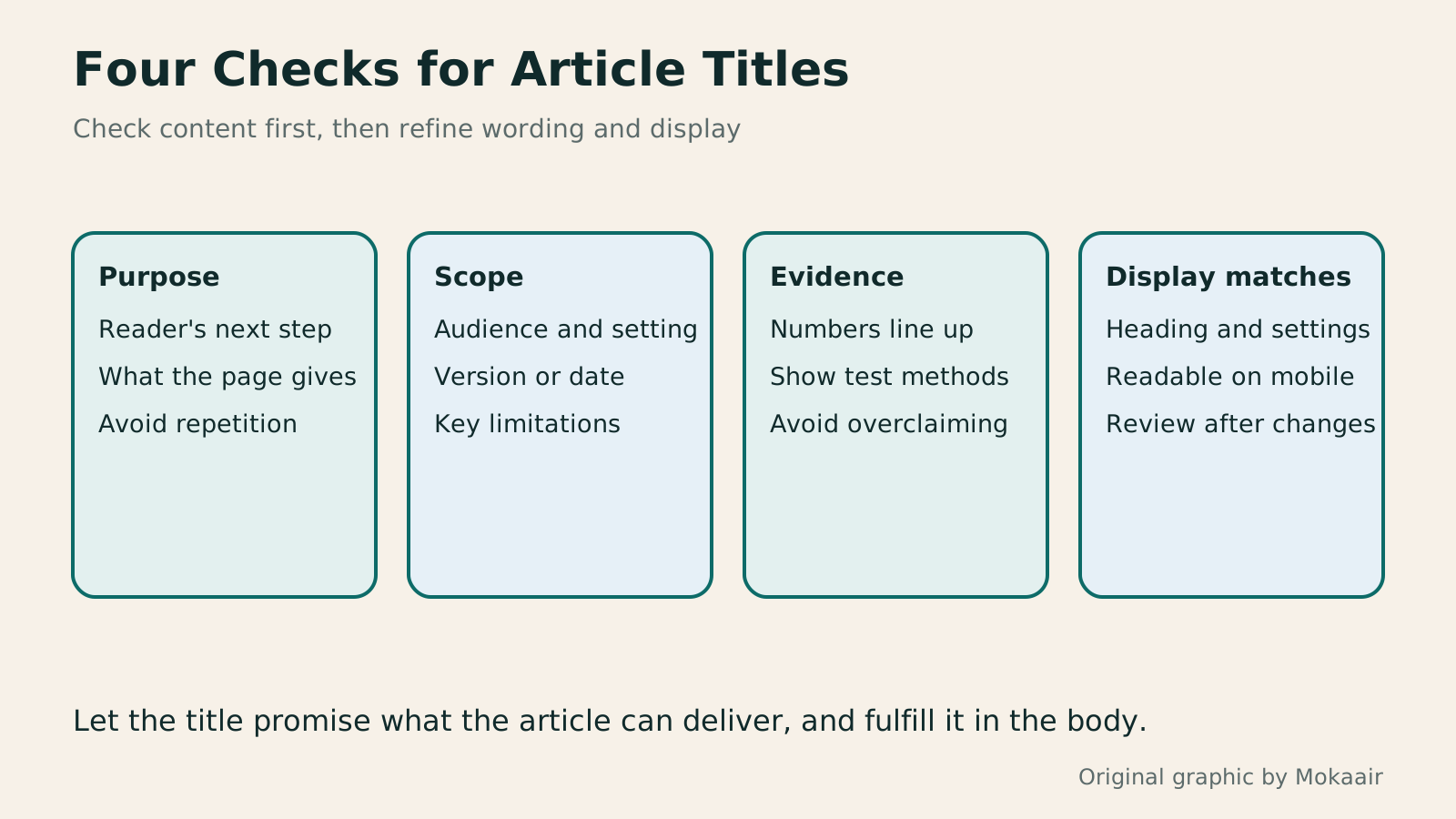
- State in one sentence what the body delivers; identify its topic and purpose.
- Propose different angles and remove modifiers that add no information.
- Check evidence for numbers, years, tests, and promised outcomes.
- Ask someone to predict the content; inspect the actual HTML title, heading, and mobile display.
After a change, check whether queries and content align better
Record old and new titles, date, and reason. Then observe the same page and comparable queries. Google must recrawl and process some changes, so do not judge right after saving. If search still shows another title, inspect the rendered page, content consistency, and update timing.
Click-through rate depends on query mix, position, device, and the search-results layout. Search Console's guidance also notes that isolating the effect of a single change is difficult. Keep the comparison scope and concurrent changes in your record; a one-week increase does not prove a title formula works.
If the new title attracts more irrelevant queries or misleads readers, return to the article's task and adjust it. Good title maintenance helps the right people see why a page is worth reading and receive the promised information after opening it. It does not mean continually choosing bigger numbers or stronger adjectives.
| Problem in the original example | Rewrite direction | What to verify |
|---|---|---|
| Storage must-read! Experts' secrets | Seasonal wardrobe sorting: Categories and space for everyday clothes | The body actually covers wardrobes and seasonal changes |
| Complete moving, organizing, storage, and packing guide | Packing order for a move: Daily essentials last | Clear order and exceptions |
| A method that triples productivity | How to name files: Date, project, and version | No invented improvement figure |
| Fully updated for the latest year | Name the version or scope actually checked | Update body and sources together |
| The best products, tested and ranked | Feature comparison and selection criteria | Do not call it a test without testing |
First define the search intent the title should answer
Check the whole article's on-page SEO
Lifestyle
Technical SEO audit order: crawling, indexing, rendering, and site structure
A useful technical SEO audit needs reproducible evidence and a sensible repair order. Using a site relaunch as an example, this guide explains how to sample page templates and check public access, indexing directives, JavaScript rendering, canonical URLs, and site structure. It separates urgent repairs, scheduled improvements, and later observation so that a general site owner can hand actionable findings to maintainers without treating a passing test as a ranking guarantee.
Lifestyle
How to Identify Search Intent: Turn Keywords into Questions Worth Answering
The same keyword can signal learning, comparison, finding a specific entry point or taking action. Using original luggage-storage examples, this guide shows how to judge intent from wording, time and place, result formats and your own query data, then turn a hypothesis into a clear content task. It includes an observation table, ways to handle mixed intent, content-format choices and later validation. Do not copy ranking pages or treat one search-results screen as the answer for every reader.
Lifestyle
A beginner's SEO learning roadmap: make your site readable before measuring traffic and results
SEO beginners need not memorize ranking factors or buy a suite of tools. Using a small Taiwan website, this guide orders five topics: how search works, site readability, content planning, Search Console metrics, and results. Exercises by stage, a resource table, and a change log help you make pages readers and search engines can understand, then plan further work from data instead of tool scores or short-term swings.
Lifestyle
A keyword research workflow: Reader needs, long-tail queries, and topic priorities
Keyword research should produce a schedulable content list, not hundreds of unused terms. Using a small baking tutorial site, this guide collects clues from reader questions, Search Console, Google Keyword Planner, and Google Trends. It separates search-volume estimates, ad competition, and relative interest, then groups specific needs, checks existing pages, and prioritizes topics by value and production capacity.
Articles that cite this one
Latest travel guides

GuideTokyo
Where to Stay in Tokyo: Comparing Shinjuku, Ueno, Tokyo Station, Shibuya, Asakusa, Ikebukuro, and Ginza, Plus Airport Access, Accommodation Tax, and Luggage Delivery
Where should you stay in Tokyo? Compare Shinjuku, Ueno, Tokyo Station, Shibuya, Asakusa, Ikebukuro, and Ginza by the same criteria: access from Narita and Haneda, transit routes, nearby attractions, neighborhood character, and who each area suits. Includes a comparison table, a Yamanote Line diagram, Tokyo’s accommodation tax as verified in 2026/9 (changing to 3% in 2027/4), and Airport TA-Q-BIN luggage shipping rules.
- Budget
- Hotels

GuideTokyo
How to Choose Tokyo Transit Passes: Are Suica, Welcome Suica, the Tokyo Subway Ticket, and the JR Pass Worth It?
On a first Tokyo trip, start with an IC card and pay per ride (Welcome Suica has no deposit and is valid for 28 days). If you take four or more subway rides in a day, add a 72-hour Tokyo Subway Ticket for 2,000 yen; a JR Pass is never worthwhile if you stay in Tokyo and do not go to Kansai. See what TOURIST PASMO, Suica on iPhone, and the Tokyo Metro day pass do and do not cover, with a decision chart. Prices verified in September 2026.
- Transport
- Budget

GuideTokyo
Tokyo Disneyland and DisneySea Guide: Ticket Prices, Fantasy Springs, Disney Premier Access (DPA), Standby Pass, and Which Park to Choose for Your First Visit
Tokyo Disney one-day Passport prices vary: most weekdays in 9/2026 cost ¥9,900 and weekends ¥10,900. At 14:00 daily, tickets go on sale for the same date two months later. Free Priority Pass is no longer on the official service list; only paid Disney Premier Access (¥1,000–3,500 per person per use) shortens waits. Covers hours, the 25th anniversary, Standby Pass, Entry Request, Fantasy Springs access and first-visit park choice; checked on the official site in 9/2026.
- Itineraries
- Family
Sources
- Google Search: Title link guidance · Checked:
- Google Discover: Preview content guidance · Checked:
- Search Console: Assessing page changes · Checked:
- WordPress: Heading block · Checked: