Lifestyle
SEO Article Quality Checklist: Sources, Useful Detail and Maintenance
A content quality review checks whether evidence, interpretation, instructions and images agree. Using a comparison of digital note-taking tools, this guide shows how to map claims to sources, distinguish official features from hands-on tests, add the details readers need to compare options, and check image rights, titles, summaries and update ownership. An editorial checklist and correction workflow make ‘finished’ mean verifiable, readable and maintainable, not merely long enough.
About 7 min read
An article can read smoothly and have complete sections yet still leave readers unable to decide: a comparison table says only ‘easy to use’, features have no version, sources point merely to homepages and images are hard to read. Adding words or turning every plugin indicator green will not fix these gaps.
Begin a content quality review with a concrete question: where is a reader following this article most likely to be misled, get stuck or lose the basis for a claim? List those gaps before planning research, rewriting and visual fixes. This is more effective than a final pass that checks spelling alone.
Map each article claim to a source
For a digital note-taking tool comparison, first mark claims that affect the choice: whether export is possible, which formats work, which plans allow sharing and what remains available offline. For each, record the source page, access date and applicable conditions. Distinguish feature documentation, plan pages and release notes instead of using one vague link to support everything.
If a primary source describes one plan, do not extend its claim to every user; if it covers the desktop app, do not assume the phone app works the same way. When official pages disagree, check their update dates and applicable products, then mark what remains unresolved. Narrow a conclusion if necessary instead of supplying your own answer.
A research sheet can distinguish confirmed facts, analysis based on those facts and matters still to verify. The reasons in the article's comparison should trace back through that sheet. A missing source does not automatically make a claim false, but changing features, prices and rules cannot be presented as confirmed current facts on memory alone.
Separate official information, actual tests and editorial inference
Official documentation can support ‘the service offers this feature’; hands-on tests can show how it behaves in a specified environment. Those are different forms of evidence. If you have not installed or used a tool, write a feature summary and choice method, not ‘I tried it’, ‘it is the fastest’ or ‘I had no problems at all’.
When you do test, record the version, device, plan, data scale and steps, and retain the evidence needed for the result. Successfully exporting one small document supports only that case; it does not show that every attachment, format or large database transfers intact. Comparisons in particular need similar conditions across tools, or the numbers are hard to interpret fairly.
Google's review guidance emphasizes original analysis, decision factors and evidence that supports experience. Use it to ask whether a passage helps readers judge more than a product blurb does. If it simply collects each vendor's slogan, add comparable conditions, limitations and choice scenarios instead of ranking products without support.
Add the details that let readers use the answer
Give the article to someone new to the subject and ask what they would prepare first, do next and use to tell whether it worked. If a tool comparison lists sync, search and sharing without saying whether the reader keeps personal notes or collaborates with a team, add that situation before explaining feature differences.
Use the same fields across a comparison table and distinguish a blank, an absent feature and an unverified feature. To assess export, check data formats, attachments, permissions and later readability for every tool. If evidence is unavailable, write ‘to verify’ rather than marking the feature absent. Explain nearby which differences matter to which users.
Original value can also be a custom checklist, worked calculation, decision flow or exception-handling method; you need not invent a new theory. A ‘sample three kinds of notes before switching tools’ checklist, for example, shows readers how to check their own data. Label assumptions in examples and recompute calculations; do not dress up an unperformed test as a story.
Check images, sources and usage conditions together
A diagram should use the same terms, direction and numbers as the article. If the text says export before validating, the figure must not place deletion of the old account before validation. Check each image for missing glyphs, overlap and cropping, and test tables and labels at the expected reading size. Keep essential steps in the body as well.
Prefer self-drawn diagrams that explain relationships clearly. For external photos, retain the creator, source, actual license terms and modification history, and verify that the intended use is allowed. CC BY 4.0, for example, permits commercial use and adaptation, but still requires attribution, a license link and an indication of changes. ‘Free’ alone says nothing about other conditions.
Say clearly when an image is illustrative rather than a real screen. In test screenshots, cover account details, private data and credentials. An image license may not cover every person or other right depicted, so choose material whose use you can verify when the situation is unclear. Quality review covers both legibility and proper use.
Proofread titles, summaries and generated fields with the body
Once the body is verified, check the title, summary, alt text and structured data too. If a feature now requires payment while the summary still calls it free, readers will still be misled. These fields are often the first information readers see; do not treat them as decoration filled once and forgotten.
Google's guidance on generative AI content extends accuracy, quality and relevance expectations to these fields and warns that mass-producing pages without added value may violate its policies. Tools can help organize leads and drafts, but people must own the final source checks, distinction-making and corrections. Generation is not an acceptance test.
Do another language and link pass: use consistent Taiwan terminology, units, product names and date formats, open each cited page to confirm it supports the nearby claim, and check that related internal articles exist. If a link goes only to a site's homepage, readers must find the evidence themselves; point directly to a supporting page.
- Mark claims that influence the reader's choice, then add sources and scope.
- Check how facts, tests and inferences are described; correct overreach.
- Use the reader's task to check steps, tables, diagrams and exceptions.
- Proofread titles, summaries and links together; record unresolved matters and owners.
Schedule updates and corrections by change risk
An article still needs care after publication. List prices, plans and interfaces that change easily for later checks. Stable concepts do not need repeated date changes just to appear new. Google's people-first content guidance also discourages changing a date when the content has not substantially changed.
When you find an error, assess its effect on readers first. A claim that could cause a wrong decision or data loss should be fixed before a punctuation issue. When appropriate, leave a clear correction note in the article and retain the original problem, the fix and its verification source, so the team knows what changed.
A maintenance sheet can record the last verification date, data owner, next review trigger and article status. Vendor releases, broken sources and reader reports of different behavior all warrant another check. Reliable content quality depends on keeping sources, text and images aligned over time.
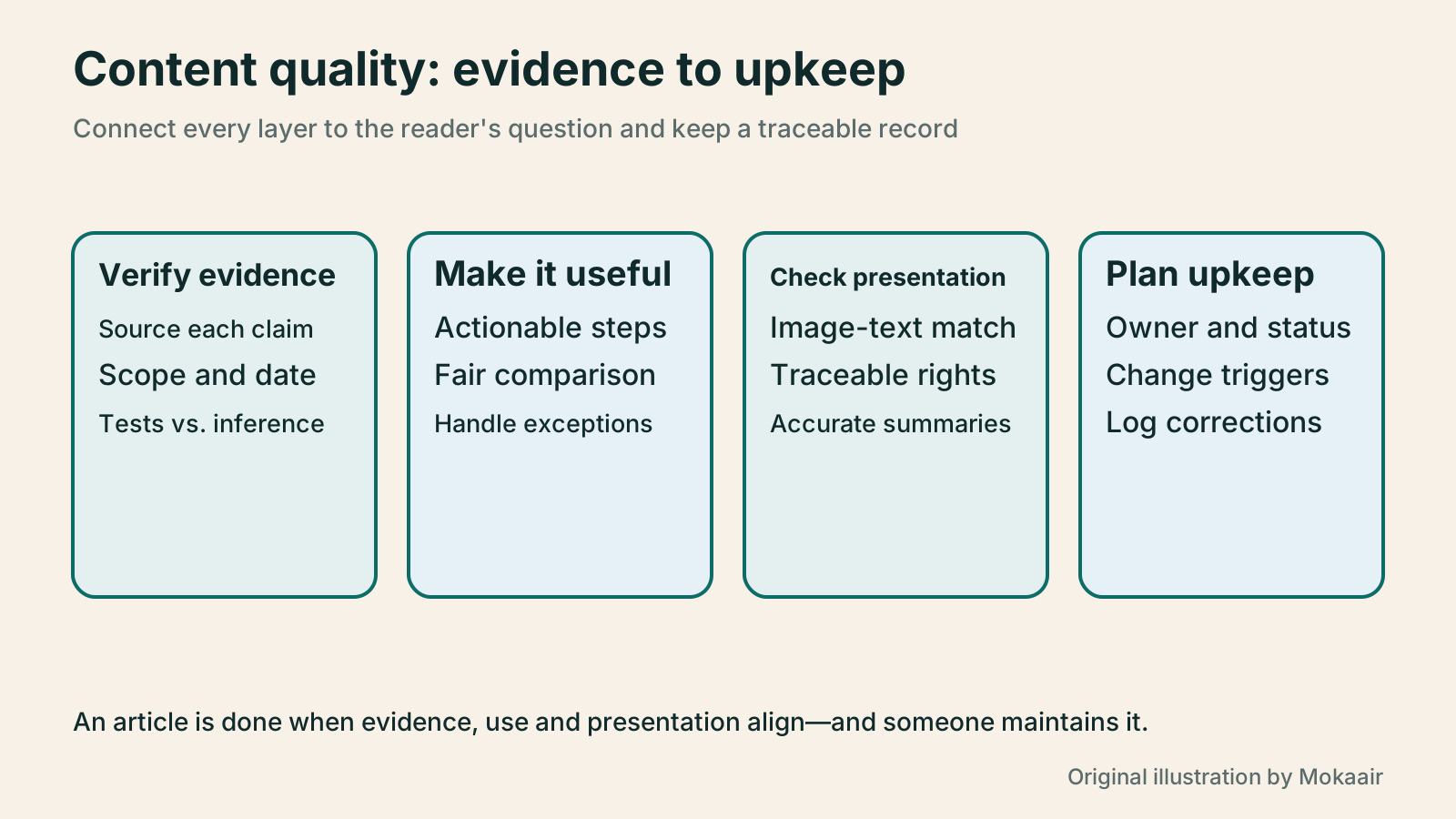
| Review layer | Common gap | Completion condition |
|---|---|---|
| Claims and sources | Using a plan homepage to support every feature | Important facts match applicable documents and dates |
| Tests and inference | Calling desk research personal experience | Description stays within what was actually done |
| Instructions and comparison | Pros and cons without grounds for trade-offs | Steps are actionable and comparison fields consistent |
| Images and rights | Outdated labels or only a ‘free’ badge | Image and text agree; usage rights are traceable |
| Cross-field proofread | Body changed but summary repeats the old claim | Title, summary and diagram updated together |
| Later maintenance | No one knows who owns updates | Verification date, corrections and review triggers retained |
Check what the title promises
Consolidate articles when their content overlaps
Lifestyle
Technical SEO audit order: crawling, indexing, rendering, and site structure
A useful technical SEO audit needs reproducible evidence and a sensible repair order. Using a site relaunch as an example, this guide explains how to sample page templates and check public access, indexing directives, JavaScript rendering, canonical URLs, and site structure. It separates urgent repairs, scheduled improvements, and later observation so that a general site owner can hand actionable findings to maintainers without treating a passing test as a ranking guarantee.
Lifestyle
How to write article titles: Show search readers the scope and purpose
A useful title tells readers before they click what problem an article addresses, when it applies, and what information they will get. Using original rewrites of everyday tutorials, this guide checks the topic, purpose, limits, and evidence behind title promises. It explains why the page heading, HTML title, and Google search title may differ, then offers prepublication checks and post-change observation without stuffing keywords, claiming tests that never happened, or adding an unverified year.
Lifestyle
How to Identify Search Intent: Turn Keywords into Questions Worth Answering
The same keyword can signal learning, comparison, finding a specific entry point or taking action. Using original luggage-storage examples, this guide shows how to judge intent from wording, time and place, result formats and your own query data, then turn a hypothesis into a clear content task. It includes an observation table, ways to handle mixed intent, content-format choices and later validation. Do not copy ranking pages or treat one search-results screen as the answer for every reader.
Lifestyle
A beginner's SEO learning roadmap: make your site readable before measuring traffic and results
SEO beginners need not memorize ranking factors or buy a suite of tools. Using a small Taiwan website, this guide orders five topics: how search works, site readability, content planning, Search Console metrics, and results. Exercises by stage, a resource table, and a change log help you make pages readers and search engines can understand, then plan further work from data instead of tool scores or short-term swings.
Articles that cite this one
Latest travel guides

GuideTokyo
Where to Stay in Tokyo: Comparing Shinjuku, Ueno, Tokyo Station, Shibuya, Asakusa, Ikebukuro, and Ginza, Plus Airport Access, Accommodation Tax, and Luggage Delivery
Where should you stay in Tokyo? Compare Shinjuku, Ueno, Tokyo Station, Shibuya, Asakusa, Ikebukuro, and Ginza by the same criteria: access from Narita and Haneda, transit routes, nearby attractions, neighborhood character, and who each area suits. Includes a comparison table, a Yamanote Line diagram, Tokyo’s accommodation tax as verified in 2026/9 (changing to 3% in 2027/4), and Airport TA-Q-BIN luggage shipping rules.
- Budget
- Hotels

GuideTokyo
How to Choose Tokyo Transit Passes: Are Suica, Welcome Suica, the Tokyo Subway Ticket, and the JR Pass Worth It?
On a first Tokyo trip, start with an IC card and pay per ride (Welcome Suica has no deposit and is valid for 28 days). If you take four or more subway rides in a day, add a 72-hour Tokyo Subway Ticket for 2,000 yen; a JR Pass is never worthwhile if you stay in Tokyo and do not go to Kansai. See what TOURIST PASMO, Suica on iPhone, and the Tokyo Metro day pass do and do not cover, with a decision chart. Prices verified in September 2026.
- Transport
- Budget

GuideTokyo
Tokyo Disneyland and DisneySea Guide: Ticket Prices, Fantasy Springs, Disney Premier Access (DPA), Standby Pass, and Which Park to Choose for Your First Visit
Tokyo Disney one-day Passport prices vary: most weekdays in 9/2026 cost ¥9,900 and weekends ¥10,900. At 14:00 daily, tickets go on sale for the same date two months later. Free Priority Pass is no longer on the official service list; only paid Disney Premier Access (¥1,000–3,500 per person per use) shortens waits. Covers hours, the 25th anniversary, Standby Pass, Entry Request, Fantasy Springs access and first-visit park choice; checked on the official site in 9/2026.
- Itineraries
- Family
Sources
- Google people-first content guidance · Checked:
- Google guidance on writing high-quality reviews · Checked:
- Google guidance on generative AI content · Checked:
- Creative Commons CC BY 4.0 deed · Checked: