Lifestyle
How to Add Structured Data: From Visible Content to Search Validation
Structured data can help search engines understand pages, but adding code does not guarantee a special search appearance. Starting with the roles of Schema.org types and JSON-LD, this article covers visible content mapping, article fields, platform output sources, and differences between Schema Markup Validator and the Rich Results Test. An original field table and validation workflow help Taiwan website administrators build maintainable markup based on real content.
About 7 min read
Contents
- 1. Schema.org Is the Vocabulary; JSON-LD Is the Format
- 2. Choose a Suitable Type Based on the Page's Main Purpose
- 3. Map Visible Content to Fields
- 4. Check Existing Platform Output to Avoid Conflicting Data
- 5. Use Both Tests, Then Manually Check the Content
- 6. Keep Checking After Publication to Keep Content and Markup in Sync
If an article already has a title, author, and publication date, why provide structured data separately? Because systems may not identify relationships as clearly as people can when reading a page's layout. Structured data expresses this information using consistent names and formats, making page content easier to process.
Before you start, make sure the content itself is accurate. If the author is unknown, the images are irrelevant, or the page has no actual product price, adding a few fields cannot solve the underlying problem. Start by organizing data for one common page type and testing the output; this is easier to maintain than enabling all markup across the site at once.
Schema.org Is the Vocabulary; JSON-LD Is the Format
Schema.org provides a shared vocabulary of types and properties, such as Article for an article, with appropriate properties to describe it. JSON-LD, Microdata, and RDFa are different ways to embed information in a page. Keep these two layers distinct: choosing JSON-LD does not determine whether the page describes an article, a person, or a product.
Google generally recommends JSON-LD because it is easy to maintain. It is usually placed in a script element whose type is application/ld+json. This data is not displayed directly like the body text, but what it describes should still match information users can see. Do not use this as an excuse to put nonexistent ratings or authors into hidden data.
Also distinguish vocabulary validity from support for Google Search features. Schema.org covers more than Google's rich results; a type may validly describe content without Google currently offering a corresponding special search appearance. If your goal is a search feature, read Google's latest documentation specifically for that feature.
Choose a Suitable Type Based on the Page's Main Purpose
For a tutorial article about organizing a home workspace, you could first consider Article or BlogPosting and describe its title, author, images, and dates based on the actual content. If the page is actually a place to buy a product, it needs a different data setup suited to products. Do not use the same template simply because both pages have an image.
First list your site's main page types, including articles, service descriptions, and personal profiles, and record who supplies the content for each type and whether markup already exists. A single page can reasonably describe multiple things, but each item should be supported by its content. There is no need to turn every noun mentioned in passing in an article into a separate entity just to increase the item count.
Google's general guidelines require markup to reflect page content and follow the rules for its type. Before choosing ratings, events, or other features that may have specific eligibility requirements, check where they apply. Seeing a particular search appearance on a competing website does not mean your page only needs the same code.
Map Visible Content to Fields
For article types, start by organizing headline, author, image, datePublished, and dateModified where applicable. These are recommended properties listed in Google's article documentation, not a universal set of required fields for every structured data type. Check the required and recommended items separately for each feature.
The headline should reflect the article itself. The author should match the actual byline, using the appropriate type for a person or organization. Record multiple authors separately instead of treating a whole string of names, job titles, and the word "posted by" as one name. Distinguish the original publication date from later modifications, use an appropriate format, and include time zone information.
Images should represent the article's content, and their URLs should be accessible. Do not substitute the website logo for each article's content image or leave in test-environment paths. Create a field table that maps each data value to its admin field and page location, so editors know what needs to be updated together when they revise an article.
- Choose an article with complete information and confirm its byline, images, and dates.
- Consult the official property requirements for the appropriate type, distinguishing required items from recommended ones.
- Record the content source and visible location for each markup field.
- Check for missing data without inventing values to make the table look complete.
Check Existing Platform Output to Avoid Conflicting Data
WordPress themes, SEO plugins, or other content features may already output structured data. First inspect the page source and search for application/ld+json, then use a tool to examine the extracted types. Not finding this string does not mean there is no markup, because the site may use Microdata or RDFa.
If two features describe the same article, check that the author, images, dates, and URLs match. Multiple data items are not necessarily wrong, but contradictions make troubleshooting harder. First decide which feature is responsible for the main article data, then adjust it using methods supported by the platform. Do not simply delete every script you do not understand.
When generating JSON-LD yourself, use a serialization method that handles quotation marks and special characters correctly. Directly assembling a reader-entered title into code is prone to errors; comments, fictional authors, and test URLs in examples must not go live unchanged. After configuration, inspect the actual page instead of validating only a draft in the editor.
Use Both Tests, Then Manually Check the Content
Schema Markup Validator can extract Schema.org data from a page, show relationships between data items, and identify syntax problems. Google's Rich Results Test focuses on the search features it can recognize and their related errors and recommendations. An error-free result from the former does not mean the latter necessarily supports a special search appearance for that type.
The Rich Results Test accepts a full URL, or you can switch to code mode and paste in the content to test. Check unpublished drafts in code mode first, then test the URL once the live page is ready to confirm that the data is actually output after deployment. URL testing requires access to the necessary resources. Do not casually remove protection from private pages just to test them.
Fix major errors first, then review whether the other recommendations apply. If information is missing, address it at the content source. Even if the tools pass the markup, manually check that it describes visible content and contains no outdated dates or false reviews. Tools cannot guarantee that your content is true, that every policy is satisfied, or that it will appear in search results.
Keep Checking After Publication to Keep Content and Markup in Sync
After launch, spot-check actual URLs, important images, and data values. Use Search Console to inspect pages as processed by Google when needed. Record local code checks, public URL tests, and subsequent search status separately so you can identify whether a problem occurred during generation, deployment, or reprocessing.
When updating an article's author, cover image, or date of substantive modification, check that its structured data is updated too. If you change themes or disable a plugin, first confirm what will take over the markup it previously handled. When data sources are unclear, a setup that seems fine in the short term can easily fail during the next redesign.
When evaluating results, keep the pages and observation conditions consistent, and record other changes made during the period. Search appearance and traffic are influenced by many factors, so you cannot attribute an entire week's increase to markup. What is worth preserving is clear data sources, correct output, and a repeatable review process that keeps page information consistent over time.
Read the full description
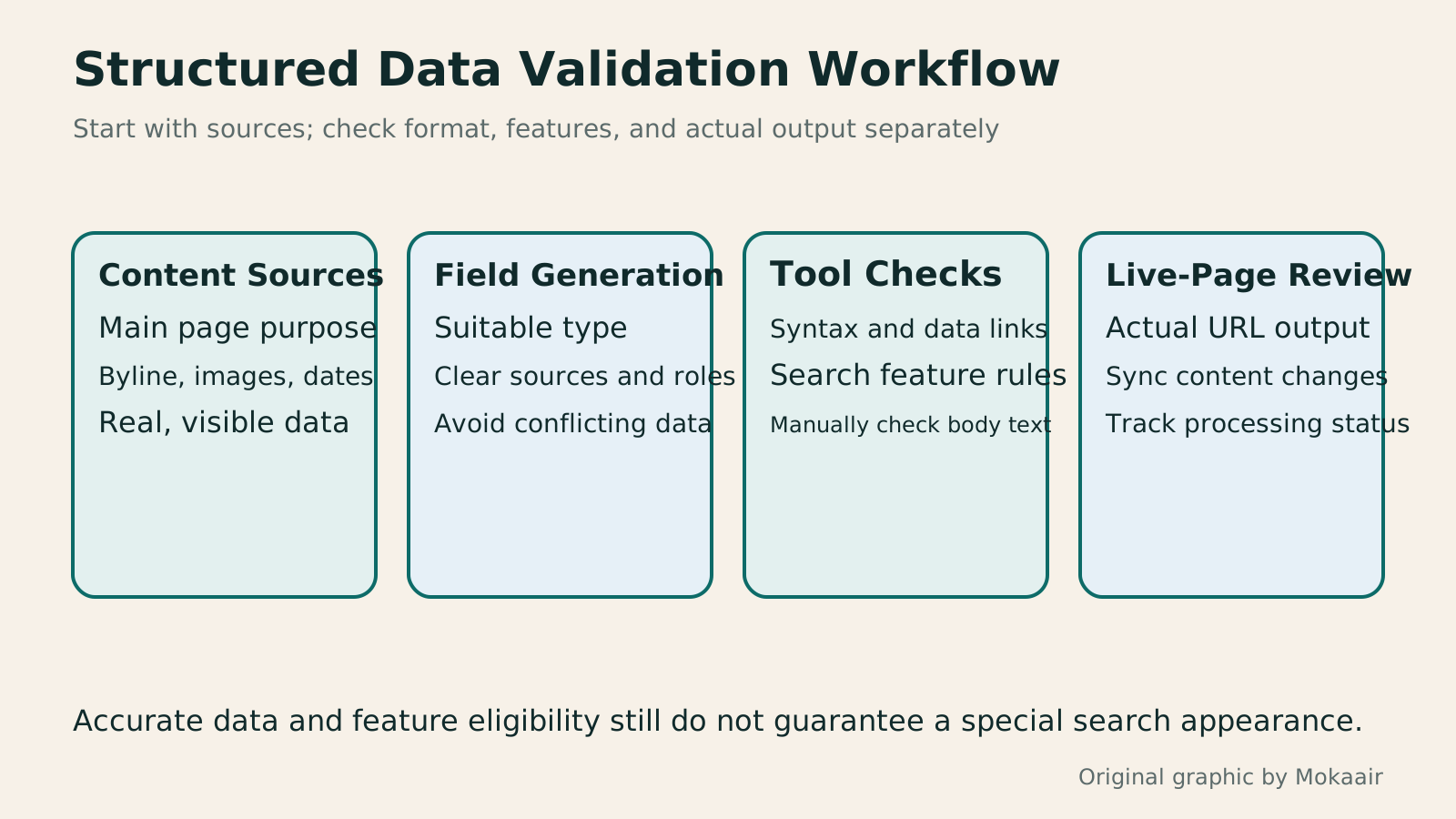
Four blocks show a visible content inventory, field generation, tool checks, and post-publication review, emphasizing that special search appearances are not guaranteed.
| Article Data | Available Field | What to Check |
|---|---|---|
| Article title | headline | Matches the article's subject and title |
| Actual byline | author | Person or organization; list multiple authors separately |
| Image representing the content | image | Relevant image and accessible URL |
| Original publication time | datePublished | Actual publication date and time zone |
| Modification time, where applicable | dateModified | Reflects modifications, not an automatic daily update |
First Improve the Article's Content QualitySEO Article Quality Checklist: Sources, Useful Detail and MaintenanceA content quality review checks whether evidence, interpretation, instructions and images agree. Using a comparison of digital note-taking tools, this guide shows how to map claims to sources, distinguish official features from hands-on tests, add the details readers need to compare options, and check image rights, titles, summaries and update ownership. An editorial checklist and correction workflow make ‘finished’ mean verifiable, readable and maintainable, not merely long enough.Read the full article
Assess the Credibility of Authors and Sensitive InformationHow Websites Build Trust: Authors, Sources and High-Risk TopicsWebsite trust rests on verifiable author backgrounds, sources, methods and correction accountability. This article explains E-E-A-T and YMYL's uses and limits, using original scenarios for everyday posts, software tutorials and high-risk information to outline author, editor and expert reviewer roles. A checklist covers source applicability, partnership disclosures, dates and corrections, so author boxes, institution names and search rankings are not taken as proof of accuracy.Read the full article
Check Page Status with Search Console
Found this guide helpful? Share it with someone who needs it
Lifestyle
How Websites Build Trust: Authors, Sources and High-Risk Topics
Website trust rests on verifiable author backgrounds, sources, methods and correction accountability. This article explains E-E-A-T and YMYL's uses and limits, using original scenarios for everyday posts, software tutorials and high-risk information to outline author, editor and expert reviewer roles. A checklist covers source applicability, partnership disclosures, dates and corrections, so author boxes, institution names and search rankings are not taken as proof of accuracy.
Lifestyle
Understanding website authority scores: Tool metrics vs. search performance
Website authority scores appear in SEO reports and partnership proposals, but tools calculate them differently. Using Ahrefs Domain Rating and Semrush Authority Score, this article explains differences between domains, pages, links, estimated traffic and actual outcomes, with steps for same-tool comparisons, anomaly checks and monthly reports. It helps small sites treat scores as research clues, not Google certification or ranking guarantees.
Lifestyle
How to Design a 404 Page: Explain the Problem and Help Readers Continue
404 pages need more than art and a home button: explain missing content and help readers finish their task. An original exhibition-site example covers clear copy, relevant categories and search, HTTP status codes, proper redirects and error tracking. Steps, a comparison table and original diagrams distinguish missing content, moved pages and service outages, avoiding attractive pages that return success or redirecting every old URL to an unrelated home page.
Lifestyle
Articles Competing for Rankings? Identify Overlapping Intent and Consolidate Content
Multiple articles from one site appearing for similar queries do not always hurt each other. This article shows how Search Console, article tasks and content differences reveal truly duplicate needs and guide retention, repositioning or merging. It explains the distinct roles of permanent redirects, canonical and noindex, plus pre-merge backups, URL mapping, internal link updates and performance tracking, to avoid deleting articles based only on keywords or short-term rankings.
Articles that cite this one
Sources
- Introduction to Schema.org Vocabulary and FormatsChecked:
- Google's Introduction to Structured DataChecked:
- Google's General Structured Data GuidelinesChecked:
- Google's Article Types and Recommended PropertiesChecked:
- Schema Markup Validator GuideChecked:
- Google Rich Results TestChecked:
Compiled from the references and verification dates listed above; fares, schedules, product features, and terms can change, so please confirm the latest details on the relevant official website before travelling, booking, or purchasing.