Lifestyle
Search Crawlers and AI Crawlers: How Website Administrators Can Identify and Manage Them
Search crawlers and AI page-fetching tools serve different purposes. Site administrators must identify the source before choosing controls. This article compares Googlebot, Google-Extended, OAI-SearchBot, GPTBot and ChatGPT-User, explains what robots.txt, noindex and login protection can address, and provides steps to check access logs and verify changes so blocking training use does not inadvertently block search or public content.
About 8 min read
Contents
- 1. Distinguish Crawling, Indexing and User Page Fetches
- 2. Understand the Different Purposes of Google and OpenAI Tools
- 3. Give robots.txt, noindex and Security Measures Separate Roles
- 4. Use Access Logs to Check Request Identity and Impact
- 5. Define Exactly What to Allow and Restrict Before Making Changes
- 6. Verify Changes with Evidence Instead of Immediately Checking Rankings
A name containing Bot in your website logs does not immediately tell you whether it is indexing for search, training a model or opening a URL for a user. Even the name itself can be spoofed by another program, so assess it alongside the officially stated purpose and actual request logs.
Before managing crawlers, define which content you want to make public, which services you want people to find it through, and which data only logged-in users should be able to read. Check purpose, identity and permissions separately so a broad blocking rule does not also shut off a search entry point you need.
Distinguish Crawling, Indexing and User Page Fetches
Crawling retrieves data from a website; indexing involves further analysis and organization; serving search results is a later stage that selects results. Google explains that not every crawled page is indexed, and meeting the requirements does not guarantee that a page will appear. A successful response in the logs therefore is not evidence that an article has been indexed.
Some tools proactively discover URLs, while others fetch pages only when a user posts a link or asks a question. They may handle robots.txt differently. Compile a list of services relevant to your website and check each one's official documentation; do not label every request from an AIWhat Is Artificial Intelligence?AI covers many technologies and uses; it is not synonymous with chatbots and need not generate text. Starting with the OECD system definition, this article uses photo classification and community resource recommendations to link inputs, inference, outputs and human goals, and explains AI's relationship to machine learning, deep learning and generative AI. Learn to ask concrete questions about what an AI feature does and distinguish capability, autonomy and trustworthiness.Read the full article product as a training crawler request.
For example, a public home repair tutorial site may want readers to find its articles through search while keeping its content out of a particular provider's training. This requirement can be split into separate search and training settings. For members' billing details, the issue is access permissions: first confirm that people who are not logged in cannot read them.
Understand the Different Purposes of Google and OpenAI Tools
Googlebot participates in crawling for Google Search. Google-Extended is a product control token in robots.txt that expresses preferences for Gemini training and related grounding uses specified in the official documentation. It has no separate HTTP User-Agent. Its controls do not affect a site's inclusion in Google Search and are not a ranking signal.
OpenAI's official documentation assigns OAI-SearchBot to search and GPTBot to crawling content that may be used to train foundation models. They can be configured independently. If your goal is to retain search eligibility while limiting training use, manage the corresponding tokens separately; allowing search still does not guarantee inclusion in answers.
ChatGPT-User handles some user-initiated actions; it is not a crawler that automatically explores the entire web. Official documentation says robots.txt may not apply to these actions, while opting out of search should be managed through OAI-SearchBot. Blocking a tool with a similar name therefore may not achieve the outcome you actually want.
Give robots.txt, noindex and Security Measures Separate Roles
robots.txt primarily expresses crawling rules and requires the other party to support and follow them. It cannot force every program to stop fetching pages, nor does it provide password protection. Do not assume private files are safe merely because you have listed their paths in the rules: others may still open publicly accessible URLs directly.
To keep a public page out of Google's index, use an appropriate noindex meta tag or response header, and allow Google to crawl the page so it can read the directive. If you also block it through robots.txt, Google may not see noindex. A URL blocked from crawling may still appear in search because of external links.
To restrict access to member data, drafts or administrative functions, use login authentication and permission controls. First verify in a browser that is not logged in that the content cannot be read, then check whether different accounts can access one another's data. These tests establish who can access the content; its presence or absence in search results should not be the sole acceptance criterion.
Use Access Logs to Check Request Identity and Impact
Obtain access logs covering an appropriate scope from your hosting provider or website maintainer. Start with the time, source IP, User-Agent, path, response code and response time. Record whether requests cluster in the same directory, encounter large numbers of errors or coincide with slower service for regular users. Avoid judging harm solely by request volume.
A User-Agent is a self-declared string; do not use it alone to allow an entire service through. Google provides public IP ranges and DNS verification methods. For manual checks, first perform a reverse DNS lookup on the IP and confirm that the domain is one specified in the official documentation. Then perform a forward DNS lookup to confirm that it resolves back to the same IP. Do not accept it based on the domain name alone.
OpenAI's official crawler page also links to IP lists for each tool. If you use a CDN or reverse proxy, ask the maintainer to confirm which field contains trusted source information, then compare it with the current official lists. Retain only the data needed for log analysis, and redact accounts, credentials and private query content when sharing examples publicly.
Define Exactly What to Allow and Restrict Before Making Changes
First create a policy table: which services may crawl public articles, which uses are unacceptable, and which directories should never be public. Before translating the administrator's decisions into rules, save the current settings and establish whether the rules are generated by the website application, an SEO plugin, the hosting provider or the CDN. This avoids editing a physical file only to have another layer overwrite it.
If you decide to restrict GPTBot, check for a corresponding separate User-agent group and Disallow paths. If you also want to retain search access, separately check the rules for OAI-SearchBot and regular search crawlers. Do not apply the same sitewide block to every unknown tool, or overwrite other necessary existing settings.
A website firewall and robots.txt operate at different layers. Even when the text rules allow access, the firewall may still return a denial or verification page. After making changes, retrieve actual responses from outside the site and compare what the target tool and regular visitors see. When creating an allow rule, limit its purpose, paths and verifiable identity, and retain a way to revert it.
- List the public scope, search requirements and preferences for providers' uses.
- Check the current official tokens, rule behavior and source verification methods.
- Save existing settings, then modify the necessary groups or access policies individually.
- Check external responses, login permissions and subsequent logs to confirm that the results meet your goals.
Verify Changes with Evidence Instead of Immediately Checking Rankings
After updating the rules, first confirm that the actual robots.txt and page responses are correct, then examine new access logs. Tools may cache rules and take time to update, so do not expect every request to disappear immediately after saving. Likewise, a single request that still appears does not establish that all providers ignore the rules.
For inclusion in Google Search, use Search Console's URL Inspection tool and relevant reports. For server load, monitor request volume, error rates and response times. These two sets of evidence serve different purposes: fewer crawler requests do not necessarily improve organic search performance, and an article being crawled does not mean it has actual readers.
Keep the change date, reason, official documentation and verification results, and review them again when a provider adds tools or the website changes its CDN. If you simply want to reduce load, first identify the request patterns causing problems. If you want to manage usage preferences, confirm the corresponding rules so that every change answers a clear management question.
Read the full description
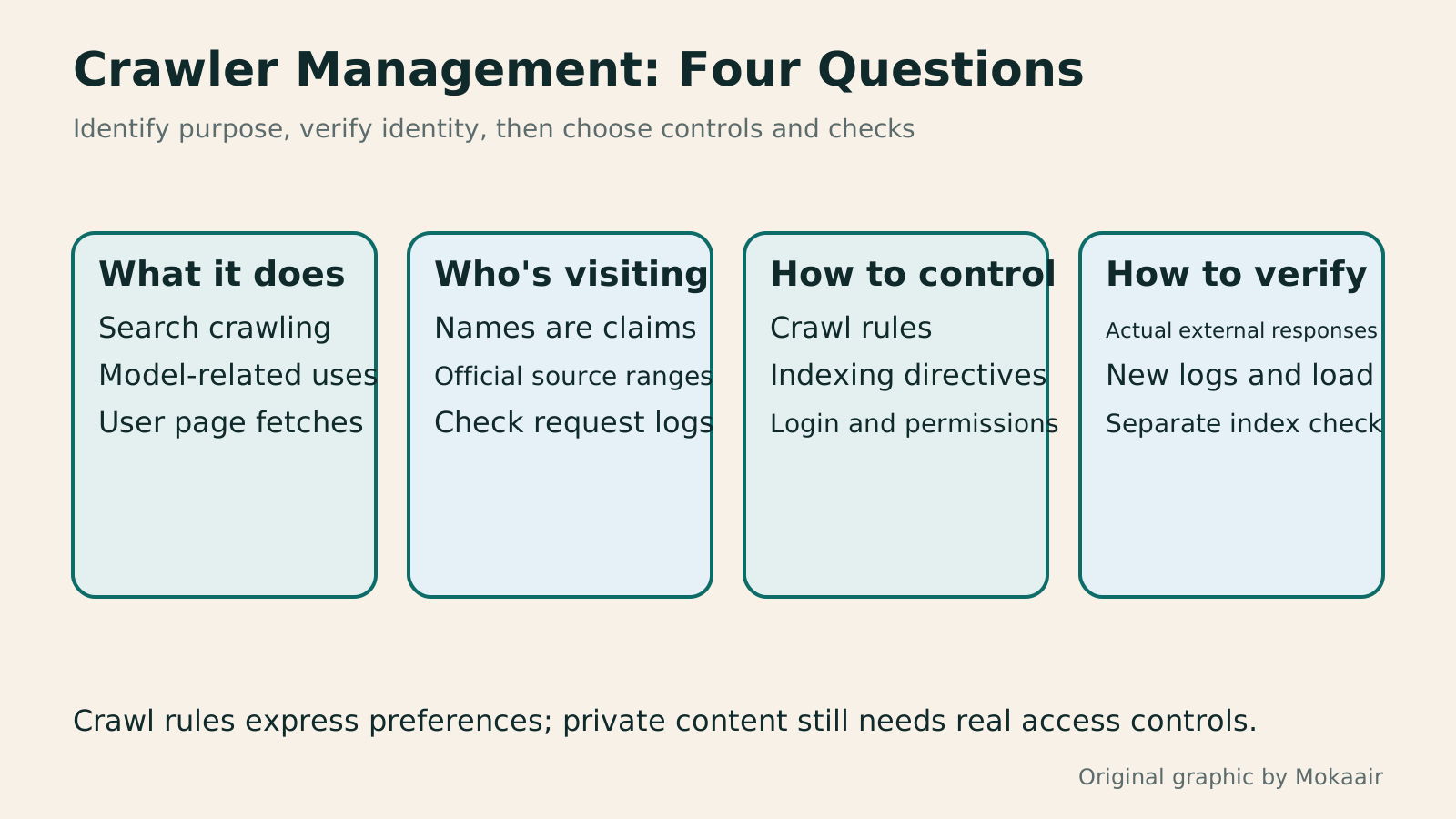
Four boxes cover purpose classification, source identity verification, crawling, indexing and access controls, and checks of responses, logs and indexing status.
| Name / Tool | Main Purpose or Scope | Management Considerations |
|---|---|---|
| Googlebot | Crawling for Google Search | Crawling does not equal indexing or ranking |
| Google-Extended | Controls for officially specified Gemini-related uses | A product token, not a separate HTTP User-Agent |
| OAI-SearchBot | ChatGPT search | Configured independently of GPTBot |
| GPTBot | Crawling content that may be used for model training | Restricting it does not mean opting out of search |
| ChatGPT-User | Some user-initiated page-fetching actions | robots.txt may not apply |
| noindex | Indexing control for tools that support it | The directive must be readable; it cannot replace login protection |
First Understand the Sequence for Learning and Verifying SEOA beginner's SEO learning roadmap: make your site readable before measuring traffic and resultsSEO beginners need not memorize ranking factors or buy a suite of tools. Using a small Taiwan website, this guide orders five topics: how search works, site readability, content planning, Search Console metrics, and results. Exercises by stage, a resource table, and a change log help you make pages readers and search engines can understand, then plan further work from data instead of tool scores or short-term swings.Read the full article
Protect Your WordPress Website and AccountsWordPress Security Maintenance: Dividing Account, Update, and Plugin ResponsibilitiesWordPress security depends on accounts, updates, firewalls, and backups working together. Starting from a small site’s real responsibilities, this guide explains least privilege, the features and limits of free Wordfence, recovery planning for two-factor authentication, and checks for learning mode and alerts. Practical steps and a comparison table help Taiwan-based site owners put someone in charge of each protection task and keep tracking the results.Read the full article
Found this guide helpful? Share it with someone who needs it
Lifestyle
How Websites Build Trust: Authors, Sources and High-Risk Topics
Website trust rests on verifiable author backgrounds, sources, methods and correction accountability. This article explains E-E-A-T and YMYL's uses and limits, using original scenarios for everyday posts, software tutorials and high-risk information to outline author, editor and expert reviewer roles. A checklist covers source applicability, partnership disclosures, dates and corrections, so author boxes, institution names and search rankings are not taken as proof of accuracy.
Lifestyle
Understanding website authority scores: Tool metrics vs. search performance
Website authority scores appear in SEO reports and partnership proposals, but tools calculate them differently. Using Ahrefs Domain Rating and Semrush Authority Score, this article explains differences between domains, pages, links, estimated traffic and actual outcomes, with steps for same-tool comparisons, anomaly checks and monthly reports. It helps small sites treat scores as research clues, not Google certification or ranking guarantees.
Lifestyle
How to Design a 404 Page: Explain the Problem and Help Readers Continue
404 pages need more than art and a home button: explain missing content and help readers finish their task. An original exhibition-site example covers clear copy, relevant categories and search, HTTP status codes, proper redirects and error tracking. Steps, a comparison table and original diagrams distinguish missing content, moved pages and service outages, avoiding attractive pages that return success or redirecting every old URL to an unrelated home page.
Lifestyle
Articles Competing for Rankings? Identify Overlapping Intent and Consolidate Content
Multiple articles from one site appearing for similar queries do not always hurt each other. This article shows how Search Console, article tasks and content differences reveal truly duplicate needs and guide retention, repositioning or merging. It explains the distinct roles of permanent redirects, canonical and noindex, plus pre-merge backups, URL mapping, internal link updates and performance tracking, to avoid deleting articles based only on keywords or short-term rankings.
Sources
- How Google Search WorksChecked:
- Google's Introduction to robots.txtChecked:
- Google's Guide to Using noindexChecked:
- Google Crawlers and Google-ExtendedChecked:
- Verifying the Source of Google RequestsChecked:
- Official OpenAI Crawler DocumentationChecked:
Compiled from the references and verification dates listed above; fares, schedules, product features, and terms can change, so please confirm the latest details on the relevant official website before travelling, booking, or purchasing.