Lifestyle
How to Organize a Portfolio Website: Show Problems and Outcomes Through Case Studies
A portfolio site should show what you did, your role, and why you made those design choices. Using an original rainy-day commute information page exercise, this article covers project selection, case structure, outcome evidence, platforms, and contact details, plus public, link-only, and password-protected access. Steps, a comparison table, and original diagrams help designers, researchers, and freelancers turn work into readable, verifiable case studies suited to sharing.
About 8 min read
Contents
- 1. Identify Your Audience, Then Choose Representative Projects
- 2. Start Each Case Study with Context, Constraints, and Your Contribution
- 3. Connect the Process Through Key Decisions, Rather Than Showing Every Deliverable
- 4. Match Outcomes to Evidence and Explain What Remains Unfinished
- 5. Choose a Portfolio Platform Based on Maintenance and Sharing Needs
- 6. Check Cross-Platform Visibility and Contact Options Before Sharing
Your portfolio homepage is full of polished visuals, yet readers cannot tell which project best represents you, or whether the work was completed independently, with a team, or as a class exercise. What you need may be clearer case studies rather than more animation, so readers can see how your abilities match the person they are looking for.
The following uses an original rainy-day commute information page exercise to demonstrate how to write a case study. The approach draws on primary research and platform documentation consulted on 2026-9-14. The example has no real client, interviews, or measured outcomes. It does not present practice work as commercial experience or reuse project rankings or recommendation lists from the source websites.
Identify Your Audience, Then Choose Representative Projects
Hiring managers, recruiters, and potential clients have somewhat different reasons for viewing a portfolio. First, write down the work you hope to take on and the abilities they need to confirm, such as organizing complex information, creating brand visuals, or turning requirements into usable pages. You can then select projects around these abilities without putting every exercise from past years on the first page.
List each project's name, type, your role, completion status, and what can be shared publicly. Prioritize cases that clearly explain the problem and your contribution. If several projects demonstrate the same ability, keep the most convincing one and put the others in a supplementary section. No fixed number of projects guarantees a job offer; completeness and relevance to the work you want deserve closer attention.
Alongside the project name and thumbnail, homepage cards can include a line explaining the problem and your role. For the original example, you could write: Rainy-day commute information page: an individual exercise in prioritizing information before leaving home. This tells readers what kind of project it is before they click. It also avoids prominently displaying the names of brands you have no working relationship with, creating the impression of client work.
Start Each Case Study with Context, Constraints, and Your Contribution
Begin with a short summary of the problem, intended audience, project status, and your responsibilities. Readers do not know your working environment, so vague statements such as improving the experience or comprehensive optimization are not enough. For team projects, distinguish your design work from others' research, joint discussions, and development outcomes so readers can understand your contribution.
The rainy-day commute exercise could state explicitly: Assuming commuters need to compare routes and exposure to rain while walking, this exercise covers only the information layout and a clickable prototype, with no live weather or traffic data integration. This scope description is more accurate than claiming to have built a smart commuting system, and it tells readers which subsequent outcomes can be verified.
Constraints may include time, available data, technical conditions, or research resources you could not obtain, but explain how they affected your decisions. For example, if real usage records were unavailable, label the content requirements as assumptions and plan follow-up interviews. Do not invent research steps afterward to make the case study fit an ideal process.
Connect the Process Through Key Decisions, Rather Than Showing Every Deliverable
Choose a few decisions that affected the outcome: the approaches you initially considered, the information behind your choice, why you rejected alternatives, and how you checked the revisions. Explain every sketch, table, or screen so readers know what it demonstrates. Screenshots of tools alone do not automatically convey analytical or collaboration skills.
The original case study could compare two information sequences: weather summary first or commute routes first. Explain that routes were prioritized because the exercise focused on decisions before leaving home, while acknowledging that user research is still needed to confirm this choice. If you did not actually observe readers' behavior, call it a design assumption rather than claiming that users generally prefer it.
Visual design projects can also explain decisions, such as how typography supports reading, how images relate to the subject, or how output specifications suit the intended use. Research projects should present the questions, methods, findings, and their effect on the team's actions. Different roles require different evidence. Do not invent interviews or personas for every project just to fit a uniform template.
Match Outcomes to Evidence and Explain What Remains Unfinished
Going live, completing a prototype, passing a particular test, and producing business impact are different states. If you have real data, record the metric definitions, comparison periods, data sources, and limitations affecting interpretation. If other changes were happening at the same time, you cannot attribute the entire improvement to your design.
Without operational data, show the outputs you actually completed and the scope of verification, such as the information you organized, reproducible problems you fixed, or a workflow you prototyped. The rainy-day commute exercise could end with a list of points awaiting validation and explain that the next step is to observe how readers compare routes. Do not fill the outcomes section with an invented percentage.
Show key details in images at a readable scale, enlarging sections and adding explanations where needed. Before sharing user quotes, research photos, internal reports, or client screens, confirm what you are allowed to disclose. Anonymization and password protection are presentation measures; they do not automatically remove confidentiality obligations or replace the consent of those involved.
Choose a Portfolio Platform Based on Maintenance and Sharing Needs
Building your own website gives you control over page structure and the domain, but makes you responsible for hosting, updates, backups, forms, and related work. Portfolio communities offer established ways to present projects, but you must accept their layout, account, and visibility rules. Organize your case studies first, then compare support for long-form text, video, prototypes, and mobile reading. This avoids choosing a beautiful template only to discover that your content will not fit.
Adobe Portfolio's official documentation says you can use themes to build portfolio websites and protect an entire site or individual pages. Publishing and keeping a site online requires an eligible active paid plan. Its pricing guidance lists eligible options including most Creative Cloud plans and Behance Pro. Check whether your own plan includes it; having an Adobe account does not mean you can keep a site online free forever.
Behance profiles are public, while individual projects have visibility settings. Pro's Link Only and password protection have additional rules. Link Only allows access to anyone with the link; it does not mean only designated recipients can view the project. Password-protected projects may still have an entry displayed on your profile. Before sharing, check how they actually appear while logged out.
- List your target readers, the abilities you want to demonstrate, and what can be shared publicly for each project.
- Choose representative case studies and clearly explain the problem, your role, decisions, and evidence-supported outcomes.
- Choose a platform based on your case study content, maintenance capabilities, and sharing needs, then check plan eligibility and visibility.
- Check case studies, contact options, and external links on a phone and while logged out, then schedule updates.
Check Cross-Platform Visibility and Contact Options Before Sharing
If you link Behance and Adobe Portfolio, do not assume visibility on both will synchronize to the state you expect. Behance's official guidance notes that link-only or password-protected projects are automatically imported into Portfolio. If you do not want them displayed, disable the corresponding projects in Portfolio before publishing. Check each actual sharing entry point separately.
Your contact page only needs to clearly explain the help you offer, suitable ways to work together, and how to contact you. There is no need to publish your home address, identification documents, or private phone number. If you use a form, confirm that both the submission result and receipt at the destination work properly. If you use an email link, check the address. This article does not send any job applications or collaboration messages on readers' behalf.
Finally, check for outdated project links, broken prototypes, image sizes, and subscription status, and keep usable backups of your case study text and original materials. Whenever you finish new work, update your records of your role and outcomes before deciding whether to add it to the website. A portfolio's persuasiveness comes from understandable abilities and credible evidence; keep that information accurate as you maintain it.
Read the full description
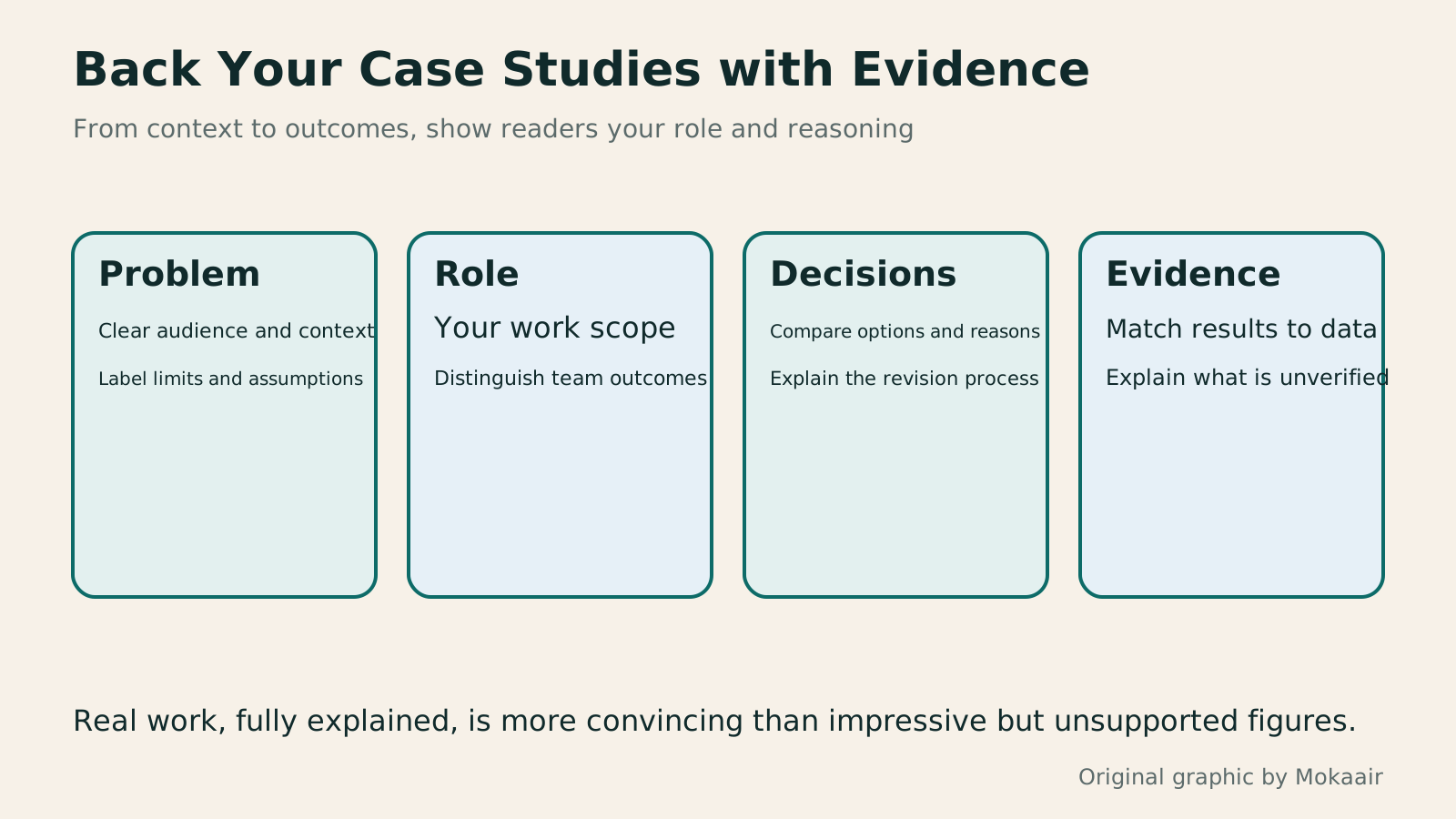
Four cards outline a case study's problem, role, decisions, and evidence, reminding readers to clearly label exercises and commercial outcomes.
| Presentation or Sharing Method | Suitable Uses | Limitations to Check First |
|---|---|---|
| Build your own website | Customize case study structure and domain | Responsibility for hosting, updates, and backups |
| Adobe Portfolio | Build a portfolio website using themes | Plan eligibility and publication status |
| Public Behance projects | Showcase content in a portfolio community | Public visibility of profiles and projects |
| Behance Link Only | Allow anyone with the link to view | Pro eligibility; links can be forwarded |
| Password-protected projects | Add an extra access requirement | Platform entry points and cross-platform display |
| Supplementary PDF version | Tailor case studies to a job opening or meeting | File versions and attachment size |
Create a Readable Case Study Page HierarchyInformation Hierarchy in Web Layouts: Whitespace, Alignment, and Reading OrderA busy page can leave readers unsure where to look first, usually calling for a revised information hierarchy. Using an original used-book swap event page, this article adjusts the main task, heading levels, grid alignment, whitespace, and action buttons step by step, and explains visual versus programmatic reading order. A comparison table, practical steps, and original diagrams help readers turn tidy layouts into pages they can read, understand, and use.Read the full article
Organize the Complete Web Design and Acceptance ProcessHow to Start a Web Design Project: Requirements, Content, and Acceptance Testing in OrderBuilding your first website often stalls over unclear requirements, content, and acceptance criteria, rather than colors. Using an original neighborhood repair studio example, this guide covers user interviews, content preparation, prototyping, development, and handover, with deliverables for each stage. Steps, a comparison table, learning resources, and original diagrams help readers building or commissioning a site turn “Is it finished?” into tasks they can verify.Read the full article
Explain Your Abilities in Clear LanguageHow to Write Marketing Copy: Clarify Value, Conditions, and Next StepsMarketing copy should explain who it suits, its value, conditions, and what happens next. Using an original journal-binding workshop example, this article revises information hierarchy, features and benefits, evidence for claims, and action buttons step by step. A before-and-after table and original diagrams show how to retain appeal without overstating promises, and check that prices, limits, images, and links align before publication.Read the full article
Found this guide helpful? Share it with someone who needs it
Lifestyle
How to Read the BCG Matrix: Uses and Limits of Product Portfolio Analysis
The BCG matrix maps product portfolios by market growth and relative share; stars, cash cows, question marks and dogs do not establish actual profit. An original home goods store example shows how to define markets, check comparison periods and denominators, understand model assumptions, and allocate resources using costs, turnover and customer needs. Includes a four-category table, practical steps, original diagrams and options when reliable market data is lacking.
Lifestyle
How to Use the Ansoff Matrix: Four Options for Expanding Products and Markets
The Ansoff matrix maps four growth paths using existing or new products and markets: market penetration, market development, product development and diversification. An original canvas goods studio example shows how to define the current business and compare the capabilities and evidence each path needs. A comparison table, steps and original diagrams turn growth ideas into small, testable plans, without treating the model as a success-rate table.
Lifestyle
How to Write Marketing Copy: Clarify Value, Conditions, and Next Steps
Marketing copy should explain who it suits, its value, conditions, and what happens next. Using an original journal-binding workshop example, this article revises information hierarchy, features and benefits, evidence for claims, and action buttons step by step. A before-and-after table and original diagrams show how to retain appeal without overstating promises, and check that prices, limits, images, and links align before publication.
Lifestyle
Customer Journeys and Marketing Funnels: Find Where Readers Drop Off
Customer journeys explain touchpoints and needs; marketing funnels count people at each step using consistent criteria. Using an original bicycle repair booking example, this article explains how to map online and offline contacts, define completion events, calculate step conversion rates, and set up GA4 open or closed funnels. A calculation table, practical steps, and original diagrams help identify improvement hypotheses to test without mistaking data gaps for causes of customer drop-off.
Articles that cite this one
Sources
- NN/g: Design Portfolios and Case Study ContentChecked:
- NN/g: Roles and Evidence in Research PortfoliosChecked:
- Adobe: Portfolio Features and Publishing EligibilityChecked:
- Adobe: Plans That Include PortfolioChecked:
- Behance: Profiles and Private ProjectsChecked:
- Behance: Link-Only Access, Passwords, and Linked ImportsChecked:
Compiled from the references and verification dates listed above; fares, schedules, product features, and terms can change, so please confirm the latest details on the relevant official website before travelling, booking, or purchasing.