Lifestyle
Before You Buy a Domain: Name, Registrant, and Renewal Management
A domain is the entrance to your website and an important record for email, future moves, and brand identity. This guide covers name choice; the roles of the registrant, registrar, host, and DNS; initial and renewal costs; account protection; and transfer prerequisites. A small-studio management sheet records the holder, notice destination, and handover when collaboration ends, so delegated setup does not leave you with website-admin access but no domain-management control.
About 6 min read
Before buying a domain, the first-year discount is not the most important thing to check; what matters more is whether the name will work over time and who can manage it. Domain registration gives the registrant contractual rights to use and manage the name for an agreed period; it is not a permanent purchase made with a single payment. Hosting, website software, and email are separate services and may come from different companies.
Suppose you are building a website for a pottery studio and a friend offers to buy and configure everything. Before starting, write down the registrant, accounts, costs, and handover method. This does not hinder collaboration. It means that a later website change, new designer, or added mailbox will not require you to reconstruct whose account was originally used.
Choose the name with real situations in mind
Say each candidate name to someone who does not know your brand and ask them to write it down. Then imagine it on a business card, social profile, and email address. This is a simple test suggested by this guide, not a promise that a shorter address is always better. Long abbreviations, easily confused digits, and spellings that need repeated explanations can all raise communication costs.
Prepare at least two or three candidate names. Check whether each can be registered, whether related names are already used, and whether you can keep using it over time. Availability describes the registration status at that moment; it does not prove there are no trademark or other rights issues. If a name involves someone else's brand, resolve the naming concern first. Securing the address alone is not sufficient grounds for printing it on a sign.
Confirm who the registrant is and who provides each service
ICANN distinguishes the registrant, registrar, and registry operator. Most people apply through a registrar or its reseller, while the registrant is the person or organization that holds contractual rights to the domain. Different extensions may follow different rules. For country-code domains in particular, check the relevant registry and registrar requirements.
When another person handles the application, confirm in writing the person or company to register, the contact details, and the management account. The payer, website administrator, and domain registrant are not necessarily the same role, and a receipt alone does not settle every management question. For a company asset, maintain a contact route that survives staff changes so a former employee is not the only person receiving verification messages.
Separate registration, renewal, and exception costs
For each candidate domain, record the initial registration period, initial total, renewal unit price, and currency separately, then check taxes and add-ons. A starting price in search results may not apply to your chosen extension or a premium name. Use the checkout details and service terms, and record the date you checked them. This guide does not quote a short-lived lowest price or assume a promotion will continue next year.
Also check whether an expired domain can be renewed, whether a restoration fee applies, and what transfer restrictions and charges exist. The process depends on the domain type, status, and provider terms, so one grace-period length should not be applied to every domain. If official documents do not answer the question, give support the complete extension and current status, obtain a written response, and plan from that response.
Set up account access and notices after registration
After purchase, sign in through an official address that you typed or saved yourself. Verify the domain spelling, registrant details, expiration date, and payment status. Complete contact verification in the way the provider requires and keep the information accurate. Do not treat a link in an unfamiliar renewal message as your only entry point. First check the account for a real pending action, then decide whether to pay.
Give the account a unique password, enable the provider's supported multi-factor authentication, and keep a safe recovery method. Renewal notices should go to a channel that does not depend on this domain, and at least one other person should be able to take over when needed. This is management advice from this guide: continuing to receive notices when the domain or mailbox fails is more useful than recording only one expiration date on a calendar.
- Record the registrar, full domain, registrant, and management owner; store passwords separately in a secure password manager.
- Confirm registration, contact verification, and the expiration date, and retain the order and the date on which you checked the applicable terms.
- Confirm the auto-renewal setting and payment method, then add a separate manual reminder so you do not rely on automatic payment alone.
- List the DNS, website hosting, and email providers separately, and record which party to contact for each type of problem.
Connecting a website and transferring the registrar are different operations
DNS can point a domain to a website hosted by another company, so changing hosting does not necessarily require moving the registration. Conversely, transferring a domain to another registrar does not automatically move the website files, database, or email. State whether you intend to change address management, DNS hosting, website space, or every service before asking for instructions.
Before a transfer, confirm the domain status, applicable restrictions, authorization process, and charges on both sides, then check whether the existing DNS service will continue. Do not disclose the authorization code or cancel the old service before verifying the new environment. If registrant details must change, first check whether that affects transfer eligibility. Let the applicable policy determine the order, rather than experimenting close to expiration.
Keep long-term control with one handover sheet
A studio can maintain one sheet with the domain name, purpose, registrar, expiration date, renewal owner, notification mailbox, DNS service, and website location. Do not put passwords or authorization codes in the sheet; record only who safeguards the secure information. Review it item by item whenever hosting or partners change instead of waiting for an outage to begin looking for people.
When accepting work performed by someone else, sign in once yourself. Confirm that you can see domain and renewal details and find the official support channel. A website that opens proves only that the current connection works; it does not prove that you can manage the domain later. A usable website and a transferable account should be handed over together to create a maintainable starting point.
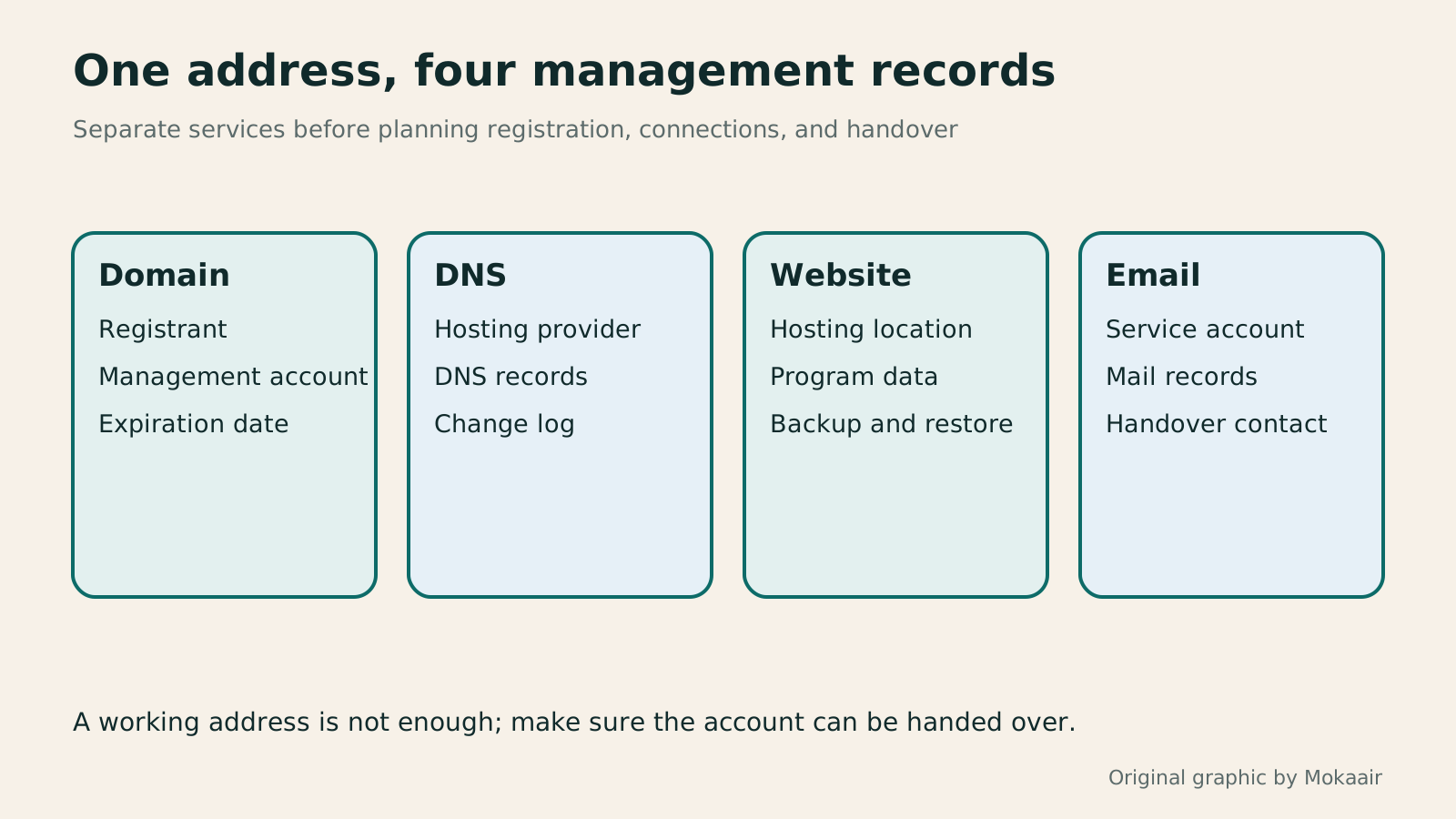
| Item | What it manages | Confirm at handover |
|---|---|---|
| Domain registration | Name and registration period | Registrant, account, expiration date |
| DNS hosting | Website and mail resolution records | Current host and record backup |
| Website hosting | Software, files, and database | Sign-in, backup, and restore method |
| Mailboxes and mail service | Accounts, capacity, and migration plan |
How to check DNS settings: A, CNAME, and mail records
What happens when a domain or hosting expires: renewal and suspension checklistWhat happens when a domain or hosting expires: a checklist before renewal or shutdownDomains, hosting and email can expire separately, with different effects if unpaid. Check orders, expiry details and admin access before renewal, recovery eligibility after expiry, and data to save before closing or moving a site. Build a checklist in time order; manage the domain, site backups, email and external accounts separately. Avoid cancelling a service only to lose verification emails, or keeping a content export without images and site settings.Read the full article
Lifestyle
Changing domain registrars: transfer locks, authorization codes and keeping DNS working
Moving a domain to another registrar changes who manages its registration; it does not automatically move your website or email. This guide covers eligibility, common locks, authorization codes and the application process. DNS, nameserver and email checks help users in Taiwan hand over domains such as .com, while reminding them to check the separate rules for .tw and other extensions.
Lifestyle
Comparing WordPress hosting: assess providers with one requirements worksheet
To compare WordPress hosting, align site content, service responsibilities and billing periods before interpreting plan differences. This guide offers a worksheet and verification process, separates official specifications from your own measurements and unresolved conditions, and covers renewal, backups, support and exit costs. It is for users in Taiwan choosing their first host or considering a different provider, without ranking services by a single speed test or promotional monthly price.
Lifestyle
Setting up a Namecheap domain: connecting it to a website and email after registration
After buying a Namecheap domain, identify its DNS manager to connect your website and email. Official documentation explains Nameservers, Advanced DNS and Mail Settings, with two routes: change nameservers or keep the current DNS. This guide provides preparation checks, step-by-step verification and fault-reporting details for people using different domain, hosting and email providers, helping prevent accidental deletion of existing email records while bringing a website online.
Lifestyle
Managing a Gandi domain: registration, DNS and renewal checks
Gandi keeps registration, DNS, email and renewal settings in separate places. Based on current official documentation, this guide covers post-purchase checks, LiveDNS records, backups, transfers and what the 2026 Classic DNS migration means for existing users. Check your own account and build a domain register others can take over, avoiding outdated tutorial nameservers and the assumption that paying means your website and email are fully configured.
Articles that cite this one
- Building a website with HostGator: installation, domain connection and handover
- Changing domain registrars: transfer locks, authorization codes and keeping DNS working
- Setting up a Namecheap domain: connecting it to a website and email after registration
- What happens when a domain or hosting expires: a checklist before renewal or shutdown
Latest travel guides

GuideTokyo
Where to Stay in Tokyo: Comparing Shinjuku, Ueno, Tokyo Station, Shibuya, Asakusa, Ikebukuro, and Ginza, Plus Airport Access, Accommodation Tax, and Luggage Delivery
Where should you stay in Tokyo? Compare Shinjuku, Ueno, Tokyo Station, Shibuya, Asakusa, Ikebukuro, and Ginza by the same criteria: access from Narita and Haneda, transit routes, nearby attractions, neighborhood character, and who each area suits. Includes a comparison table, a Yamanote Line diagram, Tokyo’s accommodation tax as verified in 2026/9 (changing to 3% in 2027/4), and Airport TA-Q-BIN luggage shipping rules.
- Budget
- Hotels

GuideTokyo
How to Choose Tokyo Transit Passes: Are Suica, Welcome Suica, the Tokyo Subway Ticket, and the JR Pass Worth It?
On a first Tokyo trip, start with an IC card and pay per ride (Welcome Suica has no deposit and is valid for 28 days). If you take four or more subway rides in a day, add a 72-hour Tokyo Subway Ticket for 2,000 yen; a JR Pass is never worthwhile if you stay in Tokyo and do not go to Kansai. See what TOURIST PASMO, Suica on iPhone, and the Tokyo Metro day pass do and do not cover, with a decision chart. Prices verified in September 2026.
- Transport
- Budget

GuideTokyo
Tokyo Disneyland and DisneySea Guide: Ticket Prices, Fantasy Springs, Disney Premier Access (DPA), Standby Pass, and Which Park to Choose for Your First Visit
Tokyo Disney one-day Passport prices vary: most weekdays in 9/2026 cost ¥9,900 and weekends ¥10,900. At 14:00 daily, tickets go on sale for the same date two months later. Free Priority Pass is no longer on the official service list; only paid Disney Premier Access (¥1,000–3,500 per person per use) shortens waits. Covers hours, the 25th anniversary, Standby Pass, Entry Request, Fantasy Springs access and first-visit park choice; checked on the official site in 9/2026.
- Itineraries
- Family
Sources
- ICANN: Domain name registration process and roles · Checked:
- ICANN: Guidance for managing a domain name · Checked:
- ICANN: Domain renewal and expiration FAQs · Checked: