Lifestyle
How to Use Sass and SCSS: Variables, Modules and Compilation
Sass organizes shared styles, but browsers use compiled CSS. Using an original board-game event site, this guide distinguishes SCSS from indented syntax and Sass variables from CSS custom properties, then covers entry files, @use, @forward, watch compilation and output checks. It includes steps, a comparison table and original diagrams, plus notes on Node Sass end of life, legacy @import migration and source maps, to avoid editing output files that get overwritten.
About 8 min read
Contents
- 1. Sass is a tool; SCSS is one of its syntaxes
- 2. Check the existing build setup before adding a compiler
- 3. Distinguish compile-time variables from browser variables
- 4. Manage sources with @use and organize exports with @forward
- 5. Watch mode makes editing easier; output still needs verification
- 6. When handling older projects, do more than remove warning messages
As a website accumulates event cards, venue information and registration buttons, shared colors and spacing may become scattered across many files. Sass can organize these settings and reusable rules into modules, but adding a compilation step also means you need to know where the source files are and what generates the CSS.
The filenames and style examples for the board-game event website below are original and based on the official Sass documentation consulted on 2026-9-14. This article teaches a workflow; it does not install packages for readers, change existing projects or claim to have completed actual compilation tests.
Sass is a tool; SCSS is one of its syntaxes
Sass provides two main syntaxes: .scss uses braces and semicolons and is closer to standard CSS, while .sass organizes content through indentation and line breaks. Both are converted by a Sass compiler into CSS that websites can use. Simply changing the extension to .css does not complete the conversion.
Beginners who already know basic CSS can start with SCSS to reduce the burden of learning a new syntax at the same time. When taking over an existing project, check its conventions first; there is no need to rewrite every file just to match your preference. Browsers still lay out content according to CSS selectors, the cascade and the box model. Sass will not correct faulty layout logic for you.
CSS itself now has custom properties and native nesting, so you can no longer justify Sass by saying CSS has no variables or nested rules at all. First consider whether you really need modules, compile-time calculations and shared rules. For pages with only a few styles, maintaining CSS directly may also make handover easier.
Check the existing build setup before adding a compiler
The main official implementation is Dart Sass, which can be installed in several ways; Node.js projects use the sass package. Node Sass was announced as end of life in 2024, so the node-sass package in older tutorials should not be used directly as the starting point for a new project. First check which integration methods your framework and build tools support.
If the project already has Sass dependencies and compilation commands, use its existing entry files and output locations first to avoid starting another compiler that overwrites the same CSS. When adding tools, record the packages and lockfile so collaborators can obtain consistent versions. Do not rely solely on a tool installed globally on one computer without project documentation.
In a practice environment where Sass is correctly installed and the sass command is available, you can run sass styles/game-night.scss public/game-night.css to compile the entry file into the specified output. These filenames are examples for this article. Before running the command, create the source file and confirm that the destination will not overwrite a handwritten file. The website should load the publicly served CSS URL from public, rather than loading SCSS directly.
Distinguish compile-time variables from browser variables
Sass variables begin with $, such as $card-gap: 18px;, and are then used in declarations such as gap: $card-gap;. After compilation, each use becomes the corresponding value. The browser does not retain that Sass variable for JavaScript to change at runtime. Changing it therefore usually requires regenerating the CSS to update the website.
CSS custom properties use names such as --card-gap and retrieve values with var(--card-gap). They remain in the CSS and participate in browser calculations and inheritance. If you want values to change at runtime according to a theme or a particular container, consider custom properties. Sass variables can also be useful for fixed settings when generating multiple stylesheets.
The two can be used together, but be clear about the stage at which each value is determined. A board-game event page can manage its basic compile-time spacing separately from colors adjusted by the browser according to the theme. Just because both are called variables, do not expect an already open page to change automatically after editing Sass sources without recompiling or updating its resources.
Manage sources with @use and organize exports with @forward
You can put shared settings in styles/_tokens.scss, then write @use 'tokens'; at the beginning of styles/game-night.scss. If the module defines $card-gap, access it with tokens.$card-gap so readers can see where the value comes from. A partial whose filename begins with an underscore is a fragment loaded by other files and is generally not used as a standalone output entry point.
Members loaded through @use are visible only in that stylesheet. Other modules that need the same settings must load them themselves. Styles generated by the same module are included only once in a single compilation. This does not mean that CSS generated from all entry files will never contain duplicate rules when combined on a website; you still need to inspect the actual output and how it is loaded.
As the number of modules grows, @forward can organize public variables, functions or mixins into one external entry point. It does not automatically make forwarded members directly available in the current file; add @use when you need to use them. Keep clear namespaces initially, rather than rushing to put every name into the same scope with as *.
Watch mode makes editing easier; output still needs verification
For practice, you can use sass --watch styles/game-night.scss public/game-night.css to recompile after source changes. This command updates files; it does not start a website server or refresh the browser for you. After changing a shared partial, confirm that it is covered by watch mode and that the terminal reports no errors.
Dart Sass's expanded output is easier to read. --style=compressed reduces extra characters and suits workflows that require compressed output, but it does not guarantee that the styles are optimized or compatible. Deeply nested selectors and mixins expanded repeatedly in large quantities can also produce CSS that is difficult to maintain, so inspect the output directly.
The command line generates source maps by default to help trace compiled rules back to their sources. Decide which mapping information to make publicly available according to the project. If you need to disable map generation, look into --no-source-map. Do not put confidential information in styles, comments or embedded sources, and do not simply delete map files while leaving broken mapping links behind.
- Check the project's existing Sass version, commands, entry files and CSS loading locations.
- Create a small SCSS entry file and shared settings, referencing them explicitly with @use.
- Compile once, then start watch mode and confirm that changes generate the correct CSS.
- Check warnings, selectors, actual pages and handover files, and record items still needing migration.
When handling older projects, do more than remove warning messages
Sass's @import and some global built-in functions have been deprecated since Dart Sass 1.80.0. This is separate from native browser CSS @import and does not mean that all older Sass sources were completely unable to compile as of the verification date. Plan migration according to the actual version and dependencies.
The official Sass migrator helps convert code to modules, but you still need to check source order, namespaces, configuration methods and output differences. First preserve a restorable version and work on a copy or separate branch. If the issue comes from a third-party package, check its update status. Suppressing warnings does not mean compatibility issues have been fixed.
During verification, check more than successful compilation: confirm that the website loads the new CSS, that long text and narrow screens have not regressed, and that shared settings affect only the intended components. Make routine fixes in the SCSS sources to avoid losing manual edits to generated files during the next compilation. Handover should include sources, dependency versions, build commands and output locations so others can reproduce the same result.
Read the full description
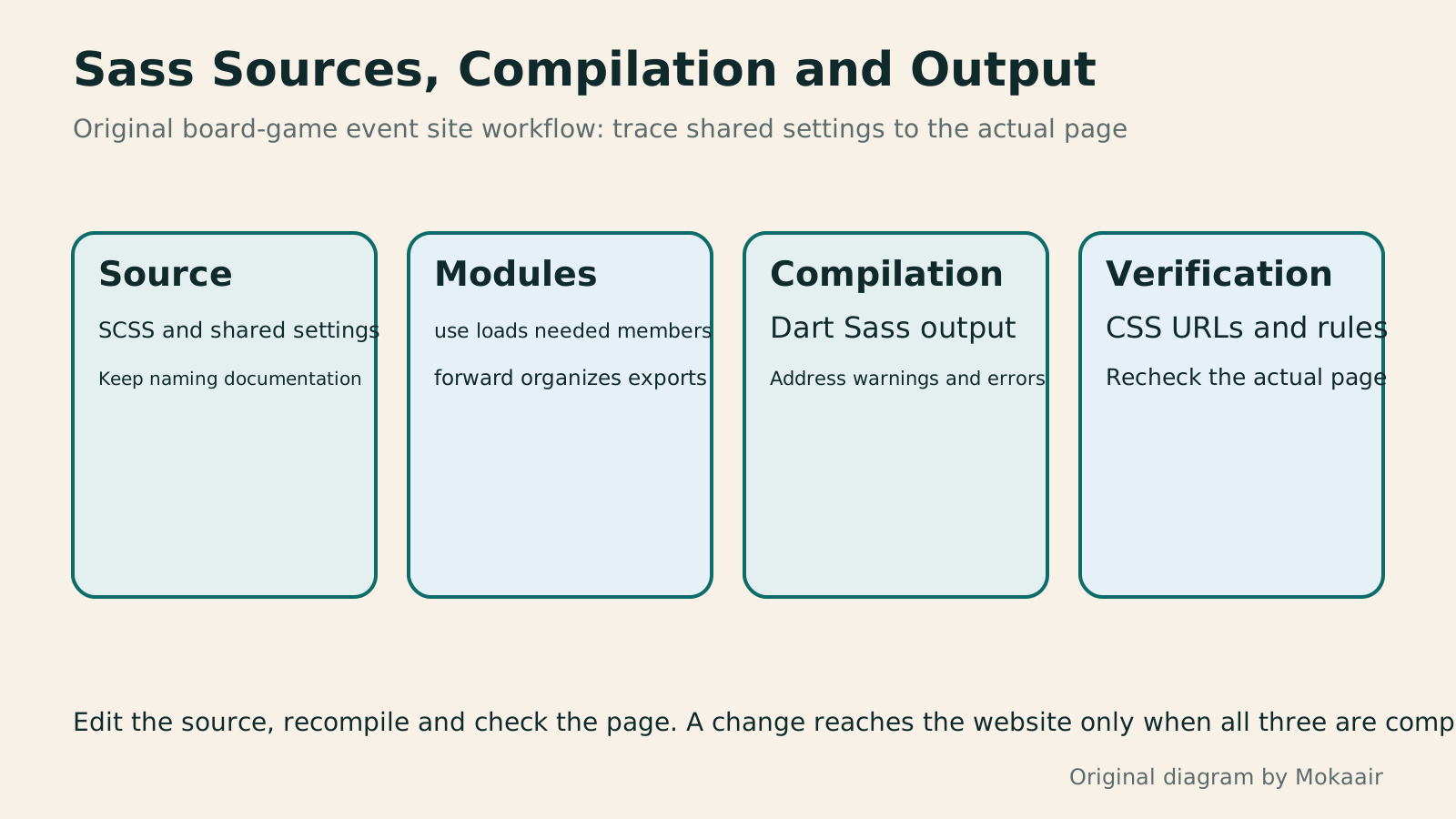
Four cards explain SCSS sources, module loading, Dart Sass compilation and CSS page checks, reminding you to make routine changes in the source files.
| Item | Stage | What to check |
|---|---|---|
| .scss / .sass | Writing source files | Different syntaxes for Sass |
| Sass $variables | Compile time | Regenerate output after changes |
| CSS --custom properties | Browser calculations | Use of var() and applicable scope |
| @use | Loading Sass modules | Explicit namespaces and sources |
| @forward | Organizing a module's public entry point | Does not automatically make members usable in the current file |
| CSS and source maps | Compilation output and debugging | Website URLs and publicly exposed information |
First understand CSS selectors and the box modelCSS Basics: Selectors, the Box Model, and LayoutCSS beginners often find styles fail to apply, cards are wider than expected, or longer text overlaps. Using an original workshop event card, this article starts with reading selectors and declarations, explains how content, padding, border, margin, and box-sizing relate, and outlines uses for normal flow, Flexbox, and Grid. Width calculations, steps, a comparison table, and original diagrams help you build layout exercises to check in a browser.Read the full article
Check content arrangement in responsive layoutsResponsive and Adaptive Websites: Planning Layouts for Mobile ReadingA website opening on a phone does not ensure small-screen readability. Using an original community course signup page, this article compares responsive and adaptive layouts, content-based breakpoints, and images, forms and navigation at different widths. Steps, a comparison table and original diagrams cover zoom, orientation, keyboard and real-device acceptance checks, helping readers discuss usable pages across devices with designers or developers.Read the full article
Organize the workflow from website design to deliveryHow to Start a Web Design Project: Requirements, Content, and Acceptance Testing in OrderBuilding your first website often stalls over unclear requirements, content, and acceptance criteria, rather than colors. Using an original neighborhood repair studio example, this guide covers user interviews, content preparation, prototyping, development, and handover, with deliverables for each stage. Steps, a comparison table, learning resources, and original diagrams help readers building or commissioning a site turn “Is it finished?” into tasks they can verify.Read the full article
Found this guide helpful? Share it with someone who needs it
Lifestyle
www, Subdomains, and Subdirectories: Choosing a Website URL Structure
Whether to use www or put a blog at blog.example.com or example.com/blog/ depends on platform support and maintenance. This article explains hostnames and paths, then compares content roles, DNS settings, HTTPS certificates, and URL consistency for subdomains and subdirectories. An original decision table and launch checklist help small websites in Taiwan build URL structures that are easy to use, manage, and hand over.
Lifestyle
Before Hiring a Web Design Agency: The Brief, Quotes and Deliverables Checklist
Before hiring a web design agency, define your site's audience, key actions and deliverables so you can compare quotes. Using a small studio as an example, this guide covers page and template counts, content duties, feature specs, mobile and accessibility checks, account and source-file handover, and post-launch maintenance terms. An editable requirements checklist helps reduce extra costs and communication gaps; no agency recommendations are included.
Lifestyle
How to Start a Web Design Project: Requirements, Content, and Acceptance Testing in Order
Building your first website often stalls over unclear requirements, content, and acceptance criteria, rather than colors. Using an original neighborhood repair studio example, this guide covers user interviews, content preparation, prototyping, development, and handover, with deliverables for each stage. Steps, a comparison table, learning resources, and original diagrams help readers building or commissioning a site turn “Is it finished?” into tasks they can verify.
Lifestyle
Website Caching and CDNs: Which Layer to Clear When Updates Do Not Appear
A website may be updated while phones still show old content because caches remain in different places. Using a Taiwan studio's business-hours update, this article explains browser, WordPress/hosting and CDN roles, cache responses, expiry times and targeted purging. An ordered procedure, comparison table and original diagram help site managers trace old versions while keeping account and shopping workflows correct.
Sources
- Sass: BasicsChecked:
- Sass: InstallationChecked:
- Sass: VariablesChecked:
- Sass: @useChecked:
- Sass: @forwardChecked:
- Sass: Dart Sass CLIChecked:
- Sass: Deprecation of @import and Global FunctionsChecked:
- Sass: Node Sass End of LifeChecked:
- MDN: CSS nestingChecked:
Compiled from the references and verification dates listed above; fares, schedules, product features, and terms can change, so please confirm the latest details on the relevant official website before travelling, booking, or purchasing.