Lifestyle
Lottie Web Animations: Loading, Controls and Reduced Motion
Lottie adds controllable vector animations to web pages, but formats, players and interaction states need joint design. Using an original projector loan application page, this article covers Lottie JSON versus dotLottie, loading, playback control, performance checks, reduced motion and static fallbacks. Steps, a comparison table and original diagrams help check that the page stays usable if animation fails and prevent treating a finished animation as a successful application.
About 8 min read
Contents
- 1. First Distinguish Animation Data from Playback Tools
- 2. Build a Loading Flow with Static Results
- 3. Playing, Pausing and Destroying Are Different Actions
- 4. Assess Performance Together with the Player and Resources
- 5. Respect Reduced-Motion Preferences and Keep Reading Controllable
- 6. Retain Asset Licenses and Handover Specifications Together
A checkmark animation appearing after an application form is submitted can help readers notice a status change. But if the server has not yet confirmed success, that checkmark can cause confusion. Before adding Lottie, decide what the animation communicates and whether users can still understand the result without it.
The following explanation uses an original projector loan application page. The documentation was checked on 2026-9-14. No player was deployed, animation exported or real-phone performance measured for this article. The examples provide design and acceptance-testing methods for readers to carry out, and all illustrations are our own drawings.
First Distinguish Animation Data from Playback Tools
Lottie JSON uses data to describe animation elements and motion, and may include image-related data. It is not a conventional video, and placing JSON in a web page does not make it play automatically. The site also needs a compatible player to parse the content and render it. Exports from design software must also be checked in the player actually selected.
dotLottie's .lottie is a compressed container that can package one or more animations and related resources, and supports content such as themes and state machines. It is not simply JSON with a different file extension. If a website plugin only accepts Lottie JSON, do not assume it can also read .lottie; check the plugin's and player's current support.
airbnb's lottie-web offers rendering options including SVG and Canvas; LottieFiles' dotlottie-web can render .lottie and Lottie JSON in a browser. The two tools have different settings, methods and dependencies, so avoid copying half the code from one tutorial and half from another and stitching them together. First settle on a tool and version.
Build a Loading Flow with Static Results
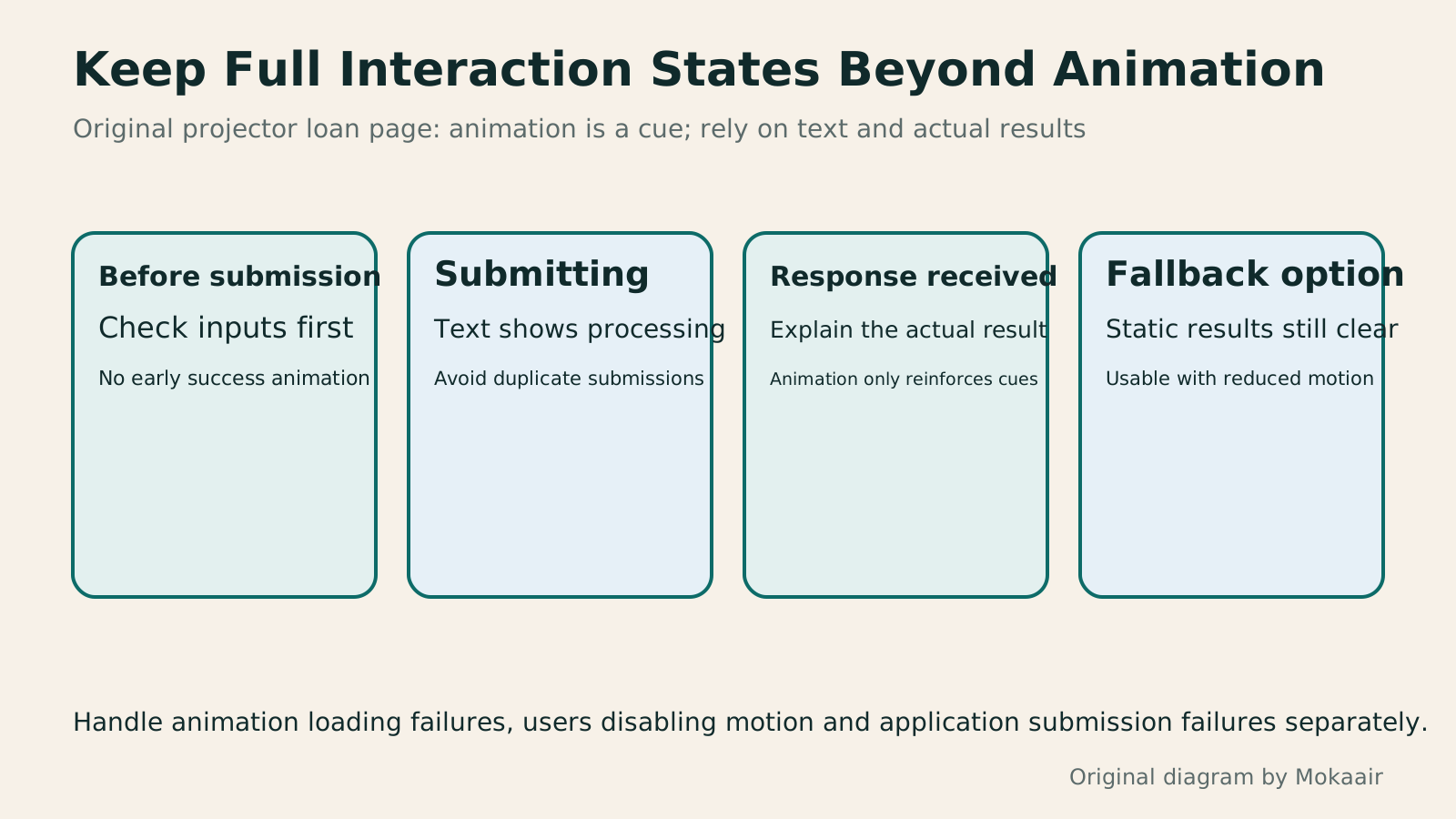
The original loan application page can retain text states: Not submitted, Submitting, Application received and Submission failed. Animation only helps emphasize a state and cannot be its sole explanation. Show the confirmation animation only after receiving a successful response. If review is pending, the text should still say Application received, rather than Equipment reserved or Loan approved.
During design, reserve the container's aspect ratio and available dimensions so the animation does not push buttons out of place after loading. Prepare a static checkmark or brief text as a fallback. If the data file, external images or player fail to load, the application result and next steps should still appear. Handle animation failure and application failure separately.
lottie-web's loadAnimation uses settings such as the container, renderer, loop, autoplay and path. If you provide animationData directly, do not also provide path. For the first integration, turn off autoplay and looping. Once the file and dimensions are confirmed to work, trigger a single playback from the actual interaction state, avoiding a success message as soon as the page loads.
Playing, Pausing and Destroying Are Different Actions
Players usually provide play and pause methods, but their details must be checked for each tool. For example, dotLottie's pause stays at the current position, while stop returns to the starting frame. freeze stops rendering updates and is not equivalent to changing the playback state. A pause button offered to users should use control behavior that matches their expectations.
A completion animation can remain on a clear result frame, or fade out while leaving the text visible. Do not treat the complete event as meaning that the server operation has finished; it only means the animation timeline has reached its end. Resubmitting an application, retrying a network request and replaying an animation should not be tied to the same button action.
When switching views in a single-page application or removing a component, destroy the instance using the player's method and clear event listeners. Merely hiding the container does not necessarily stop updates or release resources. If a page has multiple animations, keep each instance separately and avoid using page-wide control methods that could accidentally stop other content.
Assess Performance Together with the Player and Resources
When comparing loading overhead, count not only the animation file size but also the player code, external images and related runtime resources. dotlottie-web uses a WASM engine, which must also be ready for the first render. A very small animation file alone does not justify claiming that the entire page is necessarily lighter than images or video. Actual results depend on the content and how it is used.
For decorative animations lower down the page, you can defer loading until they approach the viewport and stop unnecessary rendering once they leave it. If the tool supports adjusting canvas resolution or frame interpolation, balance these according to actual sharpness and smoothness. Address the causes of stuttering first; there is no need to enable every performance option at once.
Use browser developer tools to inspect network requests and performance, then check scrolling, input and view-switching responsiveness on the target phone. Record the device, network conditions, animation count and settings so you can compare before and after adjustments. Without these measurements, describe changes as proposed improvements awaiting verification, rather than claiming a specific percentage or amount of battery power saved.
- Define the animation's purpose, and first establish text states and static fallbacks for failures.
- Confirm the animation format, player version, resource URLs and asset usage rights.
- Control playback using the correct application state, add pause controls and clean up on removal.
- Test reduced motion, keyboard operation, slow loading and responsiveness on target devices.
Respect Reduced-Motion Preferences and Keep Reading Controllable
prefers-reduced-motion can detect a user's preference to reduce nonessential motion. CSS animations can be adjusted through a media query. For JavaScript players, read the preference through matchMedia and choose to disable autoplay or use a static image. Also account for users changing the setting after opening the page.
Simply turning off CSS animation does not guarantee that SVG or Canvas updated by JavaScript also stops. Explicitly control the player and check the actual display after switching the setting. Automatically switching to slow, large swaying movements may also miss the purpose of reduced motion. Alternatives should preserve essential information and reduce unnecessary movement.
WCAG 2.2's Pause, Stop, Hide criterion generally requires controls for moving information that starts automatically, lasts more than 5 seconds and appears alongside other content, with exceptions for essential activities. This does not mean every animation under 5 seconds automatically complies. Automatically updating content, flashing, keyboard access and alternative information each have their own checks.
Retain Asset Licenses and Handover Specifications Together
When downloading an animation from an asset library, save the author, work link, applicable license and acquisition date, and check the conditions for commercial use, modification and redistribution. The player's open-source license does not automatically cover the animation author's work. An animation being free to download also does not mean that rights to its brands, fonts or people have all been secured.
Informational animations should have corresponding text alongside them. For purely decorative content, avoid having assistive tools repeatedly read meaningless details. Give control buttons clear names and keyboard support, and make the paused state recognizable. An SVG title or description can help describe content, but cannot replace validation of the entire page's semantics and interactions.
For handover, list the animation file, static fallback, player version, trigger conditions, stopping point and items awaiting confirmation. Acceptance testing for the loan application page focuses on whether users can understand the application state and continue interacting; successful animation playback is only one check. If animation adds waiting or interference, reduce its use and retain the parts that most help understanding.
Read the full description
Four cards cover pre-submission, submission in progress, a received response and motion alternatives, showing that animation failures must not override the actual application status.
| Item | Behavior to Verify | Cannot Be Assumed |
|---|---|---|
| Lottie JSON | The player can parse the animation data | All design effects render identically |
| .lottie container | The tool supports the container format and its content | Changing the file extension converts it |
| complete event | The animation timeline has ended | The server has confirmed the application |
| Reduced-motion preference | The player uses an appropriate fallback | Disabling CSS animations is enough |
| Pausing and cleanup | Control playback and release unused instances | Hiding the container stops computation |
| File size | Total the sizes of the player and required resources | A small animation file is always faster |
Check the CSS layout and container dimensionsCSS Basics: Selectors, the Box Model, and LayoutCSS beginners often find styles fail to apply, cards are wider than expected, or longer text overlaps. Using an original workshop event card, this article starts with reading selectors and declarations, explains how content, padding, border, margin, and box-sizing relate, and outlines uses for normal flow, Flexbox, and Grid. Width calculations, steps, a comparison table, and original diagrams help you build layout exercises to check in a browser.Read the full article
Compare image formats and page loading requirementsChoosing WebP, JPEG or PNG: Let Content Guide Format and CompressionSmaller files take more than lower image quality: check content, transparency, display size and platform support first. With an original cooking-notes page, this article compares WebP, JPEG, PNG and SVG, explains pixel dimensions versus file size, and covers saving originals, exporting candidates and checking images served by the site. A comparison table, steps and original diagrams help preserve text and ingredient detail without a fixed compression ratio or quality value for all images.Read the full article
Organize asset sources and license records
Found this guide helpful? Share it with someone who needs it
Lifestyle
www, Subdomains, and Subdirectories: Choosing a Website URL Structure
Whether to use www or put a blog at blog.example.com or example.com/blog/ depends on platform support and maintenance. This article explains hostnames and paths, then compares content roles, DNS settings, HTTPS certificates, and URL consistency for subdomains and subdirectories. An original decision table and launch checklist help small websites in Taiwan build URL structures that are easy to use, manage, and hand over.
Lifestyle
Before Hiring a Web Design Agency: The Brief, Quotes and Deliverables Checklist
Before hiring a web design agency, define your site's audience, key actions and deliverables so you can compare quotes. Using a small studio as an example, this guide covers page and template counts, content duties, feature specs, mobile and accessibility checks, account and source-file handover, and post-launch maintenance terms. An editable requirements checklist helps reduce extra costs and communication gaps; no agency recommendations are included.
Lifestyle
How to Start a Web Design Project: Requirements, Content, and Acceptance Testing in Order
Building your first website often stalls over unclear requirements, content, and acceptance criteria, rather than colors. Using an original neighborhood repair studio example, this guide covers user interviews, content preparation, prototyping, development, and handover, with deliverables for each stage. Steps, a comparison table, learning resources, and original diagrams help readers building or commissioning a site turn “Is it finished?” into tasks they can verify.
Lifestyle
Website Caching and CDNs: Which Layer to Clear When Updates Do Not Appear
A website may be updated while phones still show old content because caches remain in different places. Using a Taiwan studio's business-hours update, this article explains browser, WordPress/hosting and CDN roles, cache responses, expiry times and targeted purging. An ordered procedure, comparison table and original diagram help site managers trace old versions while keeping account and shopping workflows correct.
Sources
- airbnb: lottie-web Usage and Control DocumentationChecked:
- LottieFiles: Format ComparisonChecked:
- LottieFiles: JavaScript PlayerChecked:
- LottieFiles: Playback ControlsChecked:
- LottieFiles: Performance and Resource CleanupChecked:
- MDN: prefers-reduced-motionChecked:
- MDN: matchMediaChecked:
- W3C: Understanding SC 2.2.2Checked:
Compiled from the references and verification dates listed above; fares, schedules, product features, and terms can change, so please confirm the latest details on the relevant official website before travelling, booking, or purchasing.