Lifestyle
Starting a newsletter: consent, content, and delivery metrics
Before sending a newsletter, establish why readers subscribed, where addresses came from, and whether people can leave easily. Using an original neighborhood-walking group as an example, this guide covers the content promise, signup confirmation, sender verification, tool selection, and interpreting results after a send. It distinguishes opens, clicks, and completed event registrations. Steps, a comparison table, and an original diagram help small teams run a newsletter they can maintain.
About 7 min read
Contents
- 1. Write a subscription promise readers can understand
- 2. Separate list sources before deciding who may receive mail
- 3. Test the complete lifecycle before choosing a tool
- 4. Check sender identity and content together
- 5. An opt-out must stop the next marketing message
- 6. Keep metric denominators and observation windows consistent
At each event, people give a neighborhood-walking group their email addresses. They may want meeting details, ask about lost property, or request the next route. Putting those addresses in one spreadsheet does not mean everyone expects a monthly promotional message. Establish a clear subscription relationship first.
This original walking-group example draws on official legal, Gmail sender, and email-tool documentation checked on September 14, 2026. It explains planning and acceptance checks. We did not import a list or send mail, and no platform is claimed to guarantee inbox placement.
Write a subscription promise readers can understand
Answer who the newsletter serves, what they will receive, how often, and who sends it. The sample group could promise one self-guided neighborhood route each month plus upcoming event information. That is clearer than simply saying latest offers and helps editors decide whether an ad hoc partner promotion exceeds what readers expected.
When planning the first quarter, list route topics, facts to verify, photo rights, and owners before selecting send dates. If every issue needs volunteers to photograph a place, do not promise daily email. Completing one useful issue consistently is easier to maintain than a dense schedule filled at the last minute.
The promise should also explain data use. Article 8 of Taiwan's Personal Data Protection Act specifies notice items and exceptions at collection. For planning, identify the collector, purpose, data categories, use, individual rights, and consequences of not providing data, then check what applies. An unclear checkbox does not show that readers understood every use.
Separate list sources before deciding who may receive mail
Keep source records that answer where an address was collected, what notice was shown, its subscription status, and when the person made a choice. This guide uses explicit opt-in: event logistics, support inquiries, and newsletters are handled separately. Do not add purchased lists, exchanged business cards, or addresses on public websites directly to recipients.
Collect only what is needed to send the newsletter, such as email and optional topic preferences. National ID numbers and home addresses are usually unnecessary; extra fields need a clear purpose. If volunteers handle data, restrict access and discourage private-device downloads so an opt-out does not update only one copy.
Double opt-in verifies an address through an email after form submission, reducing typos and misuse. It is not a claim that the law always requires that single method, and it does not replace collection notice. With a plugin or API, check that this specific entry point really requires confirmation; a setting enabled in the main platform may not govern every source.
Test the complete lifecycle before choosing a tool
Compare forms, segmentation, confirmation messages, unsubscribe handling, permissions, data export, and pricing. Monthly send volume is only one factor. Check how contacts are billed, how inactive contacts count, what happens above limits, and whether planned automations are included. Do not reuse old free-plan figures.
If the initial goal is a regular route update, use a newsletter service that manages subscription status and complete the basic flow. If you need topic-based lesson sequences, evaluate automation. If the website already has a form, compare plugin and embedded data flows. Blind carbon copy from a general mailbox lacks complete signup and opt-out management and does not satisfy these checks.
Use a few addresses you control to test signup, confirmation, receipt, opt-out, and reimport. Record which system changes at each step. A success label in a tool does not prove the recipient confirmed or entered the right segment. Conversely, a page that has not refreshed immediately does not prove data was lost.
Check sender identity and content together
Use a sender name readers recognize and monitor the reply address. If the sending service requires domain authentication, ask the domain owner to add the records the service specifies, then verify the result. SPF, DKIM, and DMARC serve different purposes. Do not copy another brand's records or promise that authentication always avoids spam folders.
Gmail has authentication and sending requirements for mail to personal Gmail accounts, with additional conditions for bulk senders. Its subscription guidance also calls for easy opt-out, address confirmation, and separation of subscription from transactional messages. These are rules of a particular receiving service, not one universal threshold for every mailbox.
Review whether the subject matches the body, mobile text is legible, the message makes sense without images, primary buttons lead to the correct page, and sender identity and opt-out access appear in the footer. If an original route map carries essential details, include a text summary so readers need not enlarge one image to find meeting conditions.
An opt-out must stop the next marketing message
Article 20 of Taiwan's Personal Data Protection Act says a non-government agency using personal data for marketing must stop after the individual objects; the first marketing contact must provide a way to object at the agency's expense. Make opt-out easy, without requiring login, an explanation, or multiple support contacts. Do not treat Gmail's processing time limit as a grace period for continued marketing in Taiwan.
The sample group can maintain opt-out status in the sending tool and apply an exclusion rule before every import or sync. Deleting an address from one spreadsheet alone risks adding it back when a volunteer imports an older event list. Keep any necessary suppression record for a defined purpose with access controls, and handle deletion requests under applicable requirements; no record should be described as inherently necessary forever.
Reimport an old list containing an unsubscribed test address and verify it does not regain marketing-recipient status. Manage essential notices, such as event cancellation, for their original purpose; do not insert promotions into transactional notices to evade opt-outs. If someone subscribes again, record the new choice and confirmation instead of staff guessing their wishes.
Keep metric denominators and observation windows consistent
First check whether sending completed and whether bounces or complaints are unusual, then inspect engagement. Mailchimp defines click rate as the share of delivered emails with at least one recorded click; total clicks may count repeated actions by one person. Verify definitions before comparing tools instead of ranking similar-looking percentages together.
Suppose the sample group delivers 400 messages and 20 recipients have at least one recorded click. Under that definition the click rate is 5%. A registration system separately confirms that 6 people completed event signup. Those are different stages: 20 interactions are not 20 registrations. The figures illustrate arithmetic; no mailing occurred.
Apple Mail Privacy Protection may preload remote content, and security scanners may generate automated clicks. Inspect each tool's filtering settings when interpreting opens and clicks. No recorded open does not prove nobody read a message; a recorded open does not prove attentive reading. Improve one concrete issue per send while monitoring opt-outs and actual registrations, not only the open rate.
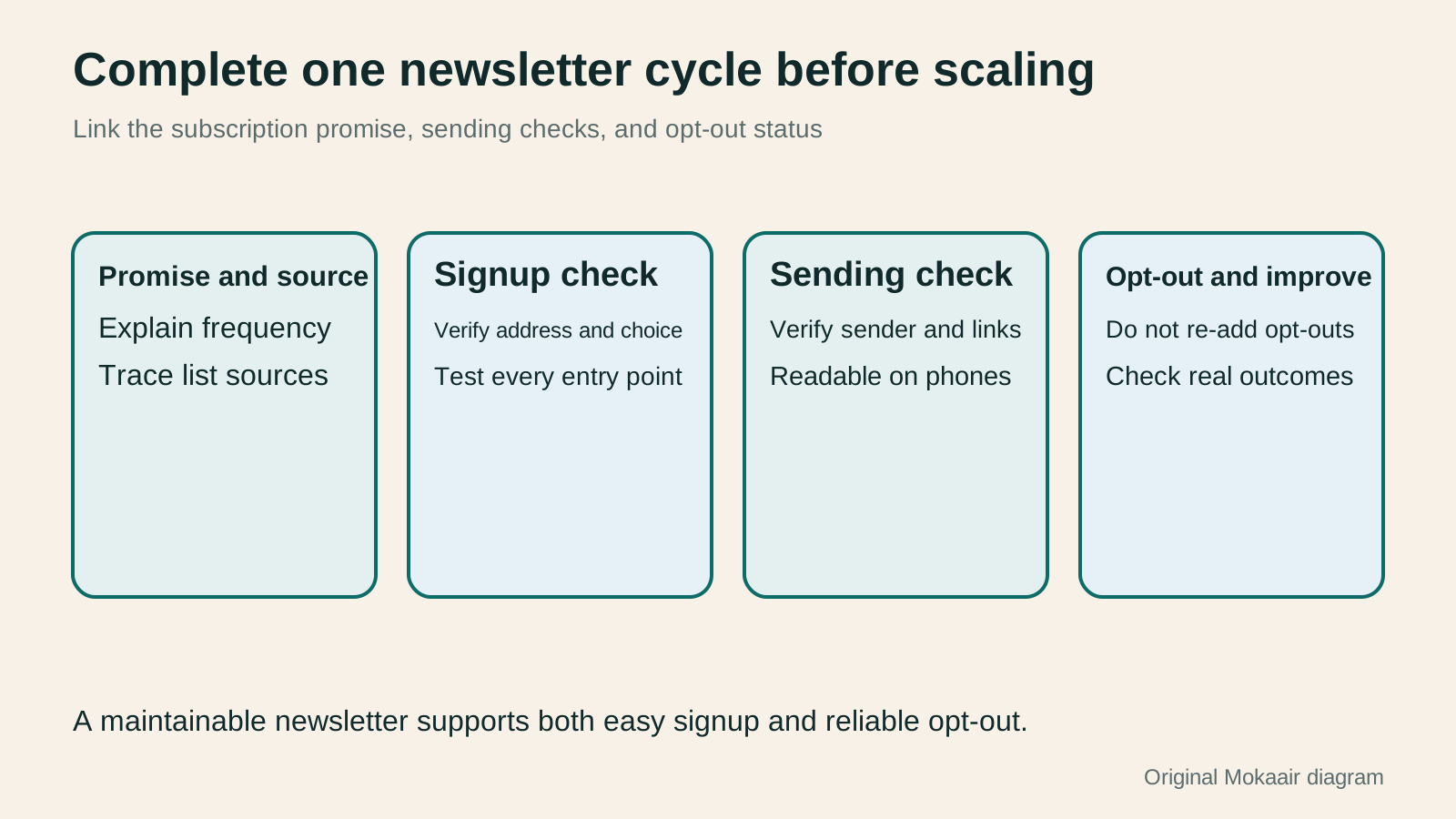
- Write the reader promise, data explanation, and content responsibilities; plan topics you can deliver.
- Record signup sources and test address confirmation and segments.
- Verify the sender domain, message layout, links, and exclusion after opt-out.
- Fix metric definitions and inspect delivery, engagement, opt-outs, and completed actions separately.
| Need | Check when choosing a tool | Acceptance test |
|---|---|---|
| Regular content newsletter | Subscription status and schedule | A test address can confirm and unsubscribe |
| Different content by interest | Segment criteria and duplicate-send control | Check whether someone in two groups gets two messages |
| Existing website form | Field mapping and sync direction | Platform status is correct after form submission |
| Lesson sequence or welcome email | Trigger, pause, and exit conditions | Automation stops after unsubscribe |
| Changing service | Export of content and suppression status | Old opt-out choices still apply after migration |
| Comparing send performance | Metric denominator and bot filtering | Compare the same scope and check the real action |
Planning a Content Marketing Calendar Around Reader Questions and UpdatesPlanning a Content Marketing Calendar Around Reader Questions and UpdatesA content marketing calendar does more than assign publication dates to headlines. It also schedules reader questions, asset production, fact-checking and ownership of updates. Using a fictional fabric shop, this guide turns customer-service questions into an idea bank and plans articles, diagrams and short posts together. A four-week schedule, production steps and an original diagram show how to allow time for review and maintenance, then test whether each piece helps readers complete a task.Read the full article
Use consistent UTM tags for newsletter traffic
Tie measurement to actions that were completed
Found this guide helpful? Share it with someone who needs it
Lifestyle
How to Read the BCG Matrix: Uses and Limits of Product Portfolio Analysis
The BCG matrix maps product portfolios by market growth and relative share; stars, cash cows, question marks and dogs do not establish actual profit. An original home goods store example shows how to define markets, check comparison periods and denominators, understand model assumptions, and allocate resources using costs, turnover and customer needs. Includes a four-category table, practical steps, original diagrams and options when reliable market data is lacking.
Lifestyle
How to Use the Ansoff Matrix: Four Options for Expanding Products and Markets
The Ansoff matrix maps four growth paths using existing or new products and markets: market penetration, market development, product development and diversification. An original canvas goods studio example shows how to define the current business and compare the capabilities and evidence each path needs. A comparison table, steps and original diagrams turn growth ideas into small, testable plans, without treating the model as a success-rate table.
Lifestyle
How to Write Marketing Copy: Clarify Value, Conditions, and Next Steps
Marketing copy should explain who it suits, its value, conditions, and what happens next. Using an original journal-binding workshop example, this article revises information hierarchy, features and benefits, evidence for claims, and action buttons step by step. A before-and-after table and original diagrams show how to retain appeal without overstating promises, and check that prices, limits, images, and links align before publication.
Lifestyle
Customer Journeys and Marketing Funnels: Find Where Readers Drop Off
Customer journeys explain touchpoints and needs; marketing funnels count people at each step using consistent criteria. Using an original bicycle repair booking example, this article explains how to map online and offline contacts, define completion events, calculate step conversion rates, and set up GA4 open or closed funnels. A calculation table, practical steps, and original diagrams help identify improvement hypotheses to test without mistaking data gaps for causes of customer drop-off.
Articles that cite this one
Sources
- Taiwan Laws & Regulations Database: Personal Data Protection Act, Article 8Checked:
- Taiwan Laws & Regulations Database: Personal Data Protection Act, Article 20Checked:
- Google: Gmail sender guidelinesChecked:
- Google: Subscription email guidelinesChecked:
- Mailchimp: Double opt-inChecked:
- Mailchimp: Definitions of open and click ratesChecked:
- Mailchimp: Bot activity and filteringChecked:
- Apple: Mail Privacy ProtectionChecked:
Compiled from the references and verification dates listed above; fares, schedules, product features, and terms can change, so please confirm the latest details on the relevant official website before travelling, booking, or purchasing.