Lifestyle
Does Your Website Still Need AMP? Compare Maintenance Costs and Reader Experience First
Whether to keep AMP depends on reader experience, features and maintenance resources. This article covers Google Search guidance as of the review date and WordPress AMP plugin compatibility cautions: comparing standard responsive pages for new sites and auditing AMP traffic, URLs and features for existing ones. A comparison table, steps and original diagrams cover keeping, improving or retiring AMP, avoiding plugins installed solely for old SEO claims or broken links after deactivation.
About 8 min read
Contents
- 1. AMP Is a Page Technology, Not Just a Mobile Speed Button
- 2. Separate Old Search Claims from Current Guidance
- 3. First Audit Current URLs, Entry Points and Feature Differences
- 4. For WordPress, Check Maintenance and Compatibility First
- 5. Compare the Costs of Keeping AMP, Improving Standard Pages and Removing AMP
- 6. When Retiring AMP, Keep Old URLs Pointing to the Corresponding Content
Your site's admin panel still has an AMP plugin, but nobody remembers why it was installed. Should you delete it immediately? First check how the site currently serves its content and whether anyone still uses its AMP URLs. Keeping or removing AMP both affect maintenance work; the decision cannot rest solely on whether a technology's name sounds old or new.
For a typical new website, start by getting the responsive layout, images and interactive performance right, then assess whether there is a clear reason to adopt AMP. Existing sites should clearly list reader entry points, feature differences and the retirement process, so the decision is supported by data and followed by complete verification.
AMP Is a Page Technology, Not Just a Mobile Speed Button
AMP uses a defined set of HTML rules and components, and its runtime manages how some resources and layouts behave. It can create content pages and be viewed on both mobile and desktop. Installing a related plugin does not automatically make every site feature compatible; check the generated markup and components.
A site may have one primary version built with AMP, or offer both standard and AMP versions. This affects URLs, content synchronization and how AMP is removed. A path containing amp does not prove a working replacement exists; check the actual pages and their relationship to the primary URL.
For example, reading articles on a site listing craft events may be straightforward, but registration forms, maps, galleries and membership features each have their own requirements. If its AMP version lacks content readers need to complete registration, a lighter load alone cannot count as a complete improvement. Include all essential actions in the comparison.
Separate Old Search Claims from Current Guidance
Google's official 2021 announcement explained that AMP was no longer required for Top Stories. This policy change has a historical context: requirements in early tutorials should not remain a reason to install AMP on a new site. Nor does eligibility guarantee that any article will appear in that placement.
According to Google's AMP guidance reviewed on 2026-9-14, Search still handles AMP using the same standards as other web pages. Structured data must still meet the applicable rules, and special search appearances are not guaranteed. The technical format itself should not be presented as a promise of rankings or traffic.
Write down measurable issues when assessing AMP: whether the main content appears promptly, whether readers can complete their actions, and whether maintenance has a clearly assigned owner. Search features, the AMP specification and support for a particular plugin are separate layers. A change in one does not mean every layer has stopped working or is available without restrictions.
First Audit Current URLs, Entry Points and Feature Differences
List representative URLs for the standard and AMP versions, noting which is the primary version and how they link to each other. If a plugin generates the pages, also record its name, source, version and mode. AMP tools with identical or similar names are not necessarily the same product; their documentation is not interchangeable.
Use the site's existing traffic data and server logs to check whether AMP entry points still receive visits, and examine how users move from articles to their next step. If segmented data is unavailable, mark it as unknown and arrange the necessary monitoring. An administrator rarely seeing AMP does not prove that nobody uses the old URLs.
Compare features across informational articles, event details and registration entry points, checking the body content, images, videos, forms, consent prompts and internal links individually. Google's guidance calls for AMP and its corresponding primary page to have content and available actions that match as closely as possible. Verification must go beyond comparing the first screen of each page.
For WordPress, Check Maintenance and Compatibility First
During this review, the official AMP plugin page on WordPress.org displayed a warning that it had not been tested with the latest three major WordPress releases. This means compatibility and current support need additional confirmation before adoption. It does not itself establish that a vulnerability exists, nor does it mean the AMP specification has stopped working.
The plugin offers modes including Standard, Transitional and Reader, with different arrangements for site versions and themes. Existing sites should first confirm their current mode and features, then check changes on a test copy. A homepage that still opens is no reason to skip article templates or content generated by specific plugins.
The official Site Scan documentation provides guidance on checking themes and plugins for AMP compatibility, and recommends rescanning after changing modes, themes or settings that affect the front end. A scan supplies technical clues; people still need to check reader interactions. Even if removing incompatible markup makes a page pass validation, essential features may have been removed too.
Compare the Costs of Keeping AMP, Improving Standard Pages and Removing AMP
If existing AMP entry points are stable, essential features are complete and someone can maintain them, you can keep AMP for now and establish checks for updates. Set a date to review the decision again. In particular, when adding new forms, tracking or advertising services, confirm that the AMP version can handle them properly too, rather than allowing the two versions to drift apart.
If the main problems are oversized images, heavy scripts or an unstable layout on standard pages, these can also be addressed directly on a standard responsive website. Improve and measure representative pages first, then compare maintenance costs. There is no need to add another page output system just to solve a single image problem.
If tool compatibility is difficult to maintain, the two versions differ substantially in functionality, or staffing is insufficient, you can plan to retire AMP. Compare redesign work hours, ongoing testing, handling of old links, data monitoring and recovery methods. Do not treat the plugin's price as the entire cost, or use the source website's measured rankings to decide for your own site.
- Document the site's current AMP mode, primary URLs and corresponding pages.
- Check actual entry-point data, essential features and tool compatibility, marking anything unknown.
- Use representative pages to compare the work involved in keeping AMP versus improving standard pages, then choose a maintainable approach.
- If retiring AMP, complete replacement pages, URL mappings and a recovery plan first, then verify in batches.
When Retiring AMP, Keep Old URLs Pointing to the Corresponding Content
If the site has both AMP and standard versions and will retain the standard version, Google's removal process includes removing the rel=amphtml link from standard pages and redirecting old AMP URLs to their corresponding non-AMP primary pages. For permanent retirement, configure appropriate permanent redirects for the actual site, preserving the content relationship for each page.
Do not blank out AMP pages or send every old article to the homepage. If AMP was the only primary version, prepare usable standard pages before switching; do not apply the deactivation steps for a site with two versions. When using a CMS or plugin removal method, also check which versions it deletes and whether it handles redirects.
After completion, sample old URLs to check their responses, final destinations, body content and images, then verify primary URLs, internal links, Sitemap and cache. Continue monitoring old entry points and error logs, and retain the change date and recovery method. Search engines need time to reprocess the changes; successful deactivation in the admin panel is one step, not verification of the entire retirement process.
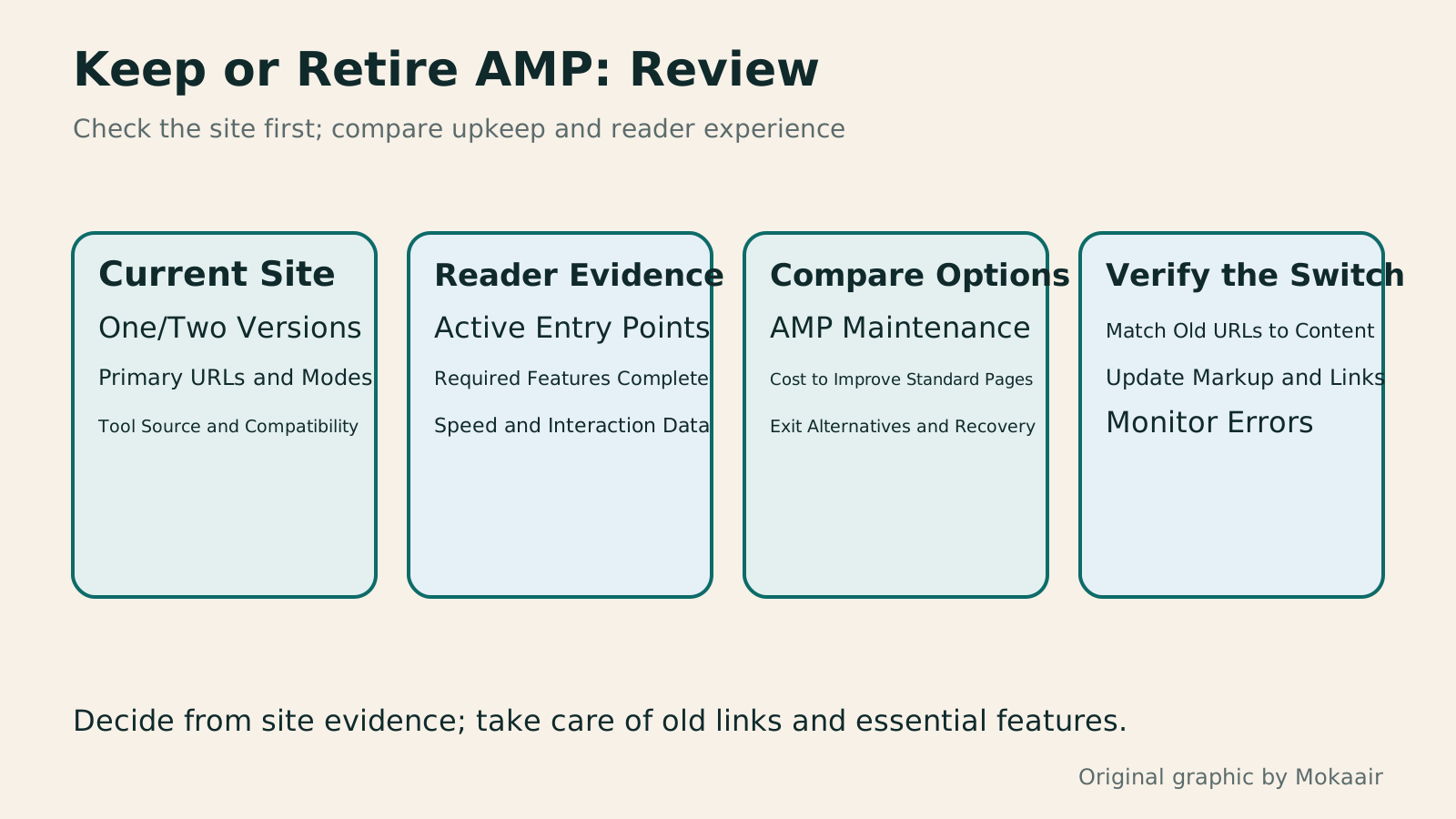
Read the full description
Four steps: audit AMP modes and URLs, review entry-point and feature data, compare keeping AMP with alternatives, and verify URLs and pages.
| Current Situation | Option to Consider | Evidence Needed |
|---|---|---|
| New site with no specific AMP requirements | Build a good standard responsive site first | Feature and performance verification |
| Stable AMP entry points with a maintenance owner | Keep AMP and review regularly | Traffic, feature and compatibility records |
| Clear performance bottlenecks in the standard version | Improve the relevant resources first | Measurements under matching conditions and workload |
| Versions are hard to keep in sync, or support is unclear | Plan consolidation or retirement | Replacement content and URL mappings |
| AMP is the only primary page version | Complete replacement output first | Complete pages and a switch plan |
Plan Permanent Redirects and Verify Old Links
Identify Your Site's Actual Performance BottlenecksHow to Improve Core Web Vitals: Find Bottlenecks in Real User DataWhen Core Web Vitals flags red items, first identify the affected devices, page groups, and user actions. Using a small course website in Taiwan as an example, this article explains the experience issues behind LCP, INP, and CLS, the roles of real user data and lab tests, reproduction records for engineers, and checks after fixes. A comparison table and original diagrams help avoid major site changes based on a single score.Read the full article
Check Primary URLs and Content Versions
Found this guide helpful? Share it with someone who needs it
Lifestyle
www, Subdomains, and Subdirectories: Choosing a Website URL Structure
Whether to use www or put a blog at blog.example.com or example.com/blog/ depends on platform support and maintenance. This article explains hostnames and paths, then compares content roles, DNS settings, HTTPS certificates, and URL consistency for subdomains and subdirectories. An original decision table and launch checklist help small websites in Taiwan build URL structures that are easy to use, manage, and hand over.
Lifestyle
Before Hiring a Web Design Agency: The Brief, Quotes and Deliverables Checklist
Before hiring a web design agency, define your site's audience, key actions and deliverables so you can compare quotes. Using a small studio as an example, this guide covers page and template counts, content duties, feature specs, mobile and accessibility checks, account and source-file handover, and post-launch maintenance terms. An editable requirements checklist helps reduce extra costs and communication gaps; no agency recommendations are included.
Lifestyle
How to Start a Web Design Project: Requirements, Content, and Acceptance Testing in Order
Building your first website often stalls over unclear requirements, content, and acceptance criteria, rather than colors. Using an original neighborhood repair studio example, this guide covers user interviews, content preparation, prototyping, development, and handover, with deliverables for each stage. Steps, a comparison table, learning resources, and original diagrams help readers building or commissioning a site turn “Is it finished?” into tasks they can verify.
Lifestyle
Website Caching and CDNs: Which Layer to Clear When Updates Do Not Appear
A website may be updated while phones still show old content because caches remain in different places. Using a Taiwan studio's business-hours update, this article explains browser, WordPress/hosting and CDN roles, cache responses, expiry times and targeted purging. An ordered procedure, comparison table and original diagram help site managers trace old versions while keeping account and shopping workflows correct.
Sources
- Google Search's Current AMP GuidanceChecked:
- Google's 2021 Announcement on Top Stories and AMPChecked:
- AMP HTML SpecificationChecked:
- Official AMP Plugin on WordPress.orgChecked:
- AMP for WordPress Site ScanChecked:
- Google's Process for Removing AMP and Keeping Standard PagesChecked:
Compiled from the references and verification dates listed above; fares, schedules, product features, and terms can change, so please confirm the latest details on the relevant official website before travelling, booking, or purchasing.