Lifestyle
On-page SEO workflow: From the reader's question to headings and page structure
On-page SEO is more than filling an SEO plugin with keywords. A useful article gives readers a consistent path from the search result to their next action. Using a family photo-organizing tutorial, this guide defines the reader's task, orders the steps, adds comparisons and exceptions, and checks WordPress headings, the URL, summaries, images, and links. It finishes with a real reading test and an update record instead of treating a plugin score as proof of quality.
About 8 min read
When you hand an article to a reader, they should quickly see whether it answers their question, what they need to prepare, and what they will accomplish. On-page SEO connects that reading path to the entry point in search.
Suppose you are writing about organizing family photos. One person wants to free space on a phone, another wants to preserve years of pictures, and another needs a shared family filing system. Each goal calls for a different process. Choose the one task this page will handle before writing its title, sections, and instructions.
Define the task this page will complete in one sentence
Write down who is in what situation and what they can do after reading. For example: an everyday user whose family photos are scattered across several devices wants a set of categories they can keep using. That is more specific than 'an introduction to photo management' and helps you decide what belongs here and what needs another article.
List the information and constraints readers may have: inconsistent file names, unknown sources, or too little time to organize everything at once. Turn those limits into section requirements: inventory first, choose categories, handle duplicates, then plan routine upkeep. If you have not used a particular software feature yourself, check its official documentation and do not present an illustrative step as firsthand testing.
Search your own article inventory too. If an existing page already answers the same practical question, improve that page first. If one article covers backups and another covers photo categories, distinguish them in the title and opening and connect them where useful. Do not publish a near duplicate merely by changing the wording.
Plan the answer before the sections and comparisons
Open with who the article is for and what it helps them finish. Then explain preparations and follow the actual order of work. For photo categories, readers might list the source devices, choose a main grouping method, test it on a small batch, and only then apply it to the rest. This order keeps them from having to stop and search backward for prerequisites.
Give each section one main question. 'Should I sort by year or event first?' is easier to scan than 'Method two.' Compare the options using the same columns, such as the situation in which a photo must be found, upkeep effort, and how exceptions are handled. Add selection criteria beneath the table; checkmarks alone do not explain a choice.
A step needs an action and a way to confirm it worked. After making a category list, for example, try finding a photo from last year's family dinner through that list. Explain what to do if its date is uncertain. Original examples and exceptions make the lesson usable, instead of rearranging source material into another summary.
Use WordPress blocks to show the real hierarchy
In the post editor, make the main sections Heading blocks. Use H2, H3, and later levels according to the content relationship, then check the order in Document Overview. WordPress documentation says most themes use the post title as H1, though themes and templates can differ. Check the actual page, and do not change heading levels just to enlarge the type.
Use Paragraph blocks for normal explanation, numbered lists for actions in sequence, and bulleted lists for parallel conditions. Headings organize the content; styles control type size. If a step is too long to scan, separate its explanation from its action rather than forcing the whole lesson into one list item.
Google does not prescribe an ideal article length or number of headings, and every section does not need the same keyword. Read the headings in order and ask whether they form a sensible route. Then check that the body actually answers each heading. If readers can still complete the task after a paragraph is removed, consider whether it merely repeats an earlier point.
Check the URL, site excerpt, and search description separately
The slug in post settings is part of the URL. Before publication, choose one that identifies the topic and can last. Updating an existing article does not automatically require a URL change. If a move is necessary, plan the old links and redirects separately. Adding more keywords to the path can create lasting maintenance work.
A WordPress post excerpt may appear on the home page or archive pages, depending on the theme; it is not necessarily the meta description shown in search. If the site uses an SEO plugin or custom fields, identify which setting outputs the description and inspect the rendered result. A normal-looking preview in the editor confirms only that preview.
Write a description that sums up this page's task, such as 'Collect photos from different devices, choose year or event categories, and create an upkeep checklist.' Google may generate a different snippet from the page for a particular query, or use the meta description. Clear opening and section text matter more than expecting one sentence to appear for every search.
Let images and links explain what words alone cannot
If the grouping methods are easy to confuse, draw a flowchart with sources, a staging area, and final categories, and place it near the relevant section. An image should clarify a relationship, not fill space. Its labels must be readable on a phone, and the key conclusion should also appear in text so the answer does not require zooming in.
Alt text should describe how the image relates to this section, such as how the flowchart brings several sources into one set of categories. Do not paste a string of search terms into the description. For third-party media, retain the license and source. Mark your own diagrams as original, and avoid drawing a mock interface that could be mistaken for an actual software screenshot.
Place internal links where readers need the next step. Link text should name the destination, such as 'See how to prepare a photo backup,' rather than saying 'click here' everywhere. Google's link guidance emphasizes crawlable links and clear anchor text. Before publishing, open every destination and confirm that it matches the wording and does not point to a feature that is not available.
Finish with a test along the reader's path
Check the desktop preview, then read at phone width. Is the opening too long? Are tables readable, images missing labels, or important steps obscured by ads or pop-ups? Ask someone new to the topic to identify the first action and the intended result using only the article. If they cannot tell where to start, improve the instructions before adjusting keyword frequency.
Before publication, confirm the post status, category, and search visibility. The WordPress reading option to discourage search engines is a site-level setting that an administrator should check against the whole site's purpose; it does not protect private data. Do not override existing policy for a staging site or member content just to release one article.
Record what changed and when. Later, review which reader questions remain unanswered and schedule an update. Plugin prompts can serve as editing reminders, but completion depends on the task, evidence, usable steps, and readability. Changing one justified thing at a time also helps you understand the next improvement.
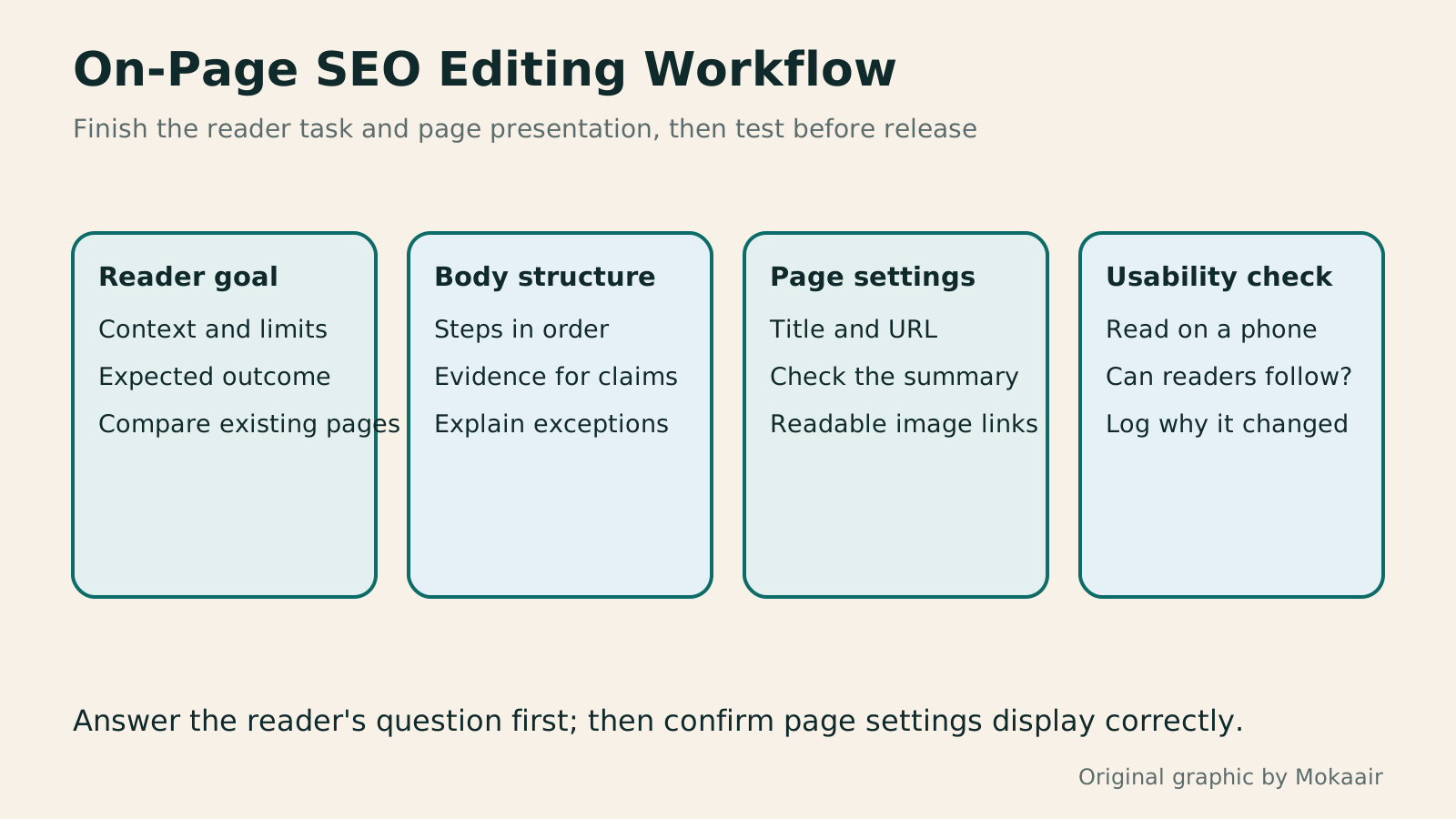
- State the reader, situation, and intended result; check existing content first.
- Order sections by the work, including comparisons, exceptions, and ways to confirm each step.
- Inspect the actual output of WordPress blocks, URL, excerpt, images, and links.
- Test the task on a phone and keep an edit record for future updates.
| Editing area | Question to answer | Practical check |
|---|---|---|
| Topic scope | Who can this page help do what? | Can the reader's task be stated in one sentence? |
| Section hierarchy | Can the reader work in order? | Does the outline alone explain the process? |
| Comparison table | How should the options be weighed? | Use the same columns and state when each option fits. |
| Summary settings | What generates the site preview and search description? | Check the theme, plugin, and rendered output. |
| Images and links | Do they clarify the task or next step? | Read on a phone and open each destination. |
| Completion test | Can someone actually follow the lesson? | Spot-check the first step, exceptions, and final result. |
First clarify when to use a WordPress post and when to use a static page.
If the page has technical problems, work through a technical SEO checklist.
Lifestyle
Technical SEO audit order: crawling, indexing, rendering, and site structure
A useful technical SEO audit needs reproducible evidence and a sensible repair order. Using a site relaunch as an example, this guide explains how to sample page templates and check public access, indexing directives, JavaScript rendering, canonical URLs, and site structure. It separates urgent repairs, scheduled improvements, and later observation so that a general site owner can hand actionable findings to maintainers without treating a passing test as a ranking guarantee.
Lifestyle
How to write article titles: Show search readers the scope and purpose
A useful title tells readers before they click what problem an article addresses, when it applies, and what information they will get. Using original rewrites of everyday tutorials, this guide checks the topic, purpose, limits, and evidence behind title promises. It explains why the page heading, HTML title, and Google search title may differ, then offers prepublication checks and post-change observation without stuffing keywords, claiming tests that never happened, or adding an unverified year.
Lifestyle
How to Identify Search Intent: Turn Keywords into Questions Worth Answering
The same keyword can signal learning, comparison, finding a specific entry point or taking action. Using original luggage-storage examples, this guide shows how to judge intent from wording, time and place, result formats and your own query data, then turn a hypothesis into a clear content task. It includes an observation table, ways to handle mixed intent, content-format choices and later validation. Do not copy ranking pages or treat one search-results screen as the answer for every reader.
Lifestyle
A beginner's SEO learning roadmap: make your site readable before measuring traffic and results
SEO beginners need not memorize ranking factors or buy a suite of tools. Using a small Taiwan website, this guide orders five topics: how search works, site readability, content planning, Search Console metrics, and results. Exercises by stage, a resource table, and a change log help you make pages readers and search engines can understand, then plan further work from data instead of tool scores or short-term swings.
Latest travel guides

GuideTokyo
Where to Stay in Tokyo: Comparing Shinjuku, Ueno, Tokyo Station, Shibuya, Asakusa, Ikebukuro, and Ginza, Plus Airport Access, Accommodation Tax, and Luggage Delivery
Where should you stay in Tokyo? Compare Shinjuku, Ueno, Tokyo Station, Shibuya, Asakusa, Ikebukuro, and Ginza by the same criteria: access from Narita and Haneda, transit routes, nearby attractions, neighborhood character, and who each area suits. Includes a comparison table, a Yamanote Line diagram, Tokyo’s accommodation tax as verified in 2026/9 (changing to 3% in 2027/4), and Airport TA-Q-BIN luggage shipping rules.
- Budget
- Hotels

GuideTokyo
How to Choose Tokyo Transit Passes: Are Suica, Welcome Suica, the Tokyo Subway Ticket, and the JR Pass Worth It?
On a first Tokyo trip, start with an IC card and pay per ride (Welcome Suica has no deposit and is valid for 28 days). If you take four or more subway rides in a day, add a 72-hour Tokyo Subway Ticket for 2,000 yen; a JR Pass is never worthwhile if you stay in Tokyo and do not go to Kansai. See what TOURIST PASMO, Suica on iPhone, and the Tokyo Metro day pass do and do not cover, with a decision chart. Prices verified in September 2026.
- Transport
- Budget

GuideTokyo
Tokyo Disneyland and DisneySea Guide: Ticket Prices, Fantasy Springs, Disney Premier Access (DPA), Standby Pass, and Which Park to Choose for Your First Visit
Tokyo Disney one-day Passport prices vary: most weekdays in 9/2026 cost ¥9,900 and weekends ¥10,900. At 14:00 daily, tickets go on sale for the same date two months later. Free Priority Pass is no longer on the official service list; only paid Disney Premier Access (¥1,000–3,500 per person per use) shortens waits. Covers hours, the 25th anniversary, Standby Pass, Entry Request, Fantasy Springs access and first-visit park choice; checked on the official site in 9/2026.
- Itineraries
- Family
Sources
- Google SEO Starter Guide · Checked:
- Google: Control your snippets in search results · Checked:
- Google: Make your links crawlable · Checked:
- WordPress Heading Block · Checked:
- WordPress Page/Post Settings Sidebar · Checked:
- WordPress Reading Settings · Checked: