Lifestyle
Semantic Search: Finding Relevant Content Through Different Wording
Semantic search seeks data by query and content meaning, not just matching words. Customer support examples explain query encoding, document representations and candidate ranking; distinguish similarity from meeting actual needs; and show limits with negation, specific codes, cross-language search and unanswerable queries. Learn where to improve search—embedding models, data preparation, hybrid search or reranking—without mistaking natural-language answers for search itself.
About 7 min read

Contents
Semantic Search attempts to judge relevance based on the meaning of queries and content, rather than only requiring matching words. If a user asks, “What should I do if I forgot that string of characters I use to log in?”, the system might find instructions titled “Reset Password.” The wording has limited overlap, but the two express similar needs. Handling such differences in wording is an important use of semantic search in knowledge bases and customer support.
However, semantic search does not necessarily generate an answer, nor is a vector database the only way to provide it. It can return documents, passages or other candidates for readers to read or for RAGWhat Is Retrieval-Augmented Generation (RAG)? Answers with Verifiable EvidenceRetrieval-augmented generation retrieves relevant external content for a language model to compose an answer. Using Q&A on event registration rules, this article explains indexing, retrieval, generation and source checking, compares it with search and fine-tuning, and shows why cited answers can still be wrong. Learn to distinguish outdated data, missing documents and overinterpreted evidence, and when to retain “I don't know.”Read the full article to organize afterward. This article uses fictional member-service instructions as examples. All rankings describe expected scenarios, without claiming that any particular model will always find the right result. Understanding its limitations helps identify the checks still needed between search that “seems to understand me” and search that “actually finds the right document.”
Search Assesses Relevance
Traditional full-text search often judges relevance using term occurrences, term frequency and other ranking factors. It can also incorporate word segmentation, synonyms and spelling processing; it does not merely match text word for word. Semantic search adds learned content representations or relevance models to handle paraphrases, synonyms and context. The two methods can complement each other. Not every feature that finds synonyms should be attributed to a large generative model.
In a typical Sentence Transformers approach, documents are first encoded into vectors, and the query is also processed by an appropriate model before similar representations are retrieved. The official documentation distinguishes symmetric from asymmetric search: finding similar meanings between two short sentences differs from finding a long answer passage for a short question. A model trained to perform well on the former task may not suit the latter, so model names or general similarity demonstrations alone are not enough to guide the choice.
From the User's Wording to Candidate Documents
First organize the topic and essential context of each set of instructions. For example, a “Reset Password” passage cannot be reduced to “Click here to continue”; it must retain which account workflow it applies to. Once the data is indexed, retrieve candidates for the query, then apply language, product-version or user-permission filters as needed. If the platform has instructions for both regular members and administrators, even very high semantic similarity cannot override the intended audience. Otherwise, readers may be sent to an interface they cannot use.
Ranking scores are relative signals tied to a particular model and dataset, not direct probabilities that an answer is correct. Even the highest-scoring document among all candidates may have little relevance to the question. A search interface should allow a “No suitable content found” outcome instead of always presenting the top result as a recommended answer. How candidate lists and confidence indicators are displayed affects whether readers place too much trust in the system.
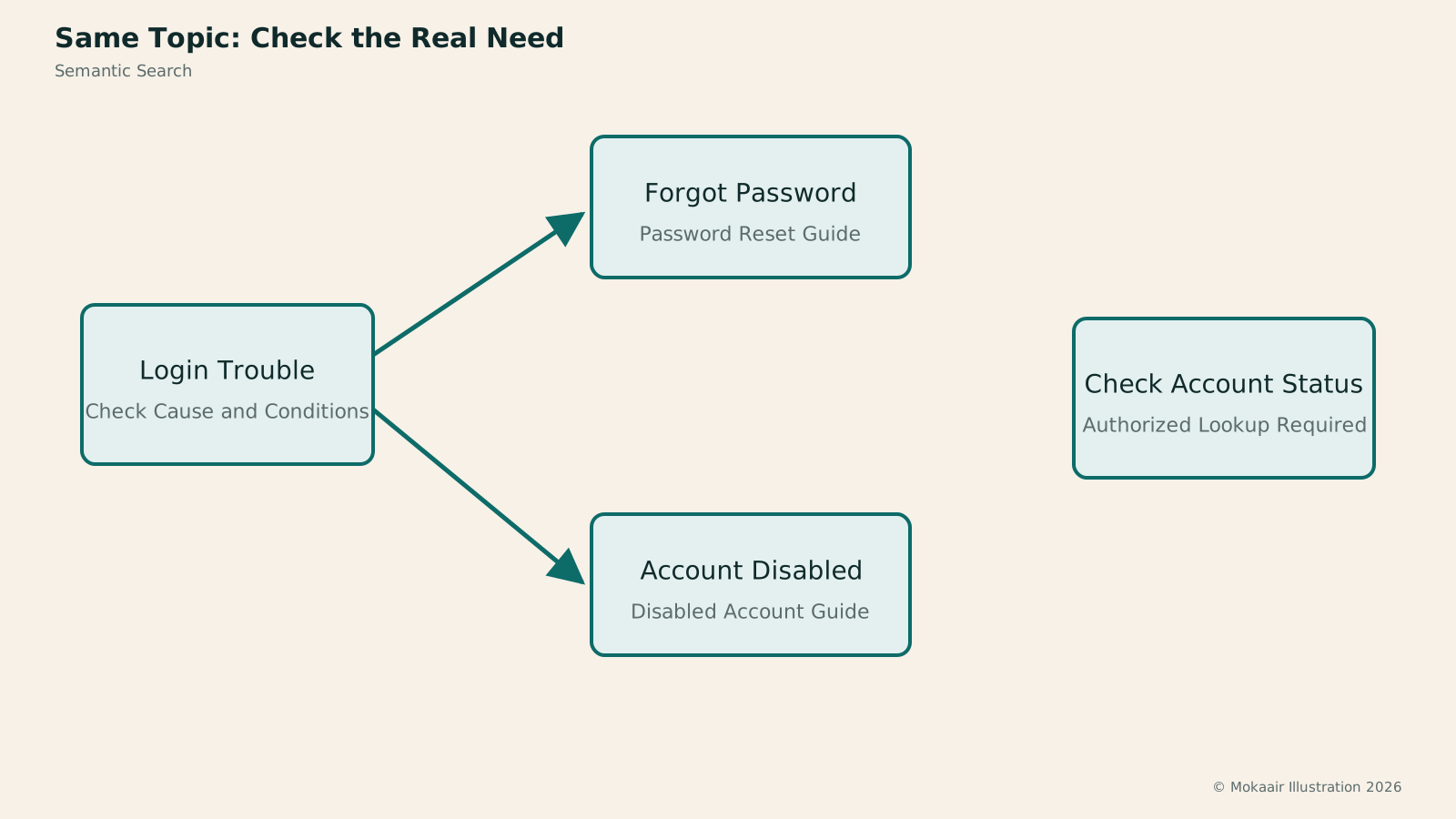
Read the full description
Login issues split into forgotten passwords and disabled accounts, leading to reset instructions or help with disabled accounts; individual account status needs a separate lookup.
Example: Forgotten Password or Disabled Account?
Suppose the input is “I forgot that string of characters I use to log in.” A reasonable expectation is to find the official password reset instructions. After retrieving that document, the system should show the passage heading and a summary that makes its scope clear, allowing readers to confirm that it fits their situation. If the question becomes “My password is definitely correct, but the screen says my account is disabled,” resetting the password is no longer the most suitable answer. The search should instead find reasons for account disabling and the appeal or contact process.
Both questions concern login, and their vectors may be close, yet they require different actions. For testing, people can first label the correct documents, then check whether candidate rankings preserve the distinction between the causes. If the instructions for disabled accounts appear among the candidates but rank too low, consider reranking. If they cannot be found at all, inspect the corpus, chunking and model. Do not merely rewrite the question to resemble the document title more closely, because that sidesteps how real users express themselves.
You can also add “I want to check whether this account is currently disabled.” Documentation can explain the process but does not contain the real-time status of individual accounts. Semantic search should not turn FAQs into judgments about individual cases. The correct response is to direct users to a status lookup they are authorized to use or to a human support channel. This kind of question checks whether the system recognizes the limits of where its content applies, rather than simply testing which document is closest.
Some Differences Require More Than Similar Meanings
Exact order numbers, product codes and version names should generally retain text or structured matching. Codes differing by just one letter may refer to entirely different products, but embeddings may not give that difference enough weight. Negation poses a similar problem: “Export supported” and “Export not supported” concern similar topics but have opposite practical implications. After retrieving relevant candidates, you still need to verify the conditions and what the negation applies to.
Cross-language search requires a model with the corresponding capabilities, along with testing on actual data. Matching an English question to a Chinese document does not mean the model can handle colloquial Taiwanese usage, local abbreviations and specialized terminology. Abbreviations in the data may need to retain their full names or aliases, and document titles should reflect questions users are likely to ask. This data preparation does more than serve the search engine: it also improves readability and subsequent maintenance.
How to Verify That Search Has Actually Improved
A test set can include original wording, natural paraphrases, typos, questions on the same topic with different conditions, and questions with no answer at all. First check whether the expected documents enter the candidate set, then whether their rankings make them easy for readers to find. Also compare query latency and how long updated documents take to become visible. This avoids improving semantic test scores while making real users wait too long or continue seeing outdated instructions.
If synonymous paraphrases improve markedly but code queries get worse, hybrid search can preserve the strength of exact terms. If all the right candidates are present but their order is poor, consider reranking. If the documents themselves are unclear, even the strongest semantic model can only retrieve vague information. The most reliable improvement sequence is to locate the layer that failed, then change the corresponding component, rather than treating “switch to AIWhat Is Artificial Intelligence?AI covers many technologies and uses; it is not synonymous with chatbots and need not generate text. Starting with the OECD system definition, this article uses photo classification and community resource recommendations to link inputs, inference, outputs and human goals, and explains AI's relationship to machine learning, deep learning and generative AI. Learn to ask concrete questions about what an AI feature does and distinguish capability, autonomy and trustworthiness.Read the full article search” as a one-time solution.
Readers can also protect themselves with a simple habit: open the original document and check the product version, intended audience and limitations. Search summaries only help locate content; shortened text may be incomplete, especially when exceptions are involved. If search results do not match the actual interface, report the original query and the document retrieved. This is more likely to lead to a verifiable fix than simply saying “AI search doesn't work well.”
| Method | Focus | What to Watch |
|---|---|---|
| Full-text search | Terms and textual signals | Suited to exact names and codes |
| Semantic search | Learned relevance representations | Differences in conditions need verification |
| RAG | Organizes an answer after retrieval | Generated content also needs checking |
What Is an Embedding? Placing Content in a Space for ComparisonWhat Is an Embedding? Mapping Content into a Space for ComparisonEmbeddings are numeric representations that models create from text and other content, often for semantic search, classification and clustering. Using “Where can I go when it rains?”, this article covers encoding, similarity and candidates; why vector distance does not indicate truth and dimensions may lack clear labels; and the effects of model versions, language ability and long-text truncation. Learn the distinct roles of embeddings, vector databases and answer generation.Read the full article
Hybrid Search: Combining Exact Terms and MeaningHybrid Search: Balancing Exact Terms and MeaningHybrid search merges full-text, vector and other retrieval results to cover exact codes and natural-language needs. An equipment-manual query explains candidate retrieval, deduplication, rank fusion and reranking, including how Reciprocal Rank Fusion (RRF) merges results by rank. Hybrid search is not always more accurate. Learn to test quality with code, paraphrase and no-answer queries and spot biases from permissions, filters and duplicate content.Read the full article
Reranking: From Finding Results to Putting Good Answers FirstReranking: From Finding Results to Putting Good Answers FirstReranking reassesses first-pass search candidates for relevance and is often used to improve search lists and RAG context quality. Using library loan rules, this article shows how retrievers and cross-encoders share the work and explains missing candidates, input truncation, and relevance scores versus truth checks. Learn when to broaden retrieval, fix chunks, or add reranking, and use suitable tests to avoid needless waiting for better rankings.Read the full article
AI Terminology Index: From Loop Engineering to Generative AI
Found this guide helpful? Share it with someone who needs it
Lifestyle
Agentic Retrieval-Augmented Generation (Agentic RAG): When to Search Again
Agentic RAG lets models make retrieval decisions, choosing sources, rewriting queries or searching further based on the question and available evidence. Using a concrete LangGraph workflow and a comparison of venue-use conditions, this article contrasts it with fixed RAG and explains stopping criteria, permissions, query logs and cost control. Learn to judge whether a task needs dynamic exploration or a predictable fixed workflow is enough.
Lifestyle
Graph Retrieval-Augmented Generation (GraphRAG): Understanding a Document Collection Through Relationships
GraphRAG uses entities and relationships in retrieval to answer questions about cross-document connections and overall themes. Drawing on Microsoft's original paper and official docs, this article explains entity extraction, community summaries, and local and global search, using local event records to show why different questions need different paths. It also shows how missing links, mistaken name merges, and distorted summaries affect answers: a pretty graph is not verified fact.
Lifestyle
Knowledge Graphs: Making Entities and Relationships Clear
Knowledge graphs organize entities and relationships to trace who took part in what, where and when through links. Using community events, this article covers entity identity, relationship direction, sources and time; compares Resource Description Framework (RDF) and property graphs; and explains why graphs are not equivalent to visualizations or reliable facts. Learn when to build one and how it works with tables, vector search and graph retrieval-augmented generation (GraphRAG).
Lifestyle
Hybrid Search: Balancing Exact Terms and Meaning
Hybrid search merges full-text, vector and other retrieval results to cover exact codes and natural-language needs. An equipment-manual query explains candidate retrieval, deduplication, rank fusion and reranking, including how Reciprocal Rank Fusion (RRF) merges results by rank. Hybrid search is not always more accurate. Learn to test quality with code, paraphrase and no-answer queries and spot biases from permissions, filters and duplicate content.
Articles that cite this one
Sources
Compiled from the references and verification dates listed above; fares, schedules, product features, and terms can change, so please confirm the latest details on the relevant official website before travelling, booking, or purchasing.