Lifestyle
How to Start a Weekly Review: Organize Commitments, Trim Tasks, and Make Room for Next Week
A review is not a scorecard. Set aside a regular period to check your calendar, unfinished items, and pending replies, then decide what you will truly take on next week so your list reflects reality.
Updated: About 6 min read

A growing task list may simply mean that everything you might want to do is on the same page and you have not decided what is worth doing now. A weekly review is for reorganizing your commitments, not judging why you have not worked hard enough. This guide offers a lightweight process whose length can change with your circumstances; it does not claim that one fixed number of minutes suits everyone.
First gather your scattered reminders
Check your calendar, notes, commitments in messages, and unanswered matters, and collect them in one place. At this stage, only collect; do not start a new large task while looking for information. Put wishes without a date on a someday list for now. For matters you have promised to others, record the item and deadline. Once collection is complete, you can see how many real commitments need attention instead of facing one vague mass of pressure.
| Input | What tends to slip through |
|---|---|
| Calendar | Materials or items to prepare before next week's appointments |
| Messages and email | Requests you have read but not answered, or where you said “I'll get back to you” |
| Paper notes and phone memos | Calls to return, bills, and things to look up that you jotted down in passing |
| Verbal promises | Small things you told family or colleagues this week that you would handle |
| Shared calendars and family group chats | Plans someone else added for you, or tasks handed to you in a group chat |
Google Calendar's official help explains how to create and manage tasks in the calendar, which can keep date-specific matters somewhere visible. But having a date does not mean enough time has been allocated, and tasks should not all be crowded onto the same day. Whether you use paper, a calendar, or a list, first distinguish fixed appointments, deadlines, and work periods you schedule yourself. They can inform one another, but they are not the same thing.
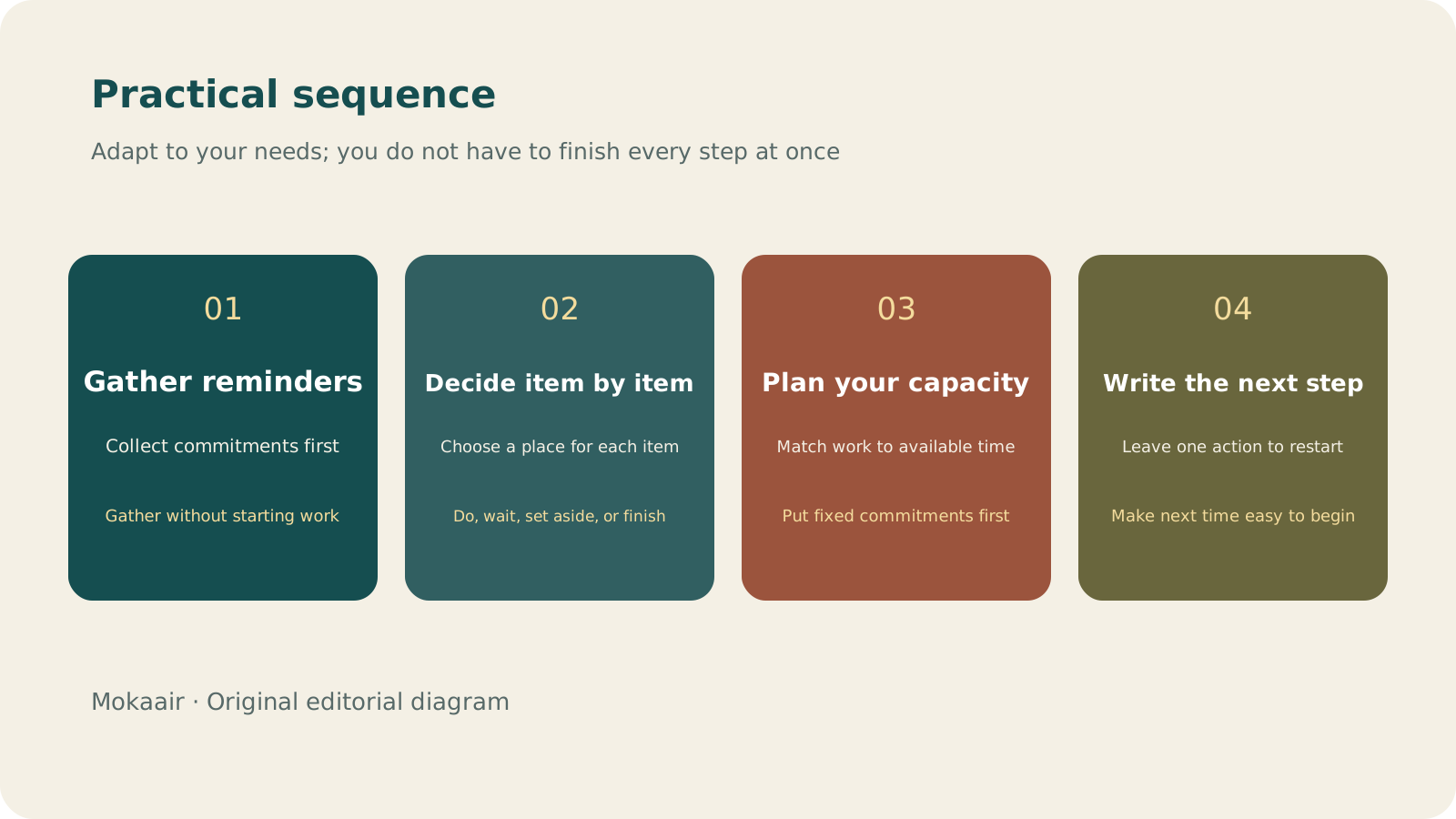
Read the full description
Check in order: gather reminders, decide item by item, plan capacity, and write the next step. Editorial summary, not a map or measured duration.
Make just one decision for each unfinished project
| Decision | Next step | Example |
|---|---|---|
| Still needed | Write the smallest action you can start | Change “prepare a quote” to “confirm the dimensions first” |
| Waiting | Record the subject and when to follow up | Wait for a family member to reply with available dates |
| Not important now | Move it to a someday list or delete it | Research on a tool that is not currently needed |
| Completed | Retain necessary results, then close it | Remove a confirmed booking from the task list |
For an item you keep postponing, ask whether it is written too broadly or whether a decision is missing. For example, “organize the house” has no finish line; you could change it to “identify the small appliances that need repair.” If you do not even want to take that step, perhaps you should not take on the whole project now. A review is not about marking everything urgent again, but giving every item an appropriate place.
For items marked “Waiting,” write down who you are waiting on and the day you plan to follow up. If there is still no news by then, ask once yourself, or change it to a next step you can move forward on your own. Looking over these items at each weekly review keeps things from quietly expiring because the other person never replied.
Put fixed commitments into next week first, then choose a few priorities
Review confirmed work, family, study, and other commitments. Allow time for travel and rest, then choose what you want to move forward next week. Do not treat every blank space on the calendar as available for work. Set aside usable periods for matters that need continuous thought and use convenient gaps for small tasks. If capacity appears insufficient, tell the relevant people early instead of discovering at the deadline that the work will not fit.
Leave one sentence that tells you how to restart
At the end, write only what to do first the next time you open the list, such as “check the attachments for Tuesday's meeting first.” Put links to the relevant materials beside it to reduce the need to find the context again. At the next review, notice where this process became difficult. If collecting takes too long, narrow the inputs; if the plan is always overfilled, reduce commitments. Continually adapting the method to your needs matters more than maintaining someone else's ideal list.
- Collect first and classify later; do not start new work while collecting.
- For each project, decide to do it, wait, set it aside, or close it.
- Schedule fixed commitments first; blank space does not equal usable capacity.
- Finish by leaving one next step that is easy to begin.
When you are busy or have missed a few weeks, start with a minimal version
A review is most easily skipped when you have the most going on, which is often exactly when you need it most. At times like that, you do not have to go through every step. Do only the three things below, and put the remaining reminders in one place to sort when you next have time.
- Look at the calendar and deadlines for the next seven days.
- Check what you have promised others but not yet finished.
- Write the next step for the item that is most stuck.
When you restart after a break of two or three weeks, do not make up every missed week one by one. Move ideas on the old list that are no longer relevant straight to the someday list or delete them, and bring back only matters someone is still waiting on and your upcoming fixed commitments. A review is for seeing next week clearly, not for handing in past homework; getting back into the rhythm matters more than clearing the entire backlog at once.
If the same time slot keeps getting pushed aside, the timing may simply not suit you; it does not mean you lack discipline. Try moving it to the end of your working week, or to a time before the next week starts when you are less likely to be interrupted, and set it up as a weekly recurring calendar reminder so you do not have to find time for the review all over again each week. Once the slot is set, also decide where you will do the review and which lists and calendars you need open, so you do not spend the start of it looking for them.
Meeting Notes Others Can Act On: Record Decisions, Owners, and Next StepsMeeting Notes Others Can Act On: Record Decisions, Owners, and Next StepsYou do not need a word-for-word record of every discussion. Use a one-page note to explain the context, decisions made, and open questions, so even people who did not attend can understand who owns the next step.Read the full article
Lifestyle
Desk cable organization isn't just about looks: label each cable's purpose, specs, and where it's used
A USB-C connector can look identical from cable to cable, yet charging and data capability may differ. Identify what each cable does before you plan the routing and labels, so daily plugging in and out doesn't turn into guesswork.
Lifestyle
Keep Buying Household Supplies You Already Have? Track Location, Quantity, and Restocking Status in a Simple Inventory Sheet
Start with supplies you often buy twice, without building a warehouse system. Help everyone at home see where things are, how much remains, and who has already restocked, so the list better matches what is actually there.
Lifestyle
Before buying new electronics (3C): define your needs, check compatibility, and consider repair and end-of-use costs
A specification sheet can compare products, but it cannot decide whether you need one. Turn problems you have actually encountered into buying requirements, then check compatibility and ongoing costs so you do not bring home another unused tool.
Lifestyle
How to use a shared household calendar: make it clear who is going out, who takes over and when plans change
A shared calendar does not need everyone's entire private life. Share only the plans that need coordination, state responsibilities, locations and changes clearly, and choose permissions that let the household maintain it together.
Articles that cite this one
- How to use a shared household calendar: make it clear who is going out, who takes over and when plans change
- Constantly Interrupted by Notifications? Set Exceptions Before Building Focus Periods That Work
- Meeting Notes Others Can Act On: Record Decisions, Owners, and Next Steps
- Inbox Zero Is Not Required: Manage Email with To Do, Waiting, and Archive
Latest travel guides

GuideTokyo
Where to Stay in Tokyo: Comparing Shinjuku, Ueno, Tokyo Station, Shibuya, Asakusa, Ikebukuro, and Ginza, Plus Airport Access, Accommodation Tax, and Luggage Delivery
Where should you stay in Tokyo? Compare Shinjuku, Ueno, Tokyo Station, Shibuya, Asakusa, Ikebukuro, and Ginza by the same criteria: access from Narita and Haneda, transit routes, nearby attractions, neighborhood character, and who each area suits. Includes a comparison table, a Yamanote Line diagram, Tokyo’s accommodation tax as verified in 2026/9 (changing to 3% in 2027/4), and Airport TA-Q-BIN luggage shipping rules.
- Budget
- Hotels

GuideTokyo
How to Choose Tokyo Transit Passes: Are Suica, Welcome Suica, the Tokyo Subway Ticket, and the JR Pass Worth It?
On a first Tokyo trip, start with an IC card and pay per ride (Welcome Suica has no deposit and is valid for 28 days). If you take four or more subway rides in a day, add a 72-hour Tokyo Subway Ticket for 2,000 yen; a JR Pass is never worthwhile if you stay in Tokyo and do not go to Kansai. See what TOURIST PASMO, Suica on iPhone, and the Tokyo Metro day pass do and do not cover, with a decision chart. Prices verified in September 2026.
- Transport
- Budget

GuideTokyo
Tokyo Disneyland and DisneySea Guide: Ticket Prices, Fantasy Springs, Disney Premier Access (DPA), Standby Pass, and Which Park to Choose for Your First Visit
Tokyo Disney one-day Passport prices vary: most weekdays in 9/2026 cost ¥9,900 and weekends ¥10,900. At 14:00 daily, tickets go on sale for the same date two months later. Free Priority Pass is no longer on the official service list; only paid Disney Premier Access (¥1,000–3,500 per person per use) shortens waits. Covers hours, the 25th anniversary, Standby Pass, Entry Request, Fantasy Springs access and first-visit park choice; checked on the official site in 9/2026.
- Itineraries
- Family
Sources
- Google Calendar: Create and manage tasks · Checked: