Lifestyle
Keep Buying Household Supplies You Already Have? Track Location, Quantity, and Restocking Status in a Simple Inventory Sheet
Start with supplies you often buy twice, without building a warehouse system. Help everyone at home see where things are, how much remains, and who has already restocked, so the list better matches what is actually there.
Updated: About 6 min read
You still have cleaning supplies at home, but bring home another pack from the store. When a different item actually runs out, everyone assumes someone else bought it. The problem may simply be that the information is scattered. This guide shows how to design a household supplies sheet for a small selection of shared consumables. It does not cover commercial inventory, food safety assessments, or detailed cost accounting.
Start only with items you tend to buy twice
Choose supplies you regularly replenish, such as toilet paper, trash bags, or dishwashing products, and record their generic names, specifications, storage locations, and available quantities. Use a consistent unit, such as packs, bottles, or boxes. Do not count an item in cases this week and individual sheets next week. List different specifications separately when they affect whether products can substitute for each other. Leave out details you do not need to track so that the sheet does not become difficult to fill in and quickly fall out of use.
Google Sheets provides an official drop-down feature that can restrict cells to fixed options. It helps keep statuses such as “To buy,” “Bought, not put away,” and “Enough” consistent. The household still needs to agree on how the sheet works; adding a drop-down does not automatically tell it how much remains at home. If people do not normally open spreadsheets, start with a shared list instead. The key is making the place to update it easy to find.
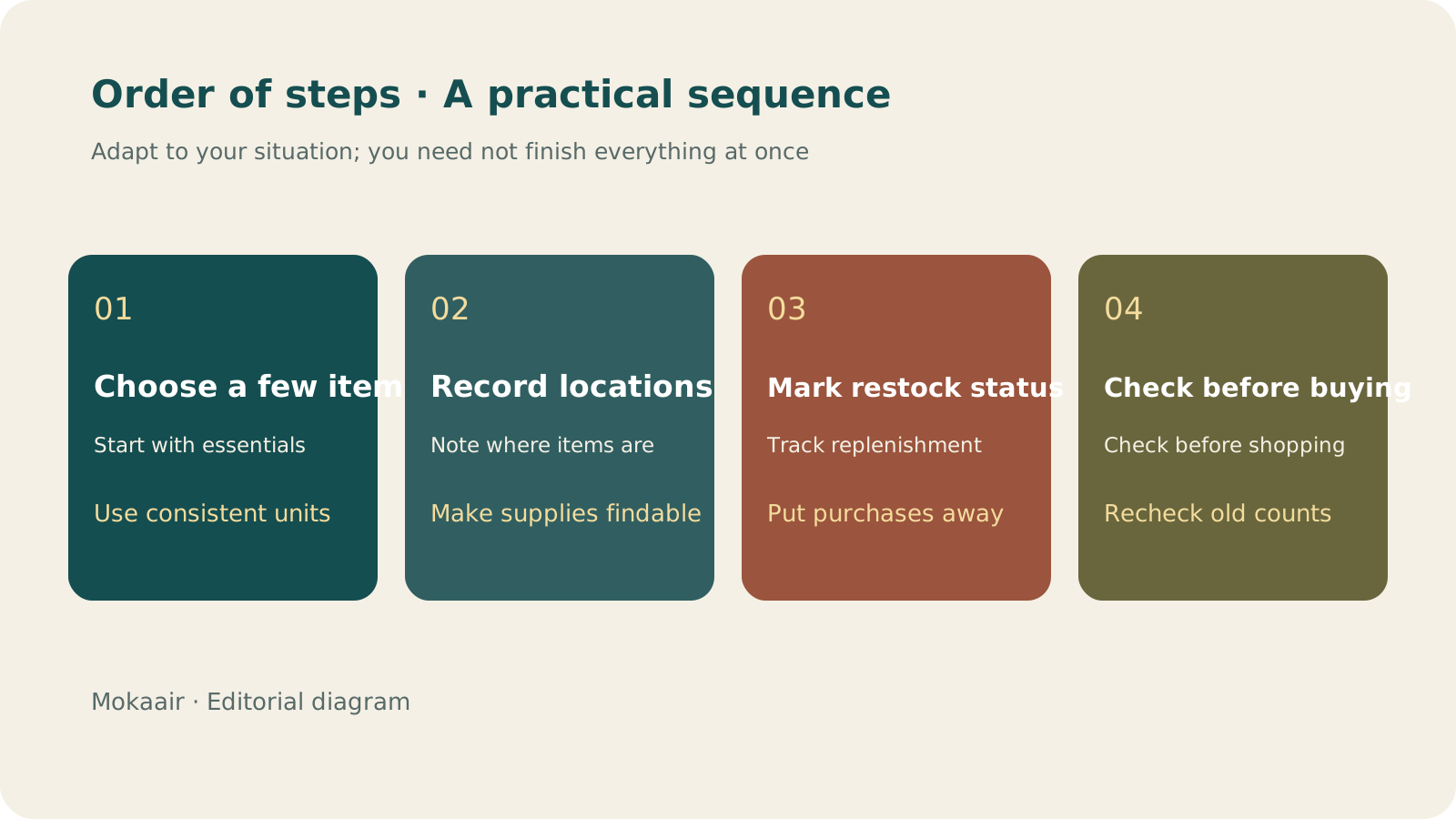
Read the full description
Check in order: choose a few supplies, record storage locations, mark restocking status, and check before shopping. An editorial guide, not a map or measured timing.
Use location and status to answer different questions
| Field | Example entry | Purpose |
|---|---|---|
| Item and specification | Trash bags / small | Avoid buying the wrong size |
| Storage location | Kitchen, lower shelf on the right | Check the actual supplies before buying |
| Quantity on hand | One unopened pack | Keep the counting method consistent |
| Restocking status | To buy | Identify the action needed |
| Last checked | Date of an organizing session and who checked | Show whether the number may be out of date |
Mark supplies that have been bought but are still in the car, entryway, or a package as “Bought, not put away,” so another shopper knows not to order more. Update the quantity and location after putting them away. This records more than simply checking off a shopping list and explains why the sheet shows stock that you cannot find in the cupboard. When updating together, agree on who changes each field so that one person does not replace another person's updated quantity with an old value.
Adjust the restocking threshold to how your household uses things
Observe how often your household uses an item, how much storage space you have, and how easy it is to buy before deciding how much should remain when you restock. Avoid buying so much during a promotion that it takes space away from other everyday supplies. For items whose brands you often change, record the general requirements and specifications you cannot accept instead of tying the list to one product. If a particular size or consumable model is required, attach a photo of its label for checking rather than relying on memory.
Agree on who changes the status, and when
A sheet most often breaks down at the moment something runs out and nobody updates it. Instead of asking everyone to remember to update it at all times, tie each update to an action that is bound to happen. Whoever opens the last spare, or uses an item down to the restocking threshold you agreed on, changes its status to “To buy” right away. Whoever orders or buys it changes the status to “Bought, not put away,” and whoever puts it away updates the quantity, location, and check date. When each moment has one person responsible, it is less likely that two people restock the same item or that each assumes the other will update it.
| Moment | Who updates | Fields to change |
|---|---|---|
| Opening the last spare | The person who opens it | Change the restocking status to “To buy” |
| Ordering it or bringing it home | The person who shops | Change the restocking status to “Bought, not put away” |
| Putting it in its storage place | The person who puts it away | Quantity on hand, storage location, and last checked |
| Getting ready to shop | Whoever is shopping this time | Look at “To buy” first, then check the actual supplies |
If some people at home cannot easily open the sheet, such as older relatives or children, not everyone needs to edit it. Agree that whoever opens the last spare tells the person who keeps the records, and that person updates it for them.
When the same item is kept in two places, such as the one in use in the bathroom and the spares in a storage cupboard, the sheet can record only the unopened spares and leave out the one in use. This makes the quantity on hand easier to count and fits the rule of changing the status to “To buy” when the last spare is opened. If both places hold spares, give each its own row with the location, so that nobody looks in only one place and concludes there is not enough.
When the sheet and what is actually in the cupboard do not match, do not just overwrite the number. First consider whether the item was moved elsewhere, used up without an update, or bought but not yet put away. If the same kind of mismatch keeps recurring, it usually means no one is responsible for one of the moments above. Adjusting who does what works better than asking everyone to be more careful.
Remove unused fields regularly and keep information that prompts action
After using the sheet for a while, look at which fields nobody fills in and which information really makes shopping easier. Removing unused fields is more practical than asking people to fill in a dozen or more details every time. Update locations while cleaning or reorganizing cupboards instead of waiting until something goes missing. If you store food or other items with special storage requirements, manage them separately according to their packaging and applicable guidance. Quantity alone cannot tell you whether an item is still suitable to use.
- Start with a small selection of supplies you often buy twice.
- Use consistent units and status names.
- Update separately after buying, putting away, and using items.
- Check outdated numbers against the actual supplies before shopping.
Cannot Find a Receipt After Photographing It? Build Searchable Purchase Records and Warranty FoldersCan't Find a Receipt After Photographing It? Build Searchable Purchase and Warranty FoldersKeeping a photo is only the first step. Connect the product, purchase date, seller, order, and warranty information so that when you need after-sales support, you do not have to search your entire photo library.Read the full article
Lifestyle
Brazil's Petrobras tests Cardano blockchain to track claims about cleaner jet fuel and diesel
According to CoinDesk, Brazil's state-owned energy company Petrobras is testing the Cardano blockchain in two research projects: one to stop the same emissions cut from sustainable aviation fuel being counted twice, the other to record the history of its partly renewable Diesel R. Both are still research work, with no timeline for wider use.
Lifestyle
Cboe and S&P Dow Jones Indices extend their S&P 500 options deal to 2051 and leave the door open to tokenized options
According to CoinDesk, exchange operator Cboe and index provider S&P Dow Jones Indices have extended Cboe's exclusive right to offer S&P 500 options by 25 years, to 2051. The deal says they may explore blockchain-based 'tokenized' options, but no product, timeline or details were announced. Here is what that means and what it does not.
Lifestyle
SEC Charges Two Groups of Entities Allegedly Behind Crypto Frauds Using WhatsApp and "AI Trading" Claims
On September 29, 2026, the US SEC charged two groups of entities, Cryptoaiml and TSAI, alleging they defrauded hundreds of individual investors, many in the US. The SEC says they falsely claimed to be SEC-regulated and used AI trading signals and bots as bait in schemes totaling at least $15 million. Here is what the SEC alleges and the warning signs readers can watch for.
Lifestyle
What to Do When Searches Get No Clicks: Rethinking Traffic Value Through Reader Tasks
Readers may find opening hours, phone numbers or brief answers on a search page without visiting a website. A non-click is not always a success, and site CTR cannot reveal the overall zero-click search rate. Using an original clothing alterations shop scenario, this article covers checks for search displays, business interactions and actual tasks, from finding information and comparing services to booking, with a comparison table, practical steps and original SVG diagrams.
Latest travel guides

GuideTokyo
Where to Stay in Tokyo: Comparing Shinjuku, Ueno, Tokyo Station, Shibuya, Asakusa, Ikebukuro, and Ginza, Plus Airport Access, Accommodation Tax, and Luggage Delivery
Where should you stay in Tokyo? Compare Shinjuku, Ueno, Tokyo Station, Shibuya, Asakusa, Ikebukuro, and Ginza by the same criteria: access from Narita and Haneda, transit routes, nearby attractions, neighborhood character, and who each area suits. Includes a comparison table, a Yamanote Line diagram, Tokyo’s accommodation tax as verified in 2026/9 (changing to 3% in 2027/4), and Airport TA-Q-BIN luggage shipping rules.
- Budget
- Hotels

GuideTokyo
How to Choose Tokyo Transit Passes: Are Suica, Welcome Suica, the Tokyo Subway Ticket, and the JR Pass Worth It?
On a first Tokyo trip, start with an IC card and pay per ride (Welcome Suica has no deposit and is valid for 28 days). If you take four or more subway rides in a day, add a 72-hour Tokyo Subway Ticket for 2,000 yen; a JR Pass is never worthwhile if you stay in Tokyo and do not go to Kansai. See what TOURIST PASMO, Suica on iPhone, and the Tokyo Metro day pass do and do not cover, with a decision chart. Prices verified in September 2026.
- Transport
- Budget

GuideTokyo
Tokyo Disneyland and DisneySea Guide: Ticket Prices, Fantasy Springs, Disney Premier Access (DPA), Standby Pass, and Which Park to Choose for Your First Visit
Tokyo Disney one-day Passport prices vary: most weekdays in 9/2026 cost ¥9,900 and weekends ¥10,900. At 14:00 daily, tickets go on sale for the same date two months later. Free Priority Pass is no longer on the official service list; only paid Disney Premier Access (¥1,000–3,500 per person per use) shortens waits. Covers hours, the 25th anniversary, Standby Pass, Entry Request, Fantasy Springs access and first-visit park choice; checked on the official site in 9/2026.
- Itineraries
- Family