Lifestyle
Project Glasswing and Mythos Preview: After AI Finds Vulnerabilities, the Real Work Begins
Reviewing Anthropic's 2026 launch of Project Glasswing and Claude Mythos Preview, exploring the standard maintenance workflow and website management essentials from identifying candidate vulnerabilities to deploying defensive patches.
Updated: About 7 min read
Event date: 2026-04-07; Verification date: 2026-09-14. On April 7, Anthropic announced Project Glasswing, enabling partners who maintain critical software to conduct defensive security work using Claude Mythos Preview.
Mythos Preview is a restricted research preview and is not fully open to general users. The official announcement attributes its vulnerability discovery capabilities to enhanced code understanding; the vulnerability counts and capability descriptions are vendor reports. A follow-up announcement on May 22 emphasized that discovery must still be followed by verification, disclosure, and patching; candidate vulnerabilities should not be treated directly as resolved incidents. The following everyday and work scenarios are editorially designed examples for readers to verify on their own and do not represent hands-on product testing by this site.
Four Key Defensive Stages: From Clues to Implementation
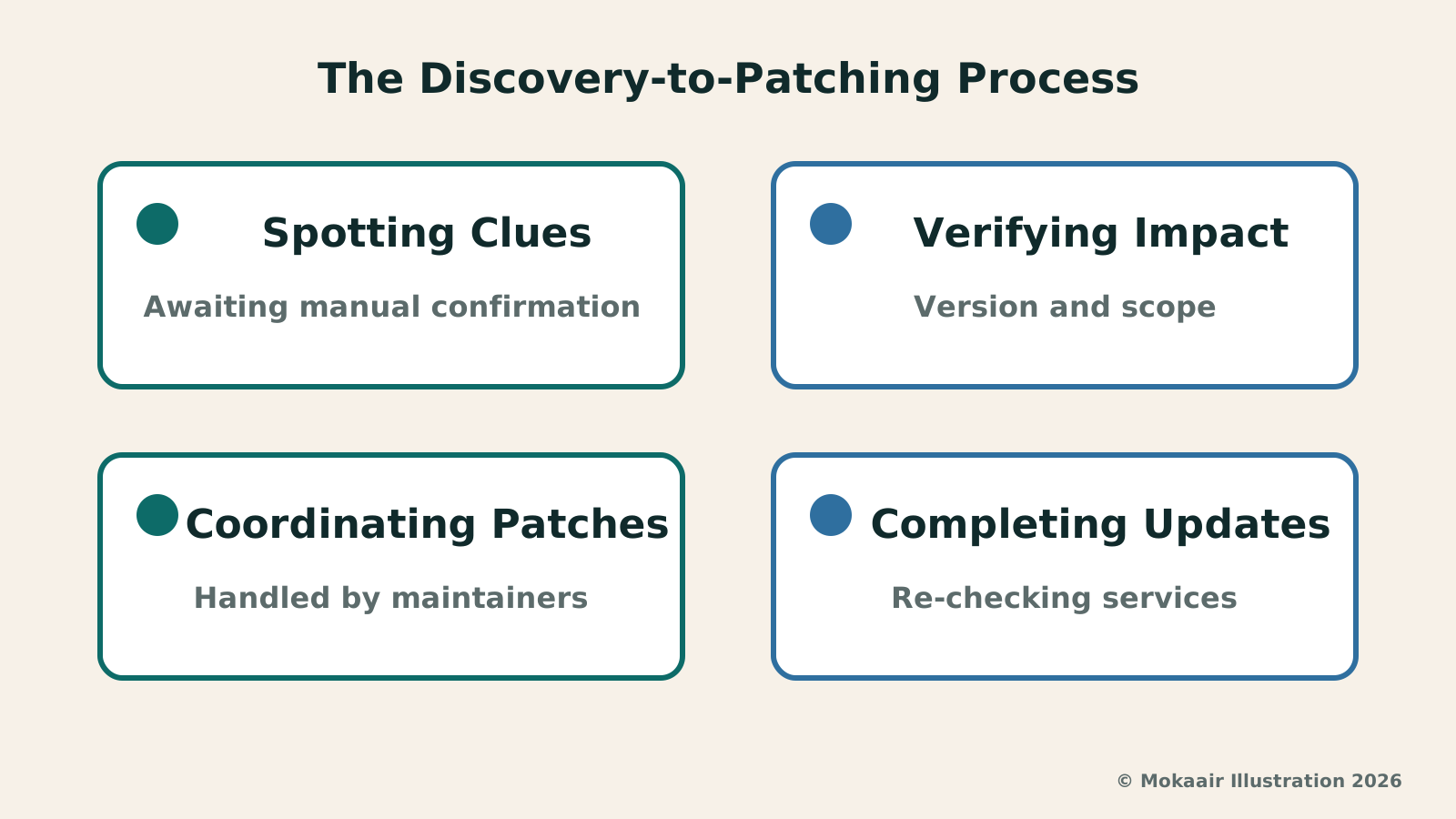
In the information security lifecycle, clearly distinguishing between the states of each stage is critical. The first stage consists of scanning alerts or candidate vulnerabilities. Typically generated by automated analysis tools, these merely indicate suspicious patterns in the code worth examining; they neither prove that harm exists nor equate to an active system compromise. Treating unfiltered scan reports directly as crises can easily trigger unnecessary internal panic and even waste valuable engineering schedules, so the first step requires maintaining rational objectivity.
The second stage involves confirmed vulnerabilities, requiring senior maintainers or specialized researchers to conduct code walkthroughs and reproduction to verify that the logic flaw indeed causes unintended behavior under specific conditions. Once the defect is verified, it advances to the third stage: patch release, where open-source maintainers or software vendors issue official updates or configuration recommendations. These two steps require meticulous cross-organizational communication to ensure that patches do not break existing software compatibility or normal operations.
The final and most easily overlooked fourth stage is user completion of updates and verification. Even if a software vendor issues a security patch immediately, overall protection is not established as long as end-point web administrators have not applied and tested it on their servers. Merely relying on front-end detection tools cannot automatically block threats for servers; only when the production environment confirms successful updates and resumes stable operation is the entire defense lifecycle truly complete.
Digital Asset Inventory and Criteria for Defining Affected Versions
When confronting various defensive initiatives and security bulletins, a website administrator's primary task is establishing a clear software inventory rather than rushing to execute unknown fix commands. An asset inventory involves cataloging server operating systems, web server software, database engines, and all dependent libraries installed via package managers. Grasping the exact version number and deployment path of each component serves as the sole objective foundation for subsequently determining whether a system falls within the affected scope.
When confirming the affected scope, one must cross-reference the officially released affected version ranges, rather than jumping to conclusions based merely on software names. Many modern software architectures rely on multi-layered dependencies, and some defects exist only under specific compile parameters or within particular minor versions. Administrators should compare the conditions listed in official security advisories against the configurations of their operating environments to verify whether specific modules are actually loaded by the system, avoiding misjudged risks or unnecessary unscheduled downtime.
After completing the preliminary cross-check, it is recommended to leave clear records in internal ticketing systems, noting the verification date, involved hostnames, current operational versions, and assessment results. Such detailed documentation helps teams quickly retrieve historical records when encountering follow-up advisories, preventing critical servers from being missed due to personnel turnover or vague recollections, and ensuring the entire organization maintains an orderly response when facing potential risks.
| Maintenance Stage | Core Execution Tasks | Acceptance & Deliverable Standards |
|---|---|---|
| Clue Screening & Inventory | Log alerts or scan warnings; cross-check host lists, package manifests, and environment configs | Confirm affected host list and precise version numbers |
| Version & Impact Verification | Compare official advisory criteria; check if internal environments actually load relevant modules | Produce impact evaluation records; rule out unrelated false alarms |
| Isolated Testing & Backup | Create full-system snapshots and database dumps; apply patches and verify functions in staging | Zero error reports in test environments and normal core functionality |
| Production Rollout & Auditing | Apply vendor official releases during maintenance windows; restart services and examine logs | Confirm running version is successfully updated; no new anomalies in system logs |
Pre-Patching Environment Isolation and Backup Checks
Before upgrading, data and configuration backups should be prepared based on service criticality, and restoration methods must be verified as functional. Database backups, uploaded files, configurations, and container images each cover different contents; having only images or snapshots does not necessarily capture all continuously written data. Administrators must verify backup coverage and consistency before scheduling updates, rather than treating "backed up" as an absolute guarantee of lossless recovery from any failure.
Having backups alone is not enough; all patching procedures must first be repeatedly verified in staging or testing environments. The staging environment should replicate the production environment's OS kernel, network configurations, and external dependencies as closely as possible. Running vendor-released update files on test machines allows early detection of unexpected side effects, such as package dependency conflicts, deprecated configuration syntax, or sudden performance drops, preventing the dilemma of fixing a security concern only to inadvertently break critical business workflows.
When verifying in a staging environment, teams should formulate a quantifiable acceptance checklist covering whether core login functions, database read/writes, common scheduled tasks, and external API responses remain normal. Patch deployments to production should only be approved once all automated tests or manual walkthroughs have fully passed and system logs show no abnormal alerts, ensuring that operational stability and system security advance side by side.
Applying Vendor Patches and Post-Installation Verification Practices
Patching in production environments must strictly follow official maintenance guidelines, avoiding unverified unofficial scripts pieced together ad hoc. Before executing upgrade procedures, maintenance windows should be announced in advance, with dedicated personnel assigned to monitor terminal output during deployment. If software requires restarting services or recompiling configurations, administrators should ensure old processes have released their memory entirely, and new processes are correctly bound to expected ports while properly loading updated libraries.
Immediate post-installation verification focuses on confirming running versions and log states. Administrators should execute commands to verify the actual running version numbers of processes, ensuring updated binary files have been loaded by the kernel rather than merely overwritten on disk. Next, system logs must be monitored continuously for several tens of minutes for permission errors, uncaught exceptions, connection timeouts, or other anomalies, ensuring underlying security fixes have not adversely disrupted higher-level business logic.
Furthermore, conducting small-scale functional acceptance tests on patched services is essential. By simulating real user access behaviors, verify that key pages render normally, certificate chains are intact, and caching mechanisms remain undisturbed. Only when all metrics return to regular operational standards can maintenance mode be officially lifted and internal stakeholders notified of successful completion, concluding this patching lifecycle.
Balancing Defensive Resources and Building Long-Term Website Resilience
Confronted with rapidly evolving software detection technologies, maintenance teams must recognize that security is an ongoing dynamic balance. Tension often exists between pursuing instant patching and maintaining high business availability; if small teams invest all their energy in chasing unconfirmed inferential reports, core operations can easily grind to a halt. Establishing a tiered response framework based on asset value and exposure risk is therefore necessary to maximize the substantive protective impact of limited engineering resources.
Long-term operational resilience fundamentally depends on disciplined execution of standard operating procedures. From automated dependency alerts and routine hot/cold backup restoration drills to standardized testing and deployment pipelines, these constitute indispensable cornerstones for solidifying defenses. Tech giants deploying research models to hunt for vulnerabilities demonstrates an innovative frontier in technology development, but disciplined inventory and verification carried out during routine operations remain the true foundation for the enduring stability of digital services.
2026 AI News Roundup: Highlights and Daily Life Applications from January to September2026 AI News Roundup: Highlights and Daily Life Applications from January to SeptemberOrganizing key AI news stories month by month from January to September 2026, linking to full analyses in five languages. Covering models, work tools, creation, costs, and transparency, explaining backgrounds, uses, and limits.Read the full article
Meta Muse Spark Debuts: How In-App AI Assistants Reshape Search and InquiryMeta Muse Spark Debuts: How In-App AI Assistants Reshape Search and InquiryAnalyzing the practical boundaries of Muse Spark, Meta Superintelligence Labs' native multimodal reasoning model, in social contexts, focusing on outdoor gear organization, discerning information sources, and understanding privacy permissions.Read the full article
Lifestyle
NVIDIA launches DGX Spark 64GB: on sale October 23 from $4,999, two units can be linked into 128GB
On October 2, 2026, NVIDIA announced a more affordable 64GB memory version of its DGX Spark personal AI computer, available from October 23 through six makers including Acer and ASUS. It is aimed mainly at developers and researchers who want to run AI models on their own machines. Below we summarize the specs NVIDIA published, its claims about linking two units, and what it means for general readers.
Lifestyle
Google Cloud Launches Spanner Queues: Putting Message Queues Inside Database Transactions to Make AI Agents More Reliable
Google Cloud has announced the general availability of Spanner queues, which make message creation part of a database transaction. The aim is to stop AI agents' "state" and "actions" from falling out of sync. This article covers Google Cloud's claims, the main features, and what it means for general readers.
Lifestyle
GPT-6.1 Sol Launches: New Sol Version in the API, Codex and ChatGPT Work, Not in Chat
OpenAI launched GPT-6.1 Sol on September 29, 2026, with the API name gpt-6.1-sol. The launch rollout covers Codex and ChatGPT Work on Plus, Pro, Business, Enterprise and Edu (Enterprise and Edu need an administrator to enable it); Free and Go are not included at launch, and it is not in Chat (checked September 2026).
Lifestyle
Claude Sonnet 5.5 Launches: Same List Price as Sonnet 5, Available in the API, on Cloud Platforms and in Claude.ai
Anthropic launched Claude Sonnet 5.5 on September 28, 2026. API list prices are the same as Sonnet 5 ($2 per million input tokens, $10 per million output tokens). It is available in Claude.ai, the API and several cloud platforms, and higher-risk cybersecurity requests fall back to Sonnet 5 (checked September 2026).
Articles that cite this one
Latest travel guides

GuideTokyo
Where to Stay in Tokyo: Comparing Shinjuku, Ueno, Tokyo Station, Shibuya, Asakusa, Ikebukuro, and Ginza, Plus Airport Access, Accommodation Tax, and Luggage Delivery
Where should you stay in Tokyo? Compare Shinjuku, Ueno, Tokyo Station, Shibuya, Asakusa, Ikebukuro, and Ginza by the same criteria: access from Narita and Haneda, transit routes, nearby attractions, neighborhood character, and who each area suits. Includes a comparison table, a Yamanote Line diagram, Tokyo’s accommodation tax as verified in 2026/9 (changing to 3% in 2027/4), and Airport TA-Q-BIN luggage shipping rules.
- Budget
- Hotels

GuideTokyo
How to Choose Tokyo Transit Passes: Are Suica, Welcome Suica, the Tokyo Subway Ticket, and the JR Pass Worth It?
On a first Tokyo trip, start with an IC card and pay per ride (Welcome Suica has no deposit and is valid for 28 days). If you take four or more subway rides in a day, add a 72-hour Tokyo Subway Ticket for 2,000 yen; a JR Pass is never worthwhile if you stay in Tokyo and do not go to Kansai. See what TOURIST PASMO, Suica on iPhone, and the Tokyo Metro day pass do and do not cover, with a decision chart. Prices verified in September 2026.
- Transport
- Budget

GuideTokyo
Tokyo Disneyland and DisneySea Guide: Ticket Prices, Fantasy Springs, Disney Premier Access (DPA), Standby Pass, and Which Park to Choose for Your First Visit
Tokyo Disney one-day Passport prices vary: most weekdays in 9/2026 cost ¥9,900 and weekends ¥10,900. At 14:00 daily, tickets go on sale for the same date two months later. Free Priority Pass is no longer on the official service list; only paid Disney Premier Access (¥1,000–3,500 per person per use) shortens waits. Covers hours, the 25th anniversary, Standby Pass, Entry Request, Fantasy Springs access and first-visit park choice; checked on the official site in 9/2026.
- Itineraries
- Family
Sources
- Anthropic: Project Glasswing · Checked:
- Anthropic: Initial Progress with Glasswing · Checked: