Lifestyle
Lyria 3 Pro Extends AI Music Creation: From Short Clips to Structured Compositions
Analyzing structured long-audio composition with Lyria 3 Pro: using a community film festival soundtrack case study to explore workflows and review checkpoints across intros, verses, choruses, and voiceover clearance.
Updated: About 6 min read
Event date: 2026-03-25; verification date: 2026-09-14. On March 25, Google announced Lyria 3 Pro, stating it can generate music up to 3 minutes long and use prompts to structure intros, verses, choruses, and bridges.
The same announcement extended to Google's creative and developer portals, with Vertex AI in public preview at the time; eligibility varies across products. Google stated that outputs embed SynthID and include safeguards to avoid impersonating existing artists; watermarking is not a commercial license or copyright guarantee. The following everyday and workplace scenarios are editorial examples designed for reader verification, not hands-on product testing by this publication.
Structural Planning and Live Screening Scenario Analysis
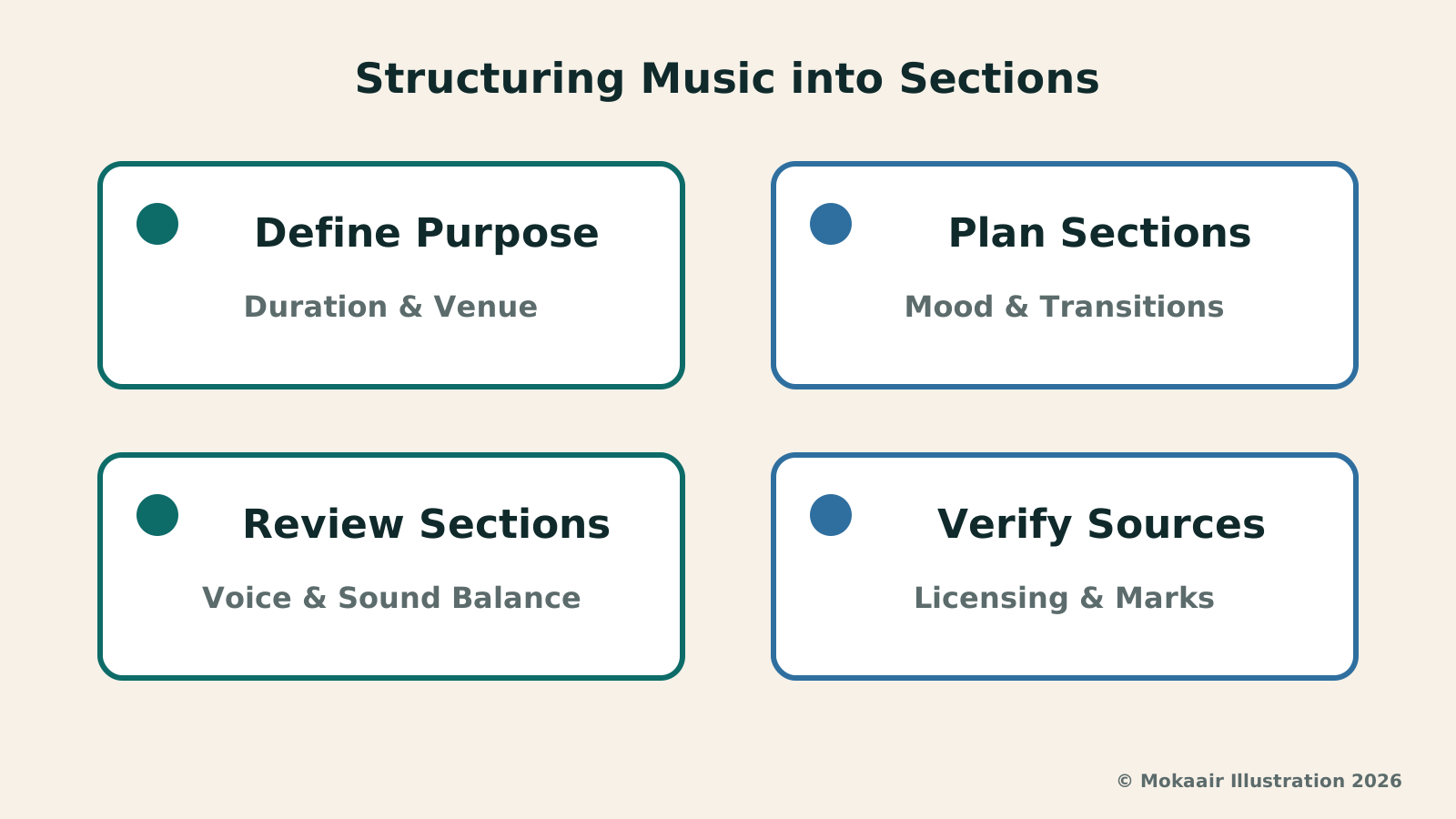
In the practical context of organizing a community micro-film festival, walk-in background music shoulders the vital task of guiding residents into the screening venue. Before brainstorming a musical structure, the curatorial team must clearly define the total track length and the on-site situation corresponding to each time block. For instance, if the total length is set to two and a half to three minutes, the first 60 seconds can be a low-key, steady ambient soundscape allowing attendees to quietly find their seats; the middle 60 seconds can gradually enrich instrumental layering to elevate anticipation; and the final phase must quickly drop in volume to reserve space.
This sectional mindset is distinctly different from the logic of mainstream pop songs built around earworm hooks. An event venue demands functional background audio rather than an overbearing performance piece. If sectional timing is not explicitly specified in the prompt, randomly generated long audio often introduces intense rhythms at inopportune moments, interfering with pre-screening announcements. Therefore, before drafting section prompts, creators should outline a timeline checklist and precisely allocate seconds for the intro, development, and outro to ensure the generated output aligns with venue flow requirements.
Intro and Opening Ambience Volume Restraint
The core of an entrance intro is creating a comfortable, non-intrusive listening space. In prompt settings for this stage, it is advisable to emphasize warm acoustic wooden instruments, soft sustained strings, or minimal piano notes, while avoiding the premature introduction of heavy kick drums or piercing synthesizers. Because attendees are still conversing and moving around when an event begins, an overly complex melody causes auditory fatigue. Creators should focus prompt instructions on timbral texture and spatial reverberation, making the intro sound expansive and calming to achieve a soothing guiding effect.
When reviewing the intro section by section, the primary inspection point is baseline volume and dynamic range. If sudden transient peaks occur right at the start, they will disrupt the welcoming atmosphere even if subsequent passages level out. At this stage, check whether the transition between the intro and succeeding musical phrases is too abrupt, watching for unnatural jumps in timbre and volume. If the intro feels overly monotonous, fine-tune the ambient texture in the prompt rather than adding percussion, keeping the opening sequence restrained and consistent in tone.
| Section Role | Musical Mood & Instrumentation | On-Site Review Checkpoints |
|---|---|---|
| Entrance Intro (0–60s) | Focus on acoustic instruments, sustained strings, or minimal piano notes to create an expansive, quiet sense of space. | Check that volume is steady and restrained, avoiding opening transient peaks that distract entering attendees. |
| Verse Development (60–120s) | Gradually introduce mid-range acoustic guitar and gentle basslines to enhance rhythmic flow and build anticipation. | Confirm instrumental layering depth, ensuring transitions are natural without sudden shifts in audio quality or frequency. |
| Chorus Build (120–150s) | Add light percussion or fuller chords moderately to elevate venue atmosphere to a focused, cohesive high point. | Examine frequency balance across tracks to ensure peak energy does not devolve into harsh or muddy noise. |
| Outro Fade (150–180s) | Strip away bass rhythm and main melody, returning to minimal ambient strings while rapidly reducing overall volume. | Clear mid-to-high frequency space for announcements, testing articulation and speech clarity against host voiceovers. |
Mid-Track Emotional Build and Instrumental Layering Expansion
Once attendees are largely seated and the music transitions to the mid-track verse and chorus, infusing moderate energy helps focus audience attention. Structurally, creators can instruct the system via prompts to introduce mid-range acoustic guitars, progressive basslines, or light shaker rhythms mid-track, gradually thickening the initially simple melodic line. The goal here is building anticipation for the upcoming screening, shifting the room's atmosphere from loose socializing into a focused, receptive state of mind.
When reviewing the midsection, listen to the phrases transitioning from verse to chorus, checking whether instruments suddenly drop out, volume jumps erratically, or the melody fails to connect with the previous passage. These are potential issues to inspect, not empirical findings on Lyria 3 Pro by this publication. If prompt adjustments alone do not meet event requirements, transitions, fade-outs, or timing can be edited in an audio editing tool rather than continuously regenerating the entire track.
Outro Tapering and Reserving Space for Live Announcements
The final 30 to 40 seconds of the soundtrack serve as a crucial transition right before the event officially begins. Here, the music must methodically wind down from its mid-track peak, clearing ample frequency room for the host's opening remarks or safety announcements. In sectional prompt design, creators should explicitly specify an attenuated outro that strips out low-end percussion and mid-range lead instruments, leaving only faint ambient strings or fading single notes so spoken announcements do not compete with background music for clarity.
When reviewing the outro, simulate a host speaking into a handheld microphone for comparative listening. If overtone resonance in the background music remains too rich near the end, it can mask speech intelligibility and articulation even at lower overall volumes. Creators should check whether the outro has a clear conclusion or a smooth, controlled fade-out, avoiding abrupt cutoffs or reverb bursts in the final seconds. Only by preserving clear mid-to-high frequency space for dialogue can the soundtrack fulfill its functional role supporting the live event.
Preserving Original Assets and Understanding Generation Watermarks
While completing sectional arrangement and audio adjustments, working teams must not neglect asset archiving. Any self-drafted voiceover copy, prompt drafts, and proprietary audio clips used for style reference should be cataloged and filed on a project-by-project basis. While modern audio tools like Lyria 3 Pro incorporate SynthID technology to watermark generated content and apply safeguards against imitating specific existing artists, such technical markers do not equate to copyright exemptions or commercial licensing guarantees.
Prior to public broadcast or promotional use, teams should verify current platform terms, utilized assets, and intended distribution channels. If aiming for a specific vibe, describe the tempo, instruments, and mood rather than targeting the replication of a particular singer's vocal style. Retaining prompts and output versions helps document the production workflow; however, neither these records nor generation watermarks alone prove that an asset is cleared for all commercial uses.
2026 AI News Roundup: Highlights and Daily Life Applications from January to September2026 AI News Roundup: Highlights and Daily Life Applications from January to SeptemberOrganizing key AI news stories month by month from January to September 2026, linking to full analyses in five languages. Covering models, work tools, creation, costs, and transparency, explaining backgrounds, uses, and limits.Read the full article
Project Glasswing and Mythos Preview: After AI Finds Vulnerabilities, the Real Work BeginsProject Glasswing and Mythos Preview: After AI Finds Vulnerabilities, the Real Work BeginsReviewing Anthropic's 2026 launch of Project Glasswing and Claude Mythos Preview, exploring the standard maintenance workflow and website management essentials from identifying candidate vulnerabilities to deploying defensive patches.Read the full article
Lifestyle
NVIDIA launches DGX Spark 64GB: on sale October 23 from $4,999, two units can be linked into 128GB
On October 2, 2026, NVIDIA announced a more affordable 64GB memory version of its DGX Spark personal AI computer, available from October 23 through six makers including Acer and ASUS. It is aimed mainly at developers and researchers who want to run AI models on their own machines. Below we summarize the specs NVIDIA published, its claims about linking two units, and what it means for general readers.
Lifestyle
Google Cloud Launches Spanner Queues: Putting Message Queues Inside Database Transactions to Make AI Agents More Reliable
Google Cloud has announced the general availability of Spanner queues, which make message creation part of a database transaction. The aim is to stop AI agents' "state" and "actions" from falling out of sync. This article covers Google Cloud's claims, the main features, and what it means for general readers.
Lifestyle
GPT-6.1 Sol Launches: New Sol Version in the API, Codex and ChatGPT Work, Not in Chat
OpenAI launched GPT-6.1 Sol on September 29, 2026, with the API name gpt-6.1-sol. The launch rollout covers Codex and ChatGPT Work on Plus, Pro, Business, Enterprise and Edu (Enterprise and Edu need an administrator to enable it); Free and Go are not included at launch, and it is not in Chat (checked September 2026).
Lifestyle
Claude Sonnet 5.5 Launches: Same List Price as Sonnet 5, Available in the API, on Cloud Platforms and in Claude.ai
Anthropic launched Claude Sonnet 5.5 on September 28, 2026. API list prices are the same as Sonnet 5 ($2 per million input tokens, $10 per million output tokens). It is available in Claude.ai, the API and several cloud platforms, and higher-risk cybersecurity requests fall back to Sonnet 5 (checked September 2026).
Articles that cite this one
Latest travel guides

GuideTokyo
Where to Stay in Tokyo: Comparing Shinjuku, Ueno, Tokyo Station, Shibuya, Asakusa, Ikebukuro, and Ginza, Plus Airport Access, Accommodation Tax, and Luggage Delivery
Where should you stay in Tokyo? Compare Shinjuku, Ueno, Tokyo Station, Shibuya, Asakusa, Ikebukuro, and Ginza by the same criteria: access from Narita and Haneda, transit routes, nearby attractions, neighborhood character, and who each area suits. Includes a comparison table, a Yamanote Line diagram, Tokyo’s accommodation tax as verified in 2026/9 (changing to 3% in 2027/4), and Airport TA-Q-BIN luggage shipping rules.
- Budget
- Hotels

GuideTokyo
How to Choose Tokyo Transit Passes: Are Suica, Welcome Suica, the Tokyo Subway Ticket, and the JR Pass Worth It?
On a first Tokyo trip, start with an IC card and pay per ride (Welcome Suica has no deposit and is valid for 28 days). If you take four or more subway rides in a day, add a 72-hour Tokyo Subway Ticket for 2,000 yen; a JR Pass is never worthwhile if you stay in Tokyo and do not go to Kansai. See what TOURIST PASMO, Suica on iPhone, and the Tokyo Metro day pass do and do not cover, with a decision chart. Prices verified in September 2026.
- Transport
- Budget

GuideTokyo
Tokyo Disneyland and DisneySea Guide: Ticket Prices, Fantasy Springs, Disney Premier Access (DPA), Standby Pass, and Which Park to Choose for Your First Visit
Tokyo Disney one-day Passport prices vary: most weekdays in 9/2026 cost ¥9,900 and weekends ¥10,900. At 14:00 daily, tickets go on sale for the same date two months later. Free Priority Pass is no longer on the official service list; only paid Disney Premier Access (¥1,000–3,500 per person per use) shortens waits. Covers hours, the 25th anniversary, Standby Pass, Entry Request, Fantasy Springs access and first-visit park choice; checked on the official site in 9/2026.
- Itineraries
- Family
Sources
- Google: Lyria 3 Pro · Checked: