Lifestyle
GPT-6 Astra Announced: From Answering Questions to Completing Computer Tasks
OpenAI announced GPT-6 Astra on September 3, 2026, emphasizing computer use, multi-step workflows, and template-based document output. Focusing on general reporting, data organization, and admin tasks, this article explains the gap between model ability and tool permissions, how to draft verifiable tasks, set required confirmation checkpoints, and recognize phased rollouts without assuming launch demos are instantly available to every account.
Updated: About 7 min read
OpenAI released GPT-6 Astra on September 3, 2026, highlighting computer operation, browsing, coding, and professional workflows, while also emphasizing the completion of documents, spreadsheets, and presentations according to templates. For general readers, the question this news addresses is not whether the model can chat, but whether tools can turn clearly communicated tasks into deliverables that you can open, inspect, and sign off on.
This article was verified on September 14, 2026. Because the launch announcement referenced a phased rollout, this article reflects the status at the time of the announcement and does not guarantee that every account in Taiwan has currently received the same features. The workflows below are editorial recommendations; there is no claim that this site has replicated the demonstrations shown in the announcement, nor should vendor benchmarks be equated with universal reliability.
Distinguish Computer Use Capabilities from the Tools You Actually Use
The launch announcement showcased Astra's capabilities across computer and browser tasks, citing the handling of documents, tables, and multi-step workflows. What actions can actually be performed still depends on whether your specific product provides the relevant tools, whether data is accessible, and what permissions your account has granted. The model name itself is not an all-access pass to every app.
For example, when organizing a roster, a tool might only read the files you upload, or it might be able to edit documents directly within an authorized workspace; the data scope and delivery methods differ between the two. Before starting, confirm where the final deliverables will be stored and which files the tool is permitted to modify, so you do not end up with merely a descriptive summary when you cannot find an actual document.
General users do not need to understand every technical term first, but they must distinguish between answering, drafting, and executing. Answering provides information, drafting produces content pending adoption, and executing can alter files or external systems. Stating these three requirements clearly is essential to retaining control where human judgment is needed.
A Good Task Must Include Verifiable Deliverables
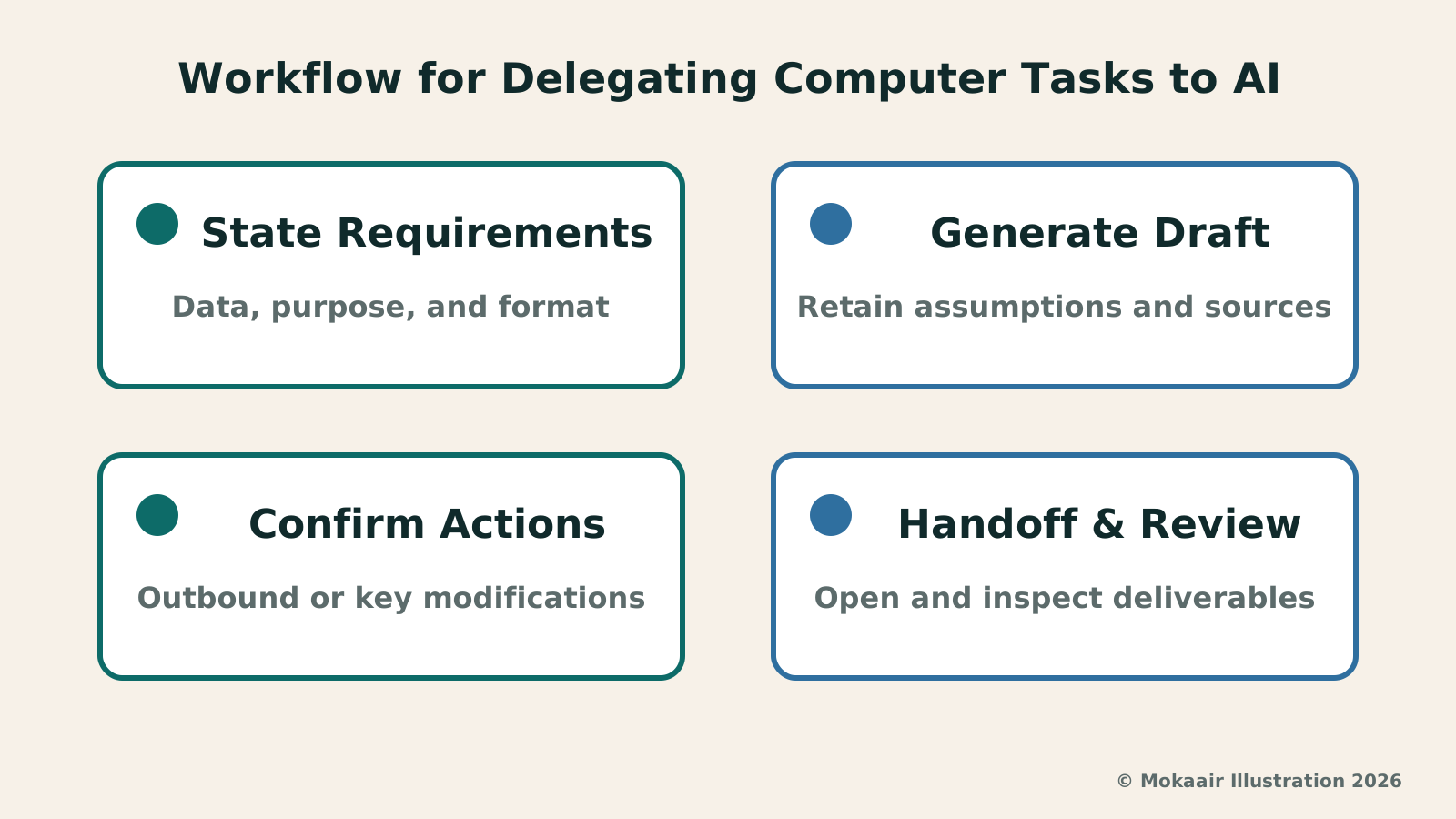
Rather than saying 'help me finish the report,' you can first specify the audience, purpose, source materials, length, and output format. For instance, ask it to summarize internal survey data for a meeting discussion, retaining the original figures and listing missing data as questions without inventing additions. This clarifies what the tool needs to produce and how you will check it at the end.
If an existing template is available, specify which elements must remain consistent and which can be modified. Preserving column headers, section order, or page limits represents a different requirement than matching a visual style. Editors suggest having the tool confirm its understanding of these constraints before generating the entire piece; a brief upfront clarification often takes far less effort than a complete reformatting later.
When verifying deliverables, do not merely check whether a file exists. Open it and check whether text is truncated, table calculations are correct, citations can be traced back, and template requirements were truly maintained. While capability descriptions in the launch announcement suggest worthwhile testing directions, your work still requires your own completion standards.
| Task Phase | Assigned Deliverable | Verification Point |
|---|---|---|
| Information Gathering | Source list and gaps | Whether data is up to date |
| Drafting & Organizing | Report or spreadsheet copy | Content, format, and math |
| Preparing Actions | Prefilled entries or draft outbox | Recipient, scope, commitments |
| Formal Handover | Files and completion logs | Open and inspect yourself |
Start with Daily Admin, Assigning in Phases
Suppose you are organizing event registration details: you can first ask the tool to look up official information, listing deadlines, required documents, and registration portals, and then outline a checklist of what you need to prepare. These two phases focus on gathering and organizing, and the deliverables should include trails back to the original source pages.
Once the data is verified, decide whether you need help filling out forms. Before entering content, verify the target recipient, fields, and data scope; before submission, review the final entries and any commitments they might trigger. Do not replace these decisions with a vague 'take care of everything for me,' and do not mistake a tool's willingness to assist for a completed application.
If a task involves contacting others, ask for a draft and a recipient list first. Confirm them before choosing to send. This setup hands time-consuming organizational tasks over to the tool while maintaining clear checkpoints for actions that speak on your behalf, making it especially suitable for those beginning to experiment with agentic workflows.
How to Respond Effectively When the Tool Asks Questions
The release also highlighted that Astra can clarify missing requirements during an assignment and adjust as you provide additional conditions. For users, the most practical answer is not 'you decide,' but communicating priorities. For example, whether a report should be concise or comprehensive, whether the budget can increase, or which data cannot be used—all of these alter the final output.
If the tool presents multiple options, respond based on the trade-offs you care about rather than redescribing the entire job. Saying 'keep an editable table for now and leave images until content is confirmed' lets it know where to focus immediate effort. Where you are unsure, directly ask it to list the implications first, rather than making irreversible decisions on your behalf.
When shifting direction midway through, clarify which existing deliverables remain valid and which need reworking. Asking the tool to update its to-do list and deliverable inventory reduces the chance that it continues applying outdated requirements. This is a collaborative arrangement and does not imply that any model can entirely eliminate misunderstandings; critical constraints should still be rechecked before final handover.
How to Gauge Whether a New Model Actually Helps
You can start with a weekly recurring task, record the time and editing steps originally required, and then test the tool using the same de-identified data. Observe whether the result is complete, whether it can be handed off directly, and whether it reduces your time spent fixing errors—rather than judging solely by how long the tool ran or how confident its replies sounded.
If a model produces a beautifully formatted document filled with unverified figures, it still cannot be adopted; if it proactively points out data gaps and prompts you to fill them early, that may represent far more valuable performance. Defining success around 'verifiable deliverables' prevents you from being swayed merely by showcase demos or marketing terminology.
The release of GPT-6 Astra gives general users more reason to rethink which computer tasks can be delegated. The best starting points are tasks with clear data boundaries, easily checked outputs, and recoverable errors. Establishing traceable work logs and delivery methods before gradually adding complexity is the best way to see the real impact of increased capabilities on your own work.
Before handing work over to colleagues, you can ask for brief user guidance: where the files are located, which fields can be modified, the basis of calculations, and constraints to watch for during future updates. This documentation should be checked alongside the deliverable, ensuring that after the model finishes generation, the person taking over does not have to guess how the file works.
Claude Fable 5.1 and Mythos 5.1: Capabilities, Access, and LimitsClaude Fable 5.1 and Mythos 5.1: Capabilities, Access, and LimitsAnthropic released Claude Fable 5.1 and Mythos 5.1 on September 1, 2026, sharing the same underlying model but with different safety measures and access methods. This guide outlines key differences for general users, explaining how to interpret long tasks, vendor evaluations, and data terms, while offering practical methods to choose tools, verify deliverables, and confirm permissions across document research and team workflows.Read the full article
ChatGPT Free Tier and Thinking Feature Updates: What Changes in Daily Use?ChatGPT Free Tier and Thinking Feature Updates: What Changes in Daily Use?On August 6, 2026, OpenAI announced updates to daily ChatGPT chats, expanding text chat and thinking features for free users while updating Sol for paid users. This guide explains quotas for text, files, and images, how to decide whether to spend extra thinking time based on complexity, and how to verify answers using itinerary, comparison, and writing scenarios—avoiding the misconception that better reasoning means always being correct.Read the full article
Lifestyle
NVIDIA launches DGX Spark 64GB: on sale October 23 from $4,999, two units can be linked into 128GB
On October 2, 2026, NVIDIA announced a more affordable 64GB memory version of its DGX Spark personal AI computer, available from October 23 through six makers including Acer and ASUS. It is aimed mainly at developers and researchers who want to run AI models on their own machines. Below we summarize the specs NVIDIA published, its claims about linking two units, and what it means for general readers.
Lifestyle
Google Cloud Launches Spanner Queues: Putting Message Queues Inside Database Transactions to Make AI Agents More Reliable
Google Cloud has announced the general availability of Spanner queues, which make message creation part of a database transaction. The aim is to stop AI agents' "state" and "actions" from falling out of sync. This article covers Google Cloud's claims, the main features, and what it means for general readers.
Lifestyle
GPT-6.1 Sol Launches: New Sol Version in the API, Codex and ChatGPT Work, Not in Chat
OpenAI launched GPT-6.1 Sol on September 29, 2026, with the API name gpt-6.1-sol. The launch rollout covers Codex and ChatGPT Work on Plus, Pro, Business, Enterprise and Edu (Enterprise and Edu need an administrator to enable it); Free and Go are not included at launch, and it is not in Chat (checked September 2026).
Lifestyle
Claude Sonnet 5.5 Launches: Same List Price as Sonnet 5, Available in the API, on Cloud Platforms and in Claude.ai
Anthropic launched Claude Sonnet 5.5 on September 28, 2026. API list prices are the same as Sonnet 5 ($2 per million input tokens, $10 per million output tokens). It is available in Claude.ai, the API and several cloud platforms, and higher-risk cybersecurity requests fall back to Sonnet 5 (checked September 2026).
Articles that cite this one
- GPT-6 Sol and Luna Launch: API Price Cuts, Available in Codex, Not Yet in Chat
- OpenAI Agents API Public Beta: Know Billing and Data Location Before Commissioning AI Work
- 2026 AI News Roundup: Highlights and Daily Life Applications from January to September
- Gemini Live Productivity Update: Handling Emails and To-Dos with Voice
- Claude Opus 5 Released: What Changes Matter Most for Everyday Work Users?
- Claude Fable 5.1 and Mythos 5.1: Capabilities, Access, and Limits
- ChatGPT Free Tier and Thinking Feature Updates: What Changes in Daily Use?
Latest travel guides

GuideTokyo
Where to Stay in Tokyo: Comparing Shinjuku, Ueno, Tokyo Station, Shibuya, Asakusa, Ikebukuro, and Ginza, Plus Airport Access, Accommodation Tax, and Luggage Delivery
Where should you stay in Tokyo? Compare Shinjuku, Ueno, Tokyo Station, Shibuya, Asakusa, Ikebukuro, and Ginza by the same criteria: access from Narita and Haneda, transit routes, nearby attractions, neighborhood character, and who each area suits. Includes a comparison table, a Yamanote Line diagram, Tokyo’s accommodation tax as verified in 2026/9 (changing to 3% in 2027/4), and Airport TA-Q-BIN luggage shipping rules.
- Budget
- Hotels

GuideTokyo
How to Choose Tokyo Transit Passes: Are Suica, Welcome Suica, the Tokyo Subway Ticket, and the JR Pass Worth It?
On a first Tokyo trip, start with an IC card and pay per ride (Welcome Suica has no deposit and is valid for 28 days). If you take four or more subway rides in a day, add a 72-hour Tokyo Subway Ticket for 2,000 yen; a JR Pass is never worthwhile if you stay in Tokyo and do not go to Kansai. See what TOURIST PASMO, Suica on iPhone, and the Tokyo Metro day pass do and do not cover, with a decision chart. Prices verified in September 2026.
- Transport
- Budget

GuideTokyo
Tokyo Disneyland and DisneySea Guide: Ticket Prices, Fantasy Springs, Disney Premier Access (DPA), Standby Pass, and Which Park to Choose for Your First Visit
Tokyo Disney one-day Passport prices vary: most weekdays in 9/2026 cost ¥9,900 and weekends ¥10,900. At 14:00 daily, tickets go on sale for the same date two months later. Free Priority Pass is no longer on the official service list; only paid Disney Premier Access (¥1,000–3,500 per person per use) shortens waits. Covers hours, the 25th anniversary, Standby Pass, Entry Request, Fantasy Springs access and first-visit park choice; checked on the official site in 9/2026.
- Itineraries
- Family
Sources
- OpenAI: GPT-6 Astra Announcement · Checked:
- OpenAI Newsroom: GPT-6 Astra Release Date · Checked: