Lifestyle
Claude Opus 5 Released: What Changes Matter Most for Everyday Work Users?
Anthropic released Claude Opus 5 on July 24, 2026, focusing on coding, knowledge work, and multi-step tasks. From the everyday office worker's perspective—document organization, proposal revisions, and task handoffs—this article covers the announced capability shifts, how to distinguish vendor benchmarks from real-world results, and how to set up data boundaries, acceptance criteria, and manual checkpoints before switching plans.
Updated: About 7 min read
Anthropic released Claude Opus 5 on July 24, 2026. The company focused improvements on programming, knowledge work, and tasks requiring sustained verification, noting that at launch it became the default model for Claude Max and the highest-capability model available for Claude Pro. That was the setup at product launch; this article was verified on September 14, 2026, and which models an actual account can select still depends on the current subscription plan and model menu.
For regular office workers, the most worthwhile aspect of this news is whether it reduces back-and-forth revisions on the same task. Polishing an email into fluent prose is merely the starting point; understanding attachments, pinpointing contradictions, proposing revised drafts, and verifying that no requirements were missed are far closer to the realities of workplace needs. The scenarios below were designed by editors to help you translate official announcements into verifiable questions, rather than serving as benchmark leaderboards.
With model updates, first check which part of your workflow becomes easier
The release announcement describes Opus 5 as placing greater emphasis on verification and iterative revision, citing benchmark results in coding and knowledge work. These results reflect Anthropic's performance under specific test prompts and configurations; they cannot be directly extrapolated to how much your reports will improve or how much time any given person will save. When reading the news, first rephrase "the model performs better" into an observable question: Can it catch its own misquoted figures before final submission?
For example, when organizing event registration data, the real hassle is often not creating a clean table, but dealing with duplicate sign-ups, unupdated payment statuses, or dietary changes left in the notes. A fitting task description asks it to list inconsistent fields, preserve the original records, and provide an items-to-confirm checklist. If you only ask it to "clean this up for me," it is difficult to tell which exceptions it simply discarded as noise.
Starting with a test task where you already know the correct answer makes evaluation much easier than throwing in your most critical project right away. Keep the original file, write down acceptance criteria beforehand, and finally compare the number of revision rounds and omitted items. The model name is only one test variable; data completeness, prompting approach, and whether you provided tools will equally influence the outcome.
How to delegate document organization and proposal revisions
Suppose you need to turn meeting discussion notes into a proposal. You can start by providing three types of material: raw notes, confirmed decisions, and undecided issues. Request that the output clearly distinguish these three states and trace each conclusion back to its corresponding source excerpt. That way, fluent writing will not mask a lack of supporting evidence, and managers can easily see which areas still require a decision.
When revising documents, rather than asking all at once for the text to be "more professional, concise, and persuasive," specify your priorities first. For example, keep delivery dates and responsible owners, remove redundant background, and only then adjust the tone. This is an editor-recommended workflow design, not an Opus 5-exclusive feature; its value lies in allowing you to maintain identical standards when comparing different models.
You can also request two deliverables: a readable revised draft, and a checklist listing substantive changes. The checklist should explain what was added, what was deleted, and what content still lacks a source. If the model merely summarizes an entire section of edits as "optimized," ask it to provide exact locations; otherwise, you will still have to guess what changed sentence by sentence.
| Work Scenario | Key Instructions | Acceptance Method |
|---|---|---|
| Meeting minutes | Distinguish decisions from items pending confirmation | Verify each point against raw notes |
| Proposal revision | Specify required information and tone | Inspect list of substantive changes |
| Spreadsheet cleanup | Preserve raw files and exceptions | Check duplicate rows and missing values |
| Task handoff | List files and unfinished action items | Open deliverables to verify item by item |
Multi-step tasks require clear handoff points
When handing over work to tools with agentic capabilities, first distinguish between the model and the tools. The model is responsible for understanding and generating content; whether it can access cloud documents, control a browser, or execute files depends on the product used, integration methods, and account permissions. You should not assume that opening a chat window gives you the same capabilities simply because the release announcement demonstrated a particular operation.
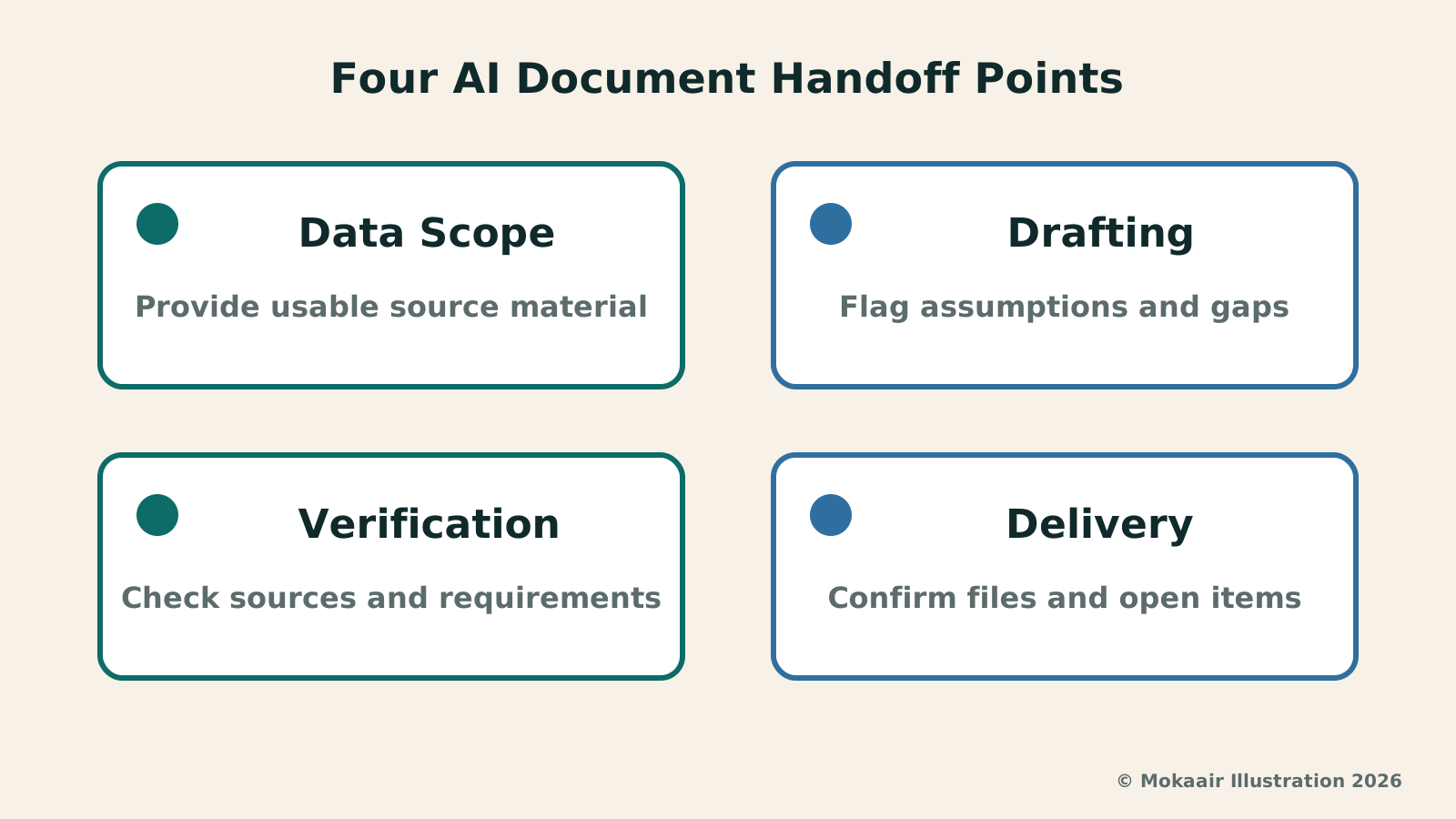
You can break a task down into four stages: organizing, drafting, verifying, and delivering. For example, ask it to list the required data first, and only write the report after you supply what is missing; once the report is finished, have it presented for your review, reserving emailing or public sharing until explicit approval is given. Especially when client data and team shared files are involved, every step that modifies external states must have clearly defined boundaries.
The final handoff must also be auditable. Instruct the tool to list output filenames, data gaps, assumptions used, and any incomplete tasks. When it says "done," you need to be able to locate and open the actual deliverable, not just read a descriptive paragraph. This acceptance method helps you determine whether the model truly reduces coordination overhead.
Should you adjust your plan for the new model?
If your primary use case currently involves revising short messages or organizing personal notes, running a comparison with whatever models you already have on hand is sufficient. When dealing with long documents, cross-referencing multiple files, or proposals requiring repeated revisions, observe whether higher-capability models save you enough verification time. Do not decide whether an upgrade is worth paying for based solely on answer length or eloquent phrasing.
When comparing, you can keep a small set of fixed tasks: a spreadsheet with duplicate rows, meeting notes containing unresolved items, and a draft reply where the tone could easily come across as discourteous. Each time, evaluate accuracy, omissions, traceability, and the time you spent reviewing. Using the same materials allows you to continue comparing when models are updated in the future, avoiding reliance on vague impressions.
Plan pricing, available models, and usage limits are subject to change; this article does not treat launch-day configurations as permanent commitments. First check your own account to clarify whether the bottleneck you want to solve stems from model capabilities, tool permissions, or simply incomplete data. Only the first issue is likely to improve solely by changing models.
Turning capability gains into reliable work deliverables
For releases like Opus 5 that center on extended tasks, the most practical expectation is that "it is easier to finish things thoroughly," not that "manual checks are no longer necessary." You still need to decide which data can be provided, which inferences are acceptable, and who confirms the work before final delivery. The closer your input matches real-world work, the less these conditions can be skipped.
When trying it out for the first time, you can provide an example stripped of personal data and explicitly state that if data is missing, it should halt and list questions rather than fabricating background details. Once you confirm it delivers work according to your format, gradually increase complexity. Usage logs gathered this way will answer whether it fits your daily workflow far better than any single score in a launch announcement.
Claude Fable 5.1 and Mythos 5.1: Capabilities, Access, and LimitsClaude Fable 5.1 and Mythos 5.1: Capabilities, Access, and LimitsAnthropic released Claude Fable 5.1 and Mythos 5.1 on September 1, 2026, sharing the same underlying model but with different safety measures and access methods. This guide outlines key differences for general users, explaining how to interpret long tasks, vendor evaluations, and data terms, while offering practical methods to choose tools, verify deliverables, and confirm permissions across document research and team workflows.Read the full article
GPT-6 Astra Announced: From Answering Questions to Completing Computer TasksGPT-6 Astra Announced: From Answering Questions to Completing Computer TasksOpenAI announced GPT-6 Astra on September 3, 2026, emphasizing computer use, multi-step workflows, and template-based document output. Focusing on general reporting, data organization, and admin tasks, this article explains the gap between model ability and tool permissions, how to draft verifiable tasks, set required confirmation checkpoints, and recognize phased rollouts without assuming launch demos are instantly available to every account.Read the full article
Lifestyle
NVIDIA launches DGX Spark 64GB: on sale October 23 from $4,999, two units can be linked into 128GB
On October 2, 2026, NVIDIA announced a more affordable 64GB memory version of its DGX Spark personal AI computer, available from October 23 through six makers including Acer and ASUS. It is aimed mainly at developers and researchers who want to run AI models on their own machines. Below we summarize the specs NVIDIA published, its claims about linking two units, and what it means for general readers.
Lifestyle
Google Cloud Launches Spanner Queues: Putting Message Queues Inside Database Transactions to Make AI Agents More Reliable
Google Cloud has announced the general availability of Spanner queues, which make message creation part of a database transaction. The aim is to stop AI agents' "state" and "actions" from falling out of sync. This article covers Google Cloud's claims, the main features, and what it means for general readers.
Lifestyle
GPT-6.1 Sol Launches: New Sol Version in the API, Codex and ChatGPT Work, Not in Chat
OpenAI launched GPT-6.1 Sol on September 29, 2026, with the API name gpt-6.1-sol. The launch rollout covers Codex and ChatGPT Work on Plus, Pro, Business, Enterprise and Edu (Enterprise and Edu need an administrator to enable it); Free and Go are not included at launch, and it is not in Chat (checked September 2026).
Lifestyle
Claude Sonnet 5.5 Launches: Same List Price as Sonnet 5, Available in the API, on Cloud Platforms and in Claude.ai
Anthropic launched Claude Sonnet 5.5 on September 28, 2026. API list prices are the same as Sonnet 5 ($2 per million input tokens, $10 per million output tokens). It is available in Claude.ai, the API and several cloud platforms, and higher-risk cybersecurity requests fall back to Sonnet 5 (checked September 2026).
Articles that cite this one
- Claude Opus 5.5 Launches: List Price Cut 20%, Paid Plans’ Five-Hour Limit Raised, 40% Is Anthropic’s Cost Estimate
- Gemini 3.6 Flash and Flash-Lite: How to Divide Fast Model Tasks
- 2026 AI News Roundup: Highlights and Daily Life Applications from January to September
- Claude Fable 5.1 and Mythos 5.1: Capabilities, Access, and Limits
Latest travel guides

GuideTokyo
Where to Stay in Tokyo: Comparing Shinjuku, Ueno, Tokyo Station, Shibuya, Asakusa, Ikebukuro, and Ginza, Plus Airport Access, Accommodation Tax, and Luggage Delivery
Where should you stay in Tokyo? Compare Shinjuku, Ueno, Tokyo Station, Shibuya, Asakusa, Ikebukuro, and Ginza by the same criteria: access from Narita and Haneda, transit routes, nearby attractions, neighborhood character, and who each area suits. Includes a comparison table, a Yamanote Line diagram, Tokyo’s accommodation tax as verified in 2026/9 (changing to 3% in 2027/4), and Airport TA-Q-BIN luggage shipping rules.
- Budget
- Hotels

GuideTokyo
How to Choose Tokyo Transit Passes: Are Suica, Welcome Suica, the Tokyo Subway Ticket, and the JR Pass Worth It?
On a first Tokyo trip, start with an IC card and pay per ride (Welcome Suica has no deposit and is valid for 28 days). If you take four or more subway rides in a day, add a 72-hour Tokyo Subway Ticket for 2,000 yen; a JR Pass is never worthwhile if you stay in Tokyo and do not go to Kansai. See what TOURIST PASMO, Suica on iPhone, and the Tokyo Metro day pass do and do not cover, with a decision chart. Prices verified in September 2026.
- Transport
- Budget

GuideTokyo
Tokyo Disneyland and DisneySea Guide: Ticket Prices, Fantasy Springs, Disney Premier Access (DPA), Standby Pass, and Which Park to Choose for Your First Visit
Tokyo Disney one-day Passport prices vary: most weekdays in 9/2026 cost ¥9,900 and weekends ¥10,900. At 14:00 daily, tickets go on sale for the same date two months later. Free Priority Pass is no longer on the official service list; only paid Disney Premier Access (¥1,000–3,500 per person per use) shortens waits. Covers hours, the 25th anniversary, Standby Pass, Entry Request, Fantasy Springs access and first-visit park choice; checked on the official site in 9/2026.
- Itineraries
- Family
Sources
- Anthropic: Introducing Claude Opus 5 · Checked: