Lifestyle
What Is Tokenization? Splitting Text Before It Enters a Model
Tokenization converts raw text into tokens and IDs; it is not the same as finding grammatical words in Chinese sentences. Using a breakfast-shop menu, this article explains how vocabularies, subwords, spaces and normalization affect results, distinguishes BPE, Unigram and tokenization tools, and shows how to check Traditional Chinese, mixed languages and rare symbols. Learn to tell whether a problem lies in text splitting, model understanding or file reading.
About 7 min read

Contents
- 1. Why Tokenization Results Differ from the Words You Have in Mind
- 2. The Roles of Vocabularies, Algorithms and Tools
- 3. Check the Entire Processing Chain with a Breakfast Menu
- 4. Why Spaces and Text Cleanup Change Results
- 5. Tokenization Is Neither Retrieval Chunking nor a Test of Chinese Understanding
Tokenization converts raw text into units a model can process. The everyday phrase “splitting a sentence into words” may bring language classes to mind, but a language model's tokenizer often splits a word into smaller pieces and may also include spaces and punctuation in its representation. Its goal is a computable encoding, which does not necessarily follow what people consider natural word boundaries.
Next, we will use the example of organizing item names at a breakfast shop to identify what a tokenizer does and does not do. You do not need to train a tokenizer yourself to learn how to check whether text mixing Chinese, English abbreviations and special symbols enters the system correctly, instead of blaming the model's Chinese comprehension whenever an answer is wrong.
Why Tokenization Results Differ from the Words You Have in Mind
Suppose a menu includes “cheese egg crepe,” “iced soy milk” and a newly named set meal. People interpret these as dishes based on meaning, while a tokenizer determines the pieces according to its established vocabulary and rules. Common text may have more complete representations, while an uncommon new name may be split into smaller pieces. The actual boundaries depend on the tokenizer you use and cannot be inferred just by looking at the text.
After splitting the text into pieces, the program converts them to corresponding IDs. The model performs numerical computations using the representations associated with these IDs, rather than thinking directly about the shapes of characters on paper. This also explains why the same text may have different token counts in different models: different tokenizers and vocabularies may select different pieces.
Do not assume that being split into small pieces makes text completely incomprehensible. Subword methods were designed precisely to handle more text combinations with a finite vocabulary. Conversely, if an item happens to use only a few tokens, that does not prove the model knows its ingredients or price. Whether text can be represented and whether the model knows that information are two separate questions.
Read the full description
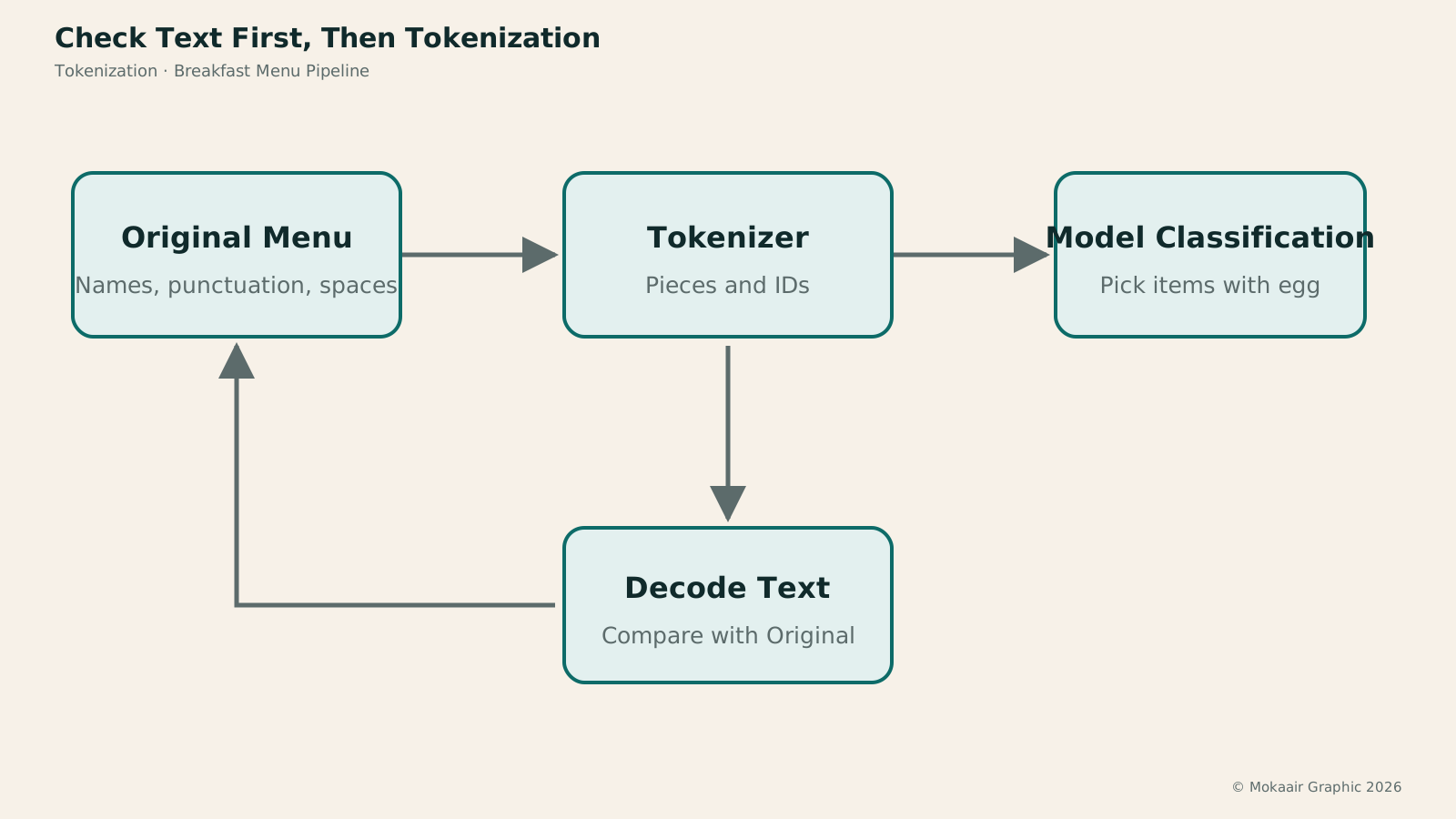
A tokenizer turns the original menu into pieces and IDs for model classification; a separate path decodes the text for comparison with the original.
The Roles of Vocabularies, Algorithms and Tools
Hugging Face documentation outlines subword methods such as BPE, Unigram and WordPiece. Intuitively, BPE builds its vocabulary by progressively merging pieces that frequently occur together; Unigram starts with candidate pieces and probabilities to select suitable representations. These are different strategies. Their names alone cannot tell you which is best for every Chinese-language task.
SentencePiece is a tool that implements tokenization and decoding, using methods such as BPE or Unigram. Its original project documentation says it can train directly on raw sentences without first relying on language-specific word segmentation. Thus, asking “Which is better, SentencePiece or BPE?” sometimes compares things at different levels, much like treating a software tool and one of the computational methods within it as mutually exclusive products.
For most users, matching the model and tokenizer matters more. When connecting to an API yourself or downloading a model, you cannot arbitrarily feed the model IDs produced by another tokenizer. The same ID may represent different pieces in different vocabularies; even if the program does not immediately report an error, the meaning of the input may already have changed. Using the tokenization settings bundled with the model or officially specified is the easiest way to avoid this confusion.
Check the Entire Processing Chain with a Breakfast Menu
The following is an illustrative procedure. Prepare a test menu containing common dishes, new set-meal names, English abbreviations, full-width punctuation and emoji. Keep an original plain-text copy first, then use the corresponding tokenization tool to inspect the pieces, IDs and total count. This record is intended to establish a baseline for comparison, rather than to find an aesthetically pleasing split.
Next, decode the IDs back into text and compare each item with the original. The goal is to confirm how names, punctuation and spaces are preserved in this processing workflow. Some settings include normalization, so check the tool's rules first rather than treating every difference as an error. Pay particular attention to full-width and half-width characters, symbols that look identical but have different encodings, and extra line breaks.
Then give the same menu to the model and ask it to list only items containing eggs, including their original names. If characters are already missing from the decoded text, first check file reading, encoding or preprocessing; if the decoded text is correct but the model selects the wrong items, the problem is more likely to lie in the task instructions, insufficient data or understanding. Checking each stage this way makes it easier to locate the actual point of failure than repeatedly rephrasing the prompt.
Why Spaces and Text Cleanup Change Results
A menu copied from a PDF may have spaces between every character; line breaks in tables may also put names and prices on separate rows. What looks like a mere formatting flaw to a person is a different input to the tokenizer and the model that follows. Inspecting the extracted plain text first is usually more effective than adding more instructions to incorrect data.
However, cleaning does not mean deleting all spaces. Spaces in English names, separators between items and notes, and boundaries between table columns can all carry essential structure. A better approach is to keep the original, set explicit rules, such as merging only abnormal line breaks introduced by a PDF, and manually inspect a few edge cases before converting the whole batch.
Normalization also needs a purpose. If you are looking for the same dish, merging some character-form differences may make matching easier; if you need a verbatim transcription of contracts, serial numbers or quoted source text, changing characters may cause information loss. Check the tokenization tool's capabilities and your data fidelity requirements separately. Do not replace data quality checks with “AIWhat Is Artificial Intelligence?AI covers many technologies and uses; it is not synonymous with chatbots and need not generate text. Starting with the OECD system definition, this article uses photo classification and community resource recommendations to link inputs, inference, outputs and human goals, and explains AI's relationship to machine learning, deep learning and generative AI. Learn to ask concrete questions about what an AI feature does and distinguish capability, autonomy and trustworthiness.Read the full article can understand it, so it's fine.”
Tokenization Is Neither Retrieval Chunking nor a Test of Chinese Understanding
Document chunking usually divides long material into paragraphs or pieces for retrieval, while tokenization represents the text sent to a model as tokens. You can first divide an entire manual into chapters, then encode one chapter with a tokenizer. Both processes can coexist and serve different purposes. Making chunks smaller does not change the model's tokenization method.
Likewise, search engines often use Chinese word segmentation to build indexes, focusing on how query terms match terms in documents; language-model tokenization concerns the representation used for model input and training. When names are similar, first ask, “Who will use the result of this splitting?” This helps avoid mixing up search settings and model settings.
If you only use a chat interface, you usually cannot replace the underlying tokenizer, but you can still clean the source text, keep fields clearly defined and avoid meaningless repetition. If you develop your own workflow, record the model name, tokenization settings and preprocessing version together. That way, if the token count suddenly changes later, you can tell whether the content changed or the encoding rules did.
| Concept | What Is Split | Main Purpose |
|---|---|---|
| Language-model tokenization | Text into tokens | Representation for models |
| Chinese word segmentation | Words within sentences | Linguistic analysis or search indexing |
| Document chunking | Paragraphs within long documents | Retrieval and data organization |
What Is a Token? How AI Measures Text Length
Document Chunking: How Long Should Chunks Be to Avoid Cutting Off Answers?
The Complete AI Terminology Index: From Loop Engineering to Generative AI
Found this guide helpful? Share it with someone who needs it
Lifestyle
Agentic Retrieval-Augmented Generation (Agentic RAG): When to Search Again
Agentic RAG lets models make retrieval decisions, choosing sources, rewriting queries or searching further based on the question and available evidence. Using a concrete LangGraph workflow and a comparison of venue-use conditions, this article contrasts it with fixed RAG and explains stopping criteria, permissions, query logs and cost control. Learn to judge whether a task needs dynamic exploration or a predictable fixed workflow is enough.
Lifestyle
Graph Retrieval-Augmented Generation (GraphRAG): Understanding a Document Collection Through Relationships
GraphRAG uses entities and relationships in retrieval to answer questions about cross-document connections and overall themes. Drawing on Microsoft's original paper and official docs, this article explains entity extraction, community summaries, and local and global search, using local event records to show why different questions need different paths. It also shows how missing links, mistaken name merges, and distorted summaries affect answers: a pretty graph is not verified fact.
Lifestyle
Knowledge Graphs: Making Entities and Relationships Clear
Knowledge graphs organize entities and relationships to trace who took part in what, where and when through links. Using community events, this article covers entity identity, relationship direction, sources and time; compares Resource Description Framework (RDF) and property graphs; and explains why graphs are not equivalent to visualizations or reliable facts. Learn when to build one and how it works with tables, vector search and graph retrieval-augmented generation (GraphRAG).
Lifestyle
Hybrid Search: Balancing Exact Terms and Meaning
Hybrid search merges full-text, vector and other retrieval results to cover exact codes and natural-language needs. An equipment-manual query explains candidate retrieval, deduplication, rank fusion and reranking, including how Reciprocal Rank Fusion (RRF) merges results by rank. Hybrid search is not always more accurate. Learn to test quality with code, paraphrase and no-answer queries and spot biases from permissions, filters and duplicate content.
Sources
- Hugging Face: Tokenization algorithmsChecked:
- SentencePiece Original ProjectChecked:
Compiled from the references and verification dates listed above; fares, schedules, product features, and terms can change, so please confirm the latest details on the relevant official website before travelling, booking, or purchasing.