Lifestyle
What Is Multimodal AI? Understanding Images, Sound and Text Together
Multimodal AI handles multiple forms—text, images, audio or video—but supporting multiple inputs does not imply every output type. Using storage shelf assembly, this article explains how images and text complement each other, native integration versus chained tools, and why models can still miss image details. Input design and cross-checking methods help you tell whether answers reflect the image or mistake plausible guesses for observed facts.
About 8 min read
Contents
Multimodal AIWhat Is Artificial Intelligence?AI covers many technologies and uses; it is not synonymous with chatbots and need not generate text. Starting with the OECD system definition, this article uses photo classification and community resource recommendations to link inputs, inference, outputs and human goals, and explains AI's relationship to machine learning, deep learning and generative AI. Learn to ask concrete questions about what an AI feature does and distinguish capability, autonomy and trustworthiness.Read the full article can process more than one form of information, such as text, images, audio or video. It can use different forms of information within the same task—for example, answering a text question based on a photo. Here, modality means the form of data, not translating the same text into different languages or opening many chat windows at once.
“Multimodal support” still requires clarifying the direction: a model that reads images may not generate images, and a system that hears audio may not answer aloud. The original storage shelf assembly example below explains how to make different inputs complement each other and verify that the model has not mistaken guesses for actual observations.
Different Forms Provide Different Kinds of Clues
Text can state goals and constraints explicitly; photos can show objects' positions and appearance; audio can preserve speech and some sound cues; and video includes changes over time. Multimodal tasks are valuable because some information is difficult to convey through a single form, while combining different forms can provide a more complete set of conditions.
For example, suppose you have a photo of storage shelf parts and some written instructions. The photo shows the number and shapes of the parts, while the text explains that you want to identify the base panel. If you upload only the photo and ask “What should I do?”, the model will not know your goal. Simply describing “a few panels” may leave out details needed to identify them.
Google's image understanding documentation demonstrates sending images and text to a model together for description, classification and visual question answering. This illustrates a specific capability, not a guarantee that any photo can be identified correctly. Image clarity, framing and the task itself still limit answer quality.
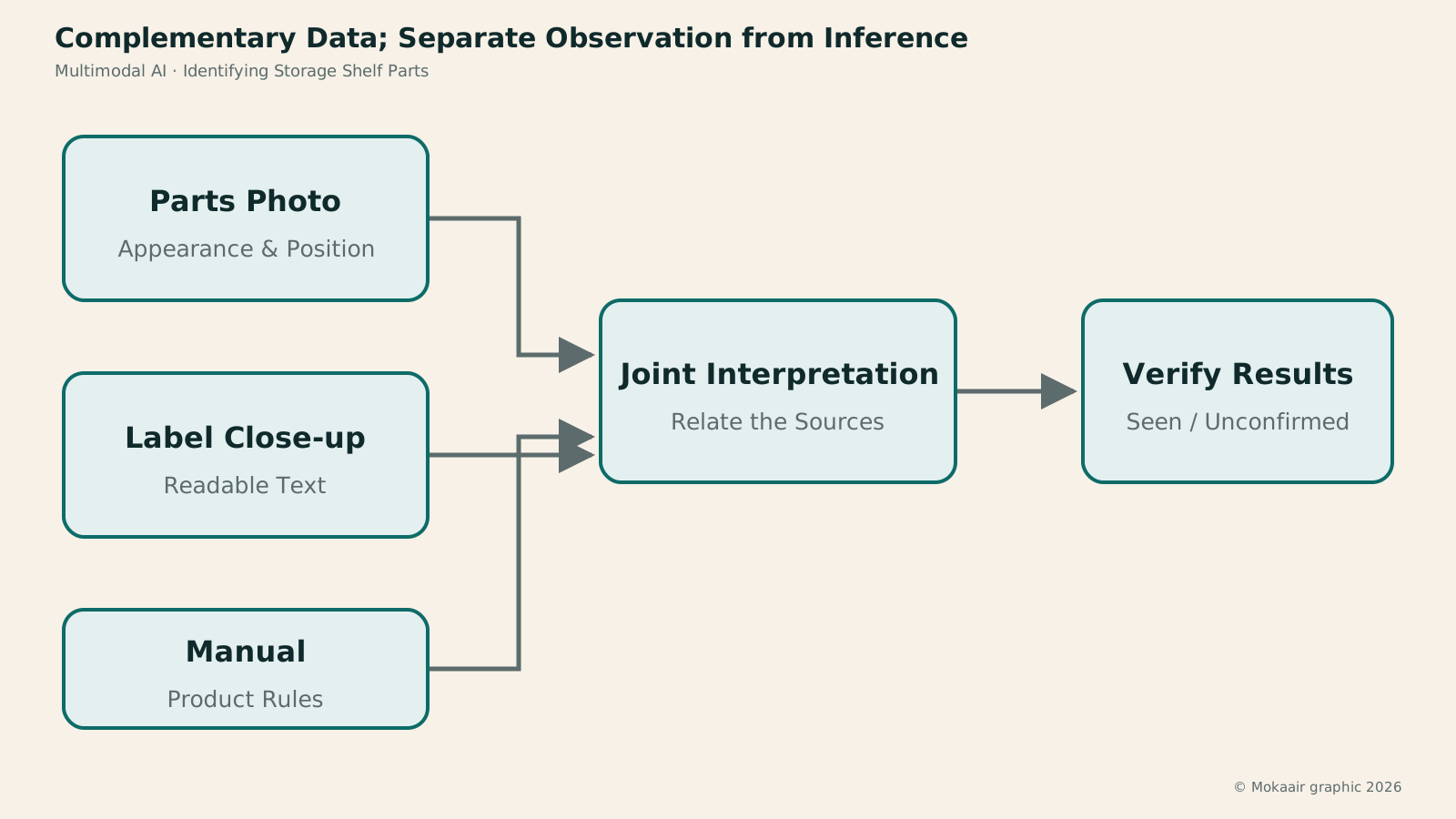
Read the full description
An overview of the parts, a label close-up and written instructions provide clues together; the model's answer separates visible facts from judgments needing confirmation.
Systems May Integrate Modalities or Chain Specialized Tools
The original Flamingo study connected vision and language models to process interleaved visual and text inputs. It demonstrates one multimodal architecture, but not all products use the same approach. Some systems first transcribe audio and then pass the text to a language model, or first use OCR to read text in images before summarizing it.
These workflows may all look like “AI that can see and hear” in the user interface, yet they preserve different information internally. If a photo is first converted only to text, the spatial positions of parts may not be fully preserved. If audio is first transcribed, some tone and background sounds may also disappear from subsequent processing.
When evaluating multimodal capabilities, ask whether the information the task needs reaches later stages, rather than merely checking whether the product accepts files. Being able to upload video does not guarantee that every frame is fully analyzed, and being able to upload photos does not mean the system can accurately measure physical dimensions. Consult the service's documentation and test it to determine how it actually processes inputs.
Ask a Clear Question Using a Storage Shelf Photo
Here is an illustrative procedure. Prepare a well-lit photo of the parts with every panel and label clearly visible, then attach the corresponding page of the manual. You could ask: “Based on the images and instructions, list possible base panels and identify the visible clues. Mark any unclear hole positions as unconfirmed.” This is easier to verify than asking for all the assembly steps outright.
The expected output should separate visible facts from inferences. For example, “The panel on the left has a visible label” is an observation, while “It may be the base panel” is a judgment. If the label is blurry, the model should retain that uncertainty. You can then add a close-up and see whether its judgment changes reasonably with the new evidence.
Finally, compare the answer with the manufacturer's instructions and the physical parts. If the model mistakes the back panel for the base panel, first check whether the photo is complete, the labels are readable and the manual matches the same model. This exercise tests visual question answering and cross-referencing, not replacing product safety instructions with AI. Do not rely on guesses from photos for uncertain load-bearing or structural issues.
Clearly Connect Multiple Images and Pieces of Information
When providing multiple photos, explain which shows all the parts, which is a label close-up and which shows the manual. Avoid referring to things only as “this” or “that,” because the model may confuse similar objects across different images. Clear names and ordering can reduce errors when matching information across images.
If the written description conflicts with the photos, ask the model to identify the conflict. For example, if the text mentions a long panel but the photo shows only short panels, a reasonable answer might be that the photo does not cover all the parts, rather than immediately concluding that the seller omitted an item. Missing information is different from an absent object; establish what is visible before drawing conclusions.
Video and audio also require identifiable locations. If you ask where a particular action occurs, request a timestamp or a segment you can revisit. A summary alone makes it hard to tell whether the model actually recognized the specified event. The more multimodal inputs you provide, the more important source labeling and cross-checking become.
Common Errors and Appropriate Uses
A model may miss small text, confuse repeated objects, misjudge spatial relationships or use general knowledge to fill in details absent from the image. A confident answer does not mean it saw clearly. Ask it to list visible evidence and identify uncertain areas, then provide an enlarged detail or another angle instead of simply asking it to “look more carefully.”
Multimodal processing also consumes resources. Services have different rules for processing volumes and limits for images, audio and video, so these cannot be estimated directly from text length. If the task needs only a label close-up, there is no need to send an entire long video. Providing the most relevant inputs at sufficient quality usually makes verification easier.
Understanding and generation are different capabilities. Identifying parts from a photo is understanding; drawing a storage shelf concept from text is generation. However realistic a generated image looks, it cannot prove how existing parts should be assembled. Distinguishing input direction, output direction and evidentiary purpose helps prevent creative output from being mistaken for an observation.
Multimodal AI is best suited to supplying information that is difficult to describe in text, but a useful question still needs a goal, relationships between sources and a verification method. First provide clear images, then ask a specific question, and finally compare the answer with the physical objects and original materials. This lets you benefit from multiple forms of information instead of letting more attachments produce more guesses.
If the answer changes after you add photos, do not simply accept the latest version. Ask the model to identify which judgment changed because of the new evidence—for example, hole positions that were previously unclear are now visible—rather than treating all earlier guesses as confirmed. This preserves both the benefits of information across modalities and the remaining gaps, making it easier for the next person taking over to check again.
| Capability Direction | Input and Output | Example |
|---|---|---|
| Image understanding | Image and question to text | Identify parts |
| Text-to-image | Text to image | Draw a concept illustration |
| Speech recognition | Audio to text | Organize spoken records |
| Speech synthesis | Text to audio | Read instructions aloud |
What Is Text-to-Image? Turning Descriptions into Images You Can Choose From
What Is Automatic Speech Recognition (ASR)? Turning Recordings into Verifiable Text
What Is Text-to-Speech (TTS)? Making Text Sound Clear and Correct
AI Terms Index: From Loop Engineering to Generative AI
Found this guide helpful? Share it with someone who needs it
Lifestyle
Agentic Retrieval-Augmented Generation (Agentic RAG): When to Search Again
Agentic RAG lets models make retrieval decisions, choosing sources, rewriting queries or searching further based on the question and available evidence. Using a concrete LangGraph workflow and a comparison of venue-use conditions, this article contrasts it with fixed RAG and explains stopping criteria, permissions, query logs and cost control. Learn to judge whether a task needs dynamic exploration or a predictable fixed workflow is enough.
Lifestyle
Graph Retrieval-Augmented Generation (GraphRAG): Understanding a Document Collection Through Relationships
GraphRAG uses entities and relationships in retrieval to answer questions about cross-document connections and overall themes. Drawing on Microsoft's original paper and official docs, this article explains entity extraction, community summaries, and local and global search, using local event records to show why different questions need different paths. It also shows how missing links, mistaken name merges, and distorted summaries affect answers: a pretty graph is not verified fact.
Lifestyle
Knowledge Graphs: Making Entities and Relationships Clear
Knowledge graphs organize entities and relationships to trace who took part in what, where and when through links. Using community events, this article covers entity identity, relationship direction, sources and time; compares Resource Description Framework (RDF) and property graphs; and explains why graphs are not equivalent to visualizations or reliable facts. Learn when to build one and how it works with tables, vector search and graph retrieval-augmented generation (GraphRAG).
Lifestyle
Hybrid Search: Balancing Exact Terms and Meaning
Hybrid search merges full-text, vector and other retrieval results to cover exact codes and natural-language needs. An equipment-manual query explains candidate retrieval, deduplication, rank fusion and reranking, including how Reciprocal Rank Fusion (RRF) merges results by rank. Hybrid search is not always more accurate. Learn to test quality with code, paraphrase and no-answer queries and spot biases from permissions, filters and duplicate content.
Sources
- Alayrac et al.: FlamingoChecked:
- Google: Image understandingChecked:
Compiled from the references and verification dates listed above; fares, schedules, product features, and terms can change, so please confirm the latest details on the relevant official website before travelling, booking, or purchasing.