Lifestyle
GPT-Live 1 Comes to the API: Can It Take Customer Service Calls, Whose Voice Is It, Will It Record?
On September 10, 2026, OpenAI’s API changelog noted that voice model GPT-Live 1 is now generally available in the API, so developers can wire it into phone support, apps, or their own products. Drawing on OpenAI’s developer documentation, this article covers the model’s API specs, how calls connect, the documentation’s note that outbound calls are not supported, its 12 named voices and unlisted spoken languages, and how recording and per-minute billing work; this site has not tested it.
About 13 min read
On September 10, 2026, OpenAI’s API developer documentation logged a new changelog entry: the full-duplex voice model GPT-Live 1 is now generally available in the API, under the model ID gpt-live-1 and the endpoint v1/live/sessions. The official documentation states that voice sessions cost $0.05 per minute, billed per second, with backend model and tool usage charged separately. What this means is that a voice model that can listen and speak at the same time is a component developers can buy and build into their own phone systems, apps, or products.
This article was checked on September 18, 2026 against OpenAI’s developer documentation: the API changelog, the GPT-Live 1 model page, the telephony and SIP integration guide, and the session management guide, reflecting the versions available on the day of checking; these documentation pages carry no version numbers and their content may change later. This site did not actually integrate with or test this API; the capability descriptions in this article are OpenAI’s own statements. This article covers only this update on the API developer side, not the plans or settings on the ChatGPT consumer side.
The September 10 Changelog Entry: Generally Available, the Model ID, and Two Delegation Modes
The official model page defines GPT-Live 1 as a full-duplex voice model: it can listen and speak at the same time, delegating reasoning and tool use to a backend agent — meaning that when something needs to be looked up or computed, that work is handed off in the background while the conversation continues. The changelog describes the September 10 status as “now generally available in the API”; that phrase describes an availability status, and the four documents this article checked do not say this is the first time it has appeared. The telephony integration guide, in fact, notes that existing integrations may still receive a deprecated incoming-call event name, which suggests integrations were already running before this date.
The model page lists the model ID as gpt-live-1, with the corresponding endpoint v1/live/sessions; the official documentation describes it as “our premier model for natural, expressive voice conversations with smooth interruption handling” — this is OpenAI’s own characterization. Both input and output modalities are audio and text; image and video are not supported. The model page lists a knowledge cutoff of July 31, 2025, which is the point in time for the model’s own training data.
When developers want GPT-Live 1 to handle questions that require looking things up or computation, the documentation describes two delegation modes: Responses delegation, paired with an OpenAI model, and client delegation, which connects to a backend the developer runs themselves; if delegation is omitted or set to null, it defaults to client mode. The documentation states that the delegation mode cannot be changed once a session has started — changing it requires starting a new session.
The Model’s API Specifications: Only One Supported Endpoint, No Free Tier
GPT-Live 1 has only one endpoint marked as supported in the API — Live (v1/live/sessions); the official endpoint list marks existing endpoints such as Chat Completions, Responses, and Realtime, along with the older Completions (legacy), as not supported. The telephony integration guide also notes that each API has its own authentication, session creation, and event contract, and they cannot be substituted for one another.
Usage is also measured differently: the documentation states that rate limits are measured in concurrent sessions, and lists Free as an unsupported usage tier. Depending on the account’s usage tier, Tier 1 through Tier 5 can open 25, 50, 200, 300, and 500 concurrent sessions respectively.
| Item | Details | Notes |
|---|---|---|
| Model ID | gpt-live-1 | Only supported endpoint: v1/live/sessions |
| Supported modalities | Audio and text (both input and output) | Image and video not supported |
| Delegation mode | Responses delegation or client delegation | Selected when the session is created; cannot be changed mid-session |
| Concurrency limit | Tier 1–5: 25 / 50 / 200 / 300 / 500 | Free tier not supported |
| Voice pricing | $0.05 per minute, billed per second | Backend model and tools billed separately |
When a Call Comes In: How GPT-Live 1 Takes Over
To connect GPT-Live 1 to a phone system, the official documentation lists two paths: Direct SIP, where the telephony provider exchanges call audio with OpenAI while the developer’s application handles webhooks, session configuration, call decisions, and business logic; and a server audio bridge, where the developer’s application relays audio from the telephony provider or a meeting room to GPT-Live over WebSocket, managing both connections, event translation, playback, and the call lifecycle itself. The documentation mentions that Twilio, Telnyx, LiveKit, and Daily/Pipecat each have dedicated integration guides.
Once a call comes in: the developer’s application applies its own authorization and routing rules, using a separate API action to accept or reject the call — accepting requires sending settings such as the model, voice, and delegation mode, while rejecting requires attaching a SIP status code between 300 and 699 (486, for busy, for example); the first accept or reject decision wins, and any decision sent afterward is rejected. Two further actions are available during a call — transferring it elsewhere or hanging up directly — both of which return 200 OK with no content on success.
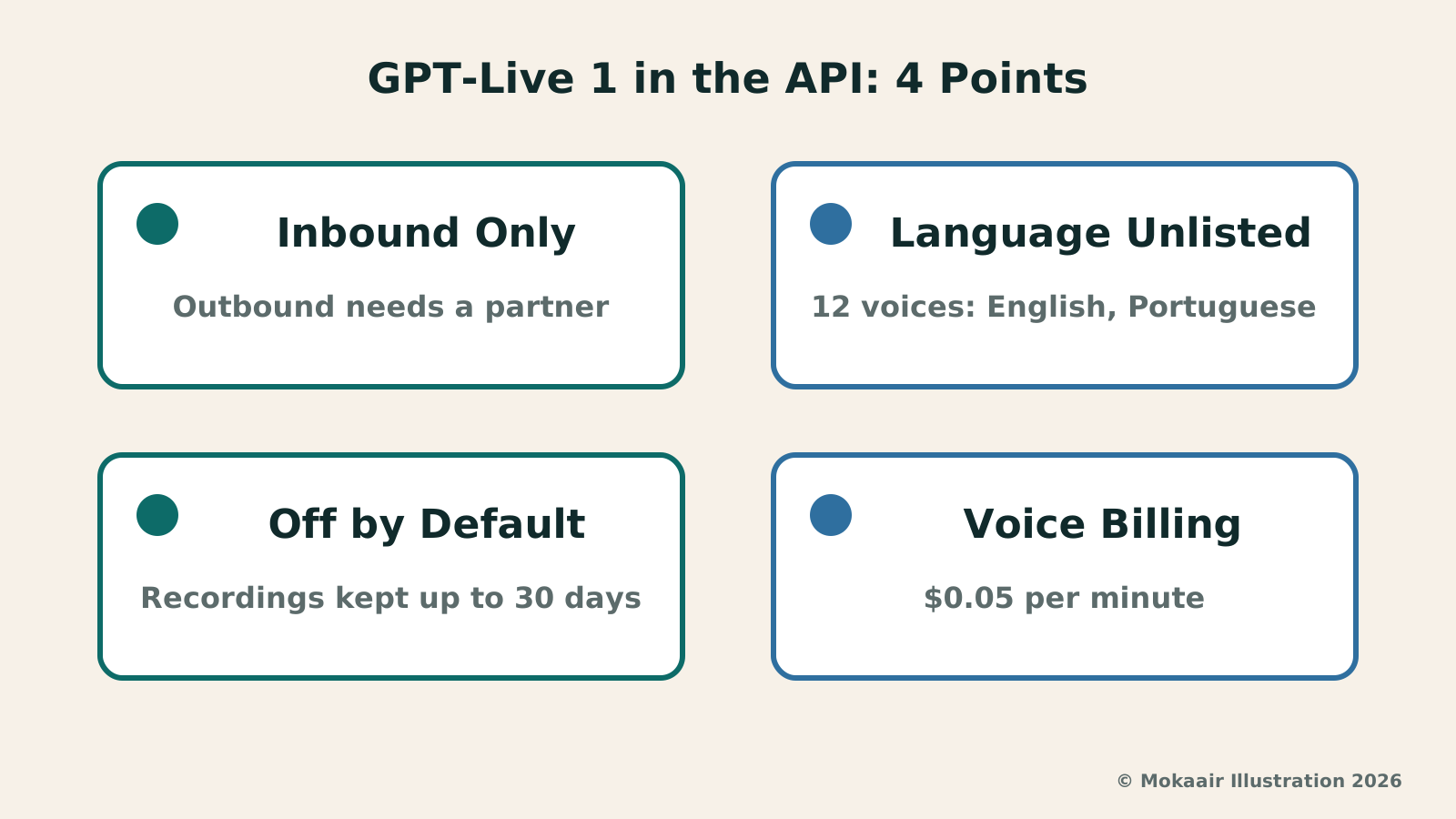
At the end of this section, the documentation states plainly that this flow handles inbound calls, and does not support creating outbound SIP calls through POST /v1/live/sessions; for outbound calling, the documentation directs developers to use a partner integration instead, describing outbound calling as something the provider owns. The documentation also warns that SIP headers attached to an incoming call should be treated as untrusted caller metadata, not as a basis for authorization.
Whose Voice Is It: 12 Built-in Options, but These Four Documents Don’t List Supported Languages
GPT-Live 1’s voice isn’t limited to just one option. Besides the default, marin, the official documentation lists 12 additional named voices to choose from — for example, vesper, whose language field is marked English and regional-influence field British, and gleam, marked English and North American; as well as bossa and tempo, both marked Portuguese with a Brazilian regional influence. Developers select one and put it in the session settings when creating a session; once a conversation has started, it cannot be changed mid-call — changing it requires starting a new session.
What readers in Taiwan should note: the documentation uses “regional influence” to describe these voices, while specifically stating that this refers only to speaking style and is not a guarantee of accent fidelity. More importantly, the four official documents this article checked do not list which spoken languages this model supports — the language field for the 12 named voices shows only English and Portuguese, and the default voice, marin, has no language specified either; when the documentation discusses greetings, it tells developers to use the language specified by the application until the caller speaks, and to test with the languages their own application supports. In other words, if GPT-Live 1 really is answering a customer service call, how well it handles Chinese is a question these four documents do not answer — it should not be assumed that it can.
The official documentation also mentions that, once approved, a custom voice can be built from your own recordings; the details are in a separate guide that this article does not go into.
Is It Recorded, How Long Does It Remember, and What Does a Few Minutes on the Phone Cost
Whether a call is recorded is up to the developer — it is not on by default. The official documentation states that a session’s recording setting defaults to off; the developer must turn it on, and the project must first be approved, before a completed recording can be kept for download or “forking” into a new session, and downloading or forking also requires a data policy that permits persistence. Saved recordings expire after 30 days; if a project has Zero Data Retention enabled, the recording setting is always treated as off, making downloads and forks unavailable. A downloaded recording is a stereo WAV file, with the input and output audio in the left and right channels respectively.
There’s also a cap on memory for long calls. The documentation states that a session’s default context window holds 128,000 tokens, which includes the instructions given by the developer, the conversation text, and audio tokens that do not appear in the transcript; when usage exceeds 90% of that window, the system starts a replacement voice engine within the same session, and the new engine receives the original instructions plus up to 8,192 tokens of conversation history (recent messages, and, when available, a summary of older messages). That means that in a very long call, details discussed earlier may be summarized or omitted.
The pricing formula itself is simple: voice sessions cost $0.05 per minute, billed by actual seconds, and the documentation notes that this is not rounded up to the next whole minute; the backend model and tools are billed separately at their own rates, and these four documents do not combine the two into a single worked example. What follows is this article’s own conversion at the rate checked on September 18, 2026, not an official figure: for three full minutes of voice alone, that works out to $0.15; the actual total also depends on how much work the backend did. When a session ends, the official documentation lists reasons including the application closing it, the session reaching its duration limit, a safety filter stopping it, the remote connection ending normally, and the connection being interrupted unexpectedly — but the documentation does not state what the duration limit actually is in minutes.
Frequently asked questions
Was September 10, 2026 the first time GPT-Live 1 became usable?
The changelog entry says it “is now generally available in the API”; that phrase describes an availability status, and the four official documents this article checked do not say this is the first time it has appeared. The telephony and SIP integration guide, in fact, mentions that existing integrations may still receive a deprecated incoming-call event name, which indicates integrations were already running before this date. These four documents also do not describe an earlier preview period or a staged rollout schedule.
Does GPT-Live 1 understand Chinese? Can you call in and ask questions in Chinese?
The four official documents this article checked do not list which spoken languages this model supports. Of the 12 named voices listed in the documentation, the language field shows only English and Portuguese, and the default voice, marin, has no language specified either; when the documentation discusses greetings, it tells developers to use the language specified by the application until the caller speaks, and to test with the languages their own application supports. As of the documentation version this article checked on September 18, 2026, there is no statement confirming Chinese support, so it should not be assumed that it can understand or respond fluently in Chinese.
Can developers in Taiwan use this API right now?
The four official documents this article checked do not list which countries or regions can use it, and none of them mention Taiwan specifically. Whether you can apply for or use it should be based on what your own account actually shows on the OpenAI platform; this article has not verified whether Taiwan-based accounts can currently use this feature.
If a business wants to connect this to its phone system, is OpenAI’s own channel the only option?
Not necessarily. The official documentation states that this call flow handles inbound calls, and does not support creating outbound SIP calls through POST /v1/live/sessions; for outbound calling, the documentation directs developers to use a partner integration instead, naming Twilio, Telnyx, LiveKit, and Daily/Pipecat. These fall under each third-party provider’s own service scope, so actual features and pricing depend on what each provider states.
Is this voice session recorded and retained?
Not by default. The official documentation states that a session’s recording setting defaults to off; the developer must turn it on, the project must first be approved, and downloading or forking also requires a data policy that permits persistence before any recording is kept; saved recordings expire after 30 days. If a project has Zero Data Retention enabled, the recording setting is always treated as off, and there is no recording available to download.
Roughly how much does a call cost?
What’s officially published is the rate for voice itself: $0.05 per minute, billed by actual seconds, as checked on September 18, 2026. What follows is this article’s own conversion, not an official figure: a three-minute call, counting voice alone, works out to $0.15. The backend model and any tools it calls are billed separately at their own rates, and the actual total for a call depends on how much work it did; these four documents do not provide a total-cost example for an entire call.
2026 AI News Roundup: Highlights and Daily Life Applications from January to September2026 AI News Roundup: Highlights and Daily Life Applications from January to SeptemberOrganizing key AI news stories month by month from January to September 2026, linking to full analyses in five languages. Covering models, work tools, creation, costs, and transparency, explaining backgrounds, uses, and limits.Read the full article
Gemini 3.8 Live and Extended Thinking: New Voice Models, Can Your Account Use Them?Gemini 3.8 Live and Extended Thinking: New Voice Models, Can Your Account Use Them?On September 15, 2026, Google introduced two voice-dialogue models, Gemini 3.8 Live and Gemini 3.8 Live Extended Thinking. Drawing on Google's official model post, developer post, model card, and pricing page, this article lays out what developers, enterprises, everyday users, and Workspace subscribers can each access, how the pricing works, the knowledge cutoff date the model card states, and the availability regions the official pages do not specify.Read the full article
Lifestyle
Gemini 3.8 Live and Extended Thinking: New Voice Models, Can Your Account Use Them?
On September 15, 2026, Google introduced two voice-dialogue models, Gemini 3.8 Live and Gemini 3.8 Live Extended Thinking. Drawing on Google's official model post, developer post, model card, and pricing page, this article lays out what developers, enterprises, everyday users, and Workspace subscribers can each access, how the pricing works, the knowledge cutoff date the model card states, and the availability regions the official pages do not specify.
Lifestyle
GPT-Live Lets ChatGPT Voice Listen as It Talks: Interruptions, Plan Limits, Recordings
OpenAI released GPT-Live in July 2026, letting ChatGPT Voice listen and speak at the same time and be interrupted, while search and reasoning are handed to a background model. Based on OpenAI's official documentation, this article covers how the flow of conversation changes, each plan's model and usage limits after the September adjustment, use cases such as cooking and speaking practice, and audio retention and training settings, with a brief note on API pricing.
Lifestyle
OpenAI Discloses Habitat Storage Architecture: The Scale and Limits Behind Over 1 Billion Weekly Users
On September 11, 2026, OpenAI published an engineering-blog post describing how its storage platform, Habitat, evolved from a Python client library into an independent service, and was rewritten in Rust in the second quarter of this year. This article sets out the request-volume, regional-coverage, and data-volume figures OpenAI states, plus the durability and regional details it omits; this site has not tested any of this and offers no advice on using or buying anything.
Lifestyle
NVIDIA launches DGX Spark 64GB: on sale October 23 from $4,999, two units can be linked into 128GB
On October 2, 2026, NVIDIA announced a more affordable 64GB memory version of its DGX Spark personal AI computer, available from October 23 through six makers including Acer and ASUS. It is aimed mainly at developers and researchers who want to run AI models on their own machines. Below we summarize the specs NVIDIA published, its claims about linking two units, and what it means for general readers.
Articles that cite this one
Latest travel guides

GuideTokyo
Where to Stay in Tokyo: Comparing Shinjuku, Ueno, Tokyo Station, Shibuya, Asakusa, Ikebukuro, and Ginza, Plus Airport Access, Accommodation Tax, and Luggage Delivery
Where should you stay in Tokyo? Compare Shinjuku, Ueno, Tokyo Station, Shibuya, Asakusa, Ikebukuro, and Ginza by the same criteria: access from Narita and Haneda, transit routes, nearby attractions, neighborhood character, and who each area suits. Includes a comparison table, a Yamanote Line diagram, Tokyo’s accommodation tax as verified in 2026/9 (changing to 3% in 2027/4), and Airport TA-Q-BIN luggage shipping rules.
- Budget
- Hotels

GuideTokyo
How to Choose Tokyo Transit Passes: Are Suica, Welcome Suica, the Tokyo Subway Ticket, and the JR Pass Worth It?
On a first Tokyo trip, start with an IC card and pay per ride (Welcome Suica has no deposit and is valid for 28 days). If you take four or more subway rides in a day, add a 72-hour Tokyo Subway Ticket for 2,000 yen; a JR Pass is never worthwhile if you stay in Tokyo and do not go to Kansai. See what TOURIST PASMO, Suica on iPhone, and the Tokyo Metro day pass do and do not cover, with a decision chart. Prices verified in September 2026.
- Transport
- Budget

GuideTokyo
Tokyo Disneyland and DisneySea Guide: Ticket Prices, Fantasy Springs, Disney Premier Access (DPA), Standby Pass, and Which Park to Choose for Your First Visit
Tokyo Disney one-day Passport prices vary: most weekdays in 9/2026 cost ¥9,900 and weekends ¥10,900. At 14:00 daily, tickets go on sale for the same date two months later. Free Priority Pass is no longer on the official service list; only paid Disney Premier Access (¥1,000–3,500 per person per use) shortens waits. Covers hours, the 25th anniversary, Standby Pass, Entry Request, Fantasy Springs access and first-visit park choice; checked on the official site in 9/2026.
- Itineraries
- Family
Sources
- OpenAI Developer Docs: Changelog (API Update Log) · Checked:
- OpenAI Developer Docs: GPT-Live 1 Model Page · Checked:
- OpenAI Developer Docs: Telephony and SIP · Checked:
- OpenAI Developer Docs: Managing GPT-Live Sessions · Checked: