Lifestyle
Lyria 3.5 Joins Gemini: New Options for AI Music Creation
Google announced on September 4, 2026, that Lyria 3.5 is coming to the Gemini App and API, offering vocals, instrumentals, style templates, and flexible track lengths. Starting with birthday songs, travel video scores, and simple creative projects, this guide explains how to write usable prompts, compare versions, evaluate vocals and rhythm, and why generation capability doesn't automatically mean commercial or material clearance.
Updated: About 7 min read
Google announced on September 4, 2026, that Lyria 3.5 has arrived in the Gemini App and Gemini API. The announcement highlighted more expressive vocals and richer arrangements, alongside controls such as style selection, vocal or instrumental tracks, templates, and track length. For those without arranging experience, this provides an entry point to describe musical needs using natural language.
Verified on September 14, 2026, this article focuses on how to turn abstract ideas into music drafts that can be evaluated. The following use cases and creative workflows were designed by the editors and do not constitute an acoustic review of works actually generated by this site. When publishing publicly, using tracks commercially, or incorporating third-party material, you must separately verify current terms of service and material rights rather than relying solely on feature announcements.
What creative challenges does the new feature solve?
People often know the mood they want, but do not know how to express those requirements to a music tool. The options for vocals versus instrumentals, styles, and templates featured in this announcement help break your needs into describable components: where the music goes, whether voiceover is present, what emotion to create, and how long the piece should be.
For example, in a travel video with ambient sound and narration, the background score doesn't necessarily need prominent vocals. Conversely, the core of a birthday greeting might be the lyrics and vocal delivery. Deciding whether the music serves as background or takes center stage often yields a more consistent direction than simply piling on multiple genre names.
Google stated in its announcement that Lyria 3.5 is available to global users, but specific account, product entry point, age, and feature limitations should still be confirmed against current documentation. This article does not assume that all users share identical generation quotas, nor does it conflate the pricing terms of the API with those of the consumer App.
Translating abstract moods into clear requirements
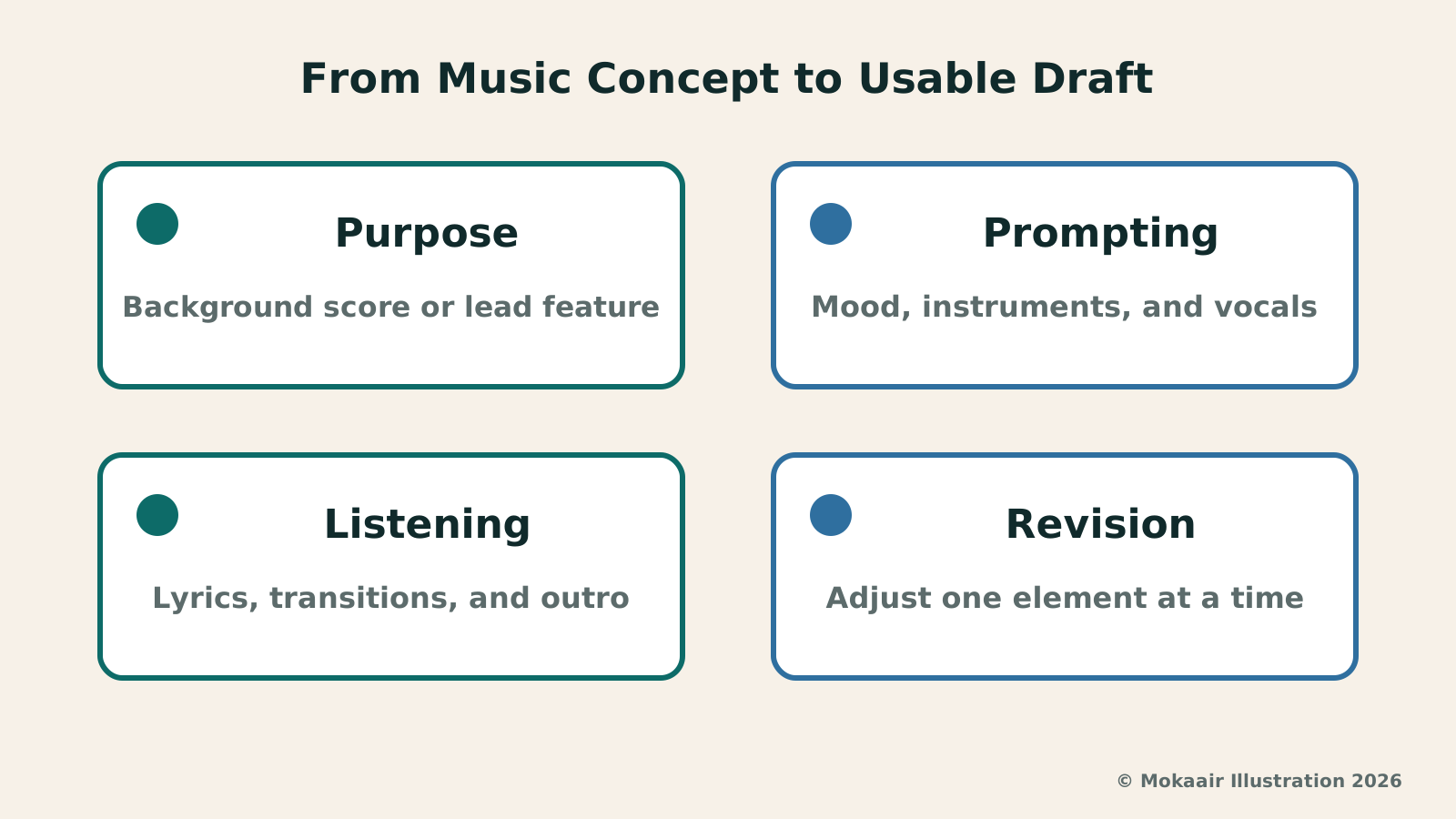
Editors suggest drafting a brief creative prompt specifying purpose, mood, primary sound, vocal needs, and elements you wish to avoid. For example, 'For a daytime city stroll video, relaxed but not upbeat, centered on gentle rhythm and minimal instruments, leaving room for voiceover, no sudden dramatic transitions' is far easier to evaluate than merely writing 'pleasant travel music.'
If generating vocals, state the lyrical context clearly: a private greeting, an event opening, or a narrative song. You can refine your own lyrics independently first to confirm names, titles, and messaging before handing them to the music tool. Avoid changing melody and lyrics constantly at the same time, as this makes it difficult to pinpoint which part makes the entire track unsuitable.
Genre descriptions should also remain restrained. Lock in the primary mood and rhythm first, and adjust instrumentation or sections only after hearing the draft. This is not a fixed prompt format guaranteed to be followed strictly by the product, but rather a methodology to help you preserve versions and compare differences; whether the output meets expectations still requires actual listening.
| Use Case | How to Describe Requirements | Listening Focus |
|---|---|---|
| Travel voiceover background | Instrumental, leaving space for speech | Whether it overpowers narration |
| Private birthday greeting | Original lyrics, clear names/titles | Pronunciation and lyric accuracy |
| Event opening draft | Mood, sections, and ending style | Alignment with event flow |
| Public creative works | Clear use case and material sources | Terms, rights, and attribution |
When reviewing drafts, evaluate content and sound separately
In the first pass, listen to the music alone without visuals. Check whether the intro feels abrupt, whether sectional transitions are smooth, whether the outro finishes properly, and whether vocals mispronounce words. If unwanted phrasing or poorly articulated vocals appear, note the timestamp rather than overlooking it just because the overall vibe seems pleasing.
In the second pass, place the music into your actual video edit or event rundown. A soundtrack that sounds lush on its own may clash when placed under narration, or a dynamic shift might overpower a key visual moment. Try trimming cut points or adjusting levels before deciding to regenerate, rather than discarding the entire direction whenever an issue arises.
If comparing multiple drafts, maintain consistent playback volume and listening conditions, and record concrete differences—such as clearer vocals, overly dense percussion, or an awkward outro. Avoid relying solely on abstract comments like 'this sounds more premium,' which cannot easily translate into actionable instructions for the next revision.
The more iterations you create, the more you need simple documentation
Music generation can easily tempt you into endlessly trying new variations, ultimately losing sight of your initial goal. For each draft, log the prompt, platform entry point, creation date, and reasons for revision, keeping one version that currently best matches your goal. This provides a clear baseline if your ideas change, preventing you from ending up with countless unidentifiable files.
When revising, focus on one aspect at a time—such as reducing vocal prominence before tweaking rhythm or the ending. Changing genre, tempo, lyrics, and instruments all at once makes it nearly impossible to tell which change produced an improvement. This standard creative management approach also helps you objectively assess whether tool updates genuinely offer better control.
When collaborating, share a short draft and project notes to validate direction before undertaking further work. Ask stakeholders to comment on specific use cases and elements they wish to preserve, rather than simply asking whether they like it. This makes it much easier to consolidate disparate expectations into a stable set of revision targets.
Separately verify generation capabilities, terms of service, and third-party rights
Feature announcements explain what a tool can produce, not that it has cleared all rights across every project. Using third-party lyrics, audio recordings, melodies, or other source materials does not make the result entirely new and free of rights restrictions just because it passed through an AI tool. Before public release or commercial use, you must verify source origins and governing terms.
For personal projects, the most manageable starting point is using self-written prompts and text, maintaining production logs, and documenting how the work was completed. If a platform provides watermarking or provenance metadata, handle it according to platform rules. When the terms for a specific use case are ambiguous, consult official documentation before deciding to deploy that version.
Lyria 3.5's integration into Gemini makes music drafting a more accessible part of everyday creative workflows. Truly effective results still depend on defined objectives, structured listening passes, and reasoned revisions. Completing one piece tailored to your work will reveal whether this new entry point is worth adopting far better than simply generating endless variations.
If your project includes voiceover, have someone uninvolved in production listen to verify that key spoken elements remain clear. Repeated listening can cause creator fatigue and lead you to overlook flaws; recording intended purpose alongside structured feedback guides revisions far more effectively than merely generating extra rounds.
ChatGPT Images 2.5: Image Generation, Inpainting, and Sketch UpdatesChatGPT Images 2.5: Image Generation, Inpainting, and Sketch UpdatesOpenAI released ChatGPT Images 2.5 on September 8, 2026, highlighting detailed images, targeted edits, Sketch, templates and image comments. This guide covers asset preparation, preserving unchanged areas and checking details in posters, travel photos and social images. It separates consumer tools from API models and vendor claims about speed and availability from hands-on tests.Read the full article
EU AI Transparency Rules Take Effect: How Are Chatbots and Generated Content Labeled?EU AI Transparency Rules Take Effect: How Are Chatbots and Generated Content Labeled?The European Commission announced that new transparency requirements under the AI Act apply as of August 2, 2026. This article explains chatbot identity disclosure, visible deepfake labeling, and machine-readable marks in plain language, clarifies the roles of providers versus deployers, and advises Taiwan creators on keeping production logs, verifying content, and checking platform rules without misconstruing EU laws as local obligations.Read the full article
Lifestyle
NVIDIA launches DGX Spark 64GB: on sale October 23 from $4,999, two units can be linked into 128GB
On October 2, 2026, NVIDIA announced a more affordable 64GB memory version of its DGX Spark personal AI computer, available from October 23 through six makers including Acer and ASUS. It is aimed mainly at developers and researchers who want to run AI models on their own machines. Below we summarize the specs NVIDIA published, its claims about linking two units, and what it means for general readers.
Lifestyle
Google Cloud Launches Spanner Queues: Putting Message Queues Inside Database Transactions to Make AI Agents More Reliable
Google Cloud has announced the general availability of Spanner queues, which make message creation part of a database transaction. The aim is to stop AI agents' "state" and "actions" from falling out of sync. This article covers Google Cloud's claims, the main features, and what it means for general readers.
Lifestyle
GPT-6.1 Sol Launches: New Sol Version in the API, Codex and ChatGPT Work, Not in Chat
OpenAI launched GPT-6.1 Sol on September 29, 2026, with the API name gpt-6.1-sol. The launch rollout covers Codex and ChatGPT Work on Plus, Pro, Business, Enterprise and Edu (Enterprise and Edu need an administrator to enable it); Free and Go are not included at launch, and it is not in Chat (checked September 2026).
Lifestyle
Claude Sonnet 5.5 Launches: Same List Price as Sonnet 5, Available in the API, on Cloud Platforms and in Claude.ai
Anthropic launched Claude Sonnet 5.5 on September 28, 2026. API list prices are the same as Sonnet 5 ($2 per million input tokens, $10 per million output tokens). It is available in Claude.ai, the API and several cloud platforms, and higher-risk cybersecurity requests fall back to Sonnet 5 (checked September 2026).
Articles that cite this one
Latest travel guides

GuideTokyo
Where to Stay in Tokyo: Comparing Shinjuku, Ueno, Tokyo Station, Shibuya, Asakusa, Ikebukuro, and Ginza, Plus Airport Access, Accommodation Tax, and Luggage Delivery
Where should you stay in Tokyo? Compare Shinjuku, Ueno, Tokyo Station, Shibuya, Asakusa, Ikebukuro, and Ginza by the same criteria: access from Narita and Haneda, transit routes, nearby attractions, neighborhood character, and who each area suits. Includes a comparison table, a Yamanote Line diagram, Tokyo’s accommodation tax as verified in 2026/9 (changing to 3% in 2027/4), and Airport TA-Q-BIN luggage shipping rules.
- Budget
- Hotels

GuideTokyo
How to Choose Tokyo Transit Passes: Are Suica, Welcome Suica, the Tokyo Subway Ticket, and the JR Pass Worth It?
On a first Tokyo trip, start with an IC card and pay per ride (Welcome Suica has no deposit and is valid for 28 days). If you take four or more subway rides in a day, add a 72-hour Tokyo Subway Ticket for 2,000 yen; a JR Pass is never worthwhile if you stay in Tokyo and do not go to Kansai. See what TOURIST PASMO, Suica on iPhone, and the Tokyo Metro day pass do and do not cover, with a decision chart. Prices verified in September 2026.
- Transport
- Budget

GuideTokyo
Tokyo Disneyland and DisneySea Guide: Ticket Prices, Fantasy Springs, Disney Premier Access (DPA), Standby Pass, and Which Park to Choose for Your First Visit
Tokyo Disney one-day Passport prices vary: most weekdays in 9/2026 cost ¥9,900 and weekends ¥10,900. At 14:00 daily, tickets go on sale for the same date two months later. Free Priority Pass is no longer on the official service list; only paid Disney Premier Access (¥1,000–3,500 per person per use) shortens waits. Covers hours, the 25th anniversary, Standby Pass, Entry Request, Fantasy Springs access and first-visit park choice; checked on the official site in 9/2026.
- Itineraries
- Family
Sources
- Google: Lyria 3.5 joins Gemini, 2026-09-04 · Checked: