Lifestyle
GPT-5.3-Codex Launched: How AI Coding Moves Toward Deliverable Work
Exploring how OpenAI's early 2026 release of GPT-5.3-Codex affects software delivery workflows for non-technical readers and small teams, offering clear requirement breakdown and acceptance methods.
Updated: About 7 min read
Event date: 2026-02-05; verification date of this article: 2026-09-14. GPT-5.3-Codex was released on February 5, integrating programming and domain-knowledge work capabilities to support research and tool use across long-horizon tasks.
Official statements at the time claimed it was 25% faster than its predecessor; this cannot be interpreted as reducing project work hours by 25% across the board. The initial launch announcement listed the Codex app, CLI, IDE extension, and web access under paid ChatGPT plans, while an API remained a planned future release at that time. The announcement demonstrated in-flight queries and direction steering; benchmark scores and self-development case studies were all reported by OpenAI. The following everyday and workplace scenarios are examples designed by the editorial team for readers to test on their own, rather than on-site hands-on product benchmarks by this publication.
Moving from Vague Ideas to Specific Specifications
When using generative tools, many teams often provide overly generalized prompts, such as asking to build an entire system at once, which frequently leads to disorganized logic in the output. Effective requirement expression should begin with the user's operational scenario, detailing UI elements, data flows, and exception cases step by step. Breaking a large goal down into the smallest verifiable units allows the system to maintain stable context during long-horizon tasks and minimizes the communication overhead of repeated revisions.
When writing requirement specifications, it is advisable to avoid overly specific UI implementation details and instead focus on functional objectives and boundary conditions. For instance, clearly define what messages users should see under specific states, how the system records data, and what safeguards should activate during network interruptions or input anomalies. Clear written specifications serve as a shared baseline for human-machine collaboration, providing a precise benchmark for evaluating subsequent deliverables.
Beyond written descriptions, defining data input and output formats is equally critical. Non-technical staff can use simple bulleted lists to outline the purpose and constraints of each data field, such as phone number formats, required field rules, or amount calculation logic. When core rules are clearly bounded early on, the code architecture generated by automated tools is less likely to deviate from business objectives, significantly reducing the likelihood of costly redesigns later.
Acceptance Criteria Planning: An Event Registration Page Example
Taking an event registration page for an in-person seminar as an example, the team can first segment requirements into three dimensions: data fields, interface feedback, and processing logic. For fields, explicitly specify name, email, contact phone number, and ticket tier selection, along with mandatory validation rules. Such explicit requirements guide the tool to construct a sensible form schema, preventing field designs that fail to meet actual operational needs.
At the user interaction level, error notices and success screens must be planned in advance. When a user misses a required field or enters an invalid email format, the screen should immediately display clear warning text. Upon successful registration, in addition to showing a thank-you page and registration number, specifications should define whether an automated confirmation notification is triggered. These seemingly basic interaction details represent the key dividing line between a rough draft and a production-ready deliverable.
Finally, there are data processing and error-proofing requirements. The team needs to define waitlist procedures when capacity is reached, logic to block duplicate registrations, and baseline specifications for storing personal data. By predefining these acceptance criteria, non-technical team members can follow a checklist to perform point-and-click testing when reviewing the generated web page or codebase, ensuring every workflow aligns with the original business plan rather than relying on visual guesswork.
| Delivery Stage | Core Task Focus | Non-Technical Review Checklist |
|---|---|---|
| Requirements & Drafting | Break down field definitions and base flows to generate a core interactive prototype | Verify all form fields exist, submission triggers properly, and feedback displays correctly |
| Boundary & Exception Testing | Validate logic for edge cases such as abnormal inputs, network errors, and capacity limits | Deliberately input invalid data to confirm warning text is clear and blocks submission |
| Code Review Stage | Review logic clarity, required inline comments, and version change logs | Ask the tool to explain critical flows and confirm no unauthorized external connections exist |
| Pre-deployment Verification | Confirm environment variable isolation, data access controls, and production host compatibility | Check with technical staff or professional audit to ensure no payment or data leak flaws |
Incremental Collaboration Across Draft, Testing, and Review Stages
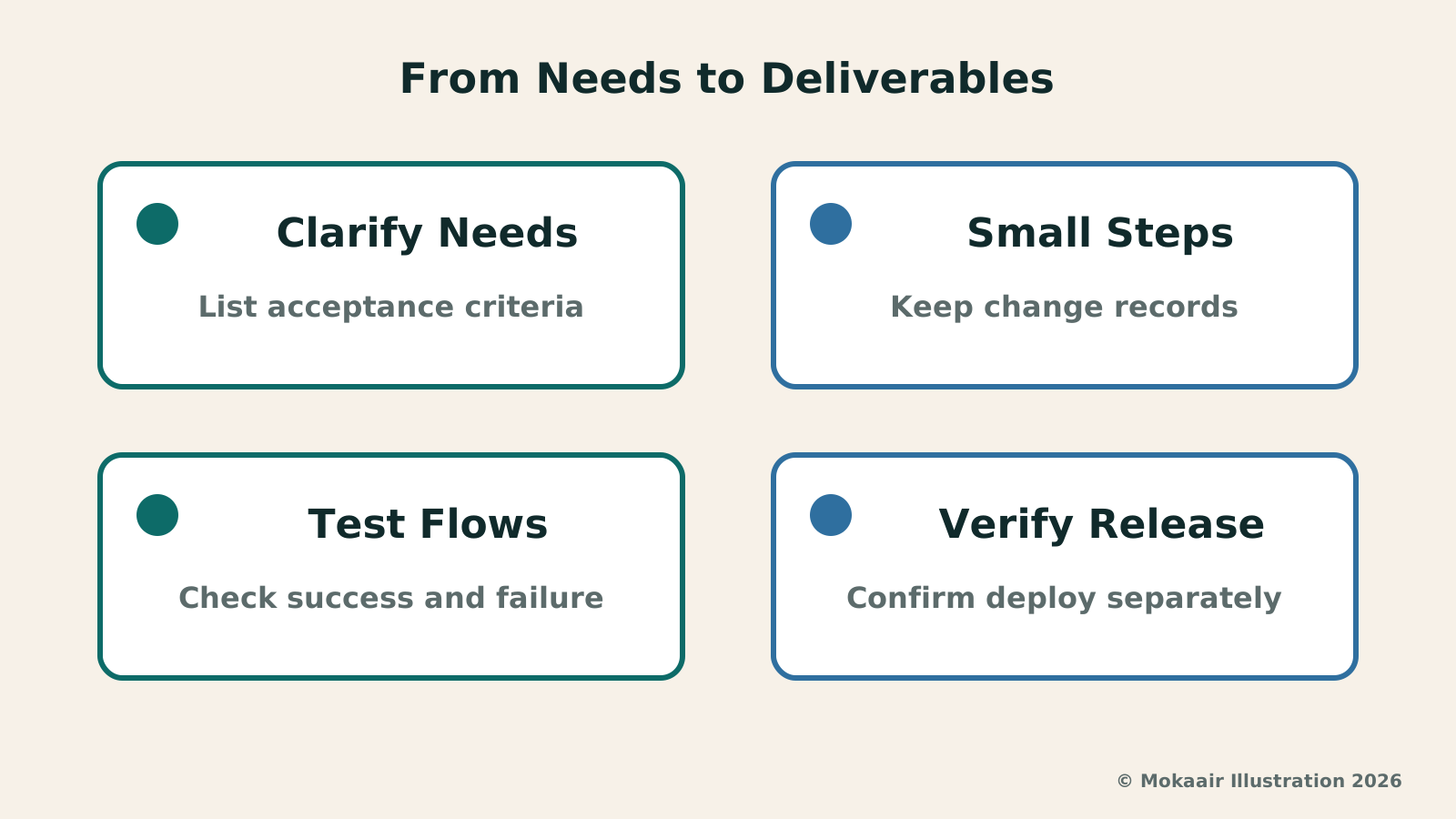
In transforming requirements into usable deliverables, an incremental, fast-paced approach is recommended. During the drafting stage, the primary objective is generating a prototype of core functionality to verify whether screen layouts and form submission flows are broadly correct. There is no need to chase polished visuals or complex animations at this stage; focus instead on whether primary data flows properly, while documenting any behavior that falls short of expectations.
Once in the testing stage, the team should simulate various abnormal actions typical of real users. Beyond completing the form normally, deliberately input excessively long strings, special characters, or leave mandatory fields blank to observe whether the system pops up error notices as expected. Such boundary testing uncovers hidden logical flaws early, preventing system crashes or data loss caused by unexpected user inputs after launch.
In the review stage, emphasis shifts toward code maintainability and compatibility. The team can ask the tool to evaluate the overall architecture, check for redundant logic, and add explanatory comments to critical sections. Retaining change logs and version history for each revision facilitates rapid rollbacks when unexpected bugs emerge, maintaining project stability and transparency throughout delivery.
Gaps and Risks Between Generated Code and Production Deployment
Code running smoothly in a local development environment does not mean it possesses the security defenses needed to withstand live production environments. While automated generation tools have strong code-writing and logical reasoning capabilities, they cannot guarantee that generated architectures are completely free of vulnerabilities. Unsanitized data inputs can lead to data leaks or injection attacks; consequently, any system handling confidential user information or financial transactions must undergo professional security reviews prior to public deployment.
Furthermore, environment configuration and system compatibility remain common technical hurdles. Features that pass tests locally may hit performance bottlenecks or crash when subjected to different server configurations, browser versions, or high concurrent traffic. Small teams must never view generative tools as a cure-all that eliminates operational responsibility; a true delivery pipeline must encompass environment isolation, log monitoring, and disaster recovery plans.
Strategies for Small Teams to Build Sustainable Workflows
For resource-constrained teams, the most sound strategy is positioning automated tools as collaborative assistants rather than autonomous decision-makers. At project kickoff, business owners should first establish non-negotiable specification boundaries before directing the tool to implement modules in phases. Every single output should correspond to an explicit business goal, preventing the purposeless accumulation of unverified code.
At the same time, teams should establish standardized review processes, institutionalizing requirement authoring, functional testing, and deployment verification. When team members develop the capability to break down problems and execute rigorous acceptance checks, the organization can maintain consistent digital delivery quality even as tools evolve and technologies shift, harnessing the auxiliary power of new computing tools while keeping security risks firmly under control.
2026 AI News Roundup: Highlights and Daily Life Applications from January to September2026 AI News Roundup: Highlights and Daily Life Applications from January to SeptemberOrganizing key AI news stories month by month from January to September 2026, linking to full analyses in five languages. Covering models, work tools, creation, costs, and transparency, explaining backgrounds, uses, and limits.Read the full article
Qwen3.5 Open Weights: What Is the Difference Between a Downloadable Model and Running It on Your Own PC?Qwen3.5 Open Weights: What Is the Difference Between a Downloadable Model and Running It on Your Own PC?Reviewing the Qwen3.5-397B-A17B open-weight model released on 2026-02-16 to clarify differences between open weights, hardware demands, and cloud hosting, offering practical evaluation guidance for SMEs.Read the full article
Lifestyle
NVIDIA launches DGX Spark 64GB: on sale October 23 from $4,999, two units can be linked into 128GB
On October 2, 2026, NVIDIA announced a more affordable 64GB memory version of its DGX Spark personal AI computer, available from October 23 through six makers including Acer and ASUS. It is aimed mainly at developers and researchers who want to run AI models on their own machines. Below we summarize the specs NVIDIA published, its claims about linking two units, and what it means for general readers.
Lifestyle
Google Cloud Launches Spanner Queues: Putting Message Queues Inside Database Transactions to Make AI Agents More Reliable
Google Cloud has announced the general availability of Spanner queues, which make message creation part of a database transaction. The aim is to stop AI agents' "state" and "actions" from falling out of sync. This article covers Google Cloud's claims, the main features, and what it means for general readers.
Lifestyle
GPT-6.1 Sol Launches: New Sol Version in the API, Codex and ChatGPT Work, Not in Chat
OpenAI launched GPT-6.1 Sol on September 29, 2026, with the API name gpt-6.1-sol. The launch rollout covers Codex and ChatGPT Work on Plus, Pro, Business, Enterprise and Edu (Enterprise and Edu need an administrator to enable it); Free and Go are not included at launch, and it is not in Chat (checked September 2026).
Lifestyle
Claude Sonnet 5.5 Launches: Same List Price as Sonnet 5, Available in the API, on Cloud Platforms and in Claude.ai
Anthropic launched Claude Sonnet 5.5 on September 28, 2026. API list prices are the same as Sonnet 5 ($2 per million input tokens, $10 per million output tokens). It is available in Claude.ai, the API and several cloud platforms, and higher-risk cybersecurity requests fall back to Sonnet 5 (checked September 2026).
Articles that cite this one
Latest travel guides

GuideTokyo
Where to Stay in Tokyo: Comparing Shinjuku, Ueno, Tokyo Station, Shibuya, Asakusa, Ikebukuro, and Ginza, Plus Airport Access, Accommodation Tax, and Luggage Delivery
Where should you stay in Tokyo? Compare Shinjuku, Ueno, Tokyo Station, Shibuya, Asakusa, Ikebukuro, and Ginza by the same criteria: access from Narita and Haneda, transit routes, nearby attractions, neighborhood character, and who each area suits. Includes a comparison table, a Yamanote Line diagram, Tokyo’s accommodation tax as verified in 2026/9 (changing to 3% in 2027/4), and Airport TA-Q-BIN luggage shipping rules.
- Budget
- Hotels

GuideTokyo
How to Choose Tokyo Transit Passes: Are Suica, Welcome Suica, the Tokyo Subway Ticket, and the JR Pass Worth It?
On a first Tokyo trip, start with an IC card and pay per ride (Welcome Suica has no deposit and is valid for 28 days). If you take four or more subway rides in a day, add a 72-hour Tokyo Subway Ticket for 2,000 yen; a JR Pass is never worthwhile if you stay in Tokyo and do not go to Kansai. See what TOURIST PASMO, Suica on iPhone, and the Tokyo Metro day pass do and do not cover, with a decision chart. Prices verified in September 2026.
- Transport
- Budget

GuideTokyo
Tokyo Disneyland and DisneySea Guide: Ticket Prices, Fantasy Springs, Disney Premier Access (DPA), Standby Pass, and Which Park to Choose for Your First Visit
Tokyo Disney one-day Passport prices vary: most weekdays in 9/2026 cost ¥9,900 and weekends ¥10,900. At 14:00 daily, tickets go on sale for the same date two months later. Free Priority Pass is no longer on the official service list; only paid Disney Premier Access (¥1,000–3,500 per person per use) shortens waits. Covers hours, the 25th anniversary, Standby Pass, Entry Request, Fantasy Springs access and first-visit park choice; checked on the official site in 9/2026.
- Itineraries
- Family
Sources
- OpenAI: GPT-5.3-Codex Launch · Checked: