Lifestyle
Google's CC Becomes a Family Agent: Its Own Account, and How Up to 6 People Share It
Google's official blog posted this on September 17, 2026 — already September 18 in Taipei time — saying CC, the AI agent from Google Labs, is expanding from a personal assistant into a version up to 6 people in one household can share, with its own Google account. Based on the blog post and the Gemini product page, this article covers how CC handles sharing and memory, the conditions Google lists — U.S., age 18+ — and what remains unexplained.
About 13 min read
Google's official blog published a new announcement on September 17, 2026, which converts to September 18, 2026 in Taipei time. The announcement says CC, the AI agent from Google Labs, is moving from a personal assistant that serves a single user to an agent that a family or a group can share: CC now has its own Google account, which Google says gives it a distinct identity and a clear permissions model, with up to 6 members able to manage and collaborate with it.
This article was fact-checked on September 18, 2026, based on the full text of this announcement on Google's official blog, the original post from when CC launched in 2025, the part of the Gemini official product page that covers Daily Brief, and Google's official blog RSS feed. This site has not actually used CC, and the only region Google lists as available is the U.S.; the everyday scenarios in this article are examples designed by our editors, and nothing here is a recommendation to buy or subscribe.
What the Announcement Says
The post is titled "The new CC, an AI agent built for families." The standfirst under the title explains that this is an experimental agent from Google Labs meant to help families spend less time on logistics and more time together. It is written by Tom Shane, Senior Product Manager at Google Labs.
CC is not a new product. Google recaps in the post that CC was originally positioned as a personal agent to help one person keep track of a day's schedule, launching as an early version on December 16, 2025, and that it quickly became a daily habit for many early testers. Google writes only that it brought CC into the Gemini App as Daily Brief "in May," printing no year and no specific day. This announcement takes that same CC and expands it from serving one person to serving an entire family or group.
The date printed on the announcement page is September 17, 2026, but Google's official RSS feed records this post as published at 18:15 UTC on September 17, which converts to the early hours of September 18, 2026 in Taipei time. This article uses the Taipei-time date, but both dates are given here so that readers checking the original post do not mistake "September 17" for an error in this article.
Three Things CC Can Do for a Household
The first is a shared morning briefing. The post says CC delivers a shared "Your Day Ahead" briefing every morning, turning household schedule information that used to be stuck in one person's inbox or head into something every member can see: who needs to be where, what needs doing, and what CC already completed the day before.
The second is automatically organizing the calendar and to-dos. The post says CC automatically tracks important dates and to-dos, pulling relevant shared information from across the group into a shared family Calendar or to-do list, and helps keep it up to date as things change.
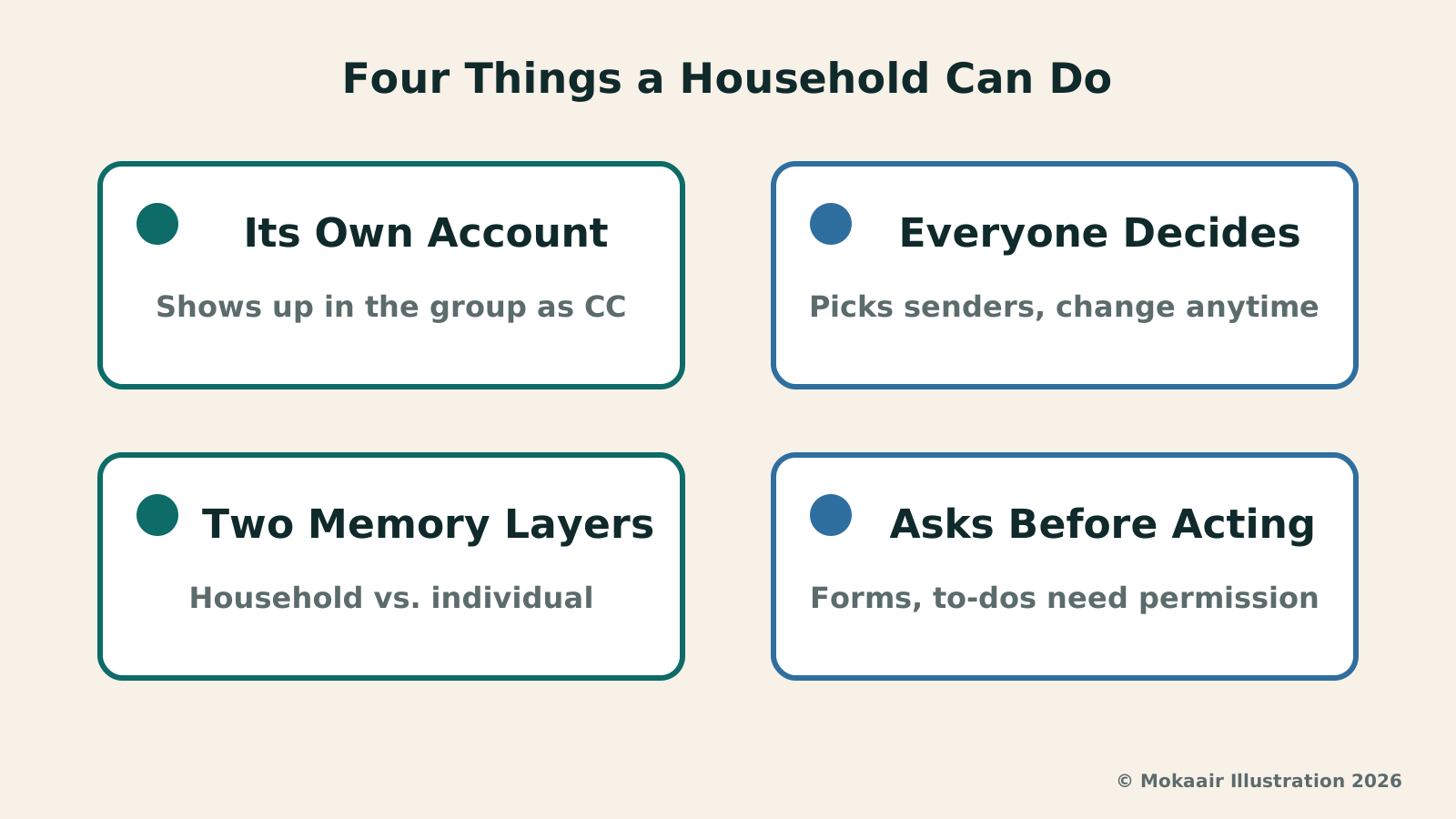
For the third, Google says it can help you complete time-consuming household administrative tasks — the examples given are filling out school permission slips or activity registration PDF forms, creating a school-supply shopping list, or drafting a weekly meal plan; when information is missing, Google says CC will ask, and update what it remembers about the group so it can use that the next time. Google also adds a caveat in the image caption under this feature: CC can take action, such as filling out forms, only with your permission.
| Feature | Who can use it | Whose permission is needed | What Google hasn't explained |
|---|---|---|---|
| Shared morning briefing | Group members | Each member decides in advance what to share | Which languages it supports |
| Automatically organizing calendar and to-dos | Group members | Same as above — only uses information members have shared | How long data is kept |
| Helping with forms, shopping, and meal plans | Group members | Yes — Google states this requires your permission | How to fix a wrong entry or a wrong order |
| Account and sharing settings | Set individually by each member | Each person decides their own sharing scope, changeable anytime | What happens to data after leaving the group |
How the Account, Sharing, and Memory Are Designed
The real design point of this update is that CC now has its own "verified" Google account. Google explains that this account gives CC a distinct identity and a clear permissions model, and that this is the account CC shows up as when it interacts with the group. Google also states two limits: CC only responds to members of the group, and it will not take action or share information outside the group without permission.
Sharing permissions are decided individually by each person. Every member can freely choose what to share with CC and what to keep private, and can change that at any time. Google also built in a standing-sender mechanism: a member can designate senders to always share going forward, such as a child's school or travel-booking emails, and those sources are then shared automatically from then on; each week, members also receive a private list of new senders they can choose to add to that sharing scope. For anything to share on the spot, a member can also forward it to CC by email or Google Chat, or share a Google Drive folder or files with it.
What CC remembers is split into two layers. Google writes that CC remembers what applies to the whole household, such as a go-to grocery list or the family's favorite restaurants, as well as what belongs to just one person, such as individual dietary preferences or local timezones. Here is an example designed by our editors: in a household of four, only one person doesn't eat spicy food. By Google's own examples, that dietary restriction would sit in the individual layer, while restaurant preferences sit in the household layer — so when the family books a restaurant together, how do the two layers interact? Google's post lists only those two sets of examples; it does not explain how something is actually classified into one layer or the other, or how long either layer of memory is kept or how it is cleared.
Not Available in Taiwan, But Here Are the Conditions to Know First
The most direct point first: the only region Google lists as available is the U.S. The post's own text says this family version is an early experiment from Google Labs, available on web and mobile to users age 18 and up in the U.S. with a personal Google account. The post does not mention Taiwan, and it lists no timeline for expanding to other regions and no supported languages, so this article does not speculate about whether or when CC might come to Taiwan.
There is also a point about the subscription threshold that isn't fully clear. When CC first launched on December 16, 2025, Google's stated conditions were a U.S. or Canada consumer account, age 18 and up, starting with Google AI Ultra and paid subscribers. This September 2026 announcement names only a personal Google account and says nothing more about a subscription or payment. Google has not explicitly said whether the payment requirement has been dropped; this article lists both sentences along with their own dates rather than drawing a conclusion for the reader.
Meeting the conditions doesn't mean access right away, either. The post says existing users will receive an upgrade email in the coming days, while new users need to join a waitlist, and neither is given a specific timeframe. There is also a gap Google doesn't explain: this is a product designed for families, and quite a few of its examples involve children's school forms and activities, yet the eligibility condition is age 18 and up. Taken literally, that means a child cannot be one of the 6 members, and the full post never addresses this apparent contradiction.
What Google Hasn't Explained, and the Existing Gemini Version
The post says almost nothing about privacy and data-retention details. Google explains that CC only sees content a member actively chooses to share, and that it will not share anything outside the group without permission; it also states that every CC runs on its own isolated cloud computer. But it does not say how long shared email content is kept, whether it is used to improve Google's models, or how a member can take back something they previously shared.
Google also leaves plenty of blanks about how the group itself works: it does not say whether shared memory is deleted after a member leaves the group; it does not say who actually owns the account itself; and it does not say whether there is any way to check or fix things if CC fills out a form incorrectly or misreads an email, beyond the general requirement that it needs your permission beforehand.
Daily Brief, which already exists in the Gemini App, is an earlier, single-user version of the same concept, and this article does not re-explain how it normally works. Google's official Gemini product page describes its current availability as rolling out to eligible users in select regions; a disclaimer block at the bottom of the page separately prints a line that covers the entire Daily Brief page: availability varies, U.S. only, English only, age 18 and up. So this earlier version is likewise not usable by users in Taiwan.
Taken as a whole, this announcement demonstrates a concrete design direction: turning a shared AI agent into an account with its own identity, sharing scope decided individually by each member, and memory split between household and individual — rather than simply lending one person's assistant to the whole family. Users in Taiwan cannot use it for now, and this site has not actually operated it; this article is based on Google's official announcement and product pages, and if the availability changes later, Google's announcement at that time should still be treated as the authority.
Frequently asked questions
Can a Taiwan Google account use the family version of CC right now?
As of this article's fact-check on September 18, 2026, Google's official post lists only the U.S. as available, with conditions of age 18 and up, a personal Google account, and access on web or mobile. The post does not mention Taiwan and lists no timeline for any other region, so this article does not speculate about whether or when CC might open up to Taiwan accounts.
Do you need to pay or subscribe separately to use the family version of CC?
Google hasn't made this fully clear. The September 17, 2026 post names only a personal Google account, with no mention of a subscription or payment; but when CC first launched on December 16, 2025, Google's stated conditions started with Google AI Ultra and paid subscribers. Google has not said whether that payment requirement has been dropped, so this article lists both sentences with their own dates rather than deciding for the reader whether payment is currently required.
Can a child be a member of the family group?
The age condition Google lists is that users must be 18 or older, and the full post does not separately explain how a minor could join. Taken literally, that means a child cannot be one of the up to 6 members, even though quite a few of the post's own examples involve children's school and activities; Google does not explain how to resolve that gap.
Could CC fill out forms or place orders incorrectly on its own?
When describing action-taking features like filling out forms or making lists, Google specifically adds the condition that it happens with your permission; but the post does not further describe any way for a member to review or check what CC is about to do before it acts, and it does not explain what happens next if CC enters the wrong information or books the wrong time.
Is Daily Brief, which is already in the Gemini App, the same thing as this new family version?
No, they are not the same feature. Daily Brief is the earlier, single-user version of CC; Google's post says only that it was brought into the Gemini App "in May," with no year printed and no specific day given. This September announcement is about a separate, new version built for a family or group to share, with its own account. Google's official Gemini product page describes Daily Brief's current availability as rolling out to eligible users in select regions, and separately prints a condition at the bottom of the page — availability varies, U.S. only, English only, age 18 and up — so, like the family version, it is currently unusable in Taiwan as well.
Where can I check the latest availability myself?
You can check posts under the Google Labs category on Google's official blog, or the Gemini official website's page on Daily Brief, to see whether the region, age, or account conditions have been updated. What this article reports reflects the pages as read on September 18, 2026; Google's official pages can be updated at any time.
2026 AI News Roundup: Highlights and Daily Life Applications from January to September2026 AI News Roundup: Highlights and Daily Life Applications from January to SeptemberOrganizing key AI news stories month by month from January to September 2026, linking to full analyses in five languages. Covering models, work tools, creation, costs, and transparency, explaining backgrounds, uses, and limits.Read the full article
Google Assistant Exits, Gemini Takes Over: Phone, Watch, and Car Checks Before and AfterGoogle Assistant Exits, Gemini Takes Over: Phone, Watch, and Car Checks Before and AfterGoogle announced in the Gemini help community that from September 4, 2026, most users can no longer use or switch back to Google Assistant on their phones or tablets, while paired watches, headphones, and Android Auto switch to Gemini as well. Based on official help pages, this article sorts out the affected devices and those not included, the features Gemini does not currently support, and the settings Taiwan users can check before and after the switch.Read the full article
Lifestyle
Google Assistant Exits, Gemini Takes Over: Phone, Watch, and Car Checks Before and After
Google announced in the Gemini help community that from September 4, 2026, most users can no longer use or switch back to Google Assistant on their phones or tablets, while paired watches, headphones, and Android Auto switch to Gemini as well. Based on official help pages, this article sorts out the affected devices and those not included, the features Gemini does not currently support, and the settings Taiwan users can check before and after the switch.
Lifestyle
ChatGPT Ads Add Sponsored Agents: Testing in the US with Select Advertisers Only
On September 16, 2026, OpenAI announced Sponsored Agents for ChatGPT ads: after opening an ad, a user can choose a separate conversation with the advertiser's own agent; the same day it also announced new Ads Manager AI tools. Checked September 18 against the announcement and OpenAI's ads pages: the feature is tested only in the US with select advertisers, the ad test shows only to logged-in adult users on Free and Go; on September 23 OpenAI announced ads beginning to roll out in Taiwan.
Lifestyle
Firefox Smart Window Adds a Mistral Model: Two Announcements, Two Different Markets
On September 16, 2026, Mistral and Mozilla each published their own announcement the same day: Firefox's AI browsing assistant Smart Window (beta) now also runs on a Mistral model. Drawing on both official posts, this article lays out where the two accounts diverge on markets, the model's name and data-handling promises, and what neither company states -- including Taiwan, other Asian markets, or a timeline for Traditional Chinese support. This article is not advice to use or adopt the feature.
Lifestyle
NVIDIA launches DGX Spark 64GB: on sale October 23 from $4,999, two units can be linked into 128GB
On October 2, 2026, NVIDIA announced a more affordable 64GB memory version of its DGX Spark personal AI computer, available from October 23 through six makers including Acer and ASUS. It is aimed mainly at developers and researchers who want to run AI models on their own machines. Below we summarize the specs NVIDIA published, its claims about linking two units, and what it means for general readers.
Articles that cite this one
Latest travel guides

GuideTokyo
Where to Stay in Tokyo: Comparing Shinjuku, Ueno, Tokyo Station, Shibuya, Asakusa, Ikebukuro, and Ginza, Plus Airport Access, Accommodation Tax, and Luggage Delivery
Where should you stay in Tokyo? Compare Shinjuku, Ueno, Tokyo Station, Shibuya, Asakusa, Ikebukuro, and Ginza by the same criteria: access from Narita and Haneda, transit routes, nearby attractions, neighborhood character, and who each area suits. Includes a comparison table, a Yamanote Line diagram, Tokyo’s accommodation tax as verified in 2026/9 (changing to 3% in 2027/4), and Airport TA-Q-BIN luggage shipping rules.
- Budget
- Hotels

GuideTokyo
How to Choose Tokyo Transit Passes: Are Suica, Welcome Suica, the Tokyo Subway Ticket, and the JR Pass Worth It?
On a first Tokyo trip, start with an IC card and pay per ride (Welcome Suica has no deposit and is valid for 28 days). If you take four or more subway rides in a day, add a 72-hour Tokyo Subway Ticket for 2,000 yen; a JR Pass is never worthwhile if you stay in Tokyo and do not go to Kansai. See what TOURIST PASMO, Suica on iPhone, and the Tokyo Metro day pass do and do not cover, with a decision chart. Prices verified in September 2026.
- Transport
- Budget

GuideTokyo
Tokyo Disneyland and DisneySea Guide: Ticket Prices, Fantasy Springs, Disney Premier Access (DPA), Standby Pass, and Which Park to Choose for Your First Visit
Tokyo Disney one-day Passport prices vary: most weekdays in 9/2026 cost ¥9,900 and weekends ¥10,900. At 14:00 daily, tickets go on sale for the same date two months later. Free Priority Pass is no longer on the official service list; only paid Disney Premier Access (¥1,000–3,500 per person per use) shortens waits. Covers hours, the 25th anniversary, Standby Pass, Entry Request, Fantasy Springs access and first-visit park choice; checked on the official site in 9/2026.
- Itineraries
- Family