Lifestyle
ChatGPT Work Officially Debuts: How to Clearly Delegate Cross-File Tasks
An analysis of cross-file delegation methods following the mid-2026 launch of ChatGPT Work. Using a reading community's events and budget organization as an example, this piece explores multi-tool consistency, tracking intervention points, and acceptance principles.
Updated: About 7 min read
Event date: 2026-07-09; Article verification date: 2026-09-14. On July 9, ChatGPT Work was released, capable of handling long tasks across connected apps and files to produce deliverables such as documents, spreadsheets, and presentations; official capability is powered by GPT-5.6.
For web and mobile, the initial rollout prioritized Pro, Enterprise, and Edu, followed by Plus and Business; desktop Mac and Windows listed all plans, including Free, at the time. Officially, work usage varies with task scale, adopting the Codex usage structure rather than a fixed cost per chat. Users can track progress, answer questions, adjust directions, and confirm critical actions during work; model capability does not equate to having all app permissions automatically. The life and work scenarios below are editorial examples designed for readers to verify on their own, not actual product tests by this site.
Defining Templates and Data When Consolidating Community Event Materials
Taking a reading community operated for many years as an example, organizers face historical records scattered across various locations whenever planning the annual review and the upcoming year's schedule. Organizers typically hold last year's event attendance sheets, venue rental receipts, speaker fee reimbursement forms, and the newly revised event planning presentation template. When delegating cross-file tasks to the system, the biggest pitfall is dumping all fragmented materials at once without explanation, which can easily cause the system to confuse mapping standards between new and old formats.
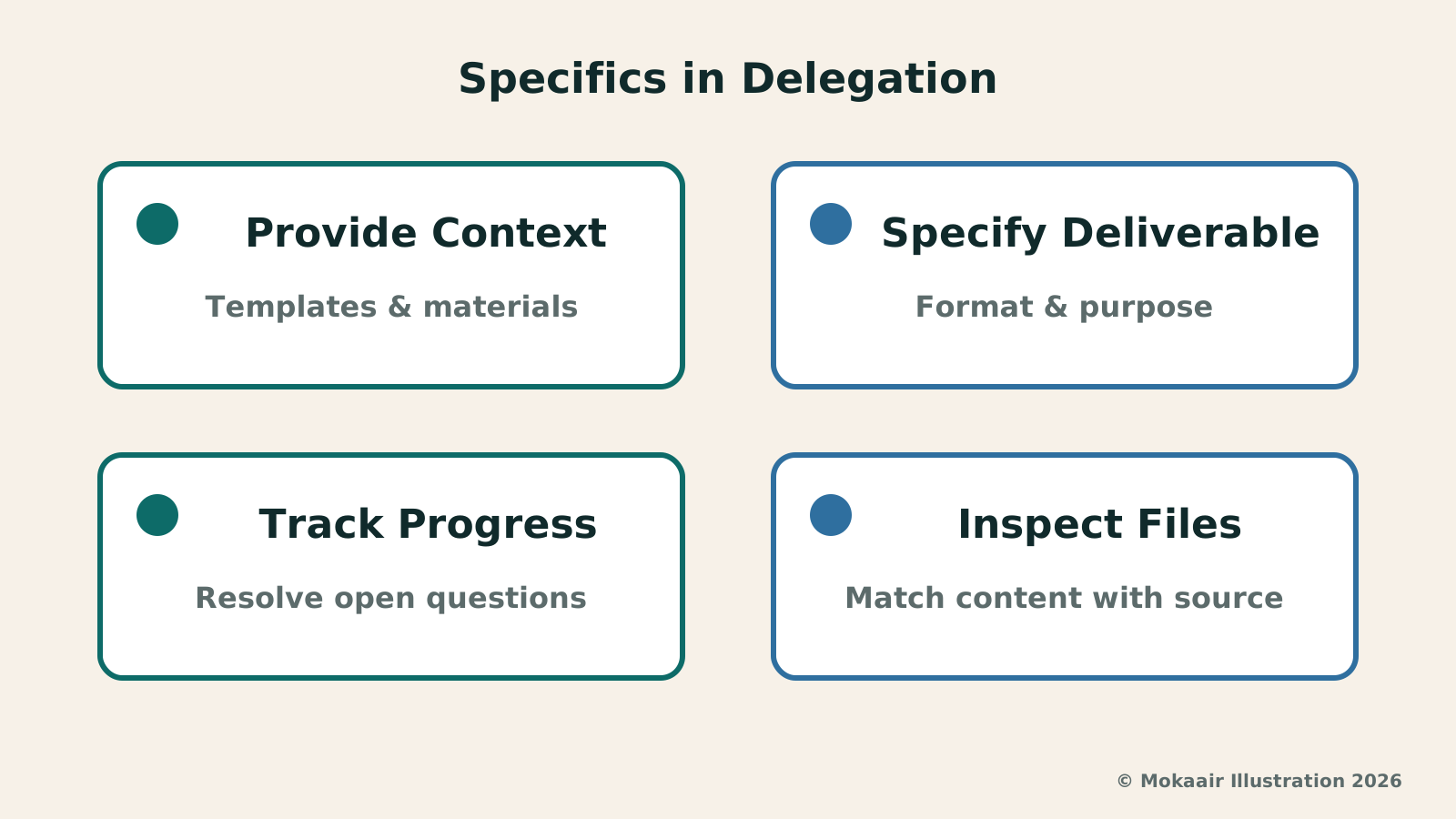
As the first step in initiating the delegation, background reference files must be clearly distinguished from output structural templates. For instance, the system must be explicitly guided to extract actual expenses from past reading sessions and be designated which past projects are closed and which events still have pending payments. If start and end months of reference materials along with cross-file reference relationships are not marked in advance, the model might mistake draft budgets for actual expenditures when aggregating figures, distorting baseline data.
Furthermore, regarding the categorization of budget items, definitions often vary slightly across different years. Work prompts should specifically require organizing items in accordance with the accounting categories of the new budget template and raising questions regarding ambiguous legacy items. By establishing the precedence of data references right at the start, one prevents the model from speculating ungrounded figures, laying a solid, traceable foundation for subsequent cross-document outputs.
Maintaining Cross-Tool Data Consistency Across Workbooks and Presentations
The core deliverables of a reading community usually comprise two main documents: an annual event income and expenditure workbook for core organizers to verify details, and an annual summary presentation showcasing results to all members. In the past, these two documents were often produced separately by different teammates, frequently leading to the awkward discrepancy where pie chart numbers in the presentation did not match spreadsheet totals. When delegating complex composite tasks, the linkage between these two deliverables must be set as the primary constraint.
Operationally, explicit instructions should designate the spreadsheet as the common data baseline. All event session counts, participant numbers, ticket revenues, and speaker fee tallies appearing on presentation slides must strictly cite the sum totals from specific spreadsheet tabs. This means the task description needs to dictate completing formula calculations and column verifications in the workbook first, and only after income and expenditure balance is confirmed should specified cell values be imported into presentation charts and explanatory text.
Beyond numerical alignment, terminology definitions and column categories must also maintain cross-tool consistency. If the spreadsheet divides book clubs into online guided readings and offline salons, undefined subgroup names must not appear arbitrarily in the presentation. Requiring deliverables to correspond across both text and numbers saves effort on manual page-by-page checks later, and avoids misleading community members regarding event outcomes when reading the summary report.
| Collaboration Phase | Core Handover Priorities | Common Gaps and Preventive Measures |
|---|---|---|
| Material Organizing Phase | Differentiate historical data from layout templates; clarify accounting categories and statistical baselines. | Historical drafts mistaken for actual expenses; specify file validity periods during input. |
| Cross-Tool Deliverable Generation | Designate spreadsheet as single data source; ensure presentation strictly references workbook figures. | Presentation charts inconsistent with spreadsheet details; restrict presentation to referencing verified values only. |
| Process Tracking and Intervention | Monitor execution step nodes; clarify categorization logic promptly when questions arise. | Allowing flawed assumptions to compound; actively pause and calibrate when calculation branches deviate. |
| Deliverable Acceptance Checkpoint | Confirm designated storage paths; generate pending questions list and block automated external sending. | External dispatch without human review; set mandatory human authorization as a prerequisite for external sending. |
Tracking Progress and Intervening at the Right Time During Long Tasks
When handling long tasks involving multi-file calculations and layout formatting, the execution process often takes considerable time. Unlike a conversational interface that delivers answers instantly, these tasks follow specific steps to parse structures, extract data, and populate content as they progress. Users should not merely wait passively for final outputs during this period; instead, they should carefully observe which logical node the work is currently paused on via the system-provided progress tracking interface.
You can explicitly stipulate in work requirements: list questions first when encountering ambiguities, such as whether a specific sponsorship income should be included in the annual budget. This is a working rule you want the system to follow, yet one must still observe whether it actually stops, rather than assuming it will proactively spot questionable points every time. If venue fee calculations shown in progress deviate from expectations, adjustments should be made early to keep errors from carrying through into the presentation.
Establishing External Publishing Checkpoints and Permission Safeguards
In automated workflows, the most critical risk control lies in human review mechanisms for confirming important actions. Although the model can access connected apps and generate tangible deliverables, this by no means implies it should have the liberty to communicate externally without approval. In community operations, annual reports often need to be sent to sponsors or all members upon completion; this action must be strictly configured as a delegation confirmation checkpoint.
Concrete requirements can be framed as: save all files in an internal draft folder first; do not send emails or create public share links without approval from the person in charge. If the tool used provides pre-action confirmation, actual settings should also be inspected; writing a single requirement in the prompt does not mean the system has established mandatory permission restrictions. When external sharing must be prevented, one can simply withhold relevant links or sending permissions initially.
This arrangement reduces the chance of misread or unconfirmed content leaking outside, yet someone still needs to read the final deliverable. Separating 'permission to operate an app' from 'what actions are permitted for this specific task' makes it easier for successors to audit. For small communities, using a clear handover checklist to record who verified what is generally more helpful than adding numerous abstract security slogans.
Acceptance Standards for Delivered File Storage Paths and Source Annotations
When a long task is marked complete, the actual acceptance work is just beginning. To facilitate subsequent maintenance by community volunteer teams, deliverables cannot be left scattered across temporary directories. Delegation prompts must designate clear storage paths in advance—for example, requiring generated spreadsheets to be archived in the fiscal year folder and presentation slides stored in the public event directory, while applying unified naming conventions for future retrieval.
More importantly, any consolidated deliverable must come with clear source annotations and an open questions list. During acceptance, check whether the spreadsheet marks original voucher numbers for every historical data entry and whether every chart in the presentation notes where in the workbook it was drawn from. If accounts fall short by several hundred dollars without receipts, the system should list that unresolved issue in an independent memo rather than arbitrarily balancing the books, allowing successors to quickly launch manual reviews.
2026 AI News Roundup: Highlights and Daily Life Applications from January to September2026 AI News Roundup: Highlights and Daily Life Applications from January to SeptemberOrganizing key AI news stories month by month from January to September 2026, linking to full analyses in five languages. Covering models, work tools, creation, costs, and transparency, explaining backgrounds, uses, and limits.Read the full article
Gemini 3.6 Flash and Flash-Lite: How to Divide Fast Model TasksGemini 3.6 Flash and Flash-Lite: How to Divide Fast Model TasksReviewing Google's July 2026 launch of Gemini 3.6 Flash and 3.5 Flash-Lite: analyzing fast vs. slow model task allocation, spot-checks, and cost control for bulk data.Read the full article
Lifestyle
NVIDIA launches DGX Spark 64GB: on sale October 23 from $4,999, two units can be linked into 128GB
On October 2, 2026, NVIDIA announced a more affordable 64GB memory version of its DGX Spark personal AI computer, available from October 23 through six makers including Acer and ASUS. It is aimed mainly at developers and researchers who want to run AI models on their own machines. Below we summarize the specs NVIDIA published, its claims about linking two units, and what it means for general readers.
Lifestyle
Google Cloud Launches Spanner Queues: Putting Message Queues Inside Database Transactions to Make AI Agents More Reliable
Google Cloud has announced the general availability of Spanner queues, which make message creation part of a database transaction. The aim is to stop AI agents' "state" and "actions" from falling out of sync. This article covers Google Cloud's claims, the main features, and what it means for general readers.
Lifestyle
GPT-6.1 Sol Launches: New Sol Version in the API, Codex and ChatGPT Work, Not in Chat
OpenAI launched GPT-6.1 Sol on September 29, 2026, with the API name gpt-6.1-sol. The launch rollout covers Codex and ChatGPT Work on Plus, Pro, Business, Enterprise and Edu (Enterprise and Edu need an administrator to enable it); Free and Go are not included at launch, and it is not in Chat (checked September 2026).
Lifestyle
Claude Sonnet 5.5 Launches: Same List Price as Sonnet 5, Available in the API, on Cloud Platforms and in Claude.ai
Anthropic launched Claude Sonnet 5.5 on September 28, 2026. API list prices are the same as Sonnet 5 ($2 per million input tokens, $10 per million output tokens). It is available in Claude.ai, the API and several cloud platforms, and higher-risk cybersecurity requests fall back to Sonnet 5 (checked September 2026).
Articles that cite this one
Latest travel guides

GuideTokyo
Where to Stay in Tokyo: Comparing Shinjuku, Ueno, Tokyo Station, Shibuya, Asakusa, Ikebukuro, and Ginza, Plus Airport Access, Accommodation Tax, and Luggage Delivery
Where should you stay in Tokyo? Compare Shinjuku, Ueno, Tokyo Station, Shibuya, Asakusa, Ikebukuro, and Ginza by the same criteria: access from Narita and Haneda, transit routes, nearby attractions, neighborhood character, and who each area suits. Includes a comparison table, a Yamanote Line diagram, Tokyo’s accommodation tax as verified in 2026/9 (changing to 3% in 2027/4), and Airport TA-Q-BIN luggage shipping rules.
- Budget
- Hotels

GuideTokyo
How to Choose Tokyo Transit Passes: Are Suica, Welcome Suica, the Tokyo Subway Ticket, and the JR Pass Worth It?
On a first Tokyo trip, start with an IC card and pay per ride (Welcome Suica has no deposit and is valid for 28 days). If you take four or more subway rides in a day, add a 72-hour Tokyo Subway Ticket for 2,000 yen; a JR Pass is never worthwhile if you stay in Tokyo and do not go to Kansai. See what TOURIST PASMO, Suica on iPhone, and the Tokyo Metro day pass do and do not cover, with a decision chart. Prices verified in September 2026.
- Transport
- Budget

GuideTokyo
Tokyo Disneyland and DisneySea Guide: Ticket Prices, Fantasy Springs, Disney Premier Access (DPA), Standby Pass, and Which Park to Choose for Your First Visit
Tokyo Disney one-day Passport prices vary: most weekdays in 9/2026 cost ¥9,900 and weekends ¥10,900. At 14:00 daily, tickets go on sale for the same date two months later. Free Priority Pass is no longer on the official service list; only paid Disney Premier Access (¥1,000–3,500 per person per use) shortens waits. Covers hours, the 25th anniversary, Standby Pass, Entry Request, Fantasy Springs access and first-visit park choice; checked on the official site in 9/2026.
- Itineraries
- Family
Sources
- OpenAI: ChatGPT Work Release · Checked:
- OpenAI Academy: Get started with ChatGPT Work · Checked: