Lifestyle
New App Store Subscription Rules: Bundles Cap at Five Developers, Multiseat Purchases On by Default, Volume Purchasing Arrives October 22
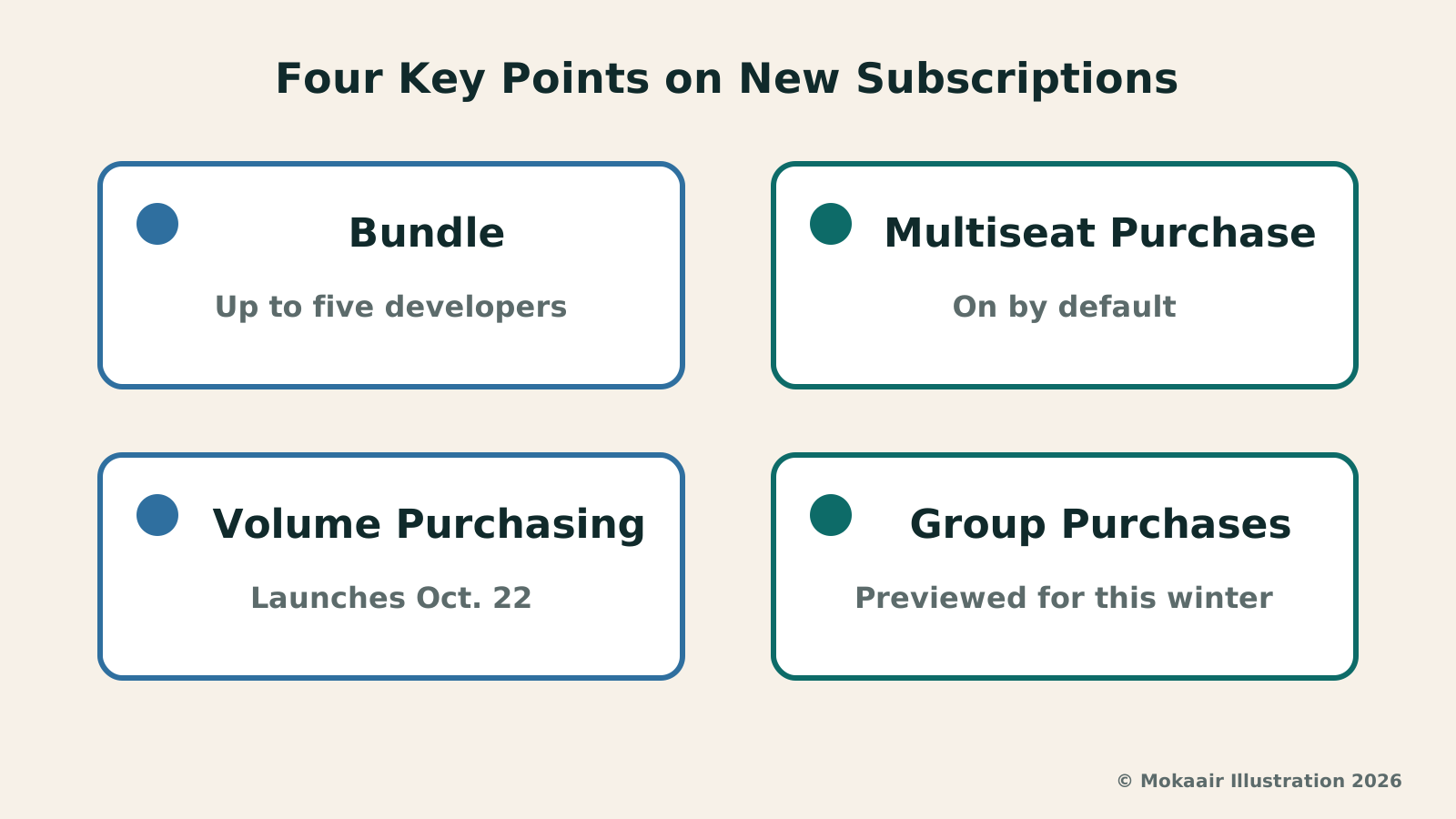
On September 16, 2026, Apple announced App Store subscription changes for iOS 27: subscriptions can combine into one purchase as a Bundle or Suite with up to five developers; multiseat purchases have defaulted on in App Store Connect since the announcement, Volume Purchasing launches October 22, and Group Purchases is only previewed for this winter. Apple names no region and does not mention Taiwan; checked and compiled September 18, 2026.
About 14 min read
On September 16, 2026, Apple used the developer announcement 'Get your subscriptions ready for iOS 27' to explain the App Store subscription changes coming with iOS 27, and advised developers to start by confirming their apps use StoreKit 2 to handle Apple In-App Purchases. The announcement covers two parts: the first is two new ways to turn several subscriptions into a single purchase, which Apple calls Bundles and Suites, defined differently from each other; the second is multiseat purchases, which let one customer buy more than one subscription at once, with the default switch taking effect in App Store Connect on the day of the announcement itself.
This article was checked on September 18, 2026, against the full text of that announcement, Apple Developer's Bundles and Suites page, and App Store Connect's help page on purchase options — Apple's own English-language pages throughout, and the primary sources quoted in this article. This site does not qualify to request access to Bundles and Suites, and has not tested the purchase flow itself.
What the Announcement Covers, and What Took Effect the Same Day
Apple's changes this time come in two layers with different timing. The first layer is Bundles and Suites, which package several subscriptions into one purchase; the announcement says they will be 'available later this year in iOS 27, iPadOS 27, macOS 27, tvOS 27, or later' — no actual date is given, and access requires filing first and passing review: the Apple Developer page's own heading for this section is 'Request access and submit for review.' A multi-developer Bundle additionally requires every participating developer to file separately and sign the Multi-Developer Bundle Program Legal Addendum.
The second layer is multiseat purchases. The developer-side setting took effect in App Store Connect on the day of the announcement itself: multiseat purchases are on by default, and the announcement does not require filing an application the way Bundles do. Whether a customer can actually buy multiple seats depends on two further routes that have not launched yet.
Bundles and Suites: How the Two Ways of Buying Together Differ
A Bundle lets a customer get several subscriptions in one purchase: within a single app, across several apps from the same developer, or across developers, with up to five developers taking part. The two examples below are Apple's own illustrations, not products this site has observed: a single developer bundling a music-streaming subscription with a podcast subscription and selling them together for less than subscribing separately; and, across developers, a fitness-tracking app and a nutrition-planning app partnering on a health-and-wellness Bundle.
A Suite is different: instead of packaging several subscriptions together, it lets a single subscription work across a set of apps from the same developer. Apple gives two further numeric caps: a Bundle can include up to five subscriptions, and a Suite can span up to fifteen apps. After purchase, Apple states a subscriber can go to their Apple Account at any time to cancel the entire Bundle or Suite; the option to keep only one or two items is stated for Bundles only. Cancellations and partial changes take effect at the next renewal date, while upgrades take effect immediately.
To offer a Bundle or Suite, an app must use StoreKit 2 and support the four systems above or later; within the same Bundle, every subscription must share the same duration, so a monthly and an annual subscription cannot be mixed. Apple also states that once an application is approved, its team helps complete configuration, a process that includes confirming pricing and the go-live date.
| Item | Description | Who or What Conditions | Official Timing |
|---|---|---|---|
| Bundle | Several subscriptions combined into one purchase | Up to five developers, five subscriptions | Later this year, needs application and review |
| Suite | One subscription works across a set of apps | Same developer, up to fifteen apps | Same as above |
| System requirement | Supported OS versions | iOS 27, iPadOS 27, macOS 27, tvOS 27, or later | Rolls out with each system |
| Technical requirement | Purchase framework the app must use | StoreKit 2 | Can start preparing now |
| After purchase | Whether a subscriber can change a purchased combination | Bundles allow keeping only some items; both can be cancelled entirely | Takes effect at the next renewal date |
Multiseat Purchases: Two Routes, Volume Purchasing and Group Purchases
Multiseat purchases let one customer buy more than one subscription at a time; Apple calls this customer the group purchaser, who manages the shared subscription and controls access, so a team, classroom, or organization can share access under a single purchase.
Apple gives two routes. Volume Purchasing is for organizations using Apple Business and Apple School Manager: they buy subscriptions through a single Apple In-App Purchase, then assign seats to members using a device management provider. Group Purchases is for ordinary subscribers: one person buys multiple seats and invites others to join, with Apple handling both assignment and invitations. The help page further notes that Apple Business and Apple School Manager support only multiseat purchases, while on the ordinary App Store, both options are available.
The two routes are on different timelines: the announcement's body gives only one firm future date — Volume Purchasing launches October 22, 2026 — while Group Purchases is only previewed for this winter, with no year or hemisphere stated. The help page is vaguer still: it says multiseat purchases will be available for Business and Education organizations and for App Store customers, again only 'later this year' with no date.
The Default Changed: The September 14, 2026 Cutoff
The default-on setting for multiseat purchases is not limited to newly launched subscriptions. The English help page states that multiseat purchases are turned on by default for all auto-renewable subscriptions, meaning the default was changed for every existing subscription on the platform. Custom apps do not even get a choice: Apple states that these apps cannot manage purchase options at all, are automatically made available on Apple Business and Apple School Manager, and may not opt out of multiseat purchases.
The exception Apple states is a single cutoff: for a subscription created before September 14, 2026, multiseat purchases default to off if either one of two conditions is met — it does not use StoreKit 2, or it has Family Sharing turned on — not both at once. That date is only where Apple drew the line, not something that happened on that day, and it falls two days before the announcement itself. Apple states that a subscription defaulted to off can be turned on at any time in App Store Connect.
If a developer does not want this, Apple's help page suggests turning it off in App Store Connect, giving the reason as avoiding impact to customers. If it is turned off after having been on, the help page lists what follows: new customers can no longer buy multiple seats, and the subscription is removed from Apple Business and Apple School Manager; existing customers keep renewing until the group purchaser cancels; no new seats can be added, though the group purchaser can remove them.
One more thing worth noting: on whether Family Sharing and multiseat purchases can coexist, the Traditional Chinese version and the English version do not agree, and the Traditional Chinese version even contradicts itself. The English version states only that both can be turned on ('both multiseat purchases and Family Sharing are turned on'), with only the group purchaser able to share with family members and every other seat for individual use only; the Traditional Chinese version translates that same sentence, yet adds a section the English version does not have, stating that 「家人共享」無法與多名額購買同時啟用 (Family Sharing cannot be turned on at the same time as multiseat purchases), and that turning on Family Sharing automatically turns off multiseat purchases. This article follows the English version, because the contrary statement appears only in that extra section the Traditional Chinese version adds; this article does not judge which version is correct.
What Apple Doesn't Say: Region, Pricing, and Revenue Split
None of these official pages' bodies name any country or region — for Bundles, Suites, Volume Purchasing, or Group Purchases, Apple does not state a rollout scope, and Taiwan is not mentioned either. The pages do distinguish three sales channels, the App Store, Apple Business, and Apple School Manager, but those are channels, not regions. The accurate statement is that Apple has not stated a regional scope; it cannot be inferred that Taiwan is or is not covered.
Pricing and revenue split are likewise not published. Apple says only that pricing is confirmed with the developer after approval, with no figures given anywhere; a multi-developer Bundle can include up to five developers, but how revenue is split among them, and whether Apple's standard commission changes as a result, is not addressed — Apple states only that every participating developer signs the Multi-Developer Bundle Program Legal Addendum, whose contents are not published. As for how many seats a Group Purchase can include at once, the help page states only 'quantities greater than 1.'
The following scenario is designed by the editors, not an official example: a four-person design studio wants to share a subscription to the same creative tool; Apple's own framing also includes collaborators sharing a creative tool. But Volume Purchasing must wait until October 22, and Group Purchases is only said to arrive this winter; to check the latest status, see this announcement (identifier likeohx4) and the three other official pages — this article's version is current as of September 18, 2026.
Frequently asked questions
What is the difference between a Bundle and a Suite?
A Bundle packages several subscriptions into one purchase — either several subscriptions from the same developer, or across developers with up to five developers taking part, and a Bundle can include up to five subscriptions. A Suite is a different design: it lets a single subscription work across a set of apps from the same developer, spanning up to fifteen apps. Both require the app to use StoreKit 2 and support iOS 27 or later, but Apple defines a Suite as staying within a single developer — the cross-developer, up-to-five-developer option only exists for Bundles.
After buying a Bundle, can I cancel just one item in it?
Yes. Apple states that a subscriber can go to their Apple Account at any time afterward and choose to keep just one or more services within the Bundle, or cancel the entire Bundle outright. Two things to note: cancellation and this kind of partial change take effect only at the next renewal date, while an upgrade takes effect immediately; and the option to keep only some items is stated for Bundles only — for Suites, Apple states only that the whole thing can be cancelled. This page does not say whether cancelling one item affects the discounted price of the combined purchase.
Can a Bundle include both a monthly and an annual subscription at once?
No. Apple requires every auto-renewable subscription in the same Bundle to share the same subscription duration, which means a monthly subscription and an annual subscription cannot be packaged in the same Bundle.
If a team wants to share one subscription, are Volume Purchasing and Group Purchases the same thing?
No, they are two different routes Apple provides. Volume Purchasing is for organizations using Apple Business and Apple School Manager: after buying subscriptions through a single purchase, they assign seats to members using a device management provider. Group Purchases is a method available to ordinary subscribers: one person buys multiple seats and invites others to join, with Apple handling both assignment and invitations. Volume Purchasing is set to launch on October 22, 2026, while Apple has only previewed Group Purchases for this winter, with no actual date given.
What does a developer need to do to use these new features?
For Bundles and Suites, the app must first use StoreKit 2 and support iOS 27, iPadOS 27, macOS 27, tvOS 27, or later, then file an application and pass review before it can be used; Apple currently only previews availability for later this year, with no actual date given, and a multi-developer Bundle additionally requires each developer to file separately and sign the legal addendum. Multiseat purchases require no such application: they have been on by default in App Store Connect since the day of the announcement, and a developer who does not want it can turn it off in the dashboard, except for custom apps, which Apple states cannot opt out.
Can users or developers in Taiwan buy or use these new features?
As of this article's check on September 18, 2026, none of these official pages' bodies name any country or region, or mention Taiwan. The pages only distinguish three sales channels, the App Store, Apple Business, and Apple School Manager, and those are channels, not regions. Given that, this article can only state that Apple has not stated a regional scope; it cannot be inferred that Taiwan is or is not able to use these features.
What is significant about September 14, 2026?
It is a cutoff Apple drew for the multiseat purchases default, not the date any feature launched or anything happened, and it appears only on the English help page — the Traditional Chinese version does not carry this date. For a subscription created before this date, multiseat purchases default to off only if it meets either one of two conditions, it does not use StoreKit 2, or it has Family Sharing turned on; the two conditions do not both need to be true. Every other subscription, whether new or old, defaults to on.
2026 Tech News Roundup: Key Points on Hardware, Platforms, Telecom, and Regulation2026 Tech News Roundup: Key Points on Hardware, Platforms, Telecom, and RegulationThis site's 2026 tech-news explainers in five groups — hardware, platforms, computing infrastructure, Taiwan policy, EU regulation: iPhone Duo and September hardware, M6/M5 Ultra, Snapdragon 8 Elite Gen 6, Project Zenith, Pixel Drop, App Store subscriptions, WordPress and Synology patches, NVIDIA, 6G, the Taiwan–Matsu cables, the sovereign AI corpus, the Cyber Resilience Act, the KIDS Act and Apple's EU terms. No purchase advice; vendor claims attributed; official sources and check dates.Read the full article
Apple Adjusts EU App Tracking Transparency Prompt: Five Countries Get the New Version, a Renamed Setting, Yearly RepromptsApple Adjusts EU App Tracking Transparency Prompt: Five Countries Get the New Version, a Renamed Setting, Yearly RepromptsOn September 16, 2026, Apple announced that the EU's App Tracking Transparency prompt will get an alternative version: from iOS 27.2 and iPadOS 27.2, Germany, France, Italy, Poland, and Romania can only use it, and the EU device setting has been renamed. Developers can now ask again a year after a user's last response. Based on Apple's announcement and support page, this article covers what changed, what did not, and what the announcement does not mention, including Taiwan.Read the full article
Lifestyle
Apple Adjusts EU App Tracking Transparency Prompt: Five Countries Get the New Version, a Renamed Setting, Yearly Reprompts
On September 16, 2026, Apple announced that the EU's App Tracking Transparency prompt will get an alternative version: from iOS 27.2 and iPadOS 27.2, Germany, France, Italy, Poland, and Romania can only use it, and the EU device setting has been renamed. Developers can now ask again a year after a user's last response. Based on Apple's announcement and support page, this article covers what changed, what did not, and what the announcement does not mention, including Taiwan.
Lifestyle
Apple Announces New EU App Business Terms: A 5% Core Technology Commission, and Alternative Payments Alongside Apple In-App Purchase
On August 18, 2026, Apple announced new EU App Store business terms: the Core Technology Fee becomes a 5% Core Technology Commission, commissions run 26%/20%/15% by payment method, and apps may offer Apple In-App Purchase alongside alternative payments. Primary updates take effect October 1, 2026, for EU storefronts only. Checked against Apple's own announcements and support pages on September 17, 2026.
Lifestyle
Google's September Pixel Drop: Model, Region, Language, and Pixel Watch 5 Conditions
On September 15, 2026, Google published its September Pixel Drop on the official blog, linking to forum posts on device and region conditions and to the Pixel Watch 5 update notes. This article covers the device, region, and language conditions for Scam Detection, the expiry dates for the Harry Potter pack and the Audible trial, the table that leaves Pixel Tablet unchecked, and the features that require pairing a Pixel Watch 5 with a Pixel 11. Checked September 17, 2026.
Lifestyle
Cloudflare launches Traces in public beta: site operators can follow every step a request takes through the platform on one timeline
On October 2, 2026, Cloudflare announced the public beta of Cloudflare Traces. Website operators and developers using Cloudflare can see a request pass through security rules, caching, routing and the origin server on a single timeline, making it easier to find why a request was blocked or slowed. New pricing takes effect on December 1, 2026. Information comes from the official Cloudflare blog.
Articles that cite this one
Latest travel guides

GuideTokyo
Where to Stay in Tokyo: Comparing Shinjuku, Ueno, Tokyo Station, Shibuya, Asakusa, Ikebukuro, and Ginza, Plus Airport Access, Accommodation Tax, and Luggage Delivery
Where should you stay in Tokyo? Compare Shinjuku, Ueno, Tokyo Station, Shibuya, Asakusa, Ikebukuro, and Ginza by the same criteria: access from Narita and Haneda, transit routes, nearby attractions, neighborhood character, and who each area suits. Includes a comparison table, a Yamanote Line diagram, Tokyo’s accommodation tax as verified in 2026/9 (changing to 3% in 2027/4), and Airport TA-Q-BIN luggage shipping rules.
- Budget
- Hotels

GuideTokyo
How to Choose Tokyo Transit Passes: Are Suica, Welcome Suica, the Tokyo Subway Ticket, and the JR Pass Worth It?
On a first Tokyo trip, start with an IC card and pay per ride (Welcome Suica has no deposit and is valid for 28 days). If you take four or more subway rides in a day, add a 72-hour Tokyo Subway Ticket for 2,000 yen; a JR Pass is never worthwhile if you stay in Tokyo and do not go to Kansai. See what TOURIST PASMO, Suica on iPhone, and the Tokyo Metro day pass do and do not cover, with a decision chart. Prices verified in September 2026.
- Transport
- Budget

GuideTokyo
Tokyo Disneyland and DisneySea Guide: Ticket Prices, Fantasy Springs, Disney Premier Access (DPA), Standby Pass, and Which Park to Choose for Your First Visit
Tokyo Disney one-day Passport prices vary: most weekdays in 9/2026 cost ¥9,900 and weekends ¥10,900. At 14:00 daily, tickets go on sale for the same date two months later. Free Priority Pass is no longer on the official service list; only paid Disney Premier Access (¥1,000–3,500 per person per use) shortens waits. Covers hours, the 25th anniversary, Standby Pass, Entry Request, Fantasy Springs access and first-visit park choice; checked on the official site in 9/2026.
- Itineraries
- Family
Sources
- Get your subscriptions ready for iOS 27 · Checked:
- Create Bundles and Suites for auto-renewable subscriptions · Checked:
- Manage purchase options for an auto-renewable subscription · Checked:
- Manage purchase options for an auto-renewable subscription (App Store Connect Help, Traditional Chinese version) · Checked: