Lifestyle
Siri AI Arrives with iOS 27 as an English Beta: What Can iPhone Users in Taiwan Use?
Apple released Siri AI in beta alongside iOS 27 on September 14, 2026, starting with English. Based on Apple's official information, this article covers which new features iPhone users in Taiwan can use with Traditional Chinese settings, the device, language, and region requirements for trying Siri AI, what the waitlist means, and what Apple says about how personal data is handled.
Updated: About 9 min read
On September 14, 2026, Apple released iOS 27 along with its other new operating system versions, and began rolling out Siri AI as a beta. Apple describes Siri AI as a rebuilt Siri powered by the next generation of Apple Intelligence. Five days earlier, on September 9, 2026, Apple announced iPhone 18 Pro and iPhone 18 Pro Max with the A20 Pro chip. Taiwan was in the first wave, with pre-orders opening at 8 p.m. Taiwan time on September 12 and availability starting September 18.
This article was fact-checked on September 15, 2026, against Apple's US and Taiwan Newsrooms, the support article “How to get Siri AI,” and Apple Taiwan's iOS feature availability page. Siri AI is currently a beta and supports English first; Apple says French, Japanese, Korean, Portuguese, and Spanish are expected to be added in October. Apple has not listed a timeline for Siri AI in Traditional Chinese. Mokaair has not tried Siri AI: the feature descriptions below are Apple's claims, and the travel scenario is an example designed by our editors.
What Siri AI Is: The Four Capabilities Apple Lists
In its September 14 press release, Apple groups Siri AI's capabilities into four areas: personal context understanding, broad world knowledge, onscreen awareness, and even more systemwide app actions. The support article is more specific. Personal context lets Siri find information across apps such as Messages, Mail, Calendar, Notes, and Reminders; onscreen awareness means asking about, or taking action on, what is on the screen; and app actions include sending messages and creating events.
Apple is also launching a standalone Siri app that syncs conversation history through iCloud, so a conversation can be picked up on another device. On iPhone, besides saying “Hey Siri,” users can press the side button or swipe down from the Dynamic Island to start a conversation, and the Camera app gains a Siri mode for asking about what is in front of you. Apple's third-party examples are sending a message with WhatsApp and playing an audiobook in Audible. It says actions in Microsoft Outlook, Notability, and Tripsy are coming “soon,” which means they were not yet available on launch day.
Apple also states that certain features relying on server-side models are subject to daily usage limits, and Siri AI is one of them. The limits vary with factors such as the feature, the complexity of the request, and system demand, and expanded usage will be offered for a fee in the future. Siri AI is not available to users under 13.
What You Can Use in Traditional Chinese After Updating to iOS 27
iOS 27 is a free software update. Apple Taiwan's Newsroom lists 16 supported languages for Apple Intelligence, and Traditional Chinese is one of them. But that is the language list for Apple Intelligence, not for Siri AI. On an iPhone that supports Apple Intelligence, setting both the device language and the Siri language to Traditional Chinese gives you some features of the next-generation Apple Intelligence after the update, while Siri AI currently supports only English.
Apple Taiwan's iOS feature availability page lists supported languages feature by feature. New features that appear under Traditional Chinese include Spatial Reframing and Extend in Photos, Group tabs into topics and Notify me in Safari, Describe an event in Calendar, Describe a shortcut in Shortcuts, and Call Context in Phone, which shows a confirmation code or reservation number when you call a business. Suggestions in Mail, however, is currently listed for English only.
On the same page, the Siri AI entry says it is available in English and not available in the China mainland or the European Union, and Expressive Voices lists only English (United Kingdom) and English (United States). Taiwan is not listed as an excluded region, but that does not mean Apple has confirmed Siri AI works for Taiwan accounts; region requirements are covered in the next section. Apple also notes that some features may not be available in every region or in every language.
| Feature | Traditional Chinese | Notes |
|---|---|---|
| Photos: Spatial Reframing, Extend | Listed | Apple Intelligence feature |
| Safari: Notify me, tab grouping | Listed | Apple Intelligence feature |
| Phone: Call Context | Listed | Shows info when calling a business |
| Mail: Suggestions | Not listed | English only |
| Siri AI | Not listed | English; excludes China mainland and EU |
Trying Siri AI: Devices, Language Settings, and the Waitlist
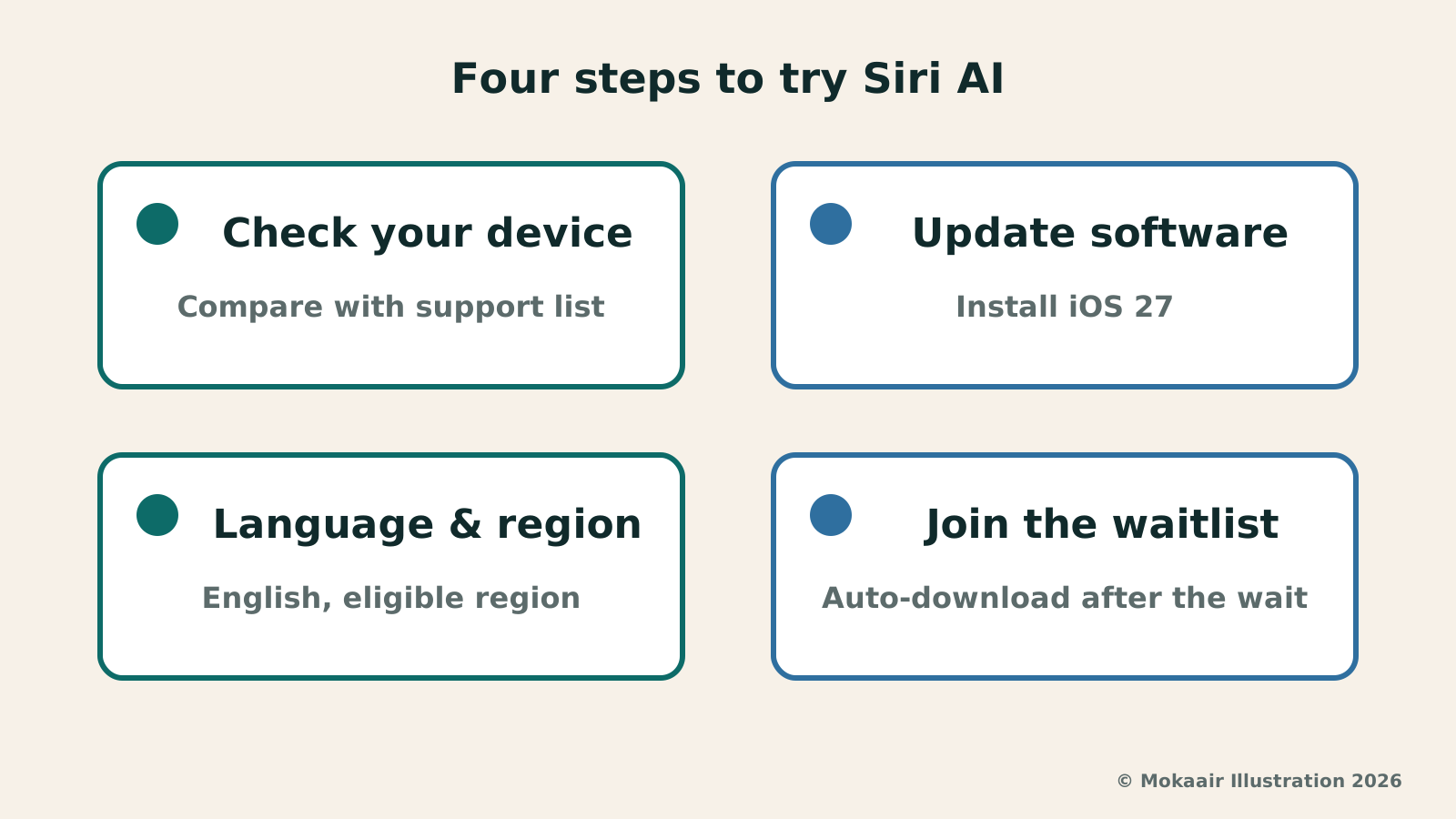
Apple's support article lists the iPhone requirements as iOS 27 on iPhone 15 Pro, iPhone 15 Pro Max, iPhone 16 models or later, or iPhone Air. The device list in the September 14 press release does not name iPhone Air separately, so the two sources are inconsistent; this article follows the support article. In addition, the device language and Siri language must be set to the same supported language, and Siri AI currently supports only English. Your Apple Account must also be in an “eligible region,” and the support article neither lists those regions nor says whether Taiwan is included.
To turn it on, update your device, go to Settings, tap Siri, then tap Try Siri AI (Beta); if Siri is turned off, you need to turn on Siri first. Then follow the onscreen instructions to pick a voice, complete voice enrollment, and review your privacy settings. Apple states that this adds you to a waitlist, that wait times can vary, and that Siri AI downloads automatically only once your wait is over, so tapping the option does not mean you can use it right away.
Language settings are the biggest trade-off for users in Taiwan. Because the device language and Siri language must match, using Siri AI means switching the entire iPhone interface to English, not just Siri, and the features in the previous section's table will also run under English settings. Apple has not said whether Siri AI set to English can handle Chinese messages and emails, so people who mainly communicate in Chinese may want to think it through before deciding.
Who Handles Your Personal Data: Reading Apple's Own Words
Siri AI's convenience comes from reading personal data, so it is worth checking first where that data is processed. In its press release, Apple says Apple Intelligence uses on-device processing and Private Cloud Compute to help protect privacy. It adds that when Private Cloud Compute processes a request, users' personal data is not stored or made accessible to Apple or anyone else, and that outside experts can continue to verify this commitment.
Apple also explains that Siri AI uses the system orchestrator to tap into core capabilities such as the Spotlight index and App Toolbox, which work entirely on device. The press release adds that the next-generation Apple Foundation Models were built in collaboration with Google and its Gemini models, and that the models run on device and on servers using Private Cloud Compute. This is Apple's description, and Mokaair cannot independently verify it.
What users can do themselves is actually read the privacy settings during setup instead of tapping Next all the way through, and keep in mind that Apple lists Siri AI among the features that rely on server-side models and have daily usage limits. Earlier this year we covered Google's Personal Intelligence; the two companies' privacy explanations should not be read as interchangeable, so check each against its own official documentation.
Asking About Bookings While Traveling: An Editorial Scenario and the Limits of a Beta
The following is an example designed by our editors, not a hands-on test. Suppose your account region is eligible, you have set your iPhone to English, and Siri AI has finished downloading. Before leaving for Osaka, your hotel confirmation is in Mail, the meeting time a friend sent you is in Messages, and your flight is in Calendar. Based on Apple's description of personal context understanding, you could ask in English about your check-in date or meeting place and have Siri AI look across these apps; with a hotel's web page open, you could also ask about what is on the screen.
Apple does not define the scope of the beta on the pages above. Generally speaking, a beta is a version still being tested: answers may be wrong, and features and rules may change. For information that affects your trip, such as booking codes, dates, and terminals, open the original email to confirm rather than relying on a summary. As for Call Context, which shows information such as a reservation number when you call a hotel, it is listed under Traditional Chinese on the feature availability page, so on a supported device you do not need to switch to English for it.
Frequent travelers may also find this useful: Apple's support article says that after you turn on Siri AI, it continues to work when you travel to other regions. Two other notes are written for residents: in the European Union, Siri AI is not available on iOS, iPadOS, or watchOS; and when the Apple Account region is in China mainland, Siri AI currently does not work.
2026 AI News Roundup: Highlights and Daily Life Applications from January to September2026 AI News Roundup: Highlights and Daily Life Applications from January to SeptemberOrganizing key AI news stories month by month from January to September 2026, linking to full analyses in five languages. Covering models, work tools, creation, costs, and transparency, explaining backgrounds, uses, and limits.Read the full article
Gemini Personal Intelligence: Where Does Convenience Come from After AI Connects Emails and Photos?Gemini Personal Intelligence: Where Does Convenience Come from After AI Connects Emails and Photos?Reviewing Google's 2026 beta launch of Gemini Personal Intelligence, analyzing personalization mechanisms across email and photo integration, potential misinterpretation risks, and key review principles.Read the full article
Lifestyle
NVIDIA launches DGX Spark 64GB: on sale October 23 from $4,999, two units can be linked into 128GB
On October 2, 2026, NVIDIA announced a more affordable 64GB memory version of its DGX Spark personal AI computer, available from October 23 through six makers including Acer and ASUS. It is aimed mainly at developers and researchers who want to run AI models on their own machines. Below we summarize the specs NVIDIA published, its claims about linking two units, and what it means for general readers.
Lifestyle
Google Cloud Launches Spanner Queues: Putting Message Queues Inside Database Transactions to Make AI Agents More Reliable
Google Cloud has announced the general availability of Spanner queues, which make message creation part of a database transaction. The aim is to stop AI agents' "state" and "actions" from falling out of sync. This article covers Google Cloud's claims, the main features, and what it means for general readers.
Lifestyle
GPT-6.1 Sol Launches: New Sol Version in the API, Codex and ChatGPT Work, Not in Chat
OpenAI launched GPT-6.1 Sol on September 29, 2026, with the API name gpt-6.1-sol. The launch rollout covers Codex and ChatGPT Work on Plus, Pro, Business, Enterprise and Edu (Enterprise and Edu need an administrator to enable it); Free and Go are not included at launch, and it is not in Chat (checked September 2026).
Lifestyle
Claude Sonnet 5.5 Launches: Same List Price as Sonnet 5, Available in the API, on Cloud Platforms and in Claude.ai
Anthropic launched Claude Sonnet 5.5 on September 28, 2026. API list prices are the same as Sonnet 5 ($2 per million input tokens, $10 per million output tokens). It is available in Claude.ai, the API and several cloud platforms, and higher-risk cybersecurity requests fall back to Sonnet 5 (checked September 2026).
Articles that cite this one
Latest travel guides

GuideTokyo
Where to Stay in Tokyo: Comparing Shinjuku, Ueno, Tokyo Station, Shibuya, Asakusa, Ikebukuro, and Ginza, Plus Airport Access, Accommodation Tax, and Luggage Delivery
Where should you stay in Tokyo? Compare Shinjuku, Ueno, Tokyo Station, Shibuya, Asakusa, Ikebukuro, and Ginza by the same criteria: access from Narita and Haneda, transit routes, nearby attractions, neighborhood character, and who each area suits. Includes a comparison table, a Yamanote Line diagram, Tokyo’s accommodation tax as verified in 2026/9 (changing to 3% in 2027/4), and Airport TA-Q-BIN luggage shipping rules.
- Budget
- Hotels

GuideTokyo
How to Choose Tokyo Transit Passes: Are Suica, Welcome Suica, the Tokyo Subway Ticket, and the JR Pass Worth It?
On a first Tokyo trip, start with an IC card and pay per ride (Welcome Suica has no deposit and is valid for 28 days). If you take four or more subway rides in a day, add a 72-hour Tokyo Subway Ticket for 2,000 yen; a JR Pass is never worthwhile if you stay in Tokyo and do not go to Kansai. See what TOURIST PASMO, Suica on iPhone, and the Tokyo Metro day pass do and do not cover, with a decision chart. Prices verified in September 2026.
- Transport
- Budget

GuideTokyo
Tokyo Disneyland and DisneySea Guide: Ticket Prices, Fantasy Springs, Disney Premier Access (DPA), Standby Pass, and Which Park to Choose for Your First Visit
Tokyo Disney one-day Passport prices vary: most weekdays in 9/2026 cost ¥9,900 and weekends ¥10,900. At 14:00 daily, tickets go on sale for the same date two months later. Free Priority Pass is no longer on the official service list; only paid Disney Premier Access (¥1,000–3,500 per person per use) shortens waits. Covers hours, the 25th anniversary, Standby Pass, Entry Request, Fantasy Springs access and first-visit park choice; checked on the official site in 9/2026.
- Itineraries
- Family