Lifestyle
GPT-5.4 Combines Reasoning and Computer Use: What It Means for Everyday Workers
Reviewing the technical integration of GPT-5.4 released in early 2026, analyzing how everyday workers handling spreadsheets and presentations can distinguish between reasoning judgment, tool operations, and human review boundaries.
Updated: About 7 min read
Event date: 2026-03-05; Verification date for this article: 2026-09-14. On March 5, GPT-5.4 was released across ChatGPT, the API, and Codex; the ChatGPT version is named GPT-5.4 Thinking, with a Pro tier also available.
Official announcements highlighted spreadsheets, presentations, documents, coding, and tool use; native computer-use capabilities were introduced to the API/Codex. The long-context capabilities of the API and Codex cannot be assumed to be equivalent limits for ChatGPT. The API was available at launch, while ChatGPT and Codex were rolled out in phases; the plans listed at launch represent historical eligibility and are not the current pricing table as of September. The following daily and work scenarios are examples designed by the editors for readers to verify on their own, rather than hands-on product benchmarks conducted by this site.
Pre-Processing Club Questionnaires and Field Standardization
When planning to turn club event questionnaires into an outcome presentation, the first task is not to feed the raw files directly to the model, but to establish a clear data structure. When collecting event feedback, many people often encounter issues such as incomplete answers, mixed single- and multiple-choice responses, or inconsistent numerical units. If the calculation method for the denominator of valid samples is not defined in advance, the model can easily introduce biases when aggregating average satisfaction scores or preference ratios due to different imputation logic for missing values, leading to subtle yet critical deviations between the generated conclusions and the actual situation.
Before providing data, you can remove names or contact details not needed for this analysis and check whether open-ended comments could still identify individuals. Replacing names with codes merely reduces direct identification and cannot be regarded as complete anonymization. Then, provide the definition of valid samples, a presentation template, and the expected length so the tool has a clear organizational direction; keep notes where data is insufficient to avoid the model inventing background information that was never provided.
Verifying Underlying Spreadsheet Formulas and Summary Text
When handling spreadsheets, although official statements highlighted table and document analysis capabilities, the most common mistake everyday workers make is only reading the summary text generated in the chat window. Text summaries often appear fluent and reasonable, and can even present satisfaction rankings in bulleted lists, but the underlying summation range might miss hidden rows after filtering or count invalid questionnaires as valid samples. Therefore, users must not be satisfied simply with reading text summaries; they must develop the habit of requesting the output file and opening it.
Specific checks can start with one or two key figures: manually select valid responses, calculate the average or ratio once, and then compare the formulas and ranges in the workbook. AVERAGE, COUNTIF, or pivot tables are merely possible approaches; using a specific function does not guarantee that the result is correct. What you need to confirm is that data types, null-value handling, and filter criteria conform to the original definitions, and verify that the presentation quotes the exact same set of numbers.
| Workflow Stage | Role of AI Reasoning & Tools | Human Review & Permission Boundaries |
|---|---|---|
| Questionnaire data pre-processing | Automatically identify formats by rule, fill missing value tags, and perform initial classification | Verify valid sample denominator definitions, and confirm de-identification before providing data |
| Spreadsheet statistical calculations | Build pivot table structures, write statistical formulas, and calculate averages | Personally open the file to check cell formula references and verify that filter ranges are correct |
| Presentation structure & generation | Extract key slide titles, bullet points, and chart recommendations based on questionnaire summaries | Review visual layouts and text hierarchy, adjusting them to match template design standards |
| Deliverable distribution & publishing | Compile distribution lists, draft notification emails, and write feedback report text | Verify recipients, attachments, and disclosure scope before authorizing specific submission actions |
Understanding Context Length Discrepancies and Presentation Generation Logic
When transforming analytical data into presentations, workers need to understand how reasoning models reorganize tabular facts into presentation outlines. Creating a presentation is not merely transcribing text; it requires considering information hierarchy, slide pacing, and audience comprehension. When reasoning through club feedback, although the model can sort out event strengths, weaknesses, and future recommendations, without visual layout guidelines, the resulting slides often contain excessive text and fail to highlight key metrics, still relying on humans to set the structural framework of the slides.
At the same time, it must be clarified that the long-context capabilities of the API and Codex cannot be assumed to mean the ChatGPT interface has the same processing ceiling. Many workers mistakenly believe they can dump hundreds of surveys or massive attachments into standard web chat sessions indefinitely, but in reality, each interface has different capacity limits and design orientations. When dealing with surveys containing extensive written feedback, a sounder strategy is to aggregate sections externally first, and then supply core materials in stages to prevent context truncation from causing the model to miss certain responses.
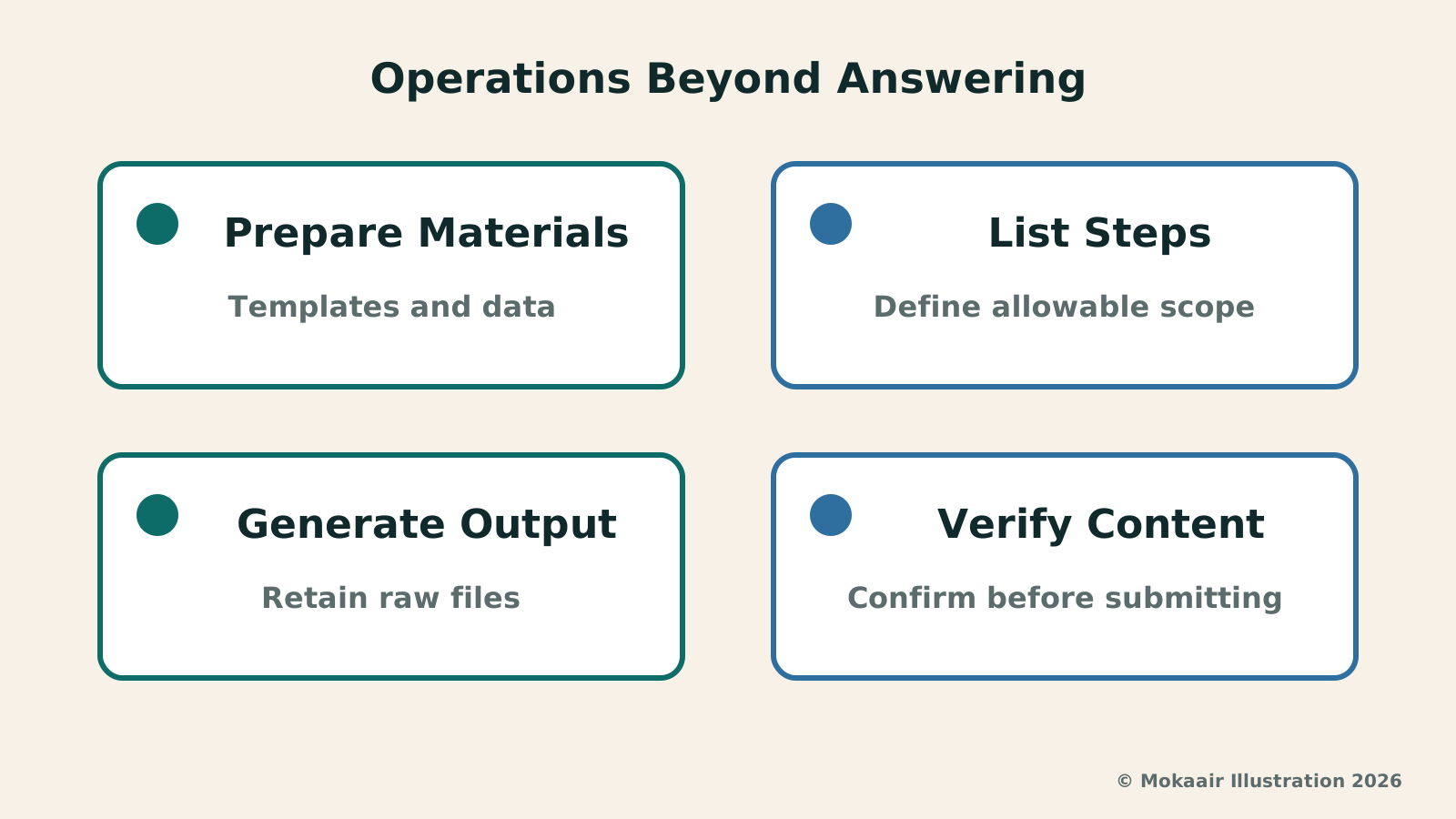
Read the full description
Prepare materials: templates & data; list steps: define allowable scope; generate outputs: retain raw files; verify content: confirm before submitting.
Tool Permission Isolation and Security Control of Login Status
As models expand with native computer-use and tool capabilities, workers must clearly distinguish the fundamental difference between 'model judgment' and 'tool permissions.' An operational suggestion made by a model during reasoning is purely the product of linguistic probability and logical deduction; it is not equivalent to an external application being authorized to execute it. If a system is granted direct access to file systems or online collaboration platforms, any flaw in reasoning can directly manifest as irreversible, real-world disasters, such as overwriting files, deleting data by mistake, or sending unconfirmed messages.
In practice, you can isolate data in a dedicated draft folder and preserve original files. When sending reports or public updates is involved, confirm the recipients, attachments, and content before authorizing specific actions. Human verification does not necessarily mean manually logging in or clicking through every single step; rather, the person in charge must know what will be submitted and ensure that the tool's actual permissions and operational procedures match the scope of that specific assignment.
Establishing a Practical Rhythm for Human-AI Collaborative Review
Looking broadly at the combination of reasoning capabilities and computer operation, the reasonable office positioning should be a 'high-efficiency draft generator' rather than a 'fully autonomous agent.' Taking the conversion of club questionnaires into a presentation as an example, the model can quickly write data-cleaning code, extract qualitative feedback keywords, and draft preliminary slide outlines, helping administrative personnel with some manual organizing tasks—though how much time is saved must be evaluated individually. However, every transition checkpoint in the workflow, including field mappings, formula calculations, and chart conclusions, requires scheduled human review gates.
Looking back at launch plans and their subsequent evolution, the rollout scope and subscription terms of various features adjust over time. Workers should focus on establishing general operational standards rather than relying on interface shortcuts specific to a certain period. By defining data specifications first, opening raw files to verify formulas, and strictly isolating account logins and execution permissions, one can safely reap the productivity benefits of reasoning technologies while preserving data privacy and statistical veracity, ensuring that every presentation withstands scrutiny.
2026 AI News Roundup: Highlights and Daily Life Applications from January to September2026 AI News Roundup: Highlights and Daily Life Applications from January to SeptemberOrganizing key AI news stories month by month from January to September 2026, linking to full analyses in five languages. Covering models, work tools, creation, costs, and transparency, explaining backgrounds, uses, and limits.Read the full article
Claude Starts Drawing Interactive Visuals: Understand the Assumptions Before the ConceptClaude Starts Drawing Interactive Visuals: Understand the Assumptions Before the ConceptExploring Claude's interactive visual features launched in 2026, analyzing water tank inflow-outflow and dual-mode commute scenarios, and providing key chart verification methods across axes, boundary values, and accessibility semantics.Read the full article
Lifestyle
NVIDIA launches DGX Spark 64GB: on sale October 23 from $4,999, two units can be linked into 128GB
On October 2, 2026, NVIDIA announced a more affordable 64GB memory version of its DGX Spark personal AI computer, available from October 23 through six makers including Acer and ASUS. It is aimed mainly at developers and researchers who want to run AI models on their own machines. Below we summarize the specs NVIDIA published, its claims about linking two units, and what it means for general readers.
Lifestyle
Google Cloud Launches Spanner Queues: Putting Message Queues Inside Database Transactions to Make AI Agents More Reliable
Google Cloud has announced the general availability of Spanner queues, which make message creation part of a database transaction. The aim is to stop AI agents' "state" and "actions" from falling out of sync. This article covers Google Cloud's claims, the main features, and what it means for general readers.
Lifestyle
GPT-6.1 Sol Launches: New Sol Version in the API, Codex and ChatGPT Work, Not in Chat
OpenAI launched GPT-6.1 Sol on September 29, 2026, with the API name gpt-6.1-sol. The launch rollout covers Codex and ChatGPT Work on Plus, Pro, Business, Enterprise and Edu (Enterprise and Edu need an administrator to enable it); Free and Go are not included at launch, and it is not in Chat (checked September 2026).
Lifestyle
Claude Sonnet 5.5 Launches: Same List Price as Sonnet 5, Available in the API, on Cloud Platforms and in Claude.ai
Anthropic launched Claude Sonnet 5.5 on September 28, 2026. API list prices are the same as Sonnet 5 ($2 per million input tokens, $10 per million output tokens). It is available in Claude.ai, the API and several cloud platforms, and higher-risk cybersecurity requests fall back to Sonnet 5 (checked September 2026).
Articles that cite this one
Latest travel guides

GuideTokyo
Where to Stay in Tokyo: Comparing Shinjuku, Ueno, Tokyo Station, Shibuya, Asakusa, Ikebukuro, and Ginza, Plus Airport Access, Accommodation Tax, and Luggage Delivery
Where should you stay in Tokyo? Compare Shinjuku, Ueno, Tokyo Station, Shibuya, Asakusa, Ikebukuro, and Ginza by the same criteria: access from Narita and Haneda, transit routes, nearby attractions, neighborhood character, and who each area suits. Includes a comparison table, a Yamanote Line diagram, Tokyo’s accommodation tax as verified in 2026/9 (changing to 3% in 2027/4), and Airport TA-Q-BIN luggage shipping rules.
- Budget
- Hotels

GuideTokyo
How to Choose Tokyo Transit Passes: Are Suica, Welcome Suica, the Tokyo Subway Ticket, and the JR Pass Worth It?
On a first Tokyo trip, start with an IC card and pay per ride (Welcome Suica has no deposit and is valid for 28 days). If you take four or more subway rides in a day, add a 72-hour Tokyo Subway Ticket for 2,000 yen; a JR Pass is never worthwhile if you stay in Tokyo and do not go to Kansai. See what TOURIST PASMO, Suica on iPhone, and the Tokyo Metro day pass do and do not cover, with a decision chart. Prices verified in September 2026.
- Transport
- Budget

GuideTokyo
Tokyo Disneyland and DisneySea Guide: Ticket Prices, Fantasy Springs, Disney Premier Access (DPA), Standby Pass, and Which Park to Choose for Your First Visit
Tokyo Disney one-day Passport prices vary: most weekdays in 9/2026 cost ¥9,900 and weekends ¥10,900. At 14:00 daily, tickets go on sale for the same date two months later. Free Priority Pass is no longer on the official service list; only paid Disney Premier Access (¥1,000–3,500 per person per use) shortens waits. Covers hours, the 25th anniversary, Standby Pass, Entry Request, Fantasy Springs access and first-visit park choice; checked on the official site in 9/2026.
- Itineraries
- Family
Sources
- OpenAI: GPT-5.4 Launch · Checked: