生活分享
提示詞、規則與交接範本索引
依工作選擇提示詞、規則與交接範本,替換必要欄位並知道每段應貼到哪裡。
閱讀時間約 15 分鐘 · 操作 20 分鐘
返回 Codex 教學總目錄Codex 學習中心:完整教學目錄從安裝、第一個任務到 MD 規則與進階整合,規劃 60 篇 Codex 教學、十個單元。依程度、平台、需求或指令搜尋下一篇;尚未公開的教學會標示狀態,方便安排學習路線。閱讀全文
目標與準備
本段提到的教學與資源: 需求描述如何把需求說清楚有效的需求不是把提示詞寫得很長,而是讓代理知道你要什麼、已有哪些材料、有哪些界線,以及怎樣算完成。同一個『幫我改善網頁』,可以指速度、外觀或無障礙;先把目標變成能觀察的行為。閱讀全文 · MarkdownMarkdown 與 MD 檔入門Markdown 是用純文字標記標題、清單、連結與程式碼的格式,常見副檔名是 .md。README.md 通常用來說明專案,AGENTS.md 提供代理工作規則,SKILL.md 描述可重用技能;不是所有 MD 檔都會被 Codex 自動當作指令。閱讀全文
步驟 1:建立範本庫並分清用途
在自己的練習目錄中建立 templates 資料夾,用編輯器新增下列檔案。Windows 選另存新檔時確認沒有變成 .md.txt;macOS 使用純文字格式;Linux 在熟悉的編輯器保存 UTF-8。三種系統都從練習根目錄操作,檔名保持一致。這個資料夾沒有特殊載入效果,也不需要新增套件、登入其他網站或把範本放進全域設定。
templates/
  task.md
  bug.md
  review.md
  handoff.md
  rules.example.md
  connection-check.md
| 需要完成的工作 | 使用哪份範本 | 不能取代什麼 |
|---|---|---|
| 實作小功能 | task.md | 實際檔案與驗收 |
| 修可重現錯誤 | bug.md | 原始錯誤與重現 |
| 審查既有修改 | review.md | 測試與人工判讀 |
| 交接長任務 | handoff.md | 最新 Git 狀態 |
| 擬定專案規則 | rules.example.md | 正確位置的 AGENTS.md |
| 檢查外部工具 | connection-check.md | 真正的工具回應 |
步驟 2:把需求改成可驗收的任務
# Task
Goal: Verify the active-task filter and repair it only if the acceptance case fails.
Context: Use the complete reference copy in this practice folder.
Inspect first: index.html, app.js, core.mjs, style.css and core.test.mjs.
Scope: Only files needed for the filter and its focused tests.
Behavior: All shows every task; Active shows tasks whose completed value is false.
Preserve: Existing task IDs, titles, ordering and stored data format.
Acceptance: With three tasks (two complete), Active shows exactly one.
Boundary: An empty list shows a useful empty state and does not throw.
Validation: Run node --test core.test.mjs and verify the browser behavior; report actual results.
If the existing behavior passes, report that evidence without unnecessary edits.
Delivery: Explain changed behavior, tests actually run and remaining limitations.
這份填好的範例對應本系列的 Small Steps 練習,不是任何專案都能直接套用。先在自己的 expected 副本確認五份程式檔存在;操作說明在下載包根目錄的 README.md,不在 expected 裡。其他專案則依自己的 README 核對驗證指令。想先討論可行性時,使用 Plan 模式Plan 模式:先規劃再實作Plan 模式適合還需要決定範圍或做法的工作。它幫你把需求整理成可實作的計畫,但計畫本身不是已完成的程式。使用時先定義要討論的問題,再檢查計畫是否包含輸入、輸出、限制與驗證。閱讀全文 並把交付改成「先提出步驟及待決定項目」。若已要實作,清楚寫明可以修改的範圍。
試著把「幫我整理一下網站」改寫成這個格式。合格版本應說出改哪個畫面、保留什麼、用什麼資料驗收,以及本次是否包含上線。檔案名稱未知時可以寫「先找出負責清單顯示的檔案再回報」,不要猜一個不存在的路徑。自然語言可以使用你的習慣語言,範例中的程式識別碼、路徑與判斷條件則保持原樣。
步驟 3:Bug 回報保留原始證據
# Bug report
Environment: <OS, browser/runtime and version>
Practice folder or branch: <actual location>
Starting state: <fixture or steps to create it>
Reproduction:
1. <first action>
2. <next action>
Expected: <observable result>
Actual: <observed result>
Error: <exact message, with secrets removed>
Frequency: <always / intermittent / unknown>
Already tried: <one change and its result, or none>
Fix scope: <allowed behavior and files>
Verification: Reproduce first, fix, rerun the original case and a boundary case.
尖括號內容是待填欄位,不是直接貼給終端機的語法。以修 Bug修 Bug 的完整流程好的除錯从可重現的症狀開始,再用證據縮小原因,最後驗證修正。『網站壞了』不夠具體;提供哪個輸入、在哪個步驟、期待什麼、實際出現什麼,能讓 Codex 更快找到相關程式。閱讀全文練習為例,寫出「broken 副本,新增 Read 與 Build,只完成 Read,Completed 卻顯示 Build」,才能重現同一個錯誤。Actual 欄只記自己看到的結果;尚未操作就填 NOT RUN,不抄範例當實測。原因未確定時不預填「資料庫壞了」;沒有錯誤訊息可寫 none observed,再補畫面行為與步驟。
修完後把原始步驟重跑一次,再檢查空資料或重複標題的邊界。測試失敗與尚未執行分開填;「預計應該通過」不是結果。若工具無法執行,交付限制及讀者能自行重跑的命令即可,不能把範本中的 Verification 當作已完成工作。本篇不預填任何人的測試通過數,讓下次使用時不會沿用舊證據。
步驟 4:分開審查與交接
# Review request
Compare: <base branch or exact before-state> -> <current change>
Purpose: <user-visible behavior>
Read first: <requirements and relevant files>
Review for: correctness, regressions and missing meaningful tests.
For each finding: give the trigger, impact, file/location and suggested correction.
Evidence: <commands actually run, exit codes and relevant output>
Unknowns: <tests or environments not checked>
Report no findings if none are supported; do not invent issues to fill a quota.
Do not modify files in this review task unless I request a fix.
# Handoff
Goal:
Working directory and branch:
Current commit:
Existing uncommitted changes and owners:
Completed work with evidence:
Pending work:
Decisions and constraints:
Files to inspect next:
Last command and result:
Known limitations:
Next smallest action:
Before continuing: verify the current files and Git state against this record.
Review 的比較起點要能在目前 Git 儲存庫解析;如果分支不存在,先查Git 與差異Git、分支、diff 與還原Git 保存檔案版本,分支承接一組修改,diff 顯示差異。Codex 可以協助操作,但你仍要確認修改屬於這次任務。聊天紀錄與 Git 歷史不同,恢復舊對話不會自動還原檔案。閱讀全文,不要默認 main 一定存在。交接範本則描述「目前在哪裡」,每次交接重新讀取狀態。某人在舊任務說已提交,不代表這個工作目錄乾淨;把尚未提交的修改與歸屬列出,接手者才不會覆寫正在進行的工作。
交接文件可以存在專案內,但寫入位置要先確認是否適合共享。私人客戶資料、憑證、聊天全文通常不是交接所需;用路徑、問題摘要和可驗證結果足以帶回上下文。檔案仍然是提供給模型的資料,保存 handoff.md 不代表新任務一定讀過;開始時明確請它閱讀,並核對回覆描述的下一步。完整恢復流程見上下文與交接上下文與工作交接長工作需要把決策與證據留下,不能只依靠對話長度。README 說明怎麼使用專案,設計文件記錄為何這樣做,交接文件整理目前做到哪裡;AGENTS.md 則放持續有效的工作規則,避免把所有進度塞成規則。閱讀全文。
步驟 5:規則範本與外部工具範本
# Practice project rules
Read index.html, app.js, core.mjs and core.test.mjs before changing this practice app.
Preserve task IDs and the existing data format.
Keep changes within the requested behavior.
Run node --test core.test.mjs and report actual results.
Do not commit credentials or private practice data.
If required files are missing, report the missing paths before making assumptions.
rules.example.md 故意不叫 AGENTS.md,讓它先作為待審核的範本。確認內容符合你的專案後,依 AGENTS.mdAGENTS.md 專案規則AGENTS.md 是讓 Codex 在開始工作前取得專案規則的檔案。全域規則、專案根目錄與工作目錄路徑中的子目錄規則會形成一條指令鏈;同一層有 AGENTS.override.md 時優先讀取它。規則愈具體愈容易遵循,仍需要驗證實際載入。閱讀全文 教學合併到正確層級;先讀現有規則,保留其他人的條件,不要整檔覆寫。若只用於這次任務,就直接貼在任務要求中。只有常常重複、範圍穩定的工作才值得做成 SKILL.mdSkills 與 SKILL.mdSkill 將固定工作流程整理成可重用的指示與資源。最小結構是一個資料夾與 SKILL.md,檔案前段需要 name 和 description,正文描述操作與輸出。安裝技能不代表每個任務都必然使用,還要檢查是否載入。閱讀全文,不用把所有臨時提示詞都安裝成技能。
# Connection check
Surface / host / version:
Plugin or MCP server name and source:
Configured:
Authenticated (if required):
Tool available in a new task:
Read-only target (fictional or public):
Expected marker or source:
Actual tool call and result:
Original data unchanged:
Disconnect or disable action, if performed:
Retest after change:
Never include tokens, passwords or one-time login URLs in this report.
外部工具驗收要依序填設定、認證、能力與實際呼叫,不適用的認證可填 not required,未查證的欄位填 not checked。不要把「有設定檔」推論為連線正常;也不要預先填 true 讓報告看起來完整。使用 PluginsPlugins 與外部服務Plugin 可以把 Skills 與 MCP 工具包在一起,提供可安裝的工作能力。安裝套件、連接外部帳號與實際執行工具是三個不同步驟;找到插件不代表已能讀你的服務資料。閱讀全文 或 MCPMCP 設定與連線排除MCP 讓 Codex 使用外部工具與資料。STDIO 伺服器通常由本機命令啟動;HTTP 伺服器透過 URL 連線。設定檔寫入成功只代表設定存在,還需要確認服務啟動、驗證通過與工具回應。閱讀全文 時,一次只填你這次檢查的那個入口與主機,同名伺服器在另一台電腦可能指向不同設定。
把互相衝突的範本改成一個任務
判讀這段錯誤需求:「只讀審查 expected,但順便修好並提交;用 npm test 驗證,回報三項全過」。它同時要求只讀與改檔、在沒有 package.json 的教材套用錯誤命令,還預填未執行的結果。這次選擇先做唯讀確認,把下方完整版本另存為練習根目錄的 adapted-task.md,保留六份原始空白範本。
# Read-only practice check
Goal: Verify the existing Active-filter behavior in this expected copy.
Confirm the absolute working directory and the five expected source files first.
Read core.mjs and core.test.mjs; explain the filter condition and test coverage.
Run node --test core.test.mjs and report the actual exit code, passes and failures.
Do not edit, stage, commit, push or deploy anything in this task.
Browser behavior: NOT RUN unless actually checked; core tests do not prove it.
If required files are missing, report the paths and stop before guessing commands.
Delivery: observed evidence, unverified behavior and the next smallest step.
用乾淨 expected 副本執行時,核心測試的參考結果為 3 過 0 敗;你仍要填本次輸出,所有程式檔保持不變。若拿到 broken 副本,應如實回報 2 過 1 敗及起點不同,先修正路徑或另立修復任務,不因範本說 expected 就忽略實際故障。這正是官方提示詞建議中目標、背景、邊界與可使用成果在本教材的具體運用。
常見錯誤、還原與小練習
第一種錯誤是保留未填的尖括號:送出前搜尋 <,逐個換成實際資訊或刪掉不適用欄位。第二種是舊任務的命令套到新專案:先讀 README 並確認工作目錄。第三種是把範本寫成互相衝突的規則,例如只讀審查又要求順便改檔;選一個本次目標再提交。已存在同名範本時保存另一個副本或用 Git 看差異,回復只針對這次新寫的範本,不撤回正式專案其他修改。
小練習:選 bug.md 填入一個你已觀察到的練習錯誤,再選 handoff.md 交代下一步。把兩份交給沒有看過原任務的人閱讀:對方應能找到正確資料夾、重現相同現象、知道哪些還沒確認。若對方還必須猜你用哪台電腦或哪份資料,補那個欄位即可,不要加長所有範本。保留一份未填寫的原始範本,每次另存任務副本,避免上次的結果變成下次的預設答案。
本篇檔案與範例為原創教材,沒有內建執行權限,也不會改動你的帳號。驗收是六份可閱讀的範本、一份填好的 Bug 回報與交接,以及至少一項被你找出的含糊條件;不要求模型回覆特定句型。下一單元從 MCP 設定MCP 設定與連線排除MCP 讓 Codex 使用外部工具與資料。STDIO 伺服器通常由本機命令啟動;HTTP 伺服器透過 URL 連線。設定檔寫入成功只代表設定存在,還需要確認服務啟動、驗證通過與工具回應。閱讀全文 開始,把 connection-check.md 用在真實的唯讀工具測試。
返回 Codex 教學總目錄Codex 學習中心:完整教學目錄從安裝、第一個任務到 MD 規則與進階整合,規劃 60 篇 Codex 教學、十個單元。依程度、平台、需求或指令搜尋下一篇;尚未公開的教學會標示狀態,方便安排學習路線。閱讀全文
閱讀完整文字說明
Three numbered stages: identify the starting point, perform the exercise, and verify the result. Original illustration, not a product screenshot.
同主題延伸閱讀
生活分享
Codex 學習中心:完整教學目錄
從安裝、第一個任務到 MD 規則與進階整合,規劃 60 篇 Codex 教學、十個單元。依程度、平台、需求或指令搜尋下一篇;尚未公開的教學會標示狀態,方便安排學習路線。
生活分享
Worktree 與多任務隔離
Worktree 讓同一個 Git 程式庫有不同的工作目錄,各自承接不同分支。它適合讓兩項工作分開改檔,但資料庫、連接埠與外部服務仍可能共用,不能把檔案隔離當成所有資源隔離。
生活分享
實戰:製作小網站
從 brief.md 規劃並製作 Small Steps 待辦網站,完成新增、完成、刪除、篩選與本機資料保存。將 HTML、CSS、資料函式、畫面事件與測試分開,以 Node 測試和瀏覽器操作驗收,並留下可重新啟動與還原的交接紀錄。
生活分享
用量與效率:減少重工
記錄任務條件、模型選項、時間與成果,找出能減少無效重試和過多上下文的調整。
引用本文的文章
最新旅遊情報攻略

情報
2026 韓國楓葉預測:雪嶽山 10 月 20 日、首爾近郊 10 月底、內藏山與漢拏山 11 月上旬
韓國山林廳 2026 年 9 月 22 日公布的楓紅高峰預測:雪嶽山 10 月 20 日,春川、國立樹木園到首爾植物園落在 10 月 28 日到 11 月 2 日,內藏山 11 月 4 日、漢拏山 11 月 6 日,整體比最近 5 年晚約 0.8 天。整理各地楓樹與銀杏的預測日、首爾出發怎麼排,以及出發前去哪裡看即時楓況。2026 年 10 月查證。
- 季節活動
- 自然
- 觀景

攻略胡志明市
胡志明市到頭頓一日遊:白藤碼頭搭高速船、船票與班次,下船就是胡梅纜車與耶穌基督像
人在胡志明市挪一天去頭頓看海:市中心的白藤高速船碼頭搭船,航程 120 分鐘到頭頓的胡梅碼頭,平日成人 320,000 越南盾、週末 350,000,回程末班平日 15:00。下船就是胡梅纜車站,同一條路上有白宮,小山頂上是耶穌基督像。平日一天只有兩班船,整天要從末班船倒推著排。
- 交通
- 行程範例
- 海灘
攻略沖繩
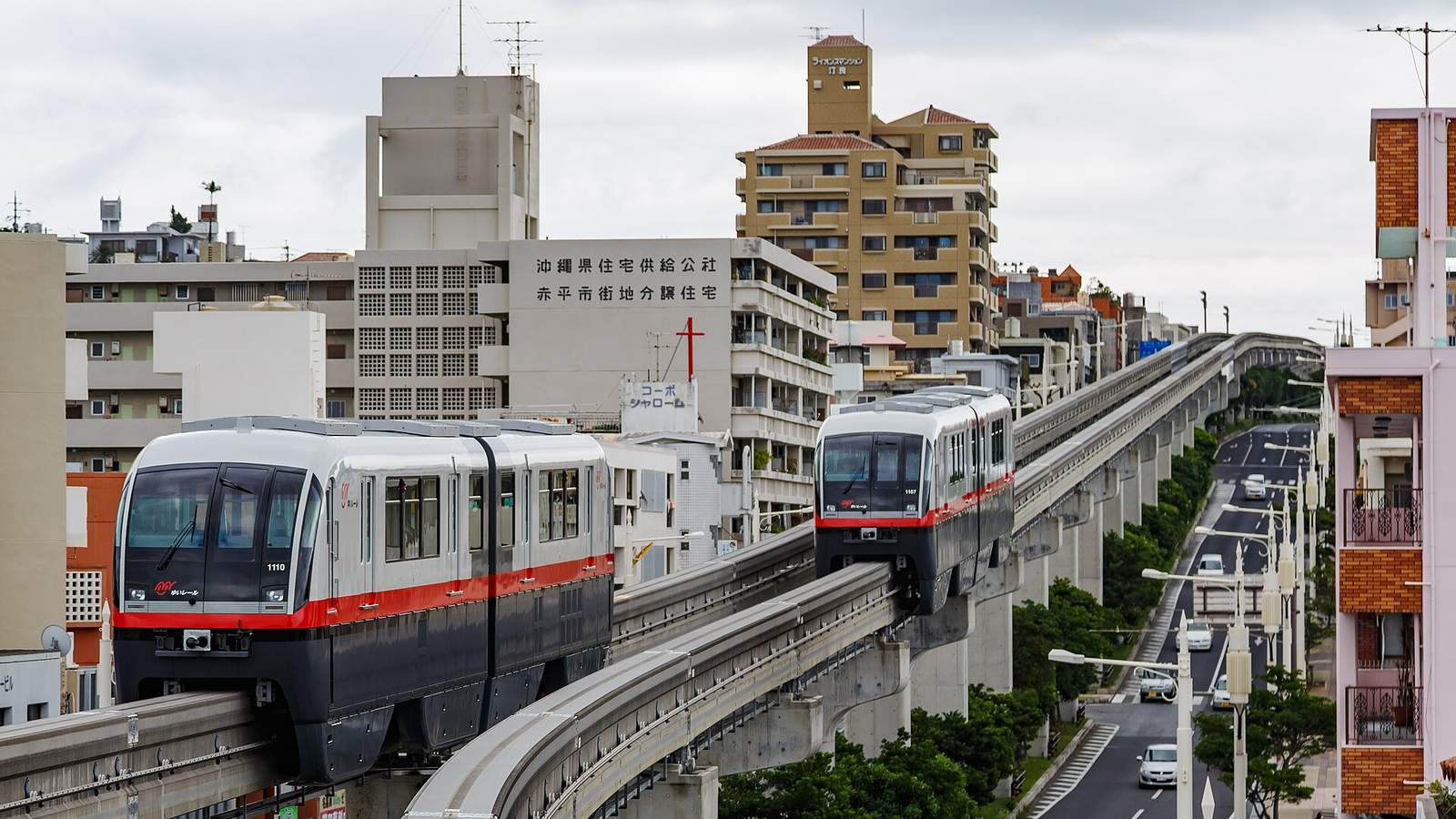
沖繩不開車攻略:單軌只到浦添,美麗海水族館要坐兩個多小時的巴士,回那霸的最後一班直達車 17:22 就開走
不租車的沖繩怎麼移動:那霸市區靠沖繩都市單軌電車(ゆいレール),那霸機場站到終點てだこ浦西 19 站、17 公里、37 分鐘,一日券 1,000 日圓;美麗海水族館有那霸機場直達的高速巴士,單程 2,000 日圓起、官方時刻表上 2 小時上下,下車後還要走 10 分鐘;古宇利島要在今帰仁村役場轉車,當天來回光坐車就六個半小時;回程的最後一班直達車 17:22 就從記念公園前開走(2026 年 9 月查證)。
- 交通
- 行程範例
- 預算